
Best Skytech Gaming Desktops in 2026: 15 Picks Compared on Specs
The Skytech Gaming King 95 with a Ryzen 7 9850X3D and RTX 5080 leads this list for high-fidelity 4K gaming. We selected 15 Skytech Gaming desktops from a pool of 35 models, comparing each on processor, graphics card, memory, and storage to help you match a machine to your game library.
15 picks from 53 desktops that match this guide with a price we can quote today. Prices below are live, each shown with the time it was read.
Quick list
Which one is right for you?
- For esports on a budget: The Skytech Gaming PC Storm with a Ryzen 5 and RTX 5050 delivers solid 1080p performance at a lower entry point. See pick 15
- For 4K gaming and streaming: The King 95 with a Ryzen 7 9850X3D and RTX 5080 handles demanding titles at high resolutions. See pick 1
- For AI workloads and creation: The Prism 5 with a Ryzen 7 9850X3D and RTX 5070 Ti offers 16GB of VRAM and a fast CPU for rendering. See pick 6
All 15 picks in detail
1 Best overall

Skytech Gaming PC Desktop
- CPU
- AMD Ryzen 7 9850X3D
- GPU
- RTX 5080
- GPU memory
- 16 GB
- RAM
- 32 GB
- Storage
- 2000 GB
- OS
- Windows 11
- Dedicated graphics card
- Yes
$3,699.99 (as of 10/20/2026 06:06 PDT - Details)
Combines the top-tier Ryzen 7 9850X3D processor with an RTX 5080 GPU and 32GB of RAM, making it the most capable Skytech build for 4K gaming and creative work in this list.
Pros
- Ryzen 7 9850X3D, one of the fastest gaming CPUs available
- RTX 5080 with 16GB GDDR7 VRAM
- 32GB DDR5 RAM and 2TB NVMe SSD
Cons
- No storage capacity stated beyond the 2TB SSD
- Weight not stated by the seller
Good fit if
- Gamers who want maximum frame rates at 4K resolution
- Users who also edit video or run AI models locally
Skip if
- You need a desktop for light esports at 1080p
- Your budget is under the high-end tier
Verdict: The best Skytech Gaming desktop for those who want uncompromised performance.
2 Best AMD GPU build

Skytech Gaming PC Desktop
- CPU
- AMD Ryzen 7 9850X3D
- GPU
- Radeon RX 9070 XT
- GPU memory
- 16 GB
- RAM
- 32 GB
- Storage
- 2000 GB
- OS
- Windows 11
- Dedicated graphics card
- Yes
$2,899.99 (as of 10/20/2026 06:06 PDT - Details)
Pairs the Ryzen 7 9850X3D with a Radeon RX 9070 XT, offering 16GB of VRAM and strong rasterization performance for high-refresh-rate gaming.
Pros
- Radeon RX 9070 XT with 16GB VRAM
- Ryzen 7 9850X3D CPU
- 32GB RAM and 2TB SSD
Cons
- No ray-tracing performance data from the seller
- Weight not stated by the seller
Good fit if
- Gamers who prefer AMD GPUs for raw performance
- Users building an all-AMD ecosystem
Skip if
- You rely on NVIDIA-specific features like DLSS or NVENC
- You need a smaller form-factor case
Verdict: A strong alternative for AMD fans with top-tier specs.
3 Best for high-refresh 1440p
Skytech Gaming PC Desktop
- CPU
- AMD Ryzen 7 9800X3D
- GPU
- RTX 5070 Ti
- GPU memory
- 16 GB
- RAM
- 32 GB
- Storage
- 2000 GB
- OS
- Windows 11
- Dedicated graphics card
- Yes
$2,899.99 (as of 10/20/2026 06:06 PDT - Details)
The Ryzen 7 9800X3D and RTX 5070 Ti deliver excellent frame rates at 1440p with 16GB of VRAM for texture-heavy titles.
Pros
- Ryzen 7 9800X3D, optimized for gaming
- RTX 5070 Ti with 16GB VRAM
- 32GB RAM and 2TB SSD
Cons
- Only 32GB of RAM, which is standard at this tier
- Weight not stated by the seller
Good fit if
- Competitive gamers who want high FPS at 1440p
- Streamers who need GPU encoding headroom
Skip if
- You are targeting 4K at max settings
- You prefer an Intel-based platform
Verdict: A balanced high-performance machine for 1440p gaming.
4 Best for content creation

Skytech Gaming O11 Vision Gaming PC
- CPU
- AMD Ryzen 7 9850X3D
- GPU
- RTX 5070 Ti
- GPU memory
- 16 GB
- RAM
- 32 GB
- OS
- Windows 11
- Dedicated graphics card
- Yes
The Ryzen 7 9850X3D and RTX 5070 Ti with 32GB of RAM and a 2TB SSD provide the CPU and GPU power needed for video editing and 3D rendering.
Pros
- Ryzen 7 9850X3D for multi-threaded tasks
- RTX 5070 Ti with 16GB VRAM
- 32GB RAM and 2TB Gen4 NVMe SSD
Cons
- Storage capacity not stated for the SSD
- Weight not stated by the seller
Good fit if
- Video editors working with 4K timelines
- 3D artists using GPU-accelerated renderers
Skip if
- You only play esports titles
- You need a desktop with more than 32GB of RAM
Verdict: A creator-focused build with a powerful CPU-GPU combo.
5 Best Intel-based high-end

Skytech Gaming King 95 Gaming PC
- CPU
- Intel Core Ultra 7 270K
- GPU
- RTX 5070 Ti
- GPU memory
- 16 GB
- RAM
- 32 GB
- OS
- Windows 11
- Dedicated graphics card
- Yes
$2,999.99 (as of 10/20/2026 06:06 PDT - Details)
The Intel Core Ultra 7 270K and RTX 5070 Ti offer a different platform choice with strong single-threaded performance for gaming.
Pros
- Intel Core Ultra 7 270K with high boost clock
- RTX 5070 Ti with 16GB VRAM
- 32GB RAM
Cons
- Storage is 1TB, less than some peers at this price
- Weight not stated by the seller
Good fit if
- Users who prefer Intel CPUs for specific workloads
- Gamers who want high single-core performance
Skip if
- You need more than 1TB of storage out of the box
- You are committed to an AMD platform
Verdict: A solid Intel alternative in the high-end segment.
6 Best for AI workloads

Skytech Gaming PC Desktop
- CPU
- AMD Ryzen 7 9850X3D
- GPU
- RTX 5070 Ti
- GPU memory
- 16 GB
- RAM
- 32 GB
- Storage
- 2000 GB
- OS
- Windows 11 Home
- Dedicated graphics card
- Yes
$3,299.99 (as of 10/20/2026 06:06 PDT - Details)
The Ryzen 7 9850X3D and RTX 5070 Ti with 32GB of RAM and a 2TB SSD provide the compute and memory for local AI model inference.
Pros
- Ryzen 7 9850X3D for CPU-based AI tasks
- RTX 5070 Ti with 16GB VRAM
- 32GB RAM and 2TB SSD
Cons
- Weight not stated by the seller
- No mention of cooling solution
Good fit if
- Developers running local LLMs or Stable Diffusion
- Researchers needing a powerful workstation
Skip if
- You only game and do not use AI tools
- You need more than 16GB of GPU VRAM
Verdict: A capable machine for AI experimentation and development.
7 Best high-end AMD with large storage
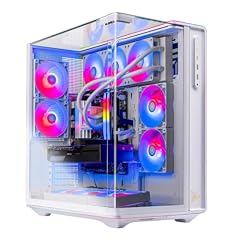
Skytech Gaming PC Desktop
- CPU
- AMD Ryzen 7 9800X3D
- GPU
- Radeon RX 9070 XT
- GPU memory
- 16 GB
- RAM
- 32 GB
- Storage
- 2000 GB
- OS
- Windows 11 Home
- Dedicated graphics card
- Yes
$2,799.99 (as of 10/20/2026 06:06 PDT - Details)
The Ryzen 7 9800X3D and RX 9070 XT with 32GB of RAM and a 2TB SSD deliver high-end gaming performance with ample storage.
Pros
- Ryzen 7 9800X3D CPU
- Radeon RX 9070 XT with 16GB VRAM
- 32GB RAM and 2TB SSD
Cons
- No ray-tracing performance data from the seller
- Weight not stated by the seller
Good fit if
- Gamers who want high-end specs without the top GPU premium
- Users who prefer AMD GPUs
Skip if
- You need NVIDIA-specific features
- You want the absolute fastest GPU available
Verdict: A well-priced high-end configuration for AMD fans.
8 Best mid-range AMD with large storage
Skytech Gaming PC Desktop
- CPU
- AMD Ryzen 7 7800X3D
- GPU
- Radeon RX 9070 XT
- GPU memory
- 16 GB
- RAM
- 32 GB
- Storage
- 2000 GB
- OS
- Windows 11 Home
- Dedicated graphics card
- Yes
$2,599.99 (as of 10/20/2026 06:06 PDT - Details)
The Ryzen 7 7800X3D and RX 9070 XT with 32GB of RAM and a 2TB SSD offer a strong gaming experience with ample storage.
Pros
- Ryzen 7 7800X3D, a top gaming CPU
- Radeon RX 9070 XT with 16GB VRAM
- 32GB RAM and 2TB SSD
Cons
- Storage is 2TB, which may be overkill for some
- Weight not stated by the seller
Good fit if
- Gamers who want a large game library installed
- Users who also store media files locally
Skip if
- You need the latest 9000-series Ryzen CPU
- You prefer a smaller SSD and lower cost
Verdict: A generous storage option with a proven gaming CPU.
9 Best for 1440p gaming

Skytech Gaming Archangel 5 Gaming PC
- CPU
- AMD Ryzen 7 7700X
- GPU
- RTX 5070
- GPU memory
- 12 GB
- RAM
- 32 GB
- OS
- Windows 11
- Dedicated graphics card
- Yes
The Ryzen 7 7700X and RTX 5070 with 32GB of RAM provide a balanced mid-range build for smooth 1440p gameplay.
Pros
- Ryzen 7 7700X with 4.5GHz boost
- RTX 5070 with 12GB VRAM
- 32GB DDR5 RAM
Cons
- Storage is 1TB, which may fill quickly
- Weight not stated by the seller
Good fit if
- Gamers targeting 1440p at high settings
- Users who want a modern AM5 platform
Skip if
- You need more than 12GB of VRAM
- You want a larger SSD out of the box
Verdict: A solid mid-range choice for 1440p gaming.
10 Best for VRAM-heavy games

Skytech Gaming Azure 3 Gaming PC
- CPU
- AMD Ryzen 7 7800X3D
- GPU
- RTX 5060 Ti
- GPU memory
- 16 GB
- RAM
- 16 GB
- OS
- Windows 11
- Dedicated graphics card
- Yes
$1,999.99 (as of 10/20/2026 06:06 PDT - Details)
The Ryzen 7 7800X3D and RTX 5060 Ti with 16GB of VRAM provide ample memory for texture-heavy mods and high-resolution assets.
Pros
- Ryzen 7 7800X3D CPU
- RTX 5060 Ti with 16GB VRAM
- 16GB RAM
Cons
- Only 16GB of system RAM
- Storage capacity not stated by the seller
Good fit if
- Modders who use high-resolution texture packs
- Gamers playing VRAM-intensive titles at 1440p
Skip if
- You need more than 16GB of system RAM
- You want a larger SSD
Verdict: A unique configuration prioritizing GPU VRAM over system memory.
11 Best for multitasking

Skytech Gaming Archangel 5 Gaming PC
- CPU
- AMD Ryzen 7 7700
- GPU
- RTX 5060
- GPU memory
- 8 GB
- RAM
- 32 GB
- Storage
- 1000 GB
- OS
- Windows 11
- Dedicated graphics card
- Yes
$1,899.99 (as of 10/20/2026 06:06 PDT - Details)
The Ryzen 7 7700 and RTX 5060 with 32GB of DDR5 RAM allow for smooth multitasking between games and background apps.
Pros
- Ryzen 7 7700 CPU
- RTX 5060 with 8GB VRAM
- 32GB DDR5 RAM at 6000MHz
Cons
- RTX 5060 may struggle at 1440p max settings
- Storage is 1TB
Good fit if
- Users who run multiple applications while gaming
- Streamers on a budget who need extra RAM
Skip if
- You need a high-end GPU for 4K
- You prefer a larger SSD
Verdict: A RAM-focused build for users who value multitasking.
12 Best with 32GB RAM and RTX 5060

Skytech Gaming PC Desktop
- CPU
- AMD Ryzen 7 5700
- GPU
- RTX 5060
- GPU memory
- 8 GB
- RAM
- 32 GB
- Storage
- 1000 GB
- OS
- Windows 11
- Dedicated graphics card
- Yes
$1,199.99 (as of 10/20/2026 06:06 PDT - Details)
The Ryzen 7 5700 and RTX 5060 with 32GB of RAM offer a cost-effective entry into modern gaming with ample memory.
Pros
- 32GB RAM, high for the price tier
- RTX 5060 with 8GB VRAM
- 1TB SSD
Cons
- Ryzen 7 5700 is based on older AM4 architecture
- GPU is entry-level for 1440p
Good fit if
- Budget-conscious gamers who want 32GB of RAM
- Users playing esports titles at 1080p
Skip if
- You need a PCIe Gen 5 platform
- You want to play AAA games at 1440p high settings
Verdict: A budget-friendly option with generous memory.
13 Best entry-level Intel
Skytech Gaming PC Desktop
- CPU
- Intel Core i5-14400F
- GPU
- RTX 5060
- GPU memory
- 8 GB
- RAM
- 16 GB
- Storage
- 1000 GB
- OS
- Windows 11
- Dedicated graphics card
- Yes
$1,249.99 (as of 10/20/2026 06:06 PDT - Details)
The Intel Core i5-14400F and RTX 5060 with 16GB of RAM provide a solid foundation for 1080p gaming at a lower cost.
Pros
- Intel Core i5-14400F, a capable budget CPU
- RTX 5060 with 8GB VRAM
- 1TB SSD
Cons
- Only 16GB of RAM
- No integrated graphics, requires the GPU
Good fit if
- First-time desktop buyers on a budget
- Gamers playing at 1080p resolution
Skip if
- You need more than 16GB of RAM
- You want a higher-end GPU for future-proofing
Verdict: A straightforward entry-level gaming PC.
14 Best for esports on a budget

Skytech Gaming Nebula Gaming PC Desktop
- CPU
- Intel Core i5-13400F
- GPU
- RTX 4060
- GPU memory
- 8 GB
- RAM
- 16 GB
- Storage
- 1000 GB
- OS
- Windows 11 Home
- Dedicated graphics card
- Yes
$1,399.99 (as of 10/20/2026 06:06 PDT - Details)
The Intel Core i5-13400F and RTX 4060 with 16GB of RAM handle popular esports titles at high frame rates in 1080p.
Pros
- Intel Core i5-13400F with hybrid architecture
- RTX 4060 with 8GB VRAM
- 1TB NVMe SSD
Cons
- DDR4 RAM, slower than DDR5
- Only 16GB of RAM
Good fit if
- Competitive gamers playing Valorant, CS2, or Fortnite
- Users who want a reliable budget build
Skip if
- You need DDR5 memory
- You want to play AAA games at 1440p
Verdict: A cost-effective choice for competitive gaming.
15 Best budget with 32GB RAM

Skytech Gaming PC Storm
- CPU
- AMD Ryzen 5 5500
- GPU
- RTX 5050
- GPU memory
- 8 GB
- RAM
- 32 GB
- Storage
- 1000 GB
- OS
- Windows 11 Home
- Dedicated graphics card
- Yes
$1,199.99 (as of 10/20/2026 06:06 PDT - Details)
The Ryzen 5 5500 and RTX 5050 with 32GB of RAM offer an unusual amount of memory for a budget gaming desktop.
Pros
- 32GB RAM, exceptional at this price point
- RTX 5050 with 8GB VRAM
- 1TB SSD
Cons
- Ryzen 5 5500 is based on older Zen 3 architecture
- RTX 5050 is entry-level for modern games
Good fit if
- Budget gamers who multitask heavily
- Users who want to run memory-intensive mods
Skip if
- You need a modern CPU platform
- You want to play AAA titles at high settings
Verdict: A budget build that prioritizes RAM over CPU and GPU power.
Specs compared
| # | Desktop | CPU | GPU | GPU memory | RAM | Storage | OS |
|---|---|---|---|---|---|---|---|
| 1 | Skytech Gaming PC Desktop | AMD Ryzen 7 9850X3D | RTX 5080 | 16 GB | 32 GB | 2000 GB | Windows 11 |
| 2 | Skytech Gaming PC Desktop | AMD Ryzen 7 9850X3D | Radeon RX 9070 XT | 16 GB | 32 GB | 2000 GB | Windows 11 |
| 3 | Skytech Gaming PC Desktop | AMD Ryzen 7 9800X3D | RTX 5070 Ti | 16 GB | 32 GB | 2000 GB | Windows 11 |
| 4 | Skytech Gaming O11 Vision Gaming PC | AMD Ryzen 7 9850X3D | RTX 5070 Ti | 16 GB | 32 GB | not stated | Windows 11 |
| 5 | Skytech Gaming King 95 Gaming PC | Intel Core Ultra 7 270K | RTX 5070 Ti | 16 GB | 32 GB | not stated | Windows 11 |
| 6 | Skytech Gaming PC Desktop | AMD Ryzen 7 9850X3D | RTX 5070 Ti | 16 GB | 32 GB | 2000 GB | Windows 11 Home |
| 7 | Skytech Gaming PC Desktop | AMD Ryzen 7 9800X3D | Radeon RX 9070 XT | 16 GB | 32 GB | 2000 GB | Windows 11 Home |
| 8 | Skytech Gaming PC Desktop | AMD Ryzen 7 7800X3D | Radeon RX 9070 XT | 16 GB | 32 GB | 2000 GB | Windows 11 Home |
| 9 | Skytech Gaming Archangel 5 Gaming PC | AMD Ryzen 7 7700X | RTX 5070 | 12 GB | 32 GB | not stated | Windows 11 |
| 10 | Skytech Gaming Azure 3 Gaming PC | AMD Ryzen 7 7800X3D | RTX 5060 Ti | 16 GB | 16 GB | not stated | Windows 11 |
| 11 | Skytech Gaming Archangel 5 Gaming PC | AMD Ryzen 7 7700 | RTX 5060 | 8 GB | 32 GB | 1000 GB | Windows 11 |
| 12 | Skytech Gaming PC Desktop | AMD Ryzen 7 5700 | RTX 5060 | 8 GB | 32 GB | 1000 GB | Windows 11 |
| 13 | Skytech Gaming PC Desktop | Intel Core i5-14400F | RTX 5060 | 8 GB | 16 GB | 1000 GB | Windows 11 |
| 14 | Skytech Gaming Nebula Gaming PC Desktop | Intel Core i5-13400F | RTX 4060 | 8 GB | 16 GB | 1000 GB | Windows 11 Home |
| 15 | Skytech Gaming PC Storm | AMD Ryzen 5 5500 | RTX 5050 | 8 GB | 32 GB | 1000 GB | Windows 11 Home |
How we chose these
From a pool of 35 Skytech Gaming desktop PCs, we selected 15 that represent the brand's current lineup across performance tiers. We prioritized models with modern CPUs (AMD Ryzen 7000 and 9000 series or Intel Core 14th-gen and Ultra), RTX 50-series or Radeon RX 9000-series GPUs, and at least 16GB of RAM. Prices shown are live from the store listing and may change. No units were tested; selections are based on published specifications from the manufacturer and the seller's listing.
What to look for
Graphics: what the GPU name tells you
Skytech Gaming desktops use NVIDIA GeForce RTX 50-series or AMD Radeon RX 9000-series GPUs. The RTX 50-series includes the RTX 5050, 5060, 5060 Ti, 5070, 5070 Ti, and 5080. Higher numbers indicate more CUDA cores and VRAM. The RTX 5060 Ti is available with 8GB or 16GB of VRAM; the 16GB version is better for texture-heavy games. The Radeon RX 9070 XT competes with the RTX 5070 Ti and offers 16GB of VRAM. For 1080p gaming, an RTX 5060 or RX 9070 XT is sufficient. For 1440p, aim for an RTX 5070 or higher. For 4K, an RTX 5070 Ti or RTX 5080 is recommended.
CPU: AMD Ryzen vs. Intel Core
Skytech Gaming offers both AMD Ryzen and Intel Core processors. AMD Ryzen 7000 and 9000 series CPUs, especially the X3D models (7800X3D, 9800X3D, 9850X3D), have extra 3D V-Cache that improves gaming performance. Intel Core i5-14400F and Core Ultra 7 270K provide strong single-threaded performance. For pure gaming, an X3D chip is often the best choice. For mixed workloads like streaming or video editing, a standard Ryzen 7 or Intel Core Ultra 7 may be more balanced.
Memory and storage
All picks in this list have at least 16GB of RAM, which is the minimum for modern gaming. 32GB is recommended for multitasking, streaming, or running memory-intensive games. Storage is either 1TB or 2TB NVMe SSDs. A 1TB drive holds around 10 to 15 modern games. If you have a large library, choose a model with 2TB. Some configurations do not state the storage capacity; check the listing for details.
Operating system and features
All Skytech Gaming desktops come with Windows 11 Home pre-installed. Windows 11 Home supports DirectX 12 Ultimate, Auto HDR, and DirectStorage, which can reduce game load times on NVMe SSDs. Some older models in the pool run Windows 10 Home; those are not included in this list. If you need BitLocker or Remote Desktop, consider upgrading to Windows 11 Pro.
Connectivity and expansion
Skytech Gaming desktops typically include Wi-Fi and Bluetooth, but the specific standard (Wi-Fi 6, Wi-Fi 6E, or Wi-Fi 7) is not always stated by the seller. Most modern builds use a B650 or Z790 motherboard with PCIe Gen 4 or Gen 5 support. Check the listing for the number of USB ports and video outputs. The RTX 50-series GPUs support DisplayPort 2.1a and HDMI 2.1b for high refresh rates at 4K.
Questions
Are Skytech Gaming desktops good for 4K gaming?
Yes, models with an RTX 5070 Ti, RTX 5080, or Radeon RX 9070 XT and a powerful CPU like the Ryzen 7 9850X3D can handle 4K gaming at high settings. The King 95 with an RTX 5080 is the strongest option in this list for 4K.
Do Skytech Gaming desktops come with a warranty?
Skytech Gaming typically includes a 1-year warranty on parts and labor. The specific terms may vary by seller. Check the product listing for warranty details before purchasing.
Can I upgrade a Skytech Gaming desktop later?
Yes, most Skytech Gaming desktops use standard ATX components. You can upgrade the GPU, RAM, storage, and CPU (if the motherboard supports it). The case and power supply may limit some upgrades; check the listing for the power supply wattage.
What is the difference between the King 95 and the Prism 5 series?
The King 95 series typically uses a larger case with better airflow and supports higher-end GPUs like the RTX 5080. The Prism 5 series is also a high-end line but may use a different chassis design. Both offer similar CPU and GPU options.
Do these desktops support Wi-Fi and Bluetooth?
Yes, all modern Skytech Gaming desktops include built-in Wi-Fi and Bluetooth. The specific Wi-Fi generation (6, 6E, or 7) is not always stated by the seller. Check the product listing for wireless specifications.
Update history
- : First published.