
Best 512GB Storage Desktops in 2026: 14 Picks Compared
The best 512GB storage desktop in this list is the Dell Pro Slim Plus QBS1250: a Core Ultra 7 265, 32GB of RAM and Windows 11 Pro in a small case make it the most well-rounded pick for work. All 14 picks come from 78 priced listings that ship with 512GB of storage, and are selected on stated specs, maker and use-case fit. Gamers should look at the HP OMEN 25L and the STGAubron builds. Prices shown below are live from the listing and may change.
14 picks from 79 desktops that match this guide with a price we can quote today. Prices below are live, each shown with the time it was read.
Quick list
Which one is right for you?
- For 1080p gaming: Desktops with a dedicated GPU (GTX 1660 Super, RTX 3050 or RTX 2060) and a modern processor. The HP OMEN 25L pairs its GTX 1660 Super with a Core i7-14700F. See pick 13
- For office and multitasking: Models with 16GB RAM and a current-gen CPU, ideal for spreadsheets, video calls, and document work. See pick 4
- For business and IT: SFF (small-form-factor) desktops with Windows 11 Pro and remote manageability for workplace deployment. See pick 6
All 14 picks in detail
1 Best overall

Dell Pro Slim Plus QBS1250 SFF AI Desktop
- CPU
- Intel Core Ultra 7 265
- RAM
- 32 GB
- Storage
- 512 GB
- OS
- Windows 11 Pro
$1,559.99 (as of 10/20/2026 17:06 PDT - Details)
The Dell Pro Slim Plus QBS1250 pairs an Intel Core Ultra 7 265 with 32GB of DDR5 RAM and Windows 11 Pro in a small form factor. No other Windows pick here states more than 16GB of memory, and its Core Ultra chip includes an NPU, so it covers office, business and memory-heavy work better than any other 512GB desktop in this list. It has no dedicated GPU, so gamers should look at the HP OMEN 25L or the STGAubron builds instead.
Pros
- Intel Core Ultra 7 265 with an NPU for AI features
- 32GB DDR5 RAM, the most stated for any Windows pick here
- SFF chassis for space saving
- Windows 11 Pro for business features
Cons
- No dedicated GPU; only Intel integrated graphics
- 512GB storage is limited for a professional workstation
- Not suited to gaming
Good fit if
- Power users needing many virtual machines or heavy data analysis
- Professionals who need lots of RAM for large datasets or statistics
Skip if
- You need a GPU for rendering or gaming
- You need more than 512GB of internal storage from day one
Verdict: The most well-rounded 512GB desktop here: a current Core Ultra 7, 32GB of RAM and Windows 11 Pro in a compact case.
2 Best for creative professionals

Apple 2026 Mac Studio Desktop Computer M5 Max chip
- CPU
- Apple M5 Max
- RAM
- 36 GB
- Storage
- 512 GB
- OS
- macOS
$2,299.00 (as of 10/20/2026 16:05 PDT - Details)
The Apple 2026 Mac Studio with M5 Max chip brings 36GB of unified memory and a high-bandwidth 512GB SSD, making it a top choice for video editing, 3D rendering, and music production. Its macOS ecosystem integrates with Final Cut Pro, Logic Pro, and Adobe apps.
Pros
- Apple M5 Max chip with high CPU/GPU and neural engine performance
- 36GB unified memory (shared across CPU/GPU/NPU)
- Quiet, compact design suitable for a studio desk
- Excellent thermal and power efficiency for sustained loads
Cons
- Mac only: no Windows native gaming or many business apps
- 512GB storage fills quickly with large media files
- No user-upgradable RAM or storage
Good fit if
- Professional video editors, photographers, and music producers
- Developers needing a fast Unix-based workstation
Skip if
- You rely on Windows-only software (AutoCAD, many PC games)
- You need Windows 11 or plan to upgrade RAM and storage yourself
Verdict: The Mac Studio is the most capable creative workstation with 512GB storage, if macOS fits your workflow.
3 Best office desktop with latest CPU

Dell Slim Desktop
- CPU
- Intel Core Ultra 5
- RAM
- 16 GB
- Storage
- 512 GB
- OS
- Windows 11 Home
$859.99 (as of 10/20/2026 17:06 PDT - Details)
Dell's Slim Desktop uses an Intel Core Ultra 5-225, a current-gen chip with a built-in NPU for AI acceleration. Its 512GB SSD and Windows 11 Home make it ready for most office tasks, and the slim tower saves desk space.
Pros
- Intel Core Ultra 5 (Series 2) with NPU for AI workloads
- Compact slim-tower design
- 512GB SSD for fast boot/app loading
- From a major brand with warranty support
Cons
- Only integrated graphics (no dedicated GPU)
- RAM details not specified by seller (likely 8GB or 16GB)
- No Ethernet port count mentioned by seller
Good fit if
- Office workers and students who need a reliable, space-saving PC
- Users experimenting with AI apps that use an NPU
Skip if
- You need a dedicated GPU for gaming or 3D work
- You need Windows 11 Pro for domain join or BitLocker
Verdict: A well-priced modern desktop for everyday productivity with AI-ready hardware.
4 Best traditional tower for home office

Lenovo IdeaCentre Tower Desktop Computer • 10-core Intel Ultra 5 225
- CPU
- Intel Core Ultra 5 225
- RAM
- 16 GB
- Storage
- 512 GB
- OS
- Windows 11
$749.99 (as of 10/20/2026 06:05 PDT - Details)
Lenovo's IdeaCentre tower runs an Intel Core Ultra 5 225 with 16GB DDR5 RAM and a 512GB SSD. It includes Office 365, making it a complete solution for home office work out of the box.
Pros
- 16GB DDR5 RAM, faster than DDR4 for multitasking
- Intel Core Ultra 5 225 with NPU for AI features
- Office 365 included (1-year subscription or trial)
- Standard tower with easy access for upgrades
Cons
- No dedicated graphics; limited to integrated Intel GPU
- Windows 11 version not specified (Home or Pro)
- No Wi-Fi mention by seller
Good fit if
- Home office users who need Office and a modern CPU
- Users who may upgrade RAM or storage later
Skip if
- You need a dedicated GPU for gaming or rendering
- You need Windows 11 Pro for business features
Verdict: A solid, upgradeable tower with abundant RAM and the latest CPU for office productivity.
5 Best all-in-one for space saving

HP OmniStudio 27 inch All-in-One Desktop PC
- CPU
- AMD Ryzen 5 220
- GPU
- Radeon 740M
- RAM
- 16 GB
- Storage
- 512 GB
- OS
- Windows 11 Home
$1,159.99 (as of 10/20/2026 04:06 PDT - Details)
The HP OmniStudio 27-inch all-in-one PC combines a 27-inch FHD display with an AMD Ryzen 5 220, Radeon 740M graphics, 16GB RAM, and a 512GB SSD. It replaces both a monitor and tower, reducing cable clutter.
Pros
- Large 27-inch FHD display built in
- AMD Radeon 740M (integrated, decent for light gaming and media)
- 16GB DDR4 RAM for smooth multitasking
- Minimal desk footprint (all-in-one design)
Cons
- Limited upgradability (RAM might be soldered)
- Not a gaming PC; integrated graphics handle only casual titles
- Display and computer cannot be replaced separately
Good fit if
- Home users with limited desk space who want a clean setup
- Families needing a PC for web, streaming, and schoolwork
Skip if
- You plan to upgrade components later
- You need a dedicated GPU for video editing or AAA gaming
Verdict: A space-efficient all-in-one that offers good everyday performance in a single package.
6 Best small-form-factor business desktop

Lenovo ThinkCentre neo 50s Gen 5 SFF Business Desktop Computer
- CPU
- Intel Core i5-14400
- RAM
- 16 GB
- Storage
- 512 GB
- OS
- Windows 11 Pro
$799.99 (as of 10/20/2026 06:05 PDT - Details)
The Lenovo ThinkCentre Neo 50s Gen 5 SFF packs an Intel Core i5-14400 and 16GB DDR5 RAM into a tiny chassis with Windows 11 Pro. It fits in cramped offices and supports dual displays via DisplayPort/HDMI.
Pros
- SFF chassis saves desk space; can mount behind display
- Windows 11 Pro for BitLocker, Remote Desktop, domain join
- 16GB DDR5 RAM, fast and modern
- Lenovo reliability and standard warranty
Cons
- No dedicated GPU; only integrated Intel graphics
- Storage not upgradeable easily (single M.2 slot likely)
- Only 512GB SSD; may be tight for business file storage
Good fit if
- Businesses with space-constrained workstations
- IT departments needing Windows 11 Pro and manageability
Skip if
- You need a GPU for design, video work, or gaming
- You need large local storage (1TB or more)
Verdict: A compact, business-ready desktop with solid specs for office tasks.
7 Best entry-level business tower

Acer Aspire TC-1775 Desktop Computer Intel i5-14400
- CPU
- Intel Core i5-14400
- RAM
- 8 GB
- Storage
- 512 GB
- OS
- Windows 11 Pro
The Acer Aspire TC-1775 offers an Intel Core i5-14400, 8GB DDR5 RAM, and a 512GB SSD with Windows 11 Pro. It is a straightforward tower for office applications and light multitasking.
Pros
- Intel Core i5-14400 (latest Raptor Lake Refresh) for solid single-thread performance
- Windows 11 Pro for business features
- DDR5 RAM (8GB) and 512GB NVMe SSD
- Standard tower from an established maker
Cons
- Only 8GB RAM, may be limiting with many browser tabs or virtual machines
- No dedicated GPU; integrated Intel UHD Graphics only
- No Wi-Fi mentioned by seller
Good fit if
- Budget-minded small businesses needing Windows 11 Pro
- Office workers doing document editing, email, and web
Skip if
- You need 16GB RAM or more for memory-intensive tasks
- You plan to do any gaming or 3D work
Verdict: A capable business tower from a major brand, though RAM may need upgrading soon.
8 Best Dell business desktop

Dell Pro Business Desktop Computer
- CPU
- Intel Core i5-14500
- RAM
- 16 GB
- Storage
- 512 GB
- OS
- Windows 11 Pro
$899.99 (as of 10/20/2026 17:06 PDT - Details)
The Dell Pro Business Desktop features an Intel Core i5-14500 (14 cores, 20 threads), 16GB DDR5, and a 512GB SSD with Windows 11 Pro. It's a standard mid-tower with modern connectivity and Dell support.
Pros
- Intel Core i5-14500 (14 cores) for strong multi-threading in business apps
- 16GB DDR5 RAM, future-ready
- Windows 11 Pro with security and management features
- Dell-branded with access to ProSupport
Cons
- No dedicated GPU; integrated Intel UHD Graphics
- Tower size may be larger than SFF options
- Only one M.2 slot? Not confirmed by seller
Good fit if
- Companies standardizing on Dell hardware
- Users needing CPU power for tasks like compiling, data analysis, or heavy spreadsheets
Skip if
- You need a compact SFF chassis
- You need a discrete GPU
Verdict: A powerful business tower with a high-core-count CPU and plenty of RAM for demanding office work.
9 Best mini tower for versatility

ASUS V500 Mini Tower 15L Desktop
- CPU
- Intel Core i7-13620H
- RAM
- 16 GB
- Storage
- 512 GB
- OS
- Windows 11 Home
$629.99 (as of 10/20/2026 16:06 PDT - Details)
The ASUS V500 mini tower (15L) uses an Intel Core i7-13620H (10 cores), 16GB DDR4, and a 512GB SSD. Its compact size still allows for some upgrades, making it a flexible choice for home or office.
Pros
- Intel Core i7-13620H (10 cores) for strong performance
- 15L mini tower, smaller than standard mid-tower but upgradable
- 16GB RAM, good out-of-the-box
- ASUS quality and warranty
Cons
- Processor is mobile (H series), lower power envelope than desktop K series
- No dedicated GPU; Intel Iris Xe integrated
- No Windows 11 Pro, only Home
Good fit if
- Users who want a powerful but space-conscious desktop
- Home users needing good CPU performance for productivity and light content creation
Skip if
- You need a desktop CPU (non-mobile) for sustained heavy loads
- You need a dedicated GPU
Verdict: A space-smart mini tower with a high-performance mobile CPU for everyday and creative tasks.
10 Best slim desktop for basic use
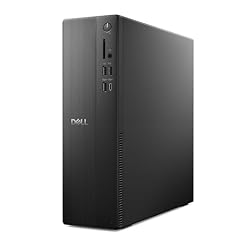
Dell Slim Desktop ECS1250
- CPU
- Intel Core i3-14100
- RAM
- 8 GB
- Storage
- 512 GB
- OS
- Windows 11 Home
$699.99 (as of 10/20/2026 17:06 PDT - Details)
The Dell Slim Desktop ECS1250 with an Intel Core i3-14100, 8GB DDR5, and a 512GB SSD is a no-frills machine for web browsing, office documents, and video streaming. Its slim design fits easily on a desk.
Pros
- Brand-new Dell with a 14th-gen Core i3
- DDR5 RAM (8GB) for efficiency
- Compact slim tower, easy placement
- Wi-Fi 6 included
Cons
- Only 8GB RAM, may require upgrade for multitasking
- Intel Core i3-14100 (4 cores) is entry-level
- No dedicated GPU; Intel UHD Graphics only
Good fit if
- Budget-conscious buyers who mainly browse and do light office work
- Students or seniors needing a simple, reliable PC
Skip if
- You plan to run multiple virtual machines or heavy software
- You need any gaming capability
Verdict: A space-saving desktop for fundamental computing tasks.
11 Best gaming desktop with RTX 3050

STGAubron Gaming PC Desktop
- CPU
- Intel Core i5-13400F
- GPU
- RTX 3050
- RAM
- 16 GB
- Storage
- 512 GB
- OS
- Windows 11 Home
- Dedicated graphics card
- Yes
$809.99 (as of 10/20/2026 06:06 PDT - Details)
The STGAubron Gaming PC with Core i5-13400F and RTX 3050 6GB offers entry-level gaming at 1080p. It includes 16GB DDR4 and a 512GB SSD.
Pros
- RTX 3050 6GB for ray tracing and DLSS support
- Intel Core i5-13400F (10 cores) for decent CPU performance
- 16GB DDR4 RAM, good for gaming and multitasking
- Windows 11 Home preinstalled
Cons
- RTX 3050 6GB is entry-level, not ideal for high-detail 1440p
- STGAubron is a system builder, support may be limited
- Only 512GB storage; may need expansion quickly
Good fit if
- Gamers on a budget who want 1080p performance
- Users who want a dedicated GPU without paying a premium
Skip if
- You want a GPU better than RTX 3050 (e.g., RTX 4060 or higher)
- You prefer a major OEM with long-term support
Verdict: A cost-effective entry into PC gaming with a modern CPU and RTX graphics.
12 Best for RTX 2060 gaming

STGAubron Gaming PC Desktop
- CPU
- Intel Core i5
- GPU
- RTX 2060
- RAM
- 16 GB
- Storage
- 512 GB
- OS
- Windows 11 Home
- Dedicated graphics card
- Yes
Another STGAubron build using an Intel Core i5 and RTX 2060 6GB, with 16GB RAM and a 512GB SSD. The RTX 2060 still performs well for 1080p gaming and supports DLSS.
Pros
- RTX 2060 6GB with ray tracing and DLSS
- 16GB RAM and 512GB SSD
- Windows 11 Home included
- Core i5 (not further specified) offers adequate speed
Cons
- CPU generation not specified by seller (likely older i5)
- RTX 2060 is now two generations old (no DLSS 3 Frame Generation)
- STGAubron support reputation mixed
Good fit if
- Gamers wanting a desktop with a capable GPU for 1080p
- Users who don't mind an older GPU for budget saving
Skip if
- You want the latest RTX 40/50-series features
- You need a newer CPU for streaming or multitasking
Verdict: A cheap entry into ray-tracing gaming, but the CPU may be older.
13 Best gaming desktop from a major OEM

HP OMEN 25L Gaming Desktop Intel i7-14700F GTX 1660S 6GB
- CPU
- Intel Core i7-14700F
- GPU
- GeForce GTX 1660 SUPER
- GPU memory
- 6 GB
- RAM
- 16 GB
- Storage
- 512 GB
- OS
- Windows 11 Home
- Dedicated graphics card
- Yes
$1,099.98 (as of 10/20/2026 04:05 PDT - Details)
The HP OMEN 25L Gaming Desktop pairs an Intel Core i7-14700F with a GeForce GTX 1660 Super 6GB, 16GB RAM, and a 512GB SSD. It offers a known brand with gaming pedigree and a standard-size case that's upgradeable.
Pros
- Intel Core i7-14700F (20 cores) for high CPU performance
- GTX 1660 Super remains competent for 1080p gaming
- HP support and warranty infrastructure
- OMEN case with good airflow and upgrade potential
Cons
- GTX 1660 Super is older and lacks ray tracing and DLSS
- Only 16GB RAM (some newer games recommend more)
- GPU tier trails the RTX cards in this list
Good fit if
- Buyers who trust HP and want a desktop they can upgrade later
- Gamers focused on multiplayer titles (Fortnite, Valorant) at 1080p medium-high
Skip if
- You want ray tracing or DLSS support
- You need a GPU for 1440p high-detail gaming
Verdict: A solid OEM gaming desktop with a strong CPU, though the GPU trails modern options.
14 Best entry-level SFF with Windows 11 Pro

Lenovo SFF Business Desktop Computer
- RAM
- 8 GB
- Storage
- 512 GB
- OS
- Windows 11 Pro
$499.99 (as of 10/20/2026 06:05 PDT - Details)
The Lenovo SFF Business Desktop comes with 8GB DDR5 RAM, a 512GB SSD and Windows 11 Pro in a new (not renewed) small form factor chassis. Its small form factor supports dual displays; the exact Intel quad-core CPU is not stated by the seller.
Pros
- New Windows 11 Pro desktop from a major maker
- DDR5 RAM (even if only 8GB)
- SFF space-saving size, VESA mountable
- Dual display support (DisplayPort/HDMI)
Cons
- Only 8GB RAM, may need upgrading for multitasking
- Intel quad-core not specified further (likely entry level)
- No dedicated GPU
Good fit if
- Cost-conscious businesses needing Windows 11 Pro in bulk
- Thin clients or kiosk systems
Skip if
- You need more than 8GB RAM for business apps
- You need a powerful CPU for heavy calculations
Verdict: A new Windows 11 Pro SFF desktop from a major maker for light office work, but RAM is minimal.
Specs compared
| # | Desktop | CPU | GPU | GPU memory | RAM | Storage | OS |
|---|---|---|---|---|---|---|---|
| 1 | Dell Pro Slim Plus QBS1250 SFF AI Desktop | Intel Core Ultra 7 265 | not stated | not stated | 32 GB | 512 GB | Windows 11 Pro |
| 2 | Apple 2026 Mac Studio Desktop Computer M5 Max chip | Apple M5 Max | not stated | not stated | 36 GB | 512 GB | macOS |
| 3 | Dell Slim Desktop | Intel Core Ultra 5 | not stated | not stated | 16 GB | 512 GB | Windows 11 Home |
| 4 | Lenovo IdeaCentre Tower Desktop Computer • 10-core Intel Ultra 5 225 | Intel Core Ultra 5 225 | not stated | not stated | 16 GB | 512 GB | Windows 11 |
| 5 | HP OmniStudio 27 inch All-in-One Desktop PC | AMD Ryzen 5 220 | Radeon 740M | not stated | 16 GB | 512 GB | Windows 11 Home |
| 6 | Lenovo ThinkCentre neo 50s Gen 5 SFF Business Desktop Computer | Intel Core i5-14400 | not stated | not stated | 16 GB | 512 GB | Windows 11 Pro |
| 7 | Acer Aspire TC-1775 Desktop Computer Intel i5-14400 | Intel Core i5-14400 | not stated | not stated | 8 GB | 512 GB | Windows 11 Pro |
| 8 | Dell Pro Business Desktop Computer | Intel Core i5-14500 | not stated | not stated | 16 GB | 512 GB | Windows 11 Pro |
| 9 | ASUS V500 Mini Tower 15L Desktop | Intel Core i7-13620H | not stated | not stated | 16 GB | 512 GB | Windows 11 Home |
| 10 | Dell Slim Desktop ECS1250 | Intel Core i3-14100 | not stated | not stated | 8 GB | 512 GB | Windows 11 Home |
| 11 | STGAubron Gaming PC Desktop | Intel Core i5-13400F | RTX 3050 | not stated | 16 GB | 512 GB | Windows 11 Home |
| 12 | STGAubron Gaming PC Desktop | Intel Core i5 | RTX 2060 | not stated | 16 GB | 512 GB | Windows 11 Home |
| 13 | HP OMEN 25L Gaming Desktop Intel i7-14700F GTX 1660S 6GB | Intel Core i7-14700F | GeForce GTX 1660 SUPER | 6 GB | 16 GB | 512 GB | Windows 11 Home |
| 14 | Lenovo SFF Business Desktop Computer | not stated | not stated | not stated | 8 GB | 512 GB | Windows 11 Pro |
How we chose these
We started from the catalogue: 78 priced listings matched a 512GB storage desktop; after folding duplicate listings of the same model, 60 remained, and we picked 14. The desktop must come from an established maker (Dell, HP, Lenovo, ASUS, Acer, Apple) or a known system builder (STGAubron); it must be sold in new condition or factory-renewed (renewed units are noted); and it must have a clear use case such as gaming, office productivity, business, or AI workloads. We considered processor generation (favoring current-gen Intel Core Ultra, AMD Ryzen 7/5, and Apple M-series), RAM capacity (8 GB minimum, 16 GB or more preferred), and GPU tier for gaming and creative tasks. Prices are read live from the store listing; no unit was tested or handled by us.
What to look for
Storage: 512GB SSD vs. HDD
All picks in this guide use a 512GB SSD (solid state drive) rather than a hard drive (HDD). An SSD provides much faster boot times, quicker application launches, and overall snappier system responsiveness compared to an HDD. If you store many large files (games, video projects, design assets), 512GB may fill quickly; consider whether the desktop has additional drive bays or expansion slots. Some models here support adding a second SATA SSD or 2.5-inch drive.
Processor: what core count and generation mean
The processor (CPU) determines how fast your desktop handles tasks. Modern Intel Core i5 and i7 chips (13th, 14th, and Core Ultra generations) and AMD Ryzen 5 and 7 processors offer strong single- and multi-thread performance. Among the picks, the Dell Pro Slim Plus (Core Ultra 7 265), the HP OMEN (Core i7-14700F) and the Dell Pro (Core i5-14500, 14 cores per the seller) carry the higher-tier CPUs for heavy multitasking or content creation. The Intel Core Ultra processors (found in the Dell Pro Slim Plus, Dell Slim and Lenovo IdeaCentre) include a neural processing unit (NPU) for AI acceleration in compatible apps. For gaming, the CPU matters less than the GPU, but you still want at least a mid-range i5 or Ryzen 5 to avoid bottlenecking the graphics card.
Graphics: dedicated vs. integrated GPU
A dedicated graphics card (GPU) is essential for gaming, 3D modeling, video editing, and GPU-accelerated AI tasks. In this list, the HP OMEN (GTX 1660 Super), and several STGAubron builds (RTX 3050 or RTX 2060) include dedicated GPUs. Integrated GPUs (Intel UHD, Intel Iris Xe, AMD Radeon 740M) handle web browsing, office apps, and 4K video playback but cannot run modern games at playable frame rates. The Mac Studio's integrated M5 Max GPU is powerful enough for demanding creative work but cannot run native Windows games.
RAM: 8GB vs. 16GB vs. 32GB
RAM capacity directly affects how smoothly you can run multiple applications at once. For basic office work and web browsing, 8GB is barely adequate; you may experience slowdowns with many browser tabs or large Excel files. 16GB is the sweet spot for most users, including gamers and creative workers. The Apple Mac Studio offers 36GB of unified memory, which works as both RAM and video memory, benefiting professional apps. Only the Dell Pro Slim Plus reaches 32GB of RAM, making it ideal for virtual machines or data analysis. If your workflow often maxes out memory, choose a model with at least 16GB.
Form factor: tower vs. SFF vs. all-in-one
Standard tower desktops (e.g., Lenovo IdeaCentre, HP OMEN, Acer Aspire) offer the most internal space for future upgrades and better airflow. Small-form-factor (SFF) models (Lenovo ThinkCentre, Dell Pro Slim, Lenovo SFF) take up much less desk space and can be VESA-mounted behind a monitor, but they often limit expansion (only one drive bay, soldered RAM). All-in-one PCs (HP OmniStudio) combine the computer and monitor into one unit, saving space but making upgrades very difficult. Consider your available desk space and whether you plan to add components later.
Questions
Is 512GB of storage enough for gaming?
512GB is enough to install a few modern games (most AAA titles take 50-150GB each). If you play many games, you may need to uninstall and reinstall, or add a secondary drive. Several desktops in this list have space for an extra SATA SSD or 2.5-inch drive. For a library of many games, consider models with 1TB or more.
Which 512GB desktop is best for video editing?
The Apple Mac Studio (M5 Max) with 36GB unified memory is the strongest pick for professional video editing in Final Cut Pro, DaVinci Resolve, or Adobe Premiere. Among Windows options, a desktop with a dedicated GPU and at least 16GB RAM (like the HP OMEN 25L with a Core i7-14700F and GTX 1660 Super) is the closer fit, and the Dell Pro Slim Plus offers 32GB of RAM without a dedicated GPU. Note that 512GB may fill quickly with video projects.
Can I upgrade the storage on these desktops?
Most tower and some SFF desktops allow adding a second drive or replacing the existing one. Desktops like the Lenovo IdeaCentre and HP OMEN have extra SATA ports and drive bays. All-in-one models (HP OmniStudio) and the Mac Studio have no internal expansion for storage; you would need external USB drives. Check the specific model's specifications on the manufacturer's site.
Are renewed (refurbished) 512GB desktops worth buying?
Renewed desktops can save money but come with caveats. The Dell Optiplex 7070 SFF (Renewed) in the pool is an older model (9th-gen Intel), which is why no renewed unit made this list. Renewed units are usually tested and may carry a short warranty, but they use older hardware and may not support Windows 11 features like TPM 2.0 or have the latest security updates. For critical use, a new desktop is safer.
What is the difference between Windows 11 Home and Pro?
Windows 11 Pro adds BitLocker device encryption, Remote Desktop, Hyper-V virtualization, and the ability to join a domain, making it better for business environments. Windows 11 Home lacks these features and requires a Microsoft account during setup. For home gaming and casual use, Home is fine; for offices or sensitive data, choose Pro.
Can I play modern games on a 512GB desktop with integrated graphics?
Integrated graphics (Intel UHD, Radeon 740M) can handle very light or older games at low settings and low resolutions. Modern AAA games like Cyberpunk 2077 or Starfield will not run smoothly. You need a dedicated GPU (RTX 3050 or better) for playable frame rates at 1080p.
Update history
- : Listings the site no longer shows were removed and the picks updated.
- : First published.