
Best Desktop PCs for Home and Office in 2026: 15 Picks
The ASUS S501MER Desktop PC leads our list of the best desktop PCs for home and office due to its powerful Intel Core i7-14700 processor and 16GB of DDR5 RAM, providing reliable performance for multitasking and demanding applications. We selected 15 desktops from a pool of 81 based on specifications, maker reputation, and suitability for productivity tasks.
15 picks from 90 desktops that match this guide with a price we can quote today. Prices below are live, each shown with the time it was read.
Quick list
Which one is right for you?
- For budget-conscious work: The Lenovo SFF Business Desktop with 8GB DDR5 RAM and a 512GB SSD offers a capable work machine at a low entry point. See pick 5
- For power users and multitaskers: The Dell Pro Tower Plus with Intel Ultra 5 and 1TB SSD delivers fast storage and solid CPU performance for heavy workloads. See pick 3
- For small home office with space constraints: The Lenovo ThinkCentre M70q Gen 6 tiny PC provides a small footprint, 16GB DDR5, and Wi-Fi 6E, ideal for tight desks. See pick 4
All 15 picks in detail
1 Best overall

ASUS S501MER Desktop PC
- CPU
- Intel Core i7-14700
- RAM
- 16 GB
- Storage
- 1000 GB
- OS
- Windows 11 Home
$895.00 (as of 10/20/2026 16:06 PDT - Details)
The ASUS S501MER pairs a 20-core Intel Core i7-14700 with 16GB of DDR5 RAM and a 1TB PCIe SSD, offering more CPU cores than any other pick in this list. It also includes Wi-Fi 6E, making it a future-proof choice for demanding home and office tasks.
Pros
- 20-core Intel Core i7-14700 processor offers excellent multi-threaded performance
- 16GB DDR5 RAM and 1TB PCIe SSD provide ample memory and fast storage
- Includes Wi-Fi 6E for fast wireless connectivity
Cons
- No Windows 11 Pro (Home edition only)
- Larger tower form factor may not suit all desk spaces
Good fit if
- Users running demanding applications like video editing or large spreadsheets
- Those who want a fast, long-lasting desktop for a home office
Skip if
- You need Windows 11 Pro for business management features
- You prefer a compact or all-in-one design
Verdict: The ASUS S501MER delivers the highest CPU core count in this list, making it the best choice for demanding office workloads.
2 Best for multitasking

Lenovo IdeaCentre Tower Desktop Computer • 10-core Intel Ultra 5 225
- CPU
- Intel Core Ultra 5 225
- RAM
- 16 GB
- Storage
- 512 GB
- OS
- Windows 11
$749.99 (as of 10/20/2026 06:05 PDT - Details)
The Lenovo IdeaCentre Tower features a 10-core Intel Core Ultra 5 225 processor and 16GB of DDR5 RAM, providing strong performance for running multiple office applications simultaneously. Its 512GB SSD ensures quick boot times and application loading.
Pros
- 10-core Intel Core Ultra 5 225 processor for efficient multitasking
- 16GB DDR5 RAM is the standard for smooth office work
- Includes Office 365 for one year
Cons
- Only 512GB of storage, which may fill up quickly with large files
- No Wi-Fi 6E support listed
Good fit if
- Office workers who regularly use multiple browser tabs and applications
- Users who appreciate a bundled Office subscription
Skip if
- You require more than 512GB of storage for media or databases
- You need the latest Wi-Fi 6E standard
Verdict: A well-balanced desktop with a modern processor and enough RAM for concurrent tasks, plus a year of Office included.
3 Best business performance

Dell Pro Tower Plus Business Desktop
- CPU
- Intel Core Ultra 5
- RAM
- 16 GB
- Storage
- 1000 GB
- OS
- Windows 11 Pro
$1,099.99 (as of 10/20/2026 17:06 PDT - Details)
The Dell Pro Tower Plus comes with an Intel Core Ultra 5 processor, 16GB DDR5 RAM, and a 1TB SSD, all on Windows 11 Pro. Its business-class build and management features make it a strong choice for professional environments.
Pros
- Intel Core Ultra 5 processor with modern architecture
- 1TB PCIe SSD provides generous storage
- Windows 11 Pro includes BitLocker and remote desktop features
- Dell Pro Tower design optimized for business use
Cons
- CPU is faster than many picks but not the highest core count in this list
- Price is higher than some comparable models
Good fit if
- Business professionals who need Windows 11 Pro features
- Users who require fast storage and a reliable tower for daily work
Skip if
- Your work fits within 512GB of storage
- You are on a tight budget for a home office
Verdict: A premium business desktop with ample storage and the security features of Windows 11 Pro.
4 Best compact desktop

Lenovo ThinkCentre M70q Gen 6
- CPU
- Intel Core Ultra 3 205T
- RAM
- 16 GB
- Storage
- 256 GB
- OS
- Windows 11 Pro
$849.95 (as of 10/20/2026 06:05 PDT - Details)
The Lenovo ThinkCentre M70q Gen 6 is a tiny form factor desktop that packs 16GB DDR5 RAM, an Intel Core Ultra 3 205T, and Wi-Fi 6E into a very small chassis. Its size saves desk space while still offering solid performance for office tasks.
Pros
- Ultra-compact design easily fits in tight spaces
- 16GB DDR5 RAM and Wi-Fi 6E are modern and fast
- Windows 11 Pro included for business use
Cons
- Only 256GB of NVMe storage, less than most picks
- Single storage slot may limit upgradeability
Good fit if
- Users with limited desk space who want a full desktop experience
- Home offices needing a quiet, small-footprint PC
Skip if
- You need more than 256GB of storage without external drives
- You prefer a larger tower for easier internal upgrades
Verdict: A tiny PC with impressive specs for its size, ideal for space-constrained workstations.
5 Best budget desktop

Lenovo SFF Business Desktop Computer
- RAM
- 8 GB
- Storage
- 512 GB
- OS
- Windows 11 Pro
$499.99 (as of 10/20/2026 06:05 PDT - Details)
The Lenovo SFF Business Desktop with 8GB DDR5 RAM and 512GB SSD is the most affordable pick in this list that still offers a modern OS and dual display support. It provides a capable office machine at the lowest entry point.
Pros
- Very low price for a new desktop with Windows 11 Pro
- 512GB SSD provides decent storage for basic use
- Dual display support out of the box
Cons
- Only 8GB of RAM, which may limit multitasking with many applications
- Processor details not fully specified (Intel Quad-Core)
- Not stated by the seller: exact CPU model
Good fit if
- Budget-conscious users who need a basic PC for email, browsing, and documents
- Small offices requiring low upfront cost
Skip if
- You run heavy software like large spreadsheets or databases
- You need more than 8GB of RAM for future-proofing
Verdict: An excellent value choice for basic home and office tasks, with room to grow if needed.
6 Best storage capacity
Lenovo SFF Business Desktop Computer
- RAM
- 16 GB
- Storage
- 2000 GB
- OS
- Windows 11 Pro
$899.99 (as of 10/20/2026 06:05 PDT - Details)
This Lenovo SFF Business Desktop stands out with 2TB of SSD storage, the largest in this list. Combined with 16GB DDR5 RAM and Windows 11 Pro, it is built for users who store large files locally.
Pros
- 2TB SSD storage is the highest capacity in this group
- 16GB DDR5 RAM supports heavy multitasking
- Dual display support and Windows 11 Pro included
Cons
- CPU is listed as Intel Quad-Core without specific model, limiting performance assessment
- Price is on the higher side for the processor tier
Good fit if
- Users who store large media files, documents, or databases locally
- Home offices needing both ample storage and decent RAM
Skip if
- You prefer a faster, high-core-count processor over storage
- 512GB or 1TB is sufficient for your files
Verdict: A storage-centric SFF desktop that prioritizes capacity without sacrificing RAM or OS features.
7 Best for storage and speed

Acer Aspire Tower Desktop Computer
- CPU
- Intel Core i5
- RAM
- 16 GB
- Storage
- 2000 GB
- OS
- Windows 11
$999.99 (as of 10/20/2026 15:07 PDT - Details)
The Acer Aspire Tower includes a 2TB SSD and 16GB of DDR5 RAM, paired with a 14th Gen Intel Core i5 processor. This combination offers both high storage capacity and modern CPU performance for demanding office tasks.
Pros
- 2TB SSD and 16GB DDR5 RAM are top-tier for this list
- 14th Gen Intel Core i5 provides strong single- and multi-threaded performance
- Includes Wi-Fi 6E and Bluetooth 5 for fast connectivity
Cons
- Operating system is Windows 11 Home, not Pro
- Price is near the top of the list among similar configurations
Good fit if
- Power users who need both fast storage and a capable processor
- Home office users who want a future-proof machine with large capacity
Skip if
- You require Windows 11 Pro for business management features
- You are on a strict budget for a home PC
Verdict: A powerful desktop with the largest storage in the list and a modern processor, ideal for heavy file work.
8 Best for business basics

Dell Pro Desktop Computers
- CPU
- Intel Core i3-14100
- RAM
- 16 GB
- Storage
- 512 GB
- OS
- Windows 11 Pro
$749.97 (as of 10/20/2026 17:06 PDT - Details)
The Dell Pro Desktop with 16GB DDR5 RAM, 512GB SSD, and Windows 11 Pro is a straightforward choice for business environments that require reliability and manageability without unnecessary extras.
Pros
- 16GB DDR5 RAM and 512GB SSD provide a solid baseline
- Windows 11 Pro offers security and remote management features
- Dell Pro branding indicates business-grade support and durability
Cons
- Intel Core i3-14100 processor may feel slower than Core i5 or i7 alternatives
- No Wi-Fi 6E or larger storage options listed
Good fit if
- Business users who need a reliable, managed desktop for standard office tasks
- IT departments requiring Windows 11 Pro for group policy support
Skip if
- You need a faster processor for CPU-intensive applications
- You prefer more storage than 512GB
Verdict: A no-frills business desktop that covers the essentials with modern RAM and a professional OS.
9 Best AMD-powered desktop

HP Pavilion Desktop Computer PC
- CPU
- AMD Ryzen 7 5700G
- RAM
- 16 GB
- Storage
- 512 GB
- OS
- Windows 11 Pro
$759.72 (as of 10/20/2026 04:06 PDT - Details)
The HP Pavilion Desktop features an AMD Ryzen 7 5700G processor, which includes integrated Radeon graphics, making it suitable for light creative work and multitasking. It offers 16GB of RAM and a 512GB SSD.
Pros
- AMD Ryzen 7 5700G processor with strong integrated graphics for office tasks
- 16GB RAM and 512GB SSD provide good performance
- Windows 11 Pro included for business use
Cons
- Integrated graphics may not be needed for basic office work
- Processor is a previous generation (Cezanne) compared to newer Ryzen 8000 series
Good fit if
- Users who may do light photo editing or design work without a dedicated GPU
- AMD fans seeking a Ryzen-powered desktop
Skip if
- You need the latest CPU architecture
- You prefer Intel for specific software compatibility
Verdict: A solid AMD-based desktop with good integrated graphics, suitable for office and light creative use.
10 Best compact tower with i7

ASUS V500 Mini Tower 15L Desktop
- CPU
- Intel Core i7-13620H
- RAM
- 16 GB
- Storage
- 512 GB
- OS
- Windows 11 Home
$629.99 (as of 10/20/2026 16:06 PDT - Details)
The ASUS V500 Mini Tower packs a 10-core Intel Core i7-13620H processor into a compact 15L chassis, offering high CPU performance without dominating desk space. Its 16GB RAM and 512GB SSD complete a balanced package.
Pros
- 10-core Intel Core i7-13620H processor is powerful for its size class
- Compact 15L tower saves desk space
- Includes wired keyboard and mouse
Cons
- Mobile processor (H-series) may not match desktop i7 in sustained loads
- No Windows 11 Pro (Home edition only)
Good fit if
- Users who want a powerful CPU in a smaller tower
- Home office setups where space is at a premium
Skip if
- You need a full-sized desktop for maximum thermal performance
- You require Windows 11 Pro
Verdict: A compact desktop that doesn't compromise on CPU power, ideal for space-conscious power users.
11 Best RAM capacity
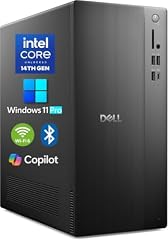
Dell 2026 Edition Desktop Computers Tower PC
- CPU
- Intel Core i3-14100
- RAM
- 64 GB
- Storage
- 2000 GB
- OS
- Windows 11 Pro
$579.99 (as of 10/20/2026 17:06 PDT - Details) Typical price: $849.97, 32% off
The Dell 2026 Edition Desktop Tower features a remarkable 64GB of DDR5 RAM, far exceeding any other pick in this list. This makes it exceptionally suited for memory-heavy tasks like virtual machines or large datasets, despite its modest Core i3-14100 processor.
Pros
- 64GB DDR5 RAM is the highest in this group, excellent for heavy multitasking
- 2TB SSD provides ample storage
- Windows 11 Pro included for business use
Cons
- Intel Core i3-14100 processor may bottleneck the large RAM in CPU-intensive tasks
- Price is moderate but RAM is overkill for typical office work
Good fit if
- Professionals running multiple virtual machines or large databases
- Users who need extreme memory capacity for data analysis
Skip if
- You don't need more than 16GB or 32GB of RAM
- Your work relies on CPU power rather than memory
Verdict: An unusual but effective choice for memory-hungry workflows, with enough storage to match.
12 Best SFF with 16GB
Lenovo SFF Business Desktop Computer
- RAM
- 16 GB
- Storage
- 512 GB
- OS
- Windows 11 Pro
$599.99 (as of 10/20/2026 06:05 PDT - Details)
This Lenovo SFF Business Desktop offers 16GB DDR5 RAM, a 512GB SSD, and Windows 11 Pro at a competitive price. It provides essential business features in a small form factor without major compromises.
Pros
- 16GB DDR5 RAM and 512GB SSD for a reasonable price
- Small form factor saves desk space
- Dual display support and Windows 11 Pro included
Cons
- Intel Quad-Core processor not specified, may be a lower-end model
- No storage expansion details given
Good fit if
- Office workers needing a solid business PC on a budget
- Users who want a compact desktop with enough RAM for multitasking
Skip if
- You require a high-core-count CPU
- You need more than 512GB of storage
Verdict: A balanced, affordable SFF desktop that delivers good value for standard office tasks.
13 Best for CPU-intensive work

Lenovo IdeaCentre Liter Tower Desktop Computer • 20-core Intel Core
- CPU
- Intel Core i7-14700
- RAM
- 16 GB
- Storage
- 512 GB
- OS
- Windows 11
$999.99 (as of 10/20/2026 06:05 PDT - Details)
The Lenovo IdeaCentre Liter Tower is equipped with a 20-core Intel Core i7-14700 processor, matching the top pick for CPU cores. Its 16GB DDR5 RAM and 512GB SSD provide a strong foundation for demanding applications like compiling or heavy spreadsheet calculations.
Pros
- 20-core Intel Core i7-14700 processor for top-tier multi-threaded performance
- 16GB DDR5 RAM and 512GB SSD
- Includes Office 365 for one year
Cons
- Only 512GB of storage, less than some picks with 1TB or 2TB
- Price is near the top of the list
Good fit if
- Users who run CPU-intensive office applications like large databases or simulations
- Professionals needing high core counts for parallel tasks
Skip if
- You need more than 512GB of storage without external drives
- Your work is mostly web-based and light
Verdict: A high-performance desktop with a top-tier CPU, ideal for demanding office workloads.
14 Best AI-ready desktop

HP OmniDesk Desktop PC
- CPU
- Intel Core Ultra 5 225
- RAM
- 16 GB
- Storage
- 512 GB
- OS
- Windows 11 Home
$734.99 (as of 10/20/2026 04:06 PDT - Details)
The HP OmniDesk Desktop PC features an Intel Core Ultra 5 225 processor with a built-in NPU, supporting AI features like Windows Studio Effects. With 16GB RAM and 512GB SSD, it offers modern performance with AI capabilities.
Pros
- Intel Core Ultra 5 225 includes an NPU for AI acceleration
- 16GB DDR5 RAM and 512GB SSD provide good performance
- Sleek design with a dark wood finish, suitable for home offices
Cons
- Only 512GB of storage, which may fill quickly
- Windows 11 Home edition, not Pro
Good fit if
- Users interested in AI-enhanced features like voice commands or background blur
- Home office users who want a stylish desktop with modern capabilities
Skip if
- You need Windows 11 Pro for business management
- You require larger storage for files
Verdict: A forward-looking desktop with AI-ready hardware and a design that blends into home decor.
15 Best slim desktop for basic tasks
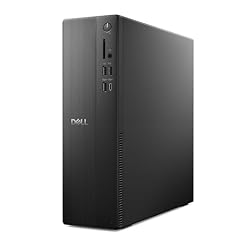
Dell Slim Desktop ECS1250
- CPU
- Intel Core i3-14100
- RAM
- 8 GB
- Storage
- 512 GB
- OS
- Windows 11 Home
$699.99 (as of 10/20/2026 17:06 PDT - Details)
The Dell Slim Desktop ECS1250 is a compact tower with a modern Intel Core i3-14100 processor, 8GB DDR5 RAM, and 512GB SSD. Its slim design fits neatly in home office setups, offering sufficient performance for everyday tasks.
Pros
- Slim profile saves desk space
- Intel Core i3-14100 is a capable modern processor
- 512GB SSD and Wi-Fi 6 included
Cons
- Only 8GB of RAM, limiting multitasking
- Windows 11 Home, not Pro
Good fit if
- Home users needing a basic PC for browsing, email, and documents
- Those who prefer a small, quiet desktop
Skip if
- You run multiple heavy applications simultaneously
- You need Windows 11 Pro features
Verdict: A budget-friendly slim desktop that handles everyday home and office tasks efficiently.
Specs compared
| # | Desktop | CPU | GPU | GPU memory | RAM | Storage | OS |
|---|---|---|---|---|---|---|---|
| 1 | ASUS S501MER Desktop PC | Intel Core i7-14700 | not stated | not stated | 16 GB | 1000 GB | Windows 11 Home |
| 2 | Lenovo IdeaCentre Tower Desktop Computer • 10-core Intel Ultra 5 225 | Intel Core Ultra 5 225 | not stated | not stated | 16 GB | 512 GB | Windows 11 |
| 3 | Dell Pro Tower Plus Business Desktop | Intel Core Ultra 5 | not stated | not stated | 16 GB | 1000 GB | Windows 11 Pro |
| 4 | Lenovo ThinkCentre M70q Gen 6 | Intel Core Ultra 3 205T | not stated | not stated | 16 GB | 256 GB | Windows 11 Pro |
| 5 | Lenovo SFF Business Desktop Computer | not stated | not stated | not stated | 8 GB | 512 GB | Windows 11 Pro |
| 6 | Lenovo SFF Business Desktop Computer | not stated | not stated | not stated | 16 GB | 2000 GB | Windows 11 Pro |
| 7 | Acer Aspire Tower Desktop Computer | Intel Core i5 | not stated | not stated | 16 GB | 2000 GB | Windows 11 |
| 8 | Dell Pro Desktop Computers | Intel Core i3-14100 | not stated | not stated | 16 GB | 512 GB | Windows 11 Pro |
| 9 | HP Pavilion Desktop Computer PC | AMD Ryzen 7 5700G | not stated | not stated | 16 GB | 512 GB | Windows 11 Pro |
| 10 | ASUS V500 Mini Tower 15L Desktop | Intel Core i7-13620H | not stated | not stated | 16 GB | 512 GB | Windows 11 Home |
| 11 | Dell 2026 Edition Desktop Computers Tower PC | Intel Core i3-14100 | not stated | not stated | 64 GB | 2000 GB | Windows 11 Pro |
| 12 | Lenovo SFF Business Desktop Computer | not stated | not stated | not stated | 16 GB | 512 GB | Windows 11 Pro |
| 13 | Lenovo IdeaCentre Liter Tower Desktop Computer • 20-core Intel Core | Intel Core i7-14700 | not stated | not stated | 16 GB | 512 GB | Windows 11 |
| 14 | HP OmniDesk Desktop PC | Intel Core Ultra 5 225 | not stated | not stated | 16 GB | 512 GB | Windows 11 Home |
| 15 | Dell Slim Desktop ECS1250 | Intel Core i3-14100 | not stated | not stated | 8 GB | 512 GB | Windows 11 Home |
How we chose these
From a pool of 81 desktop PCs tagged as office use, we selected 15 models that represent a range of configurations suitable for home and office work. Criteria included CPU generation and performance tier, RAM capacity (8GB or more), storage type and size, and the presence of modern connectivity like Wi-Fi 6. All prices listed are live and read from the store listing; we did not test any of these units. We prioritized machines from established makers (Dell, HP, Lenovo, ASUS, Acer) and included only new-condition desktops unless a renewed unit offered a standout balance of capability and features.
What to look for
Processor (CPU): what the model number tells you
For home and office use, the processor determines how quickly your desktop handles tasks like opening applications, running spreadsheets, and multitasking. Intel Core i3 and AMD Ryzen 3 are entry-level, suitable for basic browsing and document editing. Intel Core i5 and AMD Ryzen 5 offer a good balance of performance and price for most office work, including multitasking with several applications. Intel Core i7, Core Ultra 7, and AMD Ryzen 7 are high-end options for demanding tasks such as video conferencing, large data analysis, or virtual machines. The generation number (e.g., 14th Gen) indicates newer architecture and often better efficiency. Intel's naming guide provides more detail on suffixes like H (high performance mobile) or K (unlocked desktop).
Memory (RAM): 8GB vs. 16GB vs. 32GB
RAM capacity directly affects how many programs you can run at once without slowdowns. 8GB is the minimum recommended by Microsoft for Windows 11 and is adequate for light tasks like email, web browsing, and word processing. 16GB is the sweet spot for most home and office users, allowing you to keep multiple browser tabs, Office applications, and communication tools open simultaneously. 32GB or more is beneficial for professionals working with large datasets, virtual machines, or creative apps like photo editing. In our pool of 15 picks, most offer 16GB DDR5 RAM, which is the current standard for smooth performance.
Storage: SSD type and capacity
Solid-state drives (SSDs) are essential for fast boot times and quick application loading. All modern desktops use SSDs; avoid older hard disk drives (HDD) for the main drive. NVMe SSDs are faster than SATA SSDs, with higher read/write speeds. Capacity matters based on your file storage needs: 256GB is enough for the operating system and a few apps, 512GB is suitable for most users with cloud storage, and 1TB or 2TB is ideal if you store large files locally. In this list, capacities range from 256GB to 2TB, with 512GB being the most common.
Operating system: Windows 11 Home vs. Pro
Windows 11 is the standard operating system for new desktops. The Home edition is sufficient for most personal home use, including web browsing, media, and standard applications. Windows 11 Pro adds features like BitLocker device encryption, Remote Desktop, and Group Policy management, which are valuable for business environments or users who need enhanced security and remote access. The system requirements for Windows 11 include a compatible 64-bit processor, 4GB RAM, 64GB storage, TPM 2.0, and a DirectX 12 graphics card. When choosing, consider whether you might need Pro features later, as upgrading is possible but adds cost.
Form factor: tower versus small form factor versus all-in-one
Desktop form factors affect desk space, upgradeability, and portability. Standard towers (mini, mid, or full) offer the most internal space for adding components like additional storage or a dedicated graphics card. Small form factor (SFF) and slim desktops take up less room but may have limited expansion slots and cooling. All-in-one (AIO) PCs integrate the computer into the monitor, saving desk space entirely but offering minimal upgrade options. For home and office use, SFF and slim desktops are popular for their low footprint, while towers provide flexibility if you plan to upgrade in the future.
Connectivity: Wi-Fi, ports, and displays
Modern desktops should include Wi-Fi 6 or Wi-Fi 6E for fast and reliable wireless networking, especially in home offices without wired Ethernet. Look for at least USB 3.0 or USB-C ports for fast peripherals, HDMI or DisplayPort for monitors, and an audio jack. Dual display support is common on business desktops, allowing you to connect two monitors for increased productivity. Check the number and type of ports based on your existing monitors and peripherals. Wi-Fi 6E offers the latest wireless speeds and lower latency, which is beneficial for video conferencing and large file transfers.
Questions
How much RAM do I need for home and office use?
For typical tasks like web browsing, email, and Microsoft Office applications, 8GB of RAM is the minimum recommended by Microsoft for Windows 11. However, 16GB is strongly recommended for comfortable multitasking with multiple browser tabs, video conferencing, and productivity apps running at the same time. Upgrading to 32GB is only necessary for memory-intensive work like virtual machines or large datasets.
Is Windows 11 Home enough for a home office?
Yes, Windows 11 Home is sufficient for most home office setups. It includes core features like Windows Hello, Microsoft Edge, and support for productivity software. Windows 11 Pro is recommended if you need BitLocker encryption for sensitive data, Remote Desktop for accessing your PC from elsewhere, or Group Policy management, which are typically used in professional or managed environments.
Should I get a desktop with a dedicated graphics card for office work?
For standard home and office tasks like word processing, spreadsheets, and web browsing, integrated graphics included with modern CPUs (such as Intel UHD Graphics or AMD Radeon Graphics) are perfectly adequate. A dedicated graphics card is only necessary for tasks like video editing, 3D modeling, or gaming. Most office desktops do not require a separate GPU.
What is the difference between a tower and a small form factor (SFF) desktop?
A tower desktop is larger and offers more internal space for components like additional hard drives, expansion cards, and better cooling. A small form factor (SFF) desktop is much more compact, saving desk space, but it may have limited upgrade options and lower thermal capacity. SFF desktops are ideal for tight spaces, while towers are better if you plan to add or upgrade parts in the future.
Can I use a desktop for gaming as well as office work?
Yes, many of the desktops in this list, especially those with dedicated graphics cards like the STGAubron or WIWB models, can handle casual and some modern games at lower settings. However, for serious gaming, you would need a desktop with a more powerful GPU from the RTX 50 series or similar. The picks in this guide are optimized for home and office productivity, not high-end gaming.
Update history
- : First published.