
Best Intel Core Ultra 7 Desktops in 2026: 15 Picks Compared on Specs
The Lenovo Legion Tower 5i with a Core Ultra 7 265F and RTX 5070 Ti leads this list for its balance of gaming and AI-ready performance. We selected 15 desktops from a pool of 53 Intel Core Ultra 7 models available on the market, comparing them on published specifications such as processor variant, GPU, RAM, storage, and operating system.
15 picks from 87 desktops that match this guide with a price we can quote today. Prices below are live, each shown with the time it was read.
Quick list
Which one is right for you?
- For esports on a budget: The MSI Codex R2 AI with an RTX 5060 Ti and 32GB of RAM delivers strong 1080p and 1440p gaming performance without overspending. See pick 4
- For a quiet office: The HP OmniDesk M03 Business AI Desktop packs 64GB of RAM and a 2TB SSD in a compact tower, ideal for multitasking and local AI workloads. See pick 9
- For 4K gaming and streaming: The Cooler Master TD5 Pro with an RTX 5080 and 16GB of VRAM handles 4K gaming and streaming with headroom for AI tasks. See pick 2
All 15 picks in detail
1 Best overall

Lenovo Legion Tower 5i
- CPU
- Intel Core Ultra 7 265F
- GPU
- GeForce RTX 5070 Ti
- RAM
- 32 GB
- Storage
- 1000 GB
- Dedicated graphics card
- Yes
The Lenovo Legion Tower 5i pairs an Intel Core Ultra 7 265F with an NVIDIA GeForce RTX 5070 Ti, offering strong 1440p and 4K gaming performance. It also includes 32GB of RAM and a 1TB SSD, making it a well-rounded choice for gaming and AI workloads.
Pros
- RTX 5070 Ti with 16GB VRAM for high-resolution gaming and AI
- 32GB of DDR5 RAM, enough for multitasking and creative work
- 1TB NVMe SSD provides fast storage out of the box
Cons
- GPU is not the highest tier in this list (RTX 5080 or 5090 available elsewhere)
- Only 1TB of storage; some competitors offer 2TB
Good fit if
- Gamers who want a strong 1440p or entry-level 4K experience
- Users who need a desktop for both gaming and AI or creative tasks
Skip if
- You need the absolute highest GPU performance for 4K gaming at max settings
- You require more than 1TB of storage without upgrading
Verdict: A balanced gaming desktop with a capable GPU and ample memory for most users.
2 Best for 4K gaming

Cooler Master TD5 Pro Gaming PC Intel Ultra 7 + RTX 5080 ATX Desktop PC
- CPU
- Intel Core Ultra 7 265F
- GPU
- RTX 5080
- GPU memory
- 16 GB
- Dedicated graphics card
- Yes
$3,099.99 (as of 10/20/2026 17:05 PDT - Details)
The Cooler Master TD5 Pro features an RTX 5080 with 16GB of VRAM, making it one of the most powerful GPUs in this list. It is well-suited for 4K gaming and AI workloads that benefit from high VRAM capacity.
Pros
- RTX 5080 with 16GB VRAM for high-end 4K gaming and AI
- Intel Core Ultra 7 265F processor for balanced performance
- ATX form factor allows for easier upgrades
Cons
- No RAM or storage size stated by the seller
- Higher price point than many other picks
Good fit if
- Enthusiasts who want top-tier 4K gaming performance
- Users running AI models that benefit from 16GB of GPU VRAM
Skip if
- You are on a tighter budget
- You need a pre-configured amount of RAM or storage specified
Verdict: A powerful gaming rig for those who prioritize GPU performance above all else.
3 Best for AI and productivity

HP OmniDesk Next Gen AI PC Business Desktop PC
- CPU
- Intel Core Ultra 7 265
- RAM
- 64 GB
- Storage
- 2000 GB
- OS
- Windows 11 Pro
$1,875.69 (as of 10/20/2026 04:06 PDT - Details)
The HP OmniDesk Next Gen AI PC comes with 64GB of DDR5 RAM and a 2TB SSD, making it ideal for multitasking, large datasets, and local AI workloads. It runs Windows 11 Pro and is marketed as an AI-ready business desktop.
Pros
- 64GB of DDR5 RAM, the highest among standard picks
- 2TB SSD provides ample storage for files and AI models
- Windows 11 Pro includes BitLocker and Remote Desktop
Cons
- No dedicated GPU listed; relies on integrated graphics
- Not suited for gaming or GPU-accelerated tasks
Good fit if
- Professionals running virtual machines, data analysis, or AI inference
- Users who need a large amount of RAM and storage for productivity
Skip if
- You need a discrete GPU for gaming or rendering
- You prefer a smaller form factor
Verdict: A high-memory, high-storage desktop for demanding productivity and AI tasks.
4 Best for 1080p and 1440p gaming

msi Codex R2 AI Gaming Desktop
- CPU
- Intel Core Ultra 7 265
- GPU
- GeForce RTX 5060 Ti
- RAM
- 32 GB
- Storage
- 1000 GB
- OS
- Windows 11 Home
- Dedicated graphics card
- Yes
$1,770.00 (as of 10/20/2026 06:06 PDT - Details)
The MSI Codex R2 AI offers an RTX 5060 Ti with 32GB of RAM and a 1TB SSD. It provides solid 1080p and 1440p gaming performance with a modern GPU.
Pros
- RTX 5060 Ti delivers strong 1080p and 1440p gaming
- 32GB of DDR5 RAM is generous for the price
- 1TB NVMe SSD for fast loading times
Cons
- RTX 5060 Ti is not suited for 4K gaming at high settings
- No Windows 11 Pro option; comes with Home
Good fit if
- Gamers on a budget who want a modern GPU and ample RAM
- Users who play esports titles and mainstream AAA games at 1080p or 1440p
Skip if
- You need a GPU for 4K gaming or heavy AI workloads
- You require Windows 11 Pro for business features
Verdict: A well-priced gaming desktop with a capable GPU and plenty of memory.
5 Best for gaming and streaming

ASUS ROG G700
- CPU
- Intel Core Ultra 7 265F
- GPU
- GeForce RTX 5070
- RAM
- 32 GB
- Storage
- 1000 GB
- OS
- Windows 11 Pro
- Dedicated graphics card
- Yes
$2,399.00 (as of 10/20/2026 16:06 PDT - Details)
The ASUS ROG G700 combines an RTX 5070 with 32GB of RAM and a 1TB SSD in a gaming-focused design. The RTX 5070 supports NVIDIA NVENC encoding, making it a strong choice for streaming.
Pros
- RTX 5070 with 12GB VRAM for 1440p gaming and streaming
- 32GB of DDR5 RAM for multitasking while streaming
- Windows 11 Pro for advanced networking and security
Cons
- Only 1TB of storage; may need expansion for large game libraries
- No higher-tier GPU option (RTX 5080) in this model
Good fit if
- Streamers who need a dedicated GPU with good encoding capabilities
- Gamers who play at 1440p and want a reliable system
Skip if
- You need 4K gaming at maximum settings
- You prefer a desktop with more than 1TB of storage
Verdict: A solid gaming and streaming machine with a balanced spec sheet.
6 Best high-end gaming

Skytech Gaming King 95 Gaming PC
- CPU
- Intel Core Ultra 7 270K
- GPU
- RTX 5070 Ti
- GPU memory
- 16 GB
- RAM
- 32 GB
- OS
- Windows 11
- Dedicated graphics card
- Yes
$2,999.99 (as of 10/20/2026 06:06 PDT - Details)
The Skytech Gaming King 95 features an Intel Core Ultra 7 270K processor and an RTX 5070 Ti with 16GB VRAM, making it one of the most powerful gaming desktops in this list. It also includes 32GB of RAM and a 1TB Gen4 NVMe SSD.
Pros
- Intel Core Ultra 7 270K, a higher-tier Ultra 7 with 5.4GHz boost
- RTX 5070 Ti with 16GB VRAM for 4K gaming and AI
- 1TB Gen4 NVMe SSD for fast storage
Cons
- Higher price point than many other picks
- Only 1TB of storage for a high-end machine
Good fit if
- Enthusiasts who want top-tier gaming performance at 4K
- Users who need a powerful GPU for AI or creative workloads
Skip if
- You are on a budget
- You need more than 1TB of storage out of the box
Verdict: A high-performance gaming PC with a premium processor and GPU.
7 Best for brand reliability

Alienware Aurora Gaming Desktop
- CPU
- Intel Core Ultra 7 265F
- GPU
- RTX 5070
- RAM
- 32 GB
- Storage
- 1000 GB
- OS
- Windows 11 Home
- Dedicated graphics card
- Yes
$2,187.98 (as of 10/20/2026 16:05 PDT - Details)
The Alienware Aurora is a well-known gaming desktop line. This model includes an RTX 5070 and a Core Ultra 7 265F, offering reliable performance for 1440p gaming. Alienware's build quality and support are established.
Pros
- RTX 5070 with 12GB VRAM for 1440p gaming
- Alienware brand with established support and warranty
- Tool-less entry for easy upgrades
Cons
- No RAM or storage size stated by the seller
- Alienware desktops are often priced at a premium
Good fit if
- Users who prefer a well-known gaming brand with good support
- Gamers who want a 1440p-ready system with upgrade potential
Skip if
- You need a specific amount of RAM or storage specified
- You prefer a desktop with a more standardized spec sheet
Verdict: A reliable gaming desktop from a trusted brand, though specs are not fully listed.
8 Best business desktop

Dell Tower Desktop
- CPU
- Intel Core Ultra 7
- RAM
- 32 GB
- Storage
- 1000 GB
- OS
- Windows 11 Home
$1,479.99 (as of 10/20/2026 17:06 PDT - Details)
The Dell Tower Desktop with a Core Ultra 7-265 and 32GB of RAM is a straightforward business machine. It runs Windows 11 Home and is suitable for office productivity, web browsing, and light multitasking.
Pros
- 32GB of DDR5 RAM for smooth multitasking
- Intel Core Ultra 7-265 processor for efficient performance
- Dell brand with reliable support
Cons
- No dedicated GPU listed; uses integrated graphics
- Only 32GB RAM; some business desktops offer 64GB
Good fit if
- Office workers who need a reliable desktop for daily tasks
- Users who do not need a discrete GPU for their workflow
Skip if
- You need a GPU for gaming or rendering
- You require Windows 11 Pro for business features
Verdict: A solid, no-frills business desktop with sufficient RAM for most office tasks.
9 Best budget AI desktop

HP OmniDesk M03 Business AI Desktop PC Intel Ultra 7-265
- CPU
- Intel Core Ultra 7
- RAM
- 64 GB
- Storage
- 2000 GB
- OS
- Windows 11 Pro
$879.99 (as of 10/20/2026 04:06 PDT - Details)
The HP OmniDesk M03 Business AI Desktop offers 64GB of RAM and a 2TB SSD. It is configured by a reseller and is aimed at AI and business workloads.
Pros
- 64GB of DDR5 RAM for large datasets and multitasking
- 2TB SSD provides ample storage
- Competitive pricing for the memory and storage offered
Cons
- Sold by a reseller, not directly by HP
- No dedicated GPU listed; relies on integrated graphics
Good fit if
- Users on a budget who need a lot of RAM and storage for AI or data work
- Businesses looking for a cost-effective high-memory desktop
Skip if
- You prefer buying directly from the original manufacturer
- You need a discrete GPU for GPU-accelerated tasks
Verdict: A high-memory, high-storage desktop at a low price, ideal for budget-conscious AI users.
10 Best small form factor

Dell Pro Slim Plus QBS1250 AI PC
- CPU
- Intel Core Ultra 7 265
- RAM
- 64 GB
- Storage
- 1000 GB
- OS
- Windows 11 Pro
$1,499.99 (as of 10/20/2026 17:06 PDT - Details)
The Dell Pro Slim Plus QBS1250 is a small form factor (SFF) desktop with a Core Ultra 7 265 and 64GB of RAM. It is designed for business environments where space is limited, and it includes Windows 11 Pro.
Pros
- Small form factor saves desk space
- 64GB of DDR5 RAM for demanding business applications
- Windows 11 Pro for advanced security and management
Cons
- No dedicated GPU; uses integrated graphics
- Only 1TB of storage; some SFF desktops offer 2TB
Good fit if
- Businesses with limited desk space who need a powerful desktop
- Users who need Windows 11 Pro for remote desktop or BitLocker
Skip if
- You need a GPU for gaming or rendering
- You require more than 1TB of storage
Verdict: A compact business desktop with plenty of RAM for multitasking.
11 Best for 1440p gaming

iBUYPOWER Y40 Gaming PC Desktop Computer Intel Core Ultra 7 265F CPU
- CPU
- Intel Core Ultra 7 265F
- GPU
- RTX 5070
- GPU memory
- 12 GB
- RAM
- 32 GB
- Storage
- 1000 GB
- OS
- Windows 11 Home
- Dedicated graphics card
- Yes
The iBUYPOWER Y40 features an RTX 5070 with 12GB VRAM and 32GB of RAM, making it a strong contender for 1440p gaming. It includes a 1TB SSD and runs Windows 11 Home.
Pros
- RTX 5070 with 12GB VRAM for 1440p gaming
- 32GB of DDR5 RAM for multitasking
- 1TB NVMe SSD for fast storage
Cons
- Only 1TB of storage; may need expansion
- No Windows 11 Pro option
Good fit if
- Gamers who play at 1440p and want a modern GPU
- Users who want a pre-built system with a good balance of CPU and GPU
Skip if
- You need 4K gaming performance
- You require Windows 11 Pro for business features
Verdict: A well-balanced gaming desktop for 1440p gaming with a capable GPU.
12 Best entry-level gaming

HP Omen 16L 5060 Gaming Desktop PC
- CPU
- Intel Core Ultra 7 265F
- GPU
- GeForce RTX 5060
- GPU memory
- 8 GB
- RAM
- 32 GB
- Storage
- 1000 GB
- OS
- Windows 11 Home
- Dedicated graphics card
- Yes
The HP Omen 16L with an RTX 5060 and 32GB of RAM is a good entry point for 1080p gaming. It includes a 1TB SSD and runs Windows 11 Home, offering a solid foundation for budget-conscious gamers.
Pros
- RTX 5060 with 8GB VRAM for 1080p gaming
- 32GB of DDR5 RAM is generous for an entry-level system
- 1TB SSD for storage
Cons
- RTX 5060 is not suited for 4K or high-refresh 1440p gaming
- Only 8GB VRAM may limit some future titles
Good fit if
- Budget gamers who play at 1080p
- Users who want a modern GPU with good AI features like DLSS
Skip if
- You need 1440p or 4K gaming performance
- You require more than 1TB of storage
Verdict: A solid entry-level gaming desktop with a modern GPU and plenty of RAM.
13 Best for video editing

MSI Codex R2 AI A2NVL7-464US Desktop PC
- CPU
- Intel Core Ultra 7 265K
- GPU
- GeForce RTX 5060
- GPU memory
- 8 GB
- RAM
- 32 GB
- Storage
- 2000 GB
- OS
- Windows 11 Home
- Dedicated graphics card
- Yes
$1,449.99 (as of 10/20/2026 06:06 PDT - Details)
The MSI Codex R2 AI A2NVL7-464US includes an RTX 5060 with 8GB VRAM, 32GB of RAM, and a 2TB SSD. The large storage and decent GPU make it suitable for 1080p and 1440p video editing.
Pros
- 2TB SSD provides ample storage for video projects
- 32GB of DDR5 RAM for editing and rendering
- RTX 5060 with NVENC for faster video encoding
Cons
- RTX 5060 may struggle with 4K video editing timelines
- Only 8GB VRAM; 4K editing benefits from more
Good fit if
- Video editors working with 1080p or 1440p footage
- Users who need a large SSD for project files
Skip if
- You edit 4K or 8K video professionally
- You need a higher-tier GPU for faster rendering
Verdict: A good choice for video editors who need storage and a capable GPU.
14 Best for AI and workstation
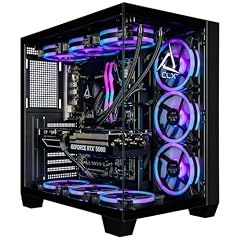
CLX Set Gaming PC
- CPU
- Intel Core Ultra 7 270K
- GPU
- GeForce RTX 5080
- GPU memory
- 16 GB
- RAM
- 64 GB
- Storage
- 2000 GB
- OS
- Windows 11 Home
- Dedicated graphics card
- Yes
$4,299.99 (as of 10/20/2026 16:08 PDT - Details)
The CLX Set Gaming PC features an Intel Core Ultra 7 270K and an RTX 5080 with 16GB VRAM, along with 64GB of RAM and a 2TB SSD. This combination is well-suited for AI model training and workstation tasks.
Pros
- 64GB of DDR5 RAM for large datasets
- RTX 5080 with 16GB VRAM for AI and rendering
- 2TB NVMe SSD for fast storage
Cons
- Higher price point
- Sold by a custom builder (CLX), not a major OEM
Good fit if
- AI developers and researchers who need a powerful GPU
- Workstation users running simulations or 3D rendering
Skip if
- You are on a budget
- You prefer a desktop from a major brand like Dell or HP
Verdict: A powerful workstation-grade desktop for AI and creative professionals.
15 Best for AI with large storage

Dell Tower Desktop Computer Intel Ultra 7 265F RTX 5060 32GB 2TB Win 11
- CPU
- Intel Core Ultra 7 265F
- GPU
- GeForce RTX 5060
- GPU memory
- 8 GB
- Storage
- 2000 GB
- OS
- Windows 11 Pro
- Dedicated graphics card
- Yes
$2,999.99 (as of 10/20/2026 17:06 PDT - Details)
The Dell Tower Desktop with an RTX 5060, 32GB of RAM, and a 2TB SSD offers a good balance of GPU and storage for AI workloads. It runs Windows 11 Pro and is configured by Dell.
Pros
- 2TB SSD provides ample storage for AI models and data
- RTX 5060 with 8GB VRAM for GPU-accelerated AI tasks
- Windows 11 Pro for advanced security
Cons
- RTX 5060 has only 8GB VRAM, limiting large model training
- 32GB RAM may be insufficient for some AI workloads
Good fit if
- AI hobbyists who need a dedicated GPU and large storage
- Users who want a Dell desktop with Windows 11 Pro
Skip if
- You need more than 8GB of GPU VRAM for AI
- You require 64GB or more of system RAM
Verdict: A capable AI desktop with large storage and a dedicated GPU.
Specs compared
| # | Desktop | CPU | GPU | GPU memory | RAM | Storage | OS |
|---|---|---|---|---|---|---|---|
| 1 | Lenovo Legion Tower 5i | Intel Core Ultra 7 265F | GeForce RTX 5070 Ti | not stated | 32 GB | 1000 GB | not stated |
| 2 | Cooler Master TD5 Pro Gaming PC Intel Ultra 7 + RTX 5080 ATX Desktop PC | Intel Core Ultra 7 265F | RTX 5080 | 16 GB | not stated | not stated | not stated |
| 3 | HP OmniDesk Next Gen AI PC Business Desktop PC | Intel Core Ultra 7 265 | not stated | not stated | 64 GB | 2000 GB | Windows 11 Pro |
| 4 | msi Codex R2 AI Gaming Desktop | Intel Core Ultra 7 265 | GeForce RTX 5060 Ti | not stated | 32 GB | 1000 GB | Windows 11 Home |
| 5 | ASUS ROG G700 | Intel Core Ultra 7 265F | GeForce RTX 5070 | not stated | 32 GB | 1000 GB | Windows 11 Pro |
| 6 | Skytech Gaming King 95 Gaming PC | Intel Core Ultra 7 270K | RTX 5070 Ti | 16 GB | 32 GB | not stated | Windows 11 |
| 7 | Alienware Aurora Gaming Desktop | Intel Core Ultra 7 265F | RTX 5070 | not stated | 32 GB | 1000 GB | Windows 11 Home |
| 8 | Dell Tower Desktop | Intel Core Ultra 7 | not stated | not stated | 32 GB | 1000 GB | Windows 11 Home |
| 9 | HP OmniDesk M03 Business AI Desktop PC Intel Ultra 7-265 | Intel Core Ultra 7 | not stated | not stated | 64 GB | 2000 GB | Windows 11 Pro |
| 10 | Dell Pro Slim Plus QBS1250 AI PC | Intel Core Ultra 7 265 | not stated | not stated | 64 GB | 1000 GB | Windows 11 Pro |
| 11 | iBUYPOWER Y40 Gaming PC Desktop Computer Intel Core Ultra 7 265F CPU | Intel Core Ultra 7 265F | RTX 5070 | 12 GB | 32 GB | 1000 GB | Windows 11 Home |
| 12 | HP Omen 16L 5060 Gaming Desktop PC | Intel Core Ultra 7 265F | GeForce RTX 5060 | 8 GB | 32 GB | 1000 GB | Windows 11 Home |
| 13 | MSI Codex R2 AI A2NVL7-464US Desktop PC | Intel Core Ultra 7 265K | GeForce RTX 5060 | 8 GB | 32 GB | 2000 GB | Windows 11 Home |
| 14 | CLX Set Gaming PC | Intel Core Ultra 7 270K | GeForce RTX 5080 | 16 GB | 64 GB | 2000 GB | Windows 11 Home |
| 15 | Dell Tower Desktop Computer Intel Ultra 7 265F RTX 5060 32GB 2TB Win 11 | Intel Core Ultra 7 265F | GeForce RTX 5060 | 8 GB | not stated | 2000 GB | Windows 11 Pro |
How we chose these
We started with 53 Intel Core Ultra 7 desktops listed on the marketplace. From that pool, we selected 15 that represent a range of use cases: gaming, business, workstation, and AI. We prioritized machines from established brands (Alienware, ASUS, Dell, HP, Lenovo, MSI) in new condition. We excluded near-duplicate configurations of the same model (e.g., same Dell Slim Desktop with different RAM/storage combos) to keep the list diverse. Each pick is evaluated on its stated specifications from the seller. Prices shown are live and read from the store listing at the time of writing. No unit was tested or handled by our team.
What to look for
Understanding Intel Core Ultra 7 processor variants
Intel Core Ultra 7 processors come in several variants, indicated by the suffix. Desktop variants include K (unlocked for overclocking), F (requires discrete graphics), KF (unlocked and no integrated graphics), and T (power-optimized). The number after the dash (e.g., 265, 270K) indicates the specific model within the generation. Higher numbers generally offer higher clock speeds or more cores. For example, the Core Ultra 7 270K has a higher boost clock than the 265F. Check the specific model to understand its performance tier.
Graphics: matching the GPU to your resolution
The GPU is the most important component for gaming and GPU-accelerated tasks. For 1080p gaming, an RTX 5060 or 5060 Ti is sufficient. For 1440p, an RTX 5070 or 5070 Ti is recommended. For 4K gaming, an RTX 5080 or higher is ideal. For AI workloads, GPU VRAM is critical: 8GB is entry-level, 12GB is good for many models, and 16GB or more is recommended for larger models. All RTX 50-series GPUs support DLSS 5 and NVIDIA NVENC for encoding.
RAM and storage: how much do you need?
For gaming, 16GB of RAM is the minimum, but 32GB is recommended for modern titles and multitasking. For productivity and AI workloads, 32GB is a good starting point, while 64GB or more is beneficial for large datasets or virtual machines. Storage: a 1TB NVMe SSD is standard for gaming and general use. For video editing or AI, a 2TB or larger SSD is preferable. Some desktops offer additional HDD bays for bulk storage.
Operating system: Windows 11 Home vs. Pro
Windows 11 Home is suitable for most home users and gamers. Windows 11 Pro adds features like BitLocker device encryption, Remote Desktop, and Hyper-V virtualization. If you need these for business or advanced security, choose a desktop with Windows 11 Pro. Both versions support Copilot+ features on compatible hardware, but Copilot+ PCs require an NPU with 40+ TOPS, which Intel Core Ultra 7 processors include.
Form factor: tower vs. small form factor
Tower desktops offer more space for upgrades, better cooling, and often support full-size GPUs. Small form factor (SFF) desktops save desk space but may have limited upgrade options and lower power limits for components. Consider your desk space and whether you plan to upgrade components in the future.
AI readiness and the NPU
Intel Core Ultra 7 processors include a neural processing unit (NPU) for on-device AI acceleration. This enables features like Windows Studio Effects, real-time video enhancement, and local AI inference. For users interested in AI, a desktop with an Intel Core Ultra 7 processor provides a good foundation for running AI applications without relying solely on the cloud.
Questions
What is the difference between Intel Core Ultra 7 and Intel Core i7?
Intel Core Ultra 7 processors are part of Intel's newer architecture, featuring a neural processing unit (NPU) for AI acceleration, improved efficiency cores, and often higher performance than the previous Core i7 generation. Core Ultra 7 is designed for AI-ready PCs, while Core i7 is an older architecture without a dedicated NPU.
Can I upgrade the GPU in an Intel Core Ultra 7 desktop?
Yes, most tower desktops with Intel Core Ultra 7 processors have a standard PCIe slot for GPU upgrades. Small form factor (SFF) desktops may have limited space for larger GPUs. Check the desktop's form factor and power supply wattage before upgrading.
Do I need a dedicated GPU for AI workloads?
For many AI workloads, especially those involving deep learning or large language models, a dedicated GPU with sufficient VRAM is highly recommended. The NPU in Intel Core Ultra 7 can handle lighter AI tasks like video enhancement or voice effects, but a discrete GPU is needed for training or running large models.
What is the best Intel Core Ultra 7 desktop for gaming?
The best gaming desktop depends on your resolution and budget. For 1440p gaming, the Lenovo Legion Tower 5i with an RTX 5070 Ti or the Skytech Gaming King 95 with an RTX 5070 Ti are strong choices. For 4K gaming, the Cooler Master TD5 Pro with an RTX 5080 is a top pick.
Are Intel Core Ultra 7 desktops good for video editing?
Yes, Intel Core Ultra 7 desktops are well-suited for video editing, especially when paired with a dedicated GPU like an RTX 5060 or higher. The NPU can assist with AI-powered editing features, and the high core count helps with rendering. Look for models with at least 32GB of RAM and a large SSD.
Update history
- : First published.