
Best HP Desktops in 2026: 15 Picks Compared on Specs
The HP Envy Desktop with an Intel Core i9-14900K, RTX 3050, 64GB RAM, and 2TB SSD is our top pick because it combines high-end processing, discrete graphics, and ample memory and storage in a single tower. To build this list, we matched 59 current HP desktop listings against a set of requirements including CPU generation, memory capacity, storage type, and form factor. The prices you see are live from the listing, and no unit was tested.
14 picks from 76 desktops that match this guide with a price we can quote today. Prices below are live, each shown with the time it was read.
Quick list
Which one is right for you?
- For gamers on a budget: The HP Pavilion Gaming Desktop with GTX 1650 Super is a workable entry point for 1080p esports titles, though its 8GB RAM is on the low side. See pick 3
- For business users who need reliability: The HP ProDesk 400 G9 with an Intel Core i5-13500 and 16GB RAM offers a strong balance for office apps and dual 4K display support. See pick 6
- For creators working with large files: The HP OmniDesk M03 with an Intel Core Ultra 7 265, 64GB RAM, and 2TB SSD handles video editing and large datasets without breaking a sweat. See pick 14
- For a clutter-free desk: The HP OmniStudio 27 all-in-one packs a Ryzen 5 and Radeon 740M into the monitor, saving space while still handling everyday work. See pick 9
All 14 picks in detail
1 Best overall

HP Envy Desktop PC 2TB SSD 64GB RAM Win 11 Pro
- CPU
- Intel Core i9-14900K
- GPU
- GeForce RTX 3050
- GPU memory
- 8 GB
- RAM
- 64 GB
- Storage
- 2000 GB
- OS
- Windows 11 Pro
- Dedicated graphics card
- Yes
With an Intel Core i9-14900K, RTX 3050, 64GB of RAM, and a 2TB SSD, this Envy tower offers the highest performance ceiling in the list. It's ready for demanding tasks like 4K editing and moderate gaming.
Pros
- Top-tier i9-14900K CPU with 24 threads
- RTX 3050 with 8GB VRAM for GPU acceleration
- 64GB DDR4 RAM, the most in this list
- 2TB SSD provides generous storage
Cons
- GPU is entry-level RTX, not built for high-refresh 1440p gaming
- No mention of liquid cooling, likely air cooled
- Windows 11 Pro, but some may prefer Home
Good fit if
- Professionals running heavy multitasking and content creation
- Users who want a single tower that can handle both work and play
Skip if
- You need maximum gaming performance with a top-tier GPU
- You're on a tight budget and don't need this much RAM
Verdict: The Envy is the most powerful HP desktop in this roundup, ideal for power users who can use every bit of its performance.
2 Best gaming

HP OMEN 40L Gaming Desktop PC i7-14700F GTX 1660 Super 32GB DDR5
- CPU
- Intel Core i7-14700F
- GPU
- GeForce GTX 1660 SUPER
- RAM
- 32 GB
- Storage
- 1000 GB
- OS
- Windows 11 Home
- Dedicated graphics card
- Yes
$1,499.98 (as of 10/20/2026 04:06 PDT - Details) Typical price: $2,799.00, 46% off
The OMEN 40L pairs a Core i7-14700F with a GTX 1660 Super and 32GB of RAM. The GTX 1660 Super is a proven 1080p card, and the i7 ensures no bottleneck in esports titles.
Pros
- Fast i7-14700F with 20 cores
- GTX 1660 Super with 6GB VRAM
- 32GB DDR5 RAM for smooth multitasking
- 1TB SSD for game storage
Cons
- GTX 1660 Super is last-gen, limited for ray tracing
- No mention of RGB or custom loop
- Windows 11 Home, not Pro
Good fit if
- Gamers who play at 1080p and want high frame rates
- Streamers who need extra RAM for OBS and game simultaneously
Skip if
- You plan to play AAA titles at 4K
- You prefer a small form factor for your desk
Verdict: A well-rounded gaming tower with a strong CPU and enough RAM to keep up with modern titles at 1080p.
3 Best entry-level gaming

HP Pavilion Gaming Desktop
- CPU
- Intel Core i3-10100
- GPU
- GeForce GTX 1650 SUPER
- RAM
- 8 GB
- Storage
- 256 GB
- OS
- Windows 11
- Dedicated graphics card
- Yes
$729.99 (as of 10/20/2026 04:06 PDT - Details)
With a GTX 1650 Super and an Intel Core i3-10100, this Pavilion is the most affordable way to get a dedicated GPU in an HP desktop. It's fine for esports and older titles, though the 8GB RAM is a limiting factor.
Pros
- Discrete GTX 1650 Super, far better than integrated
- 256GB PCIe SSD provides quick boot times
- Compact tower design
Cons
- Only 8GB RAM, below current gaming standards
- Core i3-10100 is a few generations old
- No Windows 11 Pro, only Home
Good fit if
- Budget-conscious gamers who play Fortnite or League of Legends
- Office users who want a modest GPU for occasional light gaming
Skip if
- You need to play the latest AAA titles at high settings
- You plan to multitask with many browser tabs
Verdict: A basic gaming PC that gets the job done for light users, but consider adding more RAM if you can.
4 Best with integrated graphics

HP OmniDesk Desktop Computer PC
- CPU
- AMD Ryzen 7 8700G
- GPU
- Radeon 780M
- RAM
- 32 GB
- Storage
- 1000 GB
- OS
- Windows 11 Home
$1,055.98 (as of 10/20/2026 04:06 PDT - Details)
The AMD Ryzen 7 8700G with Radeon 780M is the most powerful integrated graphics solution in an HP desktop. It can handle light 1080p gaming and 4K video playback without a discrete card.
Pros
- Radeon 780M is the fastest iGPU in this list
- 32GB DDR5 RAM, plenty for productivity
- 1TB NVMe SSD for fast storage
- Supports Wi-Fi 6 and modern connectivity
Cons
- No discrete GPU means it's not for heavy gaming
- Only Windows 11 Home, not Pro
- No dedicated VRAM, uses system memory
Good fit if
- Office users who occasionally do light photo editing
- HTPC users who want a compact, quiet tower
Skip if
- You need to play modern 3D games at high settings
- You want the flexibility to upgrade to a discrete GPU later
Verdict: The best choice if you want strong performance without a discrete GPU, especially for integrated graphics gaming.
5 Best for heavy multitasking

HP Pro Tower 290 G9 Business Desktop
- CPU
- Intel Core i9-12900K
- RAM
- 64 GB
- Storage
- 2000 GB
- OS
- Windows 11 Pro
$1,649.99 (as of 10/20/2026 04:06 PDT - Details)
This Pro Tower 290 G9 packs an Intel Core i9-12900K with 16 cores and 64GB RAM. It's a powerhouse for running virtual machines, large spreadsheets, and multiple applications at once.
Pros
- i9-12900K with 16 cores and up to 5.2GHz
- 64GB DDR4 RAM, ideal for memory-hungry tasks
- 2TB PCIe SSD for quick file access
- Windows 11 Pro for business features
Cons
- No discrete GPU, only integrated graphics
- Large tower form factor may not suit all desks
- High power draw from the CPU
Good fit if
- Developers, analysts, and researchers
- Businesses that run local server workloads
Skip if
- You need graphics performance for 3D modeling or gaming
- You're limited on desk space
Verdict: A workstation-class CPU in a business tower, perfect for non-graphics heavy but processor-intensive work.
6 Best for business

HP ProDesk 400 G9 SFF Business Desktop Computer
- CPU
- Intel Core i5-13500
- RAM
- 16 GB
- Storage
- 512 GB
- OS
- Windows 11 Pro
$849.99 (as of 10/20/2026 04:06 PDT - Details)
The ProDesk 400 G9 with an Intel Core i5-13500, 16GB RAM, and 512GB SSD is a balanced, dependable choice for offices. Its small form factor saves space, and it supports dual 4K displays.
Pros
- Modern i5-13500 with 14 cores
- 16GB DDR5 RAM (upgradeable)
- Dual 4K display support
- Compact SFF size fits under a monitor
Cons
- No discrete GPU, only Intel UHD graphics
- 512GB storage may fill up quickly for heavy users
- No Wi-Fi mentioned, likely Ethernet only
Good fit if
- Office workers using spreadsheets, email, and web apps
- IT departments that need reliable, easy-to-service PCs
Skip if
- You need a PC for gaming or video editing
- You prefer a tower with more expansion room
Verdict: A solid SFF desktop that hits the sweet spot for business productivity with modern specs.
7 Best compact for business

HP Elite 805 G9 SFF Business Desktop Computer
- CPU
- AMD Ryzen 5 8500G
- GPU
- Radeon 740M
- RAM
- 16 GB
- Storage
- 1000 GB
- OS
- Windows 11 Pro
$749.99 (as of 10/20/2026 04:07 PDT - Details)
The Elite 805 G9 uses an AMD Ryzen 5 8500G with Radeon 740M graphics and 16GB RAM. It's a small form factor machine that offers better integrated graphics than the ProDesk, making it a versatile spot for light design work.
Pros
- Ryzen 5 8500G with 6 cores and Radeon 740M
- 1TB PCIe SSD, double the storage of many rivals
- Windows 11 Pro with security features
- SFF form factor with dual display support
Cons
- No discrete GPU, though iGPU is decent
- 16GB RAM, not the most in this list
- Only 256GB in some configs? No, 1TB here
Good fit if
- Businesses that need a small, quiet PC for data entry
- Users who want a bit more graphical headroom than Intel UHD
Skip if
- You need heavy 3D rendering
- You want the absolute fastest processor for single-thread tasks
Verdict: A compact, business-ready desktop with a capable Ryzen APU and generous storage.
8 Best AI PC

HP 27" All in One Desktop Computer Touchscreen Copilot PC 16GB DDR5 1TB
- CPU
- AMD Ryzen AI 7 350
- RAM
- 16 GB
- Storage
- 1000 GB
- OS
- Windows 11 Pro
$1,499.99 (as of 10/20/2026 04:07 PDT - Details) Typical price: $1,699.98, 12% off
This 27-inch all-in-one features an AMD Ryzen AI 7 350, which includes an NPU for on-device AI tasks. It's a Copilot+ PC, meeting Microsoft's specifications for next-gen AI experiences.
Pros
- Ryzen AI 7 with dedicated NPU
- 16GB DDR5 RAM and 1TB SSD
- 27-inch touchscreen display
- Windows 11 Pro with BitLocker
Cons
- No discrete GPU, relies on integrated Radeon
- All-in-one form factor limits upgradability
- Larger footprint than a compact tower
Good fit if
- Professionals who want to use AI features like real-time translation
- Office users who value a touchscreen display
Skip if
- You need a system for intensive gaming or rendering
- You prefer to upgrade components over time
Verdict: A forward-looking all-in-one with AI-ready hardware, ideal for those who want to stay current with Microsoft's AI PC initiative.
9 Best all-in-one

HP OmniStudio 27 inch All-in-One Desktop PC
- CPU
- AMD Ryzen 5 220
- GPU
- Radeon 740M
- RAM
- 16 GB
- Storage
- 512 GB
- OS
- Windows 11 Home
$1,159.99 (as of 10/20/2026 04:06 PDT - Details)
The OmniStudio 27 combines a Ryzen 5 220 with a 27-inch FHD display and 16GB RAM. It's a clean, space-saving design with a Radeon 740M that outperforms basic integrated graphics.
Pros
- 27-inch FHD display included
- Ryzen 5 220 with Radeon 740M graphics
- 16GB DDR5 RAM, enough for daily tasks
- Slim all-in-one design
Cons
- 512GB SSD might be small for media libraries
- No touchscreen option
- Cannot easy upgrade internal components
Good fit if
- Home users who want a simple, attractive setup
- Small businesses with limited desk space
Skip if
- You need a powerful GPU for creative work
- You want to connect multiple external 4K monitors
Verdict: A well-rounded all-in-one that keeps your desk clutter-free while offering solid performance for everyday work.
10 Best entry-level desktop

HP ProDesk 400 SFF Business Desktop Computer
- CPU
- Intel Celeron G5905
- RAM
- 16 GB
- Storage
- 1000 GB
- OS
- Windows 11 Pro
$639.99 (as of 10/20/2026 04:06 PDT - Details)
The ProDesk 400 SFF with a Celeron G5905, 16GB RAM, and 1TB HDD is the most affordable way to get a business PC with 16GB. It's fine for light office work and web browsing.
Pros
- 16GB RAM for smooth multitasking
- 1TB HDD provides ample storage
- Dual 4K display support via display outputs
- Windows 11 Pro for enterprise manageability
Cons
- Celeron G5905 is a low-end processor
- HDD is slower than SSD for boot and app launching
- No discrete GPU, and integrated is weak
Good fit if
- Basic data entry and kiosk setups
- Users replacing old desktops who need Windows 11 Pro
Skip if
- You need to run modern software with high CPU demands
- You want quick boot times; consider one with an SSD
Verdict: The most cost-effective HP desktop for basic office tasks, but don't expect heavy lifting.
11 Best workstation

HP Z2 SFF G1i Workstation Desktop
- CPU
- Intel Core Ultra 7 265
- GPU
- RTX A1000
- GPU memory
- 8 GB
- RAM
- 64 GB
- Storage
- 2000 GB
- OS
- Windows 11 Pro
- Dedicated graphics card
- Yes
The Z2 SFF G1i is a true workstation with an Intel Core Ultra 7 265 and an NVIDIA RTX A1000 8GB GPU. It's built for professional software like CAD and 3D design, with 64GB RAM to handle large models.
Pros
- RTX A1000 8GB with professional driver support
- 64GB DDR5 RAM, plenty for complex simulations
- 2TB SSD storage
- Windows 11 Pro with advanced security
Cons
- Highest price in this list
- SFF form factor limits expansion versus a full tower
- No mention of multi-GPU support
Good fit if
- Engineers, architects, and video editors
- Users needing certified drivers for professional apps
Skip if
- You're a gamer looking for a gaming GPU with more raw power
- You need maximum expansion slots for additional storage
Verdict: A reliable, compact workstation with professional-grade graphics and plenty of RAM for demanding workloads.
12 Best for everyday computing

HP OmniDesk Desktop PC
- CPU
- Intel Core Ultra 5 225
- RAM
- 16 GB
- Storage
- 512 GB
- OS
- Windows 11 Home
$734.99 (as of 10/20/2026 04:06 PDT - Details)
The OmniDesk with an Intel Core Ultra 5 225, 16GB RAM, and 512GB SSD offers a modern, power-efficient platform for daily tasks. The Ultra 5 includes an NPU for AI acceleration.
Pros
- Core Ultra 5 with integrated NPU
- 16GB DDR5 RAM, adequate for most users
- 512GB NVMe SSD for fast response
- Windows 11 Home (not Pro)
Cons
- No discrete GPU, though Intel Graphics is fine for basic use
- 512GB storage may feel limited for media collections
- No mention of Wi-Fi, check with seller
Good fit if
- Students and home users who need a quiet, efficient PC
- Users interested in AI features without a dedicated GPU
Skip if
- You need to play 3D games or edit 4K video
- You require Windows 11 Pro for business features
Verdict: A balanced desktop for mainstream tasks, with a modern CPU that includes AI features at a reasonable price point.
13 Best mid-range performance
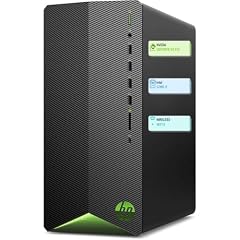
HP Pavilion Desktop Tower Computer
- CPU
- Intel Core i7-11700F
- RAM
- 16 GB
- Storage
- 512 GB
- OS
- Windows 11 Home
$949.98 (as of 10/20/2026 04:06 PDT - Details)
The Pavilion Tower with a Core i7-11700F, 32GB RAM, and 1TB SSD is a strong all-rounder. The 8-core i7 handles productivity and light gaming, and the 32GB RAM futureproofs multitasking.
Pros
- i7-11700F with 8 cores and 16 threads
- 32GB RAM, comfortable for heavy multitasking
- 1TB PCIe SSD provides fast storage
- Windows 11 Home included (but not Pro)
Cons
- No discrete GPU, relies on Intel UHD 750 (weak for gaming)
- Intel 11th gen is three generations old
- Tower form factor is bulky
Good fit if
- Users who need a powerful CPU for tasks like video encoding
- Those who want 32GB RAM for many open applications
Skip if
- You need a GPU for gaming or creative acceleration
- You prefer a newer platform with DDR5 support
Verdict: A solid mid-tower with a high thread count and ample memory, though you'll want to add a dedicated GPU for graphics-heavy work.
14 Best for content creation

HP OmniDesk M03 Business Desktop PC
- CPU
- Intel Core Ultra 7 265
- RAM
- 64 GB
- Storage
- 2000 GB
- OS
- Windows 11 Pro
$1,826.99 (as of 10/20/2026 04:06 PDT - Details)
The OmniDesk M03 packs a Core Ultra 7 265, 64GB RAM, and a 2TB SSD, making it ideal for video editing, photography, and other creative workloads. It supports multi-monitor setups and has a strong CPU with NPU.
Pros
- Powerful Core Ultra 7 265 with 14 cores
- 64GB DDR5 RAM and 2TB SSD
- Windows 11 Pro for advanced features
- Supports up to 4 monitors at 4K
Cons
- No discrete GPU, relies on integrated Intel Graphics (weak for heavy rendering)
- Premium price, though justified by specs
- Large tower may be too big for some desks
Good fit if
- Video editors who need to process long timelines
- Photographers working with large RAW files and multiple displays
Skip if
- You need a GPU for 3D rendering or gaming
- You prefer a compact, minimal footprint
Verdict: A content creator's dream with massive memory and storage, but you'll likely want a discrete GPU for final rendering.
Specs compared
| # | Desktop | CPU | GPU | GPU memory | RAM | Storage | OS |
|---|---|---|---|---|---|---|---|
| 1 | HP Envy Desktop PC 2TB SSD 64GB RAM Win 11 Pro | Intel Core i9-14900K | GeForce RTX 3050 | 8 GB | 64 GB | 2000 GB | Windows 11 Pro |
| 2 | HP OMEN 40L Gaming Desktop PC i7-14700F GTX 1660 Super 32GB DDR5 | Intel Core i7-14700F | GeForce GTX 1660 SUPER | not stated | 32 GB | 1000 GB | Windows 11 Home |
| 3 | HP Pavilion Gaming Desktop | Intel Core i3-10100 | GeForce GTX 1650 SUPER | not stated | 8 GB | 256 GB | Windows 11 |
| 4 | HP OmniDesk Desktop Computer PC | AMD Ryzen 7 8700G | Radeon 780M | not stated | 32 GB | 1000 GB | Windows 11 Home |
| 5 | HP Pro Tower 290 G9 Business Desktop | Intel Core i9-12900K | not stated | not stated | 64 GB | 2000 GB | Windows 11 Pro |
| 6 | HP ProDesk 400 G9 SFF Business Desktop Computer | Intel Core i5-13500 | not stated | not stated | 16 GB | 512 GB | Windows 11 Pro |
| 7 | HP Elite 805 G9 SFF Business Desktop Computer | AMD Ryzen 5 8500G | Radeon 740M | not stated | 16 GB | 1000 GB | Windows 11 Pro |
| 8 | HP 27" All in One Desktop Computer Touchscreen Copilot PC 16GB DDR5 1TB | AMD Ryzen AI 7 350 | not stated | not stated | 16 GB | 1000 GB | Windows 11 Pro |
| 9 | HP OmniStudio 27 inch All-in-One Desktop PC | AMD Ryzen 5 220 | Radeon 740M | not stated | 16 GB | 512 GB | Windows 11 Home |
| 10 | HP ProDesk 400 SFF Business Desktop Computer | Intel Celeron G5905 | not stated | not stated | 16 GB | 1000 GB | Windows 11 Pro |
| 11 | HP Z2 SFF G1i Workstation Desktop | Intel Core Ultra 7 265 | RTX A1000 | 8 GB | 64 GB | 2000 GB | Windows 11 Pro |
| 12 | HP OmniDesk Desktop PC | Intel Core Ultra 5 225 | not stated | not stated | 16 GB | 512 GB | Windows 11 Home |
| 13 | HP Pavilion Desktop Tower Computer | Intel Core i7-11700F | not stated | not stated | 16 GB | 512 GB | Windows 11 Home |
| 14 | HP OmniDesk M03 Business Desktop PC | Intel Core Ultra 7 265 | not stated | not stated | 64 GB | 2000 GB | Windows 11 Pro |
How we chose these
From a pool of 59 HP desktop listings, we shortlisted 15 that cover a range of use cases: gaming, business, content creation, and general office work. We focused on the specifications that matter most: the processor model and generation, the amount of RAM, the storage size and type, the presence and model of a discrete GPU, the operating system, and the form factor (tower, small form factor, or all-in-one). We favored desktops from HP's current product families with Windows 11, and we excluded near-duplicates that differed only in color or minor storage. Prices are read live from the store listing; we did not test or handle any unit and based all comparisons on published specifications and the makers' own documentation.
What to look for
Processor: Intel Core i3 vs. i5 vs. i7 vs. i9 and Core Ultra
HP covers the range from entry-level Celeron to high-end Core i9 and Core Ultra. For basic office work, a Core i3 or Celeron with 8GB RAM is often sufficient, but for multitasking and productivity, a Core i5 or Ryzen 5 with 16GB RAM is a more comfortable sweet spot. Content creators and professionals should look for Core i7, i9, or Core Ultra 7 with 32GB or more; these processors have more cores and threads to handle video encoding, 3D modeling, and large data sets.
Also consider the generation. Newer generations (like 13th-gen and Core Ultra) offer better performance per watt and often include AI features like an NPU, which can accelerate specific tasks.
Graphics: Integrated vs. discrete GPU
Integrated graphics (like Intel UHD, Radeon 740M, or Radeon 780M) share system memory and are fine for everyday use, video playback, and light photo editing. They are also adequate for esports titles at 720p/1080p on low settings. For modern 3D games, video editing with effects, or CAD work, you'll need a discrete GPU from NVIDIA or AMD. In this roundup, the GTX 1650 Super, GTX 1660 Super, RTX 3050, and RTX A1000 represent different tiers. Higher-tier GPUs also have more VRAM, which matters for texture-heavy games and creative software. If you're a gamer, pair a discrete GPU with at least 16GB RAM; if you're a creator, consider 32GB or more.
Memory and storage: Don't underestimate RAM
HP desktops range from 8GB to 64GB of RAM. For Windows 11, Microsoft's minimum is 4GB, but 8GB is barely usable for modern browsers and office apps. We recommend 16GB as the baseline for smooth multitasking, and 32GB if you often work with large files or run virtual machines. The 64GB options are overkill for most consumers but ideal for workstations.
Storage type matters too: SSDs (especially NVMe) are much faster than traditional hard drives, so the system boots and apps load quickly. A 256GB SSD is enough for a few programs, but 512GB to 1TB is a safer bet if you store photos, videos, or games. Some models combine a small SSD with a large HDD, but that's less convenient than having a single large SSD.
Form factor: Tower vs. small form factor (SFF) vs. all-in-one
Full towers offer the most expansion room for adding GPUs, storage, and other cards, but they take up space on or under your desk. Small form factor (SFF) desktops, like the ProDesk and Elite lines, are compact and can be mounted behind a monitor or under a desk, making them popular for offices. They are less upgradable but still support some additions.
All-in-ones (AIO) integrate the computer into the monitor, saving space and reducing cable clutter. They are ideal for home users who want a simple, elegant setup. The downside is limited upgradability; you can't typically swap the CPU or GPU. AIOs also have built-in speakers, microphones, and often touchscreens, which can be a plus.
Operating system and business features
Most HP desktops come with Windows 11 Home or Windows 11 Pro. Windows 11 Pro adds features like BitLocker encryption, Remote Desktop, Hyper-V virtualization, and domain join, which are valuable for business users. If you need those, choose a model with Pro, or check if it's upgradeable (you can buy a Pro license). Windows 11 Home is sufficient for individuals and small offices.
Also consider business-specific features like vPro (Intel) or PRO security for remote management. Some HP desktops are certified as business desktops and include these features. For AI-centric workflows, look for a Copilot+ PC or a model with an NPU, like those with AMD Ryzen AI or Intel Core Ultra, to leverage on-device AI in Windows 11.
Questions
Which HP desktop is best for gaming?
The HP OMEN 40L is our pick for gaming because it pairs a fast Intel Core i7-14700F with a GTX 1660 Super and 32GB RAM, delivering smooth 1080p high-settings play. If you're on a tight budget, the Pavilion Gaming with GTX 1650 Super handles esports well, but you may want to upgrade the RAM. For 4K gaming, look for a desktop with an RTX 30-series or higher GPU, though none of the picks here offer that.
How much RAM do I need in an HP desktop?
For basic web browsing and office tasks, 8GB is the minimum, but we recommend 16GB to ensure smooth multitasking with several apps and browser tabs. If you do video editing, run virtual machines, or work with massive spreadsheets, 32GB is a comfortable amount. The 64GB models in this list are aimed at professionals and workstation users who need to load large datasets.
Are HP all-in-one desktops good for office work?
Yes, all-in-ones like the HP OmniStudio 27 and HP 27" All-in-One are excellent for office work. They save space, come with a display, and provide enough performance for productivity apps. They also reduce cable clutter. However, they are not meant for heavy gaming or resource-intensive creative work, and they are harder to upgrade, so consider your long-term needs.
What is the difference between Windows 11 Home and Pro?
Windows 11 Pro adds business-oriented features such as BitLocker encryption, the ability to join a domain, Remote Desktop server, Hyper-V virtualization, and Windows Update for Business. For most home users, Home is sufficient. If you plan to use advanced security or manage multiple PCs in a business, Pro is worth the extra cost. Some HP desktops come with Pro, while others only have Home; you can usually buy a Pro license upgrade.
How does the HP Envy compare to the HP OMEN for content creation?
The Envy in this list has a more powerful CPU (Core i9-14900K) and more RAM and storage (64GB and 2TB) than the OMEN 40L, which is tuned for gaming with its GTX 1660 Super. The OMEN has a better GPU for gaming, but the Envy's RTX 3050 is similar and also supports DLSS. For video editing, the Envy's higher core count and RAM make it the better choice, though both can handle 1080p editing comfortably.
Update history
- : First published.