
Best Desktops Under $1500 in 2026: 12 Picks Compared on Specs
The MSI Codex R2 AI is our top pick for a desktop under $1500, thanks to its balanced combination of an RTX 5060 GPU, 32GB of memory, and roomy 2TB SSD. In this guide, we compared 12 desktops in this price range using only their published specifications and manufacturer details. We looked at CPU, GPU, RAM, storage, and form factor to help you find the right machine for gaming, productivity, or general use. All prices are live from the listing and may change.
12 picks from 22 desktops that match this guide with a price we can quote today. Prices below are live, each shown with the time it was read.
Quick list
Which one is right for you?
- For gamers: If you play the latest titles at 1080p or 1440p, look for a desktop with an RTX 5060 or RTX 5060 Ti and at least 16GB of RAM. See pick 3
- For business users: You need a reliable machine for office work, spreadsheets, and video calls; a desktop with 32GB RAM and a fast CPU without a dedicated GPU can be a good fit. See pick 2
- For creators: Video editing and 3D rendering benefit from a strong multi-core CPU and a dedicated GPU with ample VRAM. See pick 1
- For space savers: An all-in-one or slim desktop can save desk space while still handling everyday tasks. See pick 5
All 12 picks in detail
1 Best overall

MSI Codex R2 AI A2NVL7-464US Desktop PC
- CPU
- Intel Core Ultra 7 265K
- GPU
- GeForce RTX 5060
- GPU memory
- 8 GB
- RAM
- 32 GB
- Storage
- 2000 GB
- OS
- Windows 11 Home
- Dedicated graphics card
- Yes
$1,449.99 (as of 10/20/2026 06:06 PDT - Details)
It pairs an Intel Core Ultra 7 265K with 32GB of DDR5 memory and an RTX 5060 GPU, plus a 2TB NVMe SSD. This combination covers gaming, creative work, and heavy multitasking. The large storage and high memory capacity stand out among the other picks.
Pros
- 32GB DDR5 memory (tied for most with Dell Tower)
- 2TB NVMe storage is the largest in this list
- RTX 5060 GPU for gaming and AI-accelerated tasks
- Intel Core Ultra 7 265K is a high-tier desktop processor
Cons
- GPU has only 8GB VRAM, typical for this class
- Comes with Windows 11 Home, not Pro
- No mention of optical drive or extra expansion slots
Good fit if
- Gamers who want a balanced machine for modern titles and content creation
- Users who need substantial local storage for large projects
Skip if
- You need 64GB RAM for memory-heavy workloads
- You prefer a compact or all-in-one form factor
Verdict: The MSI Codex R2 AI offers the most comprehensive package under $1500 with its 2TB SSD, 32GB RAM, and RTX 5060.
2 Best for productivity

Dell Tower Desktop
- CPU
- Intel Core Ultra 7
- RAM
- 32 GB
- Storage
- 1000 GB
- OS
- Windows 11 Home
$1,479.99 (as of 10/20/2026 17:06 PDT - Details)
It has the same 32GB RAM as the MSI but no discrete GPU, making it suitable for office work and software development. Its Intel Core Ultra 7 265 is a strong processor for multitasking.
Pros
- 32GB DDR5 memory (tied for most in this list)
- Intel Core Ultra 7 processor with high efficiency
- Windows 11 Home preinstalled
Cons
- No discrete GPU, not suitable for modern gaming
- Storage capacity not stated by the seller
- Integrated graphics only
Good fit if
- Office workers needing fast multitasking
- Programmers and analysts who work with large datasets
Skip if
- You plan to play games or do 3D rendering
- You need lots of storage without adding a drive
Verdict: A solid choice for productivity with ample RAM, though you'll need to add a GPU for gaming.
3 Best gaming performance

KOTIN Prebuilt Gaming PC Ryzen 7 9700X 16GB DDR5 RTX 5060 Ti 8GB 1TB SSD
- CPU
- AMD Ryzen 7 9700X
- GPU
- RTX 5060 Ti
- GPU memory
- 8 GB
- RAM
- 16 GB
- Storage
- 1000 GB
- OS
- Windows 11
- Dedicated graphics card
- Yes
It pairs the Ryzen 7 9700X with an RTX 5060 Ti, the most powerful GPU in this list alongside two others. The 9700X is a latest-gen Zen 5 chip, giving it an edge in CPU-bound tasks.
Pros
- RTX 5060 Ti 8GB (most powerful GPU tier in this roundup)
- Ryzen 7 9700X is the latest generation AMD processor
- 1TB SSD for fast load times
- DDR5 memory
Cons
- Only 16GB RAM, the lowest among gaming picks alongside CyberPowerPC
- 8GB VRAM may limit ultra-high texture settings
- Brand less established than Dell or HP
Good fit if
- Gamers who prioritize frame rates and want the newest CPU architecture
- Users who want a dedicated GPU for streaming and modern titles
Skip if
- You need more than 16GB RAM for multitasking
- You prefer a prebuilt from a top-tier vendor for warranty support
Verdict: The KOTIN delivers the best raw gaming specs in this roundup, especially for CPU-heavy titles.
4 Best for esports

CyberPowerPC Gaming PC
- CPU
- AMD Ryzen 7 8700F
- GPU
- GeForce RTX 5060 Ti
- GPU memory
- 8 GB
- RAM
- 16 GB
- Storage
- 1000 GB
- OS
- Windows 11 Home
- Dedicated graphics card
- Yes
$1,499.00 (as of 10/20/2026 17:05 PDT - Details)
It also has an RTX 5060 Ti, but pairs it with the Ryzen 7 8700F, which is slightly older than the 9700X. It's still a strong CPU for competitive games. CyberPowerPC is a known builder for gaming PCs.
Pros
- RTX 5060 Ti GPU
- 1TB SSD
- 16GB DDR5 memory
- Reputable gaming PC manufacturer
Cons
- 16GB RAM, not upgrade-friendly? Actually RAM is okay but no mention of expandability
- CPU is one generation older than KOTIN's 9700X
- 8GB VRAM
Good fit if
- Esports players who play at 1080p with high refresh rates
- Users who want a dedicated gaming rig from a well-known brand
Skip if
- You need more RAM for multitasking
- You want the absolute latest CPU architecture
Verdict: A reliable gaming desktop with a strong GPU, ideal for competitive online titles.
5 Best all-in-one

HP 27" All in One Desktop Computer Touchscreen Copilot PC 16GB DDR5 1TB
- CPU
- AMD Ryzen AI 7 350
- RAM
- 16 GB
- Storage
- 1000 GB
- OS
- Windows 11 Pro
$1,499.99 (as of 10/20/2026 04:07 PDT - Details) Typical price: $1,699.98, 12% off
It combines a 27-inch touchscreen display with an AMD Ryzen AI 7 350 processor and 16GB RAM. While it lacks a dedicated GPU, its integrated Radeon graphics can handle light productivity and media tasks. The touchscreen and all-in-one design save desk space.
Pros
- 27-inch touchscreen display included
- AMD Ryzen AI 7 350 processor with integrated NPU
- Windows 11 Pro
- 1TB SSD
Cons
- No discrete GPU, not suitable for gaming
- Only 16GB RAM
- Upgrade options are limited in an all-in-one
Good fit if
- Home users who want a compact PC without a separate monitor
- Business users who need a touchscreen for presentations or kiosks
Skip if
- You need high-end graphics performance
- You prefer to choose your own monitor
Verdict: A space-saving AIO with a large touchscreen, ideal for general productivity and media consumption.
6 Best for video editing

WIWB Gaming PC Desktop Core I9-14900HX
- CPU
- Intel Core i9-14900HX
- GPU
- RTX 5060 Ti
- GPU memory
- 8 GB
- RAM
- 16 GB
- Storage
- 1000 GB
- Dedicated graphics card
- Yes
$1,499.99 (as of 10/20/2026 06:06 PDT - Details)
The Intel Core i9-14900HX is a powerful mobile-derived CPU with 24 cores and 32 threads, which excels in multi-threaded tasks like video rendering. Combined with an RTX 5060 Ti, it offers strong performance for editing software that leverages GPU acceleration.
Pros
- Intel Core i9-14900HX with 24 cores (8P+16E) for heavy workloads
- RTX 5060 Ti 8GB GPU
- 1TB NVMe SSD
- Windows 11 Home (version not specified but likely)
Cons
- Mobile processor in a desktop, may have thermal constraints
- Only 16GB RAM
- Brand less well-known
Good fit if
- Content creators who work with 4K video and need strong CPU rendering
- Users who want a high core count for compilation or simulation
Skip if
- You prefer a desktop-grade CPU like the Core Ultra series
- You need more than 16GB RAM for large projects
Verdict: A powerful editing machine with a fast CPU and GPU, though the mobile processor is a trade-off.
7 Best for AI features

Acer Nitro 60 Gaming AI Desktop
- CPU
- Intel Core Ultra 5 225F
- GPU
- GeForce RTX 5060
- GPU memory
- 8 GB
- RAM
- 16 GB
- Storage
- 1000 GB
- OS
- Windows 11 Pro
- Dedicated graphics card
- Yes
$1,499.00 (as of 10/20/2026 15:07 PDT - Details)
It comes with an Intel Core Ultra 5 225F and an RTX 5060, supporting Windows 11 AI features. The price is at the upper end but includes a dedicated GPU and a 1TB SSD. Acer is a major brand.
Pros
- RTX 5060 GPU
- Intel Core Ultra 5 225F (latest generation)
- 16GB DDR5 and 1TB SSD
- Windows 11 Pro
Cons
- Only 16GB RAM
- No mention of RGB or extra cooling
- GPU has 8GB VRAM
Good fit if
- Gamers interested in DLSS and AI upscaling
- Users who want a modern CPU with integrated NPU for AI tasks
Skip if
- You need more RAM for heavy multitasking
- You prefer AMD's platform
Verdict: A solid entry-to-mid-level gaming desktop with AI-ready silicon from a well-known manufacturer.
8 Best for server use
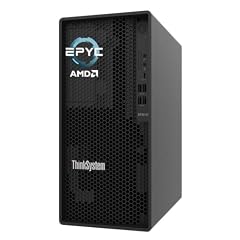
This is a tower server from Lenovo with an AMD EPYC 4244P processor and ECC memory. It's not designed for gaming, but it's ideal for hosting, virtualization, or as a home lab. The 16GB RAM is ECC, which is essential for server stability.
Pros
- AMD EPYC 4244P server-grade CPU
- ECC memory improves reliability
- ThinkSystem build quality
- Integrated graphics sufficient for server tasks
Cons
- No discrete GPU
- No storage size stated
- Not suitable for gaming
Good fit if
- Homelab enthusiasts or small businesses running servers
- Users who need error-correcting memory for data integrity
Skip if
- You need a general-purpose desktop
- You want a built-in OS (it may come with no OS)
Verdict: A specialized pick for server workloads, not recommended for consumer use.
9 Best for heavy multitasking

ASUS V500 Home & Business Desktop Computer Intel Core i7
- CPU
- Intel Core i7
- RAM
- 64 GB
- Storage
- 1000 GB
- OS
- Windows 11
$1,459.99 (as of 10/20/2026 16:06 PDT - Details)
It offers 64GB of RAM, the most in this list, which is great for running many applications or virtual machines. The Intel Core i7 (likely a desktop chip) is older but still capable. It also includes a 500GB external drive.
Pros
- 64GB RAM, the highest capacity in this roundup
- Intel Core i7 processor (model not specified)
- 1TB total storage (512GB internal + 500GB external)
- Windows 11 Home
Cons
- No discrete GPU, so no gaming
- CPU generation not specified
- External drive may be slower than internal
Good fit if
- Users running memory-hungry applications like photo editing or VMs
- Office workstations where many browser tabs are open
Skip if
- You need graphics performance
- You prefer latest-generation hardware
Verdict: A RAM-heavy productivity machine, though its storage and CPU may not be cutting-edge.
10 Best compact productivity

Dell Tower ECT1250 Desktop PC i3-14100 8GB DDR5 512GB SSD Win 11 Pro
- CPU
- Intel Core i3-14100
- RAM
- 8 GB
- Storage
- 512 GB
- OS
- Windows 11 Pro
$1,499.00 (as of 10/20/2026 17:06 PDT - Details)
A small form factor tower from Dell with a 13th-gen Intel Core i3-14100 processor and 8GB RAM. It's a budget-oriented option for basic tasks like web browsing, email, and office software. Its 512GB SSD is enough for everyday files.
Pros
- Compact tower design
- Windows 11 Pro
- 512GB SSD
- Dell reliability
Cons
- Only 8GB RAM, which can be limiting
- No discrete GPU
- Older processor compared to the Core Ultra lineup
Good fit if
- Users who need a simple, reliable desktop for admin and browsing
- Businesses requiring Windows 11 Pro for domain features
Skip if
- You plan to run modern games
- You need more than 8GB of memory
Verdict: A basic office PC that does the job, but memory is limited for heavier workloads.
11 Best small form factor

HP ProDesk 400 G9 SFF Desktop
- CPU
- Intel Core i9-12900K
- RAM
- 32 GB
- Storage
- 1000 GB
- OS
- Windows 11 Pro
$1,449.99 (as of 10/20/2026 04:06 PDT - Details)
This HP ProDesk has a compact SFF chassis and packs a powerful older-gen Intel Core i9-12900K with 32GB RAM and 1TB SSD. It's a strong performer for its size, though its power efficiency may be lower than newer chips.
Pros
- Small form factor saves space
- Intel Core i9-12900K (16 cores: 8P+8E)
- 32GB RAM and 1TB SSD
- Windows 11 Pro
Cons
- No discrete GPU
- Power-hungry and runs hot
- Older CPU architecture
Good fit if
- Professionals who need a space-saving yet fast machine
- Users who can utilize a 16-core CPU for compilation or rendering
Skip if
- You need integrated graphics for gaming (still not enough)
- You prefer energy-efficient designs
Verdict: A compact powerhouse for productivity, but lack of a GPU limits creative and gaming use.
12 Best slim desktop

Dell Slim Desktop Computer PC
- CPU
- Intel Core Ultra 7 265
- RAM
- 16 GB
- Storage
- 1000 GB
- OS
- Windows 11 Home
$1,499.99 (as of 10/20/2026 17:06 PDT - Details)
A slim tower from Dell with an Intel Core Ultra 7 265 processor, 16GB RAM, and a 1TB SSD. It's a modern CPU in a space-saving chassis. Similar to the Dell Tower but with half the memory.
Pros
- Slim design
- Intel Core Ultra 7 265 (latest gen)
- 1TB SSD
- Windows 11 Home
Cons
- Only 16GB RAM
- No dedicated GPU
- Limited expansion in slim case
Good fit if
- Home users who want a modern processor in a compact case
- Office workers who don't need a ton of RAM
Skip if
- You need heavy multitasking with many programs
- You plan to game
Verdict: A sleek, modern desktop for everyday tasks, but memory may be limiting for power users.
Specs compared
| # | Desktop | CPU | GPU | GPU memory | RAM | Storage | OS |
|---|---|---|---|---|---|---|---|
| 1 | MSI Codex R2 AI A2NVL7-464US Desktop PC | Intel Core Ultra 7 265K | GeForce RTX 5060 | 8 GB | 32 GB | 2000 GB | Windows 11 Home |
| 2 | Dell Tower Desktop | Intel Core Ultra 7 | not stated | not stated | 32 GB | 1000 GB | Windows 11 Home |
| 3 | KOTIN Prebuilt Gaming PC Ryzen 7 9700X 16GB DDR5 RTX 5060 Ti 8GB 1TB SSD | AMD Ryzen 7 9700X | RTX 5060 Ti | 8 GB | 16 GB | 1000 GB | Windows 11 |
| 4 | CyberPowerPC Gaming PC | AMD Ryzen 7 8700F | GeForce RTX 5060 Ti | 8 GB | 16 GB | 1000 GB | Windows 11 Home |
| 5 | HP 27" All in One Desktop Computer Touchscreen Copilot PC 16GB DDR5 1TB | AMD Ryzen AI 7 350 | not stated | not stated | 16 GB | 1000 GB | Windows 11 Pro |
| 6 | WIWB Gaming PC Desktop Core I9-14900HX | Intel Core i9-14900HX | RTX 5060 Ti | 8 GB | 16 GB | 1000 GB | not stated |
| 7 | Acer Nitro 60 Gaming AI Desktop | Intel Core Ultra 5 225F | GeForce RTX 5060 | 8 GB | 16 GB | 1000 GB | Windows 11 Pro |
| 8 | Lenovo ThinkSystem ST45 Tower Server | not stated | not stated | not stated | 16 GB | not stated | not stated |
| 9 | ASUS V500 Home & Business Desktop Computer Intel Core i7 | Intel Core i7 | not stated | not stated | 64 GB | 1000 GB | Windows 11 |
| 10 | Dell Tower ECT1250 Desktop PC i3-14100 8GB DDR5 512GB SSD Win 11 Pro | Intel Core i3-14100 | not stated | not stated | 8 GB | 512 GB | Windows 11 Pro |
| 11 | HP ProDesk 400 G9 SFF Desktop | Intel Core i9-12900K | not stated | not stated | 32 GB | 1000 GB | Windows 11 Pro |
| 12 | Dell Slim Desktop Computer PC | Intel Core Ultra 7 265 | not stated | not stated | 16 GB | 1000 GB | Windows 11 Home |
How we chose these
We started with a pool of 12 desktops that matched our price filter for desktops under $1500 from the live store listings. We shortlisted based on processor generation, memory capacity, storage, and presence of a discrete GPU. We compared specifications across the group, noting what each machine does well. Prices shown are the live prices from the listing at the time of writing; they change. We did not test these machines. Our choices are based on stated specifications and manufacturer information.
What to look for
Graphics: what the GPU name tells you
Most desktops in this price range include an NVIDIA GeForce RTX 5060 or RTX 5060 Ti. Both support DLSS and ray tracing, but the Ti has more CUDA cores and often comes with 8GB VRAM. For 1080p gaming, both are capable, but the Ti offers a bit more headroom. For productivity without gaming, a system without a discrete GPU can still be fast for office work and programming, but not for video editing or 3D modeling.
Processor: Intel Core vs. AMD Ryzen
You'll find Intel Core Ultra 7, Intel Core i9, and AMD Ryzen 7 chips. The Core Ultra series is Intel's newest, with an NPU for AI tasks. The i9-12900K is older but has many cores. AMD's Ryzen 7 9700X is the latest Zen 5. For most users, a recent 8-core processor is plenty; for heavy video editing, more cores help.
Memory and storage: how much is enough?
16GB is the baseline for smooth multitasking and gaming. 32GB is better for video editing and virtual machines. Storage: a 512GB SSD is adequate for basic use, but 1TB is more comfortable for game libraries and media. Some desktops offer a second drive bay for expansion.
Form factor: tower vs. slim vs. all-in-one
Full-size towers offer the most room for upgrades and airflow. Slim desktops save space but limit GPU and drive additions. All-in-ones integrate the monitor but make upgrades difficult. Choose based on your desk layout and future expansion needs.
Operating system considerations
Windows 11 Home is standard, but Pro adds features like BitLocker and Remote Desktop. If your workplace requires Pro, choose a model with it. Some desktops may come with no OS; the listings often state which version is preinstalled.
Questions
Can I upgrade the RAM on these desktops?
Desktops in tower form factors usually have accessible RAM slots. For example, the MSI Codex R2 AI and Dell Tower have 32GB but may have empty slots for expansion. Slim and all-in-one models are harder to upgrade. Check the manufacturer's specs or the listing for details. Many system builders leave at least one slot open.
Is the RTX 5060 Ti worth it over the RTX 5060?
The RTX 5060 Ti has more CUDA cores and slightly higher memory bandwidth, typically providing around 10-15% better gaming performance. If you play at 1440p or want to run ray tracing, the Ti is worth the premium. For 1080p esports titles, the RTX 5060 is already very capable.
Do I need a desktop with an AI processor?
AI processors, like the Intel Core Ultra with NPU, enable features in Windows like live captions and background blur without using the CPU. For most productivity apps, they add convenience. If you don't care about these features, a regular processor is fine.
Can I use these desktops for video editing?
Yes, but a dedicated GPU is recommended. Models with RTX 5060 Ti, like the KOTIN or CyberPowerPC, will handle 1080p and 4K video editing smoothly. The HP ProDesk and Dell Tower without a GPU will be slow for rendering and previewing. At least 32GB of RAM is also helpful for large projects.
How do I know if the desktop includes Wi-Fi?
The product listing or specs usually mention wireless connectivity. For example, the HP ProDesk 400 G9 explicitly states 'Built-in Wi-Fi'. Others may require a USB adapter or Ethernet for internet. If not stated, you can assume it has Ethernet but not Wi-Fi.
Update history
- : First published.