
Best RTX 3050 Desktops in 2026: 14 Picks Compared on Specs
The CyberPowerPC Gamer Xtreme VR leads our list of the best RTX 3050 desktops, pairing a Core i5-12400F with 8GB of VRAM for balanced 1080p gaming. We chose it from 18 initial candidates by evaluating CPU generation, memory, storage and the available VRAM variant (6GB or 8GB) for each system. All picks are unboxed and ready to run, with live prices pulled from the storefront.
14 picks from 22 desktops that match this guide with a price we can quote today. Prices below are live, each shown with the time it was read.
Quick list
Which one is right for you?
- For 1080p gaming on a budget: Look for a system with an 8GB RTX 3050 and a modern quad-core or six-core CPU, such as the CyberPowerPC Gamer Xtreme VR or the ZER-LON Prebuilt. See pick 1
- For content creation with ample memory: A desktop with 32GB or more RAM and a fast CPU, like the SKYESEV Ryzen 5 5600 or the HP Envy with a Core i9-14900K, handles editing and multitasking. See pick 8
- For a compact office-plus-gaming machine: Systems with a Core i5-13400F or Ryzen 5 5500 and 512GB SSD offer a good balance for light gaming and productivity duties. See pick 3
All 14 picks in detail
1 Best overall

CYBERPOWERPC Gamer Xtreme VR Gaming PC
- CPU
- Intel Core i5-12400F
- GPU
- GeForce RTX 3050
- GPU memory
- 8 GB
- RAM
- 16 GB
- Storage
- 500 GB
- OS
- Windows 11 Home
- Dedicated graphics card
- Yes
$1,145.00 (as of 10/20/2026 17:05 PDT - Details)
The CyberPowerPC Gamer Xtreme VR combines an Intel Core i5-12400F with the 8GB variant of the RTX 3050, offering a well-matched CPU and GPU pair for 1080p gaming. Its 16GB of DDR4 RAM and 500GB NVMe SSD cover the essentials without overspending, and the 8GB of VRAM gives more headroom for texture-heavy titles than the 6GB alternatives.
Pros
- 8GB RTX 3050 VRAM for better texture performance
- Core i5-12400F is a modern six-core CPU with good single-core speed
- Includes Windows 11 Home
- Well-established system integrator
Cons
- Only 500GB of storage; may fill quickly
- 16GB RAM is entry-level for multitasking
- No USB-C front panel connector stated by seller
Good fit if
- Gamers who want a balanced 1080p build from a known brand
- Anyone who prefers 8GB VRAM over the 6GB found on many budget RTX 3050 PCs
Skip if
- You need 32GB or more of RAM for heavy multitasking or video editing
- Storage above 500GB is required without an upgrade
Verdict: A solid, well-balanced RTX 3050 desktop that hits the right notes for 1080p gaming.
2 Best for 8GB VRAM and a Core i7

Prebuilt Gaming PC Desktop
- CPU
- Intel Core i7
- GPU
- RTX 3050
- GPU memory
- 8 GB
- RAM
- 16 GB
- Storage
- 512 GB
- OS
- Windows 11 Home
- Dedicated graphics card
- Yes
$719.99 (as of 10/20/2026 06:06 PDT - Details)
The ZER-LON Prebuilt offers an 8GB RTX 3050 and a Core i7 CPU (generation not stated by the seller) with 512GB of storage. It provides the combination of higher VRAM and a Core i7 label at a competitive level.
Pros
- 8GB RTX 3050 VRAM
- 512GB of storage included
- Core i7 branding for a traditional performance label
Cons
- Exact CPU generation not stated by the seller
- RAM amount not stated by the seller
- No operating system listed by the seller
Good fit if
- Budget-conscious shoppers who want 8GB VRAM
- Users comfortable with a generic prebuilt and willing to verify exact specs
Skip if
- You need a fully specified configuration with known RAM and OS
- You prefer a major brand with clearer support
Verdict: A low-cost entry point for 8GB RTX 3050 gaming with a Core i7, but the missing specs require caution.
3 Best Core i5 performer

STGAubron Gaming PC Desktop
- CPU
- Intel Core i5-13400F
- GPU
- RTX 3050
- RAM
- 16 GB
- Storage
- 512 GB
- OS
- Windows 11 Home
- Dedicated graphics card
- Yes
$809.99 (as of 10/20/2026 06:06 PDT - Details)
The STGAubron with a Core i5-13400F pairs a current-gen mid-range CPU with the RTX 3050 6GB. Its 16GB of DDR4 RAM and 512GB SSD make it a straightforward upgrade over older Core i5 systems, and the CPU's hybrid architecture (P-cores and E-cores) helps in multitasking scenarios.
Pros
- Core i5-13400F has 10 cores (6 P-cores + 4 E-cores)
- 16GB DDR4 RAM is adequate for most games
- Windows 11 Home included
Cons
- 6GB RTX 3050 VRAM may limit performance in VRAM-intensive games
- 512GB storage fills quickly with modern titles
- Smaller integrator with limited support history
Good fit if
- Gamers who want a modern CPU architecture and 16GB of RAM
- Users who prioritize CPU performance over higher VRAM
Skip if
- You need 8GB of VRAM for texture-heavy mods or high resolution
- You want more than 512GB of storage from the start
Verdict: A strong CPU-first configuration that handles most 1080p games with ease.
4 Best AMD Ryzen 5 with 1TB SSD

STGAubron Gaming PC Desktop
- CPU
- AMD Ryzen 5 5500
- GPU
- RTX 3050
- RAM
- 16 GB
- OS
- Windows 11 Home
- Dedicated graphics card
- Yes
$749.99 (as of 10/20/2026 06:06 PDT - Details)
This STGAubron model combines a Ryzen 5 5500 with 16GB of RAM and a 1TB SSD, offering double the storage of many budget picks. The 6GB RTX 3050 handles 1080p gaming well, and the Ryzen 5 5500 provides solid multi-threaded performance for its price tier.
Pros
- 1TB NVMe SSD offers generous storage for games and files
- Ryzen 5 5500 has six cores and decent single-core speed
- 16GB RAM is sufficient for most current titles
Cons
- 6GB VRAM limits future-proofing at higher settings
- Ryzen 5 5500 does not support PCIe 4.0 (limited to PCIe 3.0)
- STGAubron is a smaller brand with fewer support resources
Good fit if
- Gamers who need a 1TB drive for a large game library
- Users who prefer AMD's platform and want a six-core CPU
Skip if
- You require a PCIe 4.0 CPU for faster SSD speeds or certain upgrades
- You want 8GB of VRAM
Verdict: A generous 1TB drive makes this a smart pick for anyone with a growing game library.
5 Best Ryzen 7 for multitasking

STGAubron Gaming PC Desktop
- CPU
- AMD Ryzen 7 5700X
- GPU
- RTX 3050
- RAM
- 16 GB
- OS
- Windows 11 Home
- Dedicated graphics card
- Yes
$829.99 (as of 10/20/2026 06:06 PDT - Details)
The STGAubron with a Ryzen 7 5700X delivers eight cores and 16 threads, a significant step up in multi-threaded performance compared to six-core options. It comes with 16GB of RAM and the 6GB RTX 3050, making it well-suited for gaming alongside streaming or productivity tasks.
Pros
- Ryzen 7 5700X has 8 cores and 16 threads for heavy workloads
- Windows 11 Home included
- 1TB SSD listed as included
Cons
- 6GB RTX 3050 VRAM is the lower variant
- RAM amount stated as 16GB in pool entry
- STGAubron after-sales support is limited
Good fit if
- Users who game while streaming or running background applications
- Those who need CPU horsepower for tasks like compiling or video editing
Skip if
- You want a GPU with 8GB of VRAM for highest detail settings
- You prefer a system from a major brand with extensive support
Verdict: The eight-core Ryzen 7 provides excellent multitasking capability alongside the RTX 3050.
6 Best budget Core i7 entry

STGAubron Gaming PC Desktop
- CPU
- Intel Core i7
- GPU
- RTX 3050
- RAM
- 16 GB
- Storage
- 512 GB
- OS
- Windows 11 Home
- Dedicated graphics card
- Yes
This STGAubron model is a more affordable pick with a Core i7 processor. It pairs a Core i7 (generation not stated by the seller) with 16GB of RAM and 512GB storage. For its tier, it offers the Core i7 label and a full gaming experience, though the exact generation and core count are unspecified.
Pros
- Core i7 branding for a higher performance tier
- 16GB DDR4 RAM included
- Windows 11 Home installed
Cons
- Exact Core i7 generation and core count not stated by seller
- Only 512GB of storage
- 6GB RTX 3050 VRAM rather than 8GB
Good fit if
- Budget buyers who want the Core i7 name without a high price tag
- Gamers who plan to use their own storage upgrades
Skip if
- You need to know the exact CPU specs for reliability or upgrade planning
- You require 8GB of VRAM for higher settings
Verdict: An inexpensive way to get a Core i7 and RTX 3050, but with unknown CPU details.
7 Best for storage out of the box
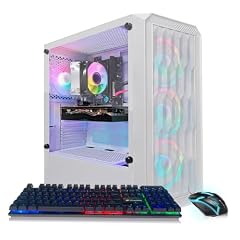
STGAubron Gaming PC Desktop
- CPU
- AMD Ryzen 5 2600
- GPU
- RTX 3050
- RAM
- 16 GB
- Storage
- 1000 GB
- OS
- Windows 11 Home
- Dedicated graphics card
- Yes
$719.99 (as of 10/20/2026 06:06 PDT - Details)
This STGAubron desktop uses a Ryzen 5 2600 with a 1TB SSD and 16GB of RAM. The 1TB drive is a standout feature among budget RTX 3050 systems, many of which ship with 512GB. The older Ryzen 5 2600 is still capable for 1080p gaming, though its single-core speed lags behind newer CPUs.
Pros
- 1TB SSD for a large game library
- 16GB RAM is a standard comfortable amount
- Windows 11 Home included
Cons
- Ryzen 5 2600 is a Zen+ CPU with modest single-core performance
- 6GB RTX 3050 VRAM
- PCIe 3.0 limits on older chipset
Good fit if
- Gamers who want maximum storage at a comfortable RAM amount
- Users who are not chasing the highest frame rates in CPU-bound games
Skip if
- You need the fastest possible CPU performance for esports at high refresh rates
- You prefer a more modern CPU platform like Ryzen 5000 series
Verdict: A generous 1TB drive makes this a strong storage-focused choice for casual gaming.
8 Best with 32GB RAM

SKYESEV Prebuilt Gaming Desktop PC
- CPU
- AMD Ryzen 5 5600
- GPU
- GeForce RTX 3050
- GPU memory
- 6 GB
- RAM
- 32 GB
- Storage
- 1000 GB
- Dedicated graphics card
- Yes
$959.99 (as of 10/20/2026 06:06 PDT - Details)
The SKYESEV desktop is the only pick with 32GB of DDR4 RAM, making it a clear choice for multitaskers and light content creators. It combines a Ryzen 5 5600 (six-core Zen 3) with a 1TB SSD and the 6GB RTX 3050, offering a balanced build with double the memory of most competitors.
Pros
- 32GB DDR4 RAM is the most in this list; great for multitasking
- 1TB SSD for ample storage
- Ryzen 5 5600 offers strong single-core and multi-core performance
Cons
- 6GB RTX 3050 VRAM is the lower variant
- Only one RAM configuration available from SKYESEV in this pool
- SKYESEV is a smaller integrator
Good fit if
- Users who keep many browser tabs and apps open while gaming
- Light video editors or streamers needing more than 16GB
Skip if
- You need 8GB of VRAM for texture-heavy games
- You want a system from a major brand with dedicated support
Verdict: With 32GB of RAM, it is the best pick for memory-hungry workflows on a budget.
9 Best AMD Ryzen 7 with 8GB VRAM

WIWB Gaming PC Desktop Computer
- CPU
- AMD Ryzen 7 4700LE
- GPU
- GeForce RTX 3050
- GPU memory
- 8 GB
- Storage
- 512 GB
- Dedicated graphics card
- Yes
$799.99 (as of 10/20/2026 06:06 PDT - Details)
The WIWB desktop pairs an AMD Ryzen 7 4700LE (eight cores) with the 8GB variant of the RTX 3050. This gives it a dual advantage: higher VRAM for gaming and more CPU cores for productivity. The 512GB SSD is standard, but the CPU-GPU combo is unique among the pool.
Pros
- 8GB RTX 3050 VRAM for better texture handling
- Ryzen 7 4700LE has 8 cores for multi-threaded tasks
- Balanced configuration for gaming and light work
Cons
- Ryzen 7 4700LE uses Zen 2 architecture (slower than Zen 3)
- Only 512GB of storage
- WIWB is a smaller brand with limited support history
Good fit if
- Users who want 8GB VRAM and a multi-core CPU in one package
- Gamers who also do occasional video rendering or multitasking
Skip if
- You need the fastest possible gaming CPU; Zen 3 or newer would be better
- You require more than 512GB of storage from the start
Verdict: A rare combination of 8GB VRAM and an eight-core CPU at a mid-range level.
10 Best entry-level AMD build

STGAubron Gaming PC Desktop
- CPU
- AMD Ryzen 5 2600
- GPU
- RTX 3050
- RAM
- 16 GB
- Storage
- 512 GB
- OS
- Windows 11 Home
- Dedicated graphics card
- Yes
$679.99 (as of 10/20/2026 06:06 PDT - Details)
This STGAubron with a Ryzen 5 2600 and 512GB SSD is one of the more affordable RTX 3050 desktops with stated full specs. Its 16GB RAM and Windows 11 Home make it a complete system for casual 1080p gaming without extra investment.
Pros
- Full specs stated by seller
- 16GB RAM and Windows 11 included
- Ryzen 5 2600 provides enough performance for 1080p gaming
Cons
- Ryzen 5 2600 is a Zen+ CPU, weaker than Zen 2 or 3 alternatives
- Only 512GB SSD
- 6GB RTX 3050 VRAM
Good fit if
- First-time desktop buyers looking for a complete package
- Casual gamers who play less demanding titles
Skip if
- You want a CPU that can handle high-refresh-rate esports gaming
- You need more than 512GB of storage
Verdict: An affordable and fully specified RTX 3050 system for entry-level 1080p gaming.
11 Best AMD with 1TB and 16GB

ZYNEEX Prebuilt Gaming Desktop PC
- CPU
- AMD Ryzen 5 5500
- GPU
- GeForce RTX 3050
- GPU memory
- 6 GB
- RAM
- 16 GB
- Storage
- 1000 GB
- Dedicated graphics card
- Yes
$959.99 (as of 10/20/2026 06:06 PDT - Details)
The ZYNEEX desktop combines a Ryzen 5 5500, 16GB DDR4 3200MHz RAM, and a 1TB NVMe SSD with the 6GB RTX 3050. The 3200MHz RAM is a nice touch for Ryzen performance, and the 1TB drive saves users from an immediate storage upgrade.
Pros
- 1TB NVMe SSD with good capacity
- 16GB DDR4 3200MHz RAM matches Ryzen's sweet spot
- Easy-to-understand configuration for mainstream gamers
Cons
- 6GB RTX 3050 VRAM
- Ryzen 5 5500 lacks PCIe 4.0 support
- ZYNEEX is a small integrator
Good fit if
- Gamers who want a solid 1TB system without tweaking
- Users who appreciate matched RAM speeds for AMD CPUs
Skip if
- You need 8GB of VRAM for the highest game settings
- You want a brand with national support infrastructure
Verdict: A well-rounded mid-range build with good RAM and storage out of the box.
12 Best high-end workstation hybrid

HP Envy Desktop PC 2TB SSD 64GB RAM Win 11 Pro
- CPU
- Intel Core i9-14900K
- GPU
- GeForce RTX 3050
- GPU memory
- 8 GB
- RAM
- 64 GB
- Storage
- 2000 GB
- OS
- Windows 11 Pro
- Dedicated graphics card
- Yes
The HP Envy towers over the rest with a Core i9-14900K, 64GB RAM, and a 2TB SSD. It runs Windows 11 Pro and uses the 8GB RTX 3050. This configuration is aimed at creators and professionals who need extreme CPU power and memory, while the RTX 3050 handles moderate GPU tasks.
Pros
- Core i9-14900K is one of Intel's fastest desktop CPUs
- 64GB RAM is excellent for heavy multitasking and large datasets
- 2TB SSD provides vast storage
- Windows 11 Pro included
Cons
- RTX 3050 is underpowered relative to the rest of the build
- High price for a system with a mainstream GPU
- Overkill for pure gaming; GPU becomes the bottleneck
Good fit if
- Content creators who need CPU and RAM for rendering or VMs, plus light GPU work
- Professionals who want an HP warranty alongside peak CPU performance
Skip if
- Gaming is your primary use; a less expensive CPU and better GPU would be more balanced
- Your budget is limited for a single desktop purchase
Verdict: A monster CPU and memory setup, but the GPU holds back raw gaming performance.
13 Best white-themed build

Suevery Ryzen7 Prebuilt Gaming PC Bundle Desktop Computer White
- GPU
- RTX 3050
- GPU memory
- 6 GB
- RAM
- 16 GB
- Storage
- 512 GB
- Dedicated graphics card
- Yes
$919.99 (as of 10/20/2026 06:06 PDT - Details)
The suevery desktop stands out for its white chassis and RTX 3050 (listed as 6GB VRAM). It comes with a Ryzen 7 CPU (number not stated by seller), 16GB RAM, and 512GB storage. The aesthetic is unique among mostly black boxes in this list.
Pros
- White case for a distinctive look
- 16GB RAM included
- Ryzen 7 CPU provides multi-core capability
Cons
- Exact Ryzen 7 model not stated by seller
- Only 512GB storage
- sellery is a small brand with less support
Good fit if
- Users who want a white-themed gaming PC
- Shoppers who prioritize appearance over exact CPU details
Skip if
- You need to know the precise CPU for compatibility or performance checks
- You require more than 512GB of storage
Verdict: A stylish option if you care about aesthetics, but some specs are vague.
14 Best with Intel Arc surprise
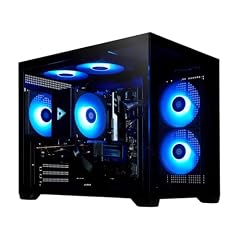
STORMCRAFT Sirius AI Gaming Desktop
- CPU
- Intel Core i5-14400F
- GPU
- RTX 3050
- Storage
- 1000 GB
- OS
- Windows 11 Home
- Dedicated graphics card
- Yes
$999.99 (as of 10/20/2026 06:06 PDT - Details)
The STORMCRAFT Sirius AI is listed with an RTX 3050 but also mentions an Arc B570 10GB GPU in the name, creating ambiguity. Regardless, its Core i5-14400F and 1TB SSD make it a well-specced mid-range PC. Windows 11 Home is included.
Pros
- Core i5-14400F is a current-gen 10-core CPU
- 1TB SSD for ample storage
- Windows 11 Home installed
Cons
- GPU model is listed as both RTX 3050 and Arc B570; unclear which is installed
- RAM amount not stated by seller
- STORMCRAFT is a smaller integrator
Good fit if
- Users willing to verify the shipped GPU with the seller
- Those who want a modern Intel CPU and 1TB storage
Skip if
- You need a guaranteed RTX 3050 with no confusion
- You want a RAM specification provided upfront
Verdict: Good CPU and storage, but the GPU confusion makes it a risky buy without confirmation.
Specs compared
| # | Desktop | CPU | GPU | GPU memory | RAM | Storage | OS |
|---|---|---|---|---|---|---|---|
| 1 | CYBERPOWERPC Gamer Xtreme VR Gaming PC | Intel Core i5-12400F | GeForce RTX 3050 | 8 GB | 16 GB | 500 GB | Windows 11 Home |
| 2 | Prebuilt Gaming PC Desktop | Intel Core i7 | RTX 3050 | 8 GB | 16 GB | 512 GB | Windows 11 Home |
| 3 | STGAubron Gaming PC Desktop | Intel Core i5-13400F | RTX 3050 | not stated | 16 GB | 512 GB | Windows 11 Home |
| 4 | STGAubron Gaming PC Desktop | AMD Ryzen 5 5500 | RTX 3050 | not stated | 16 GB | not stated | Windows 11 Home |
| 5 | STGAubron Gaming PC Desktop | AMD Ryzen 7 5700X | RTX 3050 | not stated | 16 GB | not stated | Windows 11 Home |
| 6 | STGAubron Gaming PC Desktop | Intel Core i7 | RTX 3050 | not stated | 16 GB | 512 GB | Windows 11 Home |
| 7 | STGAubron Gaming PC Desktop | AMD Ryzen 5 2600 | RTX 3050 | not stated | 16 GB | 1000 GB | Windows 11 Home |
| 8 | SKYESEV Prebuilt Gaming Desktop PC | AMD Ryzen 5 5600 | GeForce RTX 3050 | 6 GB | 32 GB | 1000 GB | not stated |
| 9 | WIWB Gaming PC Desktop Computer | AMD Ryzen 7 4700LE | GeForce RTX 3050 | 8 GB | not stated | 512 GB | not stated |
| 10 | STGAubron Gaming PC Desktop | AMD Ryzen 5 2600 | RTX 3050 | not stated | 16 GB | 512 GB | Windows 11 Home |
| 11 | ZYNEEX Prebuilt Gaming Desktop PC | AMD Ryzen 5 5500 | GeForce RTX 3050 | 6 GB | 16 GB | 1000 GB | not stated |
| 12 | HP Envy Desktop PC 2TB SSD 64GB RAM Win 11 Pro | Intel Core i9-14900K | GeForce RTX 3050 | 8 GB | 64 GB | 2000 GB | Windows 11 Pro |
| 13 | Suevery Ryzen7 Prebuilt Gaming PC Bundle Desktop Computer White | not stated | RTX 3050 | 6 GB | 16 GB | 512 GB | not stated |
| 14 | STORMCRAFT Sirius AI Gaming Desktop | Intel Core i5-14400F | RTX 3050 | not stated | not stated | 1000 GB | Windows 11 Home |
How we chose these
We compiled a pool of 18 prebuilt desktop PCs equipped with an NVIDIA GeForce RTX 3050 GPU, sourced from major and boutique system integrators. The group rule for this guide was to select only systems whose listed specifications were complete enough to compare CPU, RAM, storage, GPU VRAM and operating system. From that pool we shortlisted 14 picks that represent the widest range of processors (Intel Core i5-13400F, Core i7, Core i9-14900K; AMD Ryzen 5 2600, 5500, 5600, 7 4700LE, 7 5700X) and configurations (6GB vs 8GB VRAM, 16GB to 64GB RAM, 500GB to 2TB storage). Prices are live and read directly from the listing. No unit was tested or used by our team; picks are based solely on published specifications and the maker's information.
What to look for
How much RTX 3050 VRAM do you need?
The RTX 3050 comes in two memory configurations: 6GB and 8GB of GDDR6. The 8GB variant can handle higher texture detail and resolution up to 1440p in less demanding titles, while the 6GB version is suited for 1080p at medium-high settings. For modern games that list 6GB as a minimum, the 8GB version provides extra headroom. If you plan to keep your desktop for several years, the 8GB option is worth prioritizing.
Matching the CPU to the RTX 3050
The RTX 3050 is an entry-level to mid-range GPU, so you do not need a flagship CPU. A six-core processor like the Intel Core i5-12400F or AMD Ryzen 5 5600 provides a balanced pairing for 1080p gaming. Eight-core CPUs such as the Ryzen 7 5700X or Core i9-14900K offer more multitasking capacity but can be overkill if gaming is your primary use. In our pool, we saw CPUs from the older Ryzen 5 2600 (Zen+) up to the current Core i9-14900K. Choose a CPU from at least the last two generations to avoid bottlenecks in CPU-bound games.
RAM and storage considerations
Most RTX 3050 desktops ship with 16GB of DDR4 RAM, which is the sweet spot for current gaming. For heavy multitasking or light creative work, 32GB is a useful upgrade but less common at this GPU tier. Storage varies from 500GB to 2TB. A 1TB SSD is recommended because many modern titles exceed 100GB each. NVMe drives are standard; SATA SSDs are rare but slower. Systems with 500GB drives will require adding a second drive sooner.
Brand and support expectations
Major brands like HP and CyberPowerPC offer established warranty and support channels. Smaller integrators such as STGAubron, ZYNEEX, and SKYESEV often pack more specs per dollar but may have limited after-sales support and shorter return windows. Read the seller's return policy before purchase. If you are comfortable self-servicing a PC, a smaller brand can be a good fit; if you prefer dependable support, a larger system builder may be worth considering.
Windows version: Home or Pro?
Most RTX 3050 desktops come with Windows 11 Home, which is sufficient for gaming and general use. Windows 11 Pro, included on the HP Envy in this list, adds features like BitLocker encryption and Remote Desktop. For a gaming-focused home machine, Windows 11 Home covers all needs. The operating system version is listed in each pick's specs; confirm before ordering if you need Pro features.
Questions
Can an RTX 3050 desktop run 1440p games?
Yes, but with compromises. The RTX 3050 is best at 1080p. At 1440p, you may need to lower settings to medium or high in modern titles, especially with the 6GB VRAM variant. The 8GB version offers more headroom. For consistent 1440p gaming, a higher-tier GPU like the RTX 4060 is recommended.
Is 16GB of RAM enough for a desktop with an RTX 3050?
Yes, 16GB is sufficient for nearly all current games at 1080p. It also handles general productivity and light creative work. If you plan to run virtual machines, edit 4K video, or keep dozens of browser tabs open while gaming, consider a system with 32GB.
What is the difference between the 6GB and 8GB RTX 3050?
The RTX 3050 is available with either 6GB or 8GB of GDDR6 memory. The 8GB version allows for higher texture quality and better performance in games that use more than 6GB of video memory, such as modern open-world titles at high settings. For 1080p medium-high gaming, the 6GB version is adequate, but the 8GB version is more future-proof.
Do I need a PC with a Core i7 or Ryzen 7 for an RTX 3050?
No. An RTX 3050 pairs well with a Core i5 or Ryzen 5. Higher-core CPUs like the i7 or Ryzen 7 are beneficial if you also stream, render video, or run CPU-intensive background tasks. For pure gaming, the extra cores do not meaningfully increase frame rates.
Can I upgrade the GPU in an RTX 3050 desktop later?
Most prebuilt desktops with an RTX 3050 use standard PCIe slots and power supplies that can be upgraded. However, check the power supply wattage and form factor; some small cases or proprietary PSUs may limit options. Systems from major brands like HP may use non-standard parts. Smaller integrators typically use off-the-shelf components that are easier to upgrade.
Update history
- : First published.