
Best Radeon RX 9070 Desktops in 2026: 15 Picks Compared on Specs
The Skytech Gaming Azure 3 with a Ryzen 7 9850X3D and RX 9070 XT is the top pick for gaming and productivity, balancing a high-end CPU with 32GB of RAM and 2TB of storage. This list compares 15 desktops from mostly larger brands that pair a Radeon RX 9070 or 9070 XT with various AMD processors.
15 picks from 43 desktops that match this guide with a price we can quote today. Prices below are live, each shown with the time it was read.
Quick list
Which one is right for you?
- For high-end gaming and streaming: A desktop with an RX 9070 XT and a 3D V-Cache CPU like the Ryzen 7 7800X3D or 9800X3D handles current games at high refresh rates. See pick 2
- For video editing and workstation tasks: Large RAM (64GB) and fast storage (2TB or 4TB) make the HYPER CYBER models a fit for 4K timeline work and large file transfers. See pick 4
- For a balanced mid-range build: A Ryzen 7 9700X with 32GB of RAM and a 1TB SSD offers strong performance for gaming and light creation without the premium of a 3D V-Cache chip. See pick 3
All 15 picks in detail
1 Best overall

Skytech Gaming PC Desktop
- CPU
- AMD Ryzen 7 9850X3D
- GPU
- Radeon RX 9070 XT
- GPU memory
- 16 GB
- RAM
- 32 GB
- Storage
- 2000 GB
- OS
- Windows 11
- Dedicated graphics card
- Yes
$2,899.99 (as of 10/20/2026 06:06 PDT - Details)
The Skytech Gaming Azure 3 combines a Ryzen 7 9850X3D with the RX 9070 XT, 32GB of RAM, and 2TB of storage. The 3D V-Cache CPU gives it an edge in gaming frame rates while the large SSD and ample memory suit creative workloads.
Pros
- Ryzen 7 9850X3D CPU with 3D V-Cache for gaming
- 32GB DDR5 RAM and 2TB SSD
- RX 9070 XT with 16GB VRAM
Cons
- Not stated by the seller: exact RAM speed
- No stated Ethernet or USB port details
Good fit if
- Gamers who want top-tier frame rates in CPU-bound titles
- Users who need a large SSD for game and file storage
Skip if
- You need more than 2TB of internal storage out of the box
- A workstation with 64GB of RAM is required
Verdict: A well-rounded high-end gaming desktop that balances a fast CPU with plenty of memory and storage.
2 Best for high-refresh-rate gaming
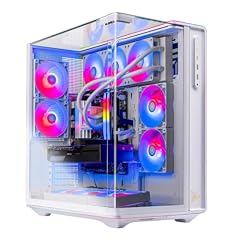
Skytech Gaming PC Desktop
- CPU
- AMD Ryzen 7 9800X3D
- GPU
- Radeon RX 9070 XT
- GPU memory
- 16 GB
- RAM
- 32 GB
- Storage
- 2000 GB
- OS
- Windows 11 Home
- Dedicated graphics card
- Yes
$2,799.99 (as of 10/20/2026 06:06 PDT - Details)
The Prism 5 with a Ryzen 7 9800X3D and 32GB RAM pairs a top-tier gaming CPU with the RX 9070 XT. The 2TB SSD provides room for a large game library while the 16GB VRAM handles high-resolution textures.
Pros
- Ryzen 7 9800X3D, one of the fastest gaming CPUs available
- 32GB DDR5 RAM
- 2TB SSD for storage
Cons
- Not stated by the seller: RAM speed or type
- No specs on expansion slots or ports
Good fit if
- Competitive gamers seeking maximum frame rates
- Users who want a high-end CPU for future-proofing
Skip if
- You are on a tighter budget and prefer a less expensive CPU
- A storage capacity of 1TB is adequate for your needs
Verdict: An excellent choice for gamers who prioritize CPU performance, paired with a powerful GPU.
3 Best balanced configuration

KOTIN Gaming PC
- CPU
- AMD Ryzen 7 9700X
- GPU
- Radeon RX 9070 XT
- GPU memory
- 16 GB
- RAM
- 32 GB
- Storage
- 1000 GB
- OS
- Windows 11 Home
- Dedicated graphics card
- Yes
$2,199.99 (as of 10/20/2026 06:05 PDT - Details)
This KOTIN desktop offers a Ryzen 7 9700X and an RX 9070 XT with 32GB of RAM and a 1TB SSD. It skips the 3D V-Cache premium while still delivering strong gaming and productivity performance.
Pros
- Ryzen 7 9700X provides solid multi-core performance
- 32GB of DDR5 memory
- RX 9070 XT for high frame rates
Cons
- Only 1TB of storage may fill quickly with modern games
- Brand KOTIN is less established than larger system integrators
Good fit if
- Buyers who want a capable RX 9070 XT system without the 3D V-Cache cost
- Users who plan to add a second storage drive later
Skip if
- You need a large SSD out of the box
- You prefer a brand with a long service history
Verdict: A well-priced entry into RX 9070 XT gaming with a modern CPU and sufficient RAM.
4 Best for video editing

HYPER CYBER Ultra Black Plus Screen Gaming PC Desktop Computer
- CPU
- AMD Ryzen 7 7800X3D
- GPU
- Radeon RX 9070 XT
- RAM
- 64 GB
- Storage
- 4000 GB
- OS
- Windows 11 Home
- Dedicated graphics card
- Yes
$5,359.00 (as of 10/20/2026 04:05 PDT - Details)
With 64GB of DDR5 RAM, a 4TB SSD, and the RX 9070 XT, this HYPER CYBER desktop is built for large media projects. The Ryzen 7 7800X3D provides strong single-threaded performance.
Pros
- 64GB of RAM, the most in this list
- 4TB SSD for storing large video files
- RX 9070 XT with 16GB VRAM
Cons
- CPU is a generation older than the 9000-series options
- No stated Ethernet or USB-C port details
Good fit if
- Video editors working with 4K timelines and large assets
- Users who need substantial scratch space on a single drive
Skip if
- Gaming frame rates from a 7800X3D are sufficient, but a 9800X3D is not needed
- You prefer a smaller storage capacity to save on cost
Verdict: A storage-heavy workstation that pairs a capable GPU with abundant memory.
5 Best compact gaming build

Skytech Gaming PC Desktop
- CPU
- AMD Ryzen 7 7800X3D
- GPU
- Radeon RX 9070 XT
- GPU memory
- 16 GB
- RAM
- 16 GB
- Storage
- 1000 GB
- OS
- Windows 11 Home
- Dedicated graphics card
- Yes
The Skytech Gaming King 95 packs a Ryzen 7 7800X3D and RX 9070 XT into a system with 16GB of RAM and a 1TB SSD. The 7800X3D is still a top gaming CPU, but the lower RAM may limit multitasking.
Pros
- Ryzen 7 7800X3D for excellent gaming performance
- RX 9070 XT with 16GB VRAM
- Smaller footprint likely (case not specified by seller)
Cons
- Only 16GB of RAM, less than other picks in this list
- 1TB SSD may be restrictive for a game library
Good fit if
- Gamers who upgrade RAM themselves and want a strong base
- Users with a limited desk space who still want high-end parts
Skip if
- You need at least 32GB of RAM out of the box
- You plan to run multiple heavy applications simultaneously
Verdict: A focused gaming machine that sacrifices RAM and storage for a lower entry point.
6 Best for gaming with a 9800X3D

Skytech Gaming PC Desktop
- CPU
- AMD Ryzen 7 9800X3D
- GPU
- Radeon RX 9070 XT
- GPU memory
- 16 GB
- RAM
- 32 GB
- Storage
- 1000 GB
- OS
- Windows 11 Home
- Dedicated graphics card
- Yes
$2,599.99 (as of 10/20/2026 06:06 PDT - Details)
This Prism 5 variant pairs the Ryzen 7 9800X3D with 32GB of RAM but only a 1TB SSD. It offers the same CPU as the top pick at a lower storage capacity, suiting users who prefer to add their own drive.
Pros
- Same Ryzen 7 9800X3D CPU as the gaming award pick
- 32GB of RAM for gaming and multitasking
- RX 9070 XT with 16GB VRAM
Cons
- 1TB storage may fill quickly
- Not stated by the seller: case airflow or cooling details
Good fit if
- Gamers who already own a secondary SSD or use cloud storage
- Users who want the fastest gaming CPU without a large upfront storage investment
Skip if
- You need 2TB or more out of the box
- You prefer a system with a larger SSD for a similar price
Verdict: A CPU-focused build that lets you customize storage without paying for unneeded capacity.
7 Best balanced mid-range

Skytech Gaming PC Desktop
- CPU
- AMD Ryzen 7 7800X3D
- GPU
- Radeon RX 9070 XT
- GPU memory
- 16 GB
- RAM
- 32 GB
- Storage
- 2000 GB
- OS
- Windows 11 Home
- Dedicated graphics card
- Yes
$2,599.99 (as of 10/20/2026 06:06 PDT - Details)
With a Ryzen 7 7800X3D, 32GB RAM, and a 2TB SSD, this Prism 5 balances cost and performance. The RX 9070 XT handles high settings at 1440p, and the large SSD avoids storage concerns.
Pros
- 32GB of RAM and 2TB SSD
- Ryzen 7 7800X3D for gaming
- RX 9070 XT with 16GB VRAM
Cons
- CPU is not the latest 9000-series
- Not stated by the seller: RAM speed or cooling
Good fit if
- Gamers who want a large SSD and good multitasking
- Users who don't need the absolute latest CPU generation
Skip if
- You need the highest frame rates from a 9800X3D
- You prefer a smaller case design
Verdict: A sensible mid-range build that offers plenty of storage and memory for most gamers.
8 Best for large storage needs

HYPER CYBER Ultra Black Plus Screen Gaming PC Desktop Computer
- CPU
- AMD Ryzen 7 7800X3D
- GPU
- Radeon RX 9070 XT
- RAM
- 32 GB
- Storage
- 4000 GB
- OS
- Windows 11 Home
- Dedicated graphics card
- Yes
$4,679.00 (as of 10/20/2026 04:05 PDT - Details)
This HYPER CYBER model includes 32GB of RAM, a 4TB SSD, and the RX 9070 XT with the Ryzen 7 7800X3D. The massive storage is ideal for a large game library or video project archives.
Pros
- 4TB SSD, the largest in this list with 32GB RAM
- RX 9070 XT for fast rendering and gaming
- 32GB DDR5 RAM is sufficient for most tasks
Cons
- CPU is a generation older
- Price premium for the large SSD may not suit all budgets
Good fit if
- Gamers who keep many installed titles
- Content creators who store multiple projects locally
Skip if
- 2TB of storage is enough and you want a newer CPU
- You prefer a smaller case
Verdict: A storage-focused desktop that combines a fast GPU with a large drive and solid memory.
9 Best 2TB configuration
HYPER CYBER Ultra Black Plus Screen Gaming PC Desktop Computer
- CPU
- AMD Ryzen 7 7800X3D
- GPU
- Radeon RX 9070 XT
- RAM
- 32 GB
- Storage
- 2000 GB
- OS
- Windows 11 Home
- Dedicated graphics card
- Yes
$4,379.00 (as of 10/20/2026 04:05 PDT - Details)
With 32GB of RAM, a 2TB SSD, and the RX 9070 XT, this HYPER CYBER desktop provides a strong balance of specs. The Ryzen 7 7800X3D keeps gaming smooth.
Pros
- 32GB of RAM
- 2TB SSD for games and applications
- RX 9070 XT with 16GB VRAM
Cons
- CPU is a generation older
- Not stated by the seller: cooling or case ventilation
Good fit if
- Users who want a large SSD without paying for 4TB
- Gamers who need a well-rounded system for 1440p
Skip if
- You require the latest Ryzen 9000-series CPU
- You need 64GB of RAM for heavy workstation tasks
Verdict: A practical choice that offers ample storage and memory.
10 Best entry-level RX 9070 XT

HYPER CYBER Ultra Black Plus Screen Gaming PC Desktop Computer
- CPU
- AMD Ryzen 7 7800X3D
- GPU
- Radeon RX 9070 XT
- RAM
- 32 GB
- Storage
- 1000 GB
- OS
- Windows 11 Home
- Dedicated graphics card
- Yes
$4,179.00 (as of 10/20/2026 04:05 PDT - Details)
This HYPER CYBER model has 32GB of RAM, a 1TB SSD, and the RX 9070 XT with a Ryzen 7 7800X3D. It is the least expensive RX 9070 XT configuration in this list with a 7800X3D.
Pros
- 32GB of DDR5 RAM
- Ryzen 7 7800X3D for gaming
- RX 9070 XT enables high settings
Cons
- Only 1TB of storage
- Not stated by the seller: exact motherboard or power supply specs
Good fit if
- Budget-conscious gamers who want a 7800X3D and RX 9070 XT
- Users who already have an external drive or plan to add storage
Skip if
- You need at least 2TB of internal storage immediately
- You prefer a larger system integrator like Skytech Gaming
Verdict: A cost-effective way to get a 7800X3D and RX 9070 XT in one system.
11 Best RX 9070 (non-XT) desktop

HYPER CYBER Ultra Black Plus Screen Gaming PC Desktop Computer
- CPU
- AMD Ryzen 7 7800X3D
- GPU
- Radeon RX 9070
- RAM
- 32 GB
- Storage
- 1000 GB
- OS
- Windows 11 Home
- Dedicated graphics card
- Yes
$3,999.00 (as of 10/20/2026 04:05 PDT - Details)
For users who want the Radeon RX 9070 without the XT variant, this HYPER CYBER model includes the same 7800X3D CPU, 32GB of RAM, and a 1TB SSD. It offers a lower entry point into the RDNA 4 architecture.
Pros
- Still uses the same Ryzen 7 7800X3D CPU
- 32GB of DDR5 RAM
- RX 9070 provides good 1440p performance
Cons
- RX 9070 has less CU and lower clock than the XT variant
- Only 1TB of storage
Good fit if
- Buyers who want the RX 9070's feature set at a lower price
- Users who don't need the highest GPU performance tier
Skip if
- You want maximum frame rates from the RX 9070 XT
- You need more than 1TB of storage
Verdict: A solid choice for those who prioritize the RX 9070's efficiency or budget.
12 Best for multitasking with RX 9070

HYPER CYBER Ultra Black Plus Screen Gaming PC Desktop Computer
- CPU
- AMD Ryzen 7 7800X3D
- GPU
- Radeon RX 9070
- RAM
- 64 GB
- Storage
- 1000 GB
- OS
- Windows 11 Home
- Dedicated graphics card
- Yes
$4,679.00 (as of 10/20/2026 04:05 PDT - Details)
This HYPER CYBER model pairs the RX 9070 with 64GB of RAM and a 1TB SSD. The large memory suits heavy multitasking and virtual machines, while the GPU handles 1440p gaming.
Pros
- 64GB of RAM, the most in the RX 9070 group
- Ryzen 7 7800X3D CPU
- RX 9070 with 16GB VRAM
Cons
- Only 1TB SSD for this amount of storage
- GPU is the lower-tier RX 9070
Good fit if
- Users who run multiple applications and VMs
- Those who need 64GB of RAM but don't need the fastest GPU
Skip if
- You want the RX 9070 XT for gaming
- You need more than 1TB of onboard storage
Verdict: A RAM-heavy configuration for productivity users who also want RDNA 4 graphics.
13 Best balanced RX 9070 with 2TB
HYPER CYBER Ultra Black Plus Screen Gaming PC Desktop Computer
- CPU
- AMD Ryzen 7 7800X3D
- GPU
- Radeon RX 9070
- RAM
- 32 GB
- Storage
- 2000 GB
- OS
- Windows 11 Home
- Dedicated graphics card
- Yes
$4,199.00 (as of 10/20/2026 04:05 PDT - Details)
Combining the RX 9070 with 32GB of RAM and a 2TB SSD, this HYPER CYBER desktop provides a good balance of memory and storage. The Ryzen 7 7800X3D ensures solid gaming performance.
Pros
- 2TB SSD for a large game library
- 32GB of DDR5 RAM
- Ryzen 7 7800X3D for gaming
Cons
- GPU is the RX 9070, not the XT
- Not stated by the seller: cooling or noise levels
Good fit if
- Users who want a spacious drive with a capable CPU
- Gamers who are fine with the RX 9070 for 1440p
Skip if
- You need the XT variant for 4K gaming
- You prefer the newest CPU generation
Verdict: A storage-friendly RX 9070 system that leaves room for future GPU upgrades.
14 Best large storage RX 9070
HYPER CYBER Ultra Black Plus Screen Gaming PC Desktop Computer
- CPU
- AMD Ryzen 7 7800X3D
- GPU
- Radeon RX 9070
- RAM
- 32 GB
- Storage
- 4000 GB
- OS
- Windows 11 Home
- Dedicated graphics card
- Yes
$4,519.00 (as of 10/20/2026 04:05 PDT - Details)
With 32GB of RAM and a 4TB SSD, this HYPER CYBER model is the only RX 9070 configuration offering that much storage. The Ryzen 7 7800X3D ensures gaming remains smooth.
Pros
- 4TB SSD, the largest among RX 9070 picks
- 32GB of RAM
- Ryzen 7 7800X3D CPU
Cons
- GPU is the slower RX 9070
- Not stated by the seller: RAM speed specifics
Good fit if
- Data hoarders who store many games and files locally
- Users who need a single large drive for media archives
Skip if
- You want the highest GPU performance for gaming
- You prefer to invest less in storage and more in a faster GPU
Verdict: A storage-first desktop that trades GPU tier for an enormous SSD.
15 Best 64GB RAM with RX 9070
HYPER CYBER Ultra Black Plus Screen Gaming PC Desktop Computer
- CPU
- AMD Ryzen 7 7800X3D
- GPU
- Radeon RX 9070
- RAM
- 64 GB
- Storage
- 4000 GB
- OS
- Windows 11 Home
- Dedicated graphics card
- Yes
$5,199.00 (as of 10/20/2026 04:05 PDT - Details)
This HYPER CYBER desktop offers the non-XT RX 9070 with 64GB of RAM and a 4TB SSD, making it a workstation-oriented choice for memory-intensive tasks like 3D rendering or large databases.
Pros
- 64GB of RAM and 4TB SSD for large datasets
- Ryzen 7 7800X3D CPU
- RX 9070 with 16GB VRAM
Cons
- GPU is not the XT variant
- CPU is a generation older than the 9000-series
Good fit if
- Workstation users who process large files and need memory
- Users who want a single large SSD and plenty of RAM
Skip if
- You need GPU performance for gaming that the RX 9070 XT provides
- You require the latest CPU generation
Verdict: A memory-heavy configuration suited for workstation tasks with RDNA 4 graphics.
Specs compared
| # | Desktop | CPU | GPU | GPU memory | RAM | Storage | OS |
|---|---|---|---|---|---|---|---|
| 1 | Skytech Gaming PC Desktop | AMD Ryzen 7 9850X3D | Radeon RX 9070 XT | 16 GB | 32 GB | 2000 GB | Windows 11 |
| 2 | Skytech Gaming PC Desktop | AMD Ryzen 7 9800X3D | Radeon RX 9070 XT | 16 GB | 32 GB | 2000 GB | Windows 11 Home |
| 3 | KOTIN Gaming PC | AMD Ryzen 7 9700X | Radeon RX 9070 XT | 16 GB | 32 GB | 1000 GB | Windows 11 Home |
| 4 | HYPER CYBER Ultra Black Plus Screen Gaming PC Desktop Computer | AMD Ryzen 7 7800X3D | Radeon RX 9070 XT | not stated | 64 GB | 4000 GB | Windows 11 Home |
| 5 | Skytech Gaming PC Desktop | AMD Ryzen 7 7800X3D | Radeon RX 9070 XT | 16 GB | 16 GB | 1000 GB | Windows 11 Home |
| 6 | Skytech Gaming PC Desktop | AMD Ryzen 7 9800X3D | Radeon RX 9070 XT | 16 GB | 32 GB | 1000 GB | Windows 11 Home |
| 7 | Skytech Gaming PC Desktop | AMD Ryzen 7 7800X3D | Radeon RX 9070 XT | 16 GB | 32 GB | 2000 GB | Windows 11 Home |
| 8 | HYPER CYBER Ultra Black Plus Screen Gaming PC Desktop Computer | AMD Ryzen 7 7800X3D | Radeon RX 9070 XT | not stated | 32 GB | 4000 GB | Windows 11 Home |
| 9 | HYPER CYBER Ultra Black Plus Screen Gaming PC Desktop Computer | AMD Ryzen 7 7800X3D | Radeon RX 9070 XT | not stated | 32 GB | 2000 GB | Windows 11 Home |
| 10 | HYPER CYBER Ultra Black Plus Screen Gaming PC Desktop Computer | AMD Ryzen 7 7800X3D | Radeon RX 9070 XT | not stated | 32 GB | 1000 GB | Windows 11 Home |
| 11 | HYPER CYBER Ultra Black Plus Screen Gaming PC Desktop Computer | AMD Ryzen 7 7800X3D | Radeon RX 9070 | not stated | 32 GB | 1000 GB | Windows 11 Home |
| 12 | HYPER CYBER Ultra Black Plus Screen Gaming PC Desktop Computer | AMD Ryzen 7 7800X3D | Radeon RX 9070 | not stated | 64 GB | 1000 GB | Windows 11 Home |
| 13 | HYPER CYBER Ultra Black Plus Screen Gaming PC Desktop Computer | AMD Ryzen 7 7800X3D | Radeon RX 9070 | not stated | 32 GB | 2000 GB | Windows 11 Home |
| 14 | HYPER CYBER Ultra Black Plus Screen Gaming PC Desktop Computer | AMD Ryzen 7 7800X3D | Radeon RX 9070 | not stated | 32 GB | 4000 GB | Windows 11 Home |
| 15 | HYPER CYBER Ultra Black Plus Screen Gaming PC Desktop Computer | AMD Ryzen 7 7800X3D | Radeon RX 9070 | not stated | 64 GB | 4000 GB | Windows 11 Home |
How we chose these
From a pool of 39 prebuilt desktops listed with a Radeon RX 9070 or RX 9070 XT GPU, we selected 15 that come from established brands like Skytech Gaming and HYPER CYBER, avoiding near-identical configurations (e.g., same model in different storage sizes where only the largest is included). We prioritized machines that combine a capable CPU with at least 32GB of RAM for gaming and creator workloads. Prices shown are live from the store listing and updated at the time of reading; no units were tested by the site.
What to look for
RX 9070 vs. RX 9070 XT: what to expect
The Radeon RX 9070 XT is the higher-end variant in this generation, with more compute units and higher clock speeds than the standard RX 9070. In the pool, the XT appears in the majority of configurations and is paired with CPUs ranging from the Ryzen 7 7800X3D to the 9850X3D. The non-XT RX 9070 still offers 16GB of VRAM and RDNA 4 features like improved ray tracing, but will deliver lower frame rates at the same settings. If your priority is maximum gaming performance, choose an XT model. If you want to save on the system cost and still get the architecture, an RX 9070 desktop will serve 1440p well.
CPU pairing: 3D V-Cache vs. standard Ryzen
The Ryzen 7 7800X3D, 9800X3D, and 9850X3D have an extra layer of L3 cache (3D V-Cache) that can boost gaming frame rates in CPU-bound titles. The standard Ryzen 7 9700X and 9800X3D (the latter also a 3D V-Cache chip, but the 9800X3D is the newer generation) offer higher clock speeds and multi-core performance for productivity. In the pool, the 7800X3D is the most common, found in both Skytech and HYPER CYBER builds. For gaming, a 7800X3D or better is recommended; for video editing or rendering, the 9700X's higher multi-core throughput may be more beneficial.
RAM: 16GB, 32GB, or 64GB
Most desktops in the pool ship with 32GB of DDR5 RAM, which is adequate for gaming and light creation. Two Skytech models come with 16GB, which may limit multitasking in heavy games or while streaming. HYPER CYBER offers 64GB in several configurations, ideal for video editors, 3D artists, or anyone running virtual machines. If you plan to keep a system for several years, 32GB is a safe baseline. The RAM speed is not stated by the sellers for these picks, so verify the actual speed from the manufacturer if it matters to your workflow.
Storage: 1TB vs. 2TB vs. 4TB
Modern games can occupy 100GB or more each, so 1TB fills quickly. 2TB is a comfortable middle ground for most gamers, while 4TB suits users with large media libraries or who keep many games installed simultaneously. HYPER CYBER offers all three tiers, while Skytech Gaming mostly uses 1TB or 2TB SSDs. If you choose a 1TB model, factor in the cost and ease of adding a second drive later, or the need for external storage.
Brand considerations
Skytech Gaming is a well-known system integrator with a longer track record and generally positive reputation for build quality and support. HYPER CYBER is a less established brand; its machines often offer higher RAM and storage for the same price range. KOTIN is another smaller brand. While all desktops here run Windows 11 Home, component quality and warranty terms may vary. If after-sales support is important, Skytech Gaming may be the safer choice. Specifications like power supply wattage and motherboard chipset are not stated by the sellers for these models, so check the product page for details.
Questions
What is the difference between Radeon RX 9070 and RX 9070 XT?
The RX 9070 XT has more compute units and higher clock speeds than the standard RX 9070, resulting in higher gaming frame rates. Both GPUs have 16GB of GDDR7 VRAM and support RDNA 4 features like improved ray tracing. In the pool, the XT is paired with higher-end CPUs and larger RAM configurations.
Are these RX 9070 desktops suitable for 4K gaming?
The RX 9070 XT can handle 4K gaming in many titles at high settings, especially with upscaling technologies. The standard RX 9070 is better suited for 1440p high-refresh-rate gaming. The 16GB of VRAM on both helps with high-resolution textures, but for consistent 4K at maximum settings, the XT is the better choice.
Do these prebuilt desktops come with a monitor included?
Some listings may include a screen, but for the picks in this list, the name does not indicate a monitor (e.g., "Ultra Black Plus Screen" suggests a display is included, but the product page should be checked). None of the picks guarantee a monitor. Check the product description before purchasing.
Can I upgrade the RAM or storage in these desktops later?
Generally yes, but the ease depends on the case and motherboard. Skytech Gaming desktops typically use standard ATX or micro-ATX components with accessible DIMM slots and additional drive bays. HYPER CYBER models may have a more compact case. For details, refer to the seller's listing or manufacturer support.
What version of Windows do these desktops run?
All desktops in the pool are listed with Windows 11 Home preinstalled. This is the standard edition for consumer PCs. If you need Windows 11 Pro for business features like BitLocker or Remote Desktop, you would need to upgrade separately.
Update history
- : First published.