
Best Desktops Under $2000 in 2026: 7 Picks Compared on Specs
The best desktops under $2000 deliver a GeForce RTX 50-series GPU, a modern eight-core processor, and 32GB of RAM or more. For most buyers, the Skytech Gaming O11 Vision stands out: it pairs an RTX 5070 with a Ryzen 7 7700X and 32GB of memory. We picked seven systems from the catalogue, judging them purely on the specifications the seller lists.
7 picks from 8 desktops that match this guide with a price we can quote today. Prices below are live, each shown with the time it was read.
Quick list
| # | Pick | Desktop | Price |
|---|---|---|---|
| 1 | Best overall | Skytech Gaming O11 Vision Gaming PC | |
| 2 | Best for creative professionals | Dell Slim Business Desktop Computer | |
| 3 | Best for business and productivity | HP OmniDesk Next Gen AI PC Business Desktop PC | $1,875.69 (as of 10/20/2026 04:06 PDT - Details) |
| 4 | Best for 1440p high-refresh gaming | iBUYPOWER Y40 Gaming PC Desktop Computer Intel Core Ultra 7 265F CPU | |
| 5 | Best for 1080p esports and everyday gaming | Skytech Gaming PC Azure 3 | $1,999.99 (as of 10/20/2026 06:06 PDT - Details) |
| 6 | Best for AI and machine learning | Skytech Gaming Azure 3 Gaming PC | $1,999.99 (as of 10/20/2026 06:06 PDT - Details) |
| 7 | Best legacy workstation | HP Z4 G4 Workstation | $1,902.17 (as of 10/20/2026 04:06 PDT - Details) |
Which one is right for you?
- For 1440p gaming on a budget: You want high frame rates at 1440p without exceeding the budget. Look for an RTX 5070 system like the Skytech O11 Vision or iBUYPOWER Y40. See pick 1
- For creative work with huge files: A 12TB drive and 64GB of RAM let the Dell Tower handle video projects and large asset libraries. The discrete RTX 5060 accelerates rendering and exports. See pick 2
- For business productivity: The HP OmniDesk pairs 64GB of RAM and 2TB of storage with Windows 11 Pro, making it a strong choice for office multitasking and AI-assisted workflows. See pick 3
All 7 picks in detail
1 Best overall
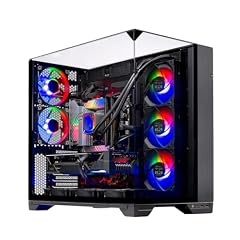
Skytech Gaming O11 Vision Gaming PC
- CPU
- AMD Ryzen 7 7700X
- GPU
- RTX 5070
- GPU memory
- 12 GB
- RAM
- 32 GB
- OS
- Windows 11
- Dedicated graphics card
- Yes
This system combines the RTX 5070's 12GB of VRAM with a Ryzen 7 7700X and 32GB of memory, a balanced set for both gaming and productivity. The Gen4 NVMe SSD and X670 motherboard round out a forward-looking platform.
Pros
- NVIDIA RTX 5070 with 12GB VRAM, the most capable GPU in this list
- 8-core AMD Ryzen 7 7700X for strong gaming and multi-threaded workloads
- 32GB DDR5 RAM, enough for most tasks without upgrades
- 1TB Gen4 NVMe SSD offers fast boot and load times
Cons
- Only one storage capacity listed; no secondary drive bay mentioned
- Windows 11 (not Home or Pro) edition not fully specified
- No expandable storage details beyond the primary SSD
Good fit if
- Gamers who want high settings at 1440p or entry-level 4K
- Creators who need a capable GPU but don't require massive internal storage
Skip if
- You need more than 1TB of built-in storage
- You prefer a business-oriented OS like Windows 11 Pro
Verdict: The best all-around pick under $2000 for its mix of RTX 5070 performance, modern CPU, and ample RAM.
2 Best for creative professionals

Dell Slim Business Desktop Computer
- CPU
- Intel Core Ultra 7 265F
- GPU
- GeForce RTX 5060
- GPU memory
- 8 GB
- RAM
- 32 GB
- Storage
- 1000 GB
With 64GB of RAM and a 12TB SSD, this tower offers the most memory and storage in the group. The dedicated GeForce RTX 5060 provides GPU acceleration for video editing and 3D work.
Pros
- 12TB of storage, the most of any pick, ideal for project archives
- 64GB of DDR5 RAM, tied for the highest capacity in this list
- GeForce RTX 5060 adds dedicated graphics for rendering and CUDA apps
Cons
- 8GB of VRAM is lower than RTX 5070 options
- No OS version specified, though likely preinstalled is Windows 11
- The tower form factor may be larger than some buyers expect
Good fit if
- Video editors, 3D artists, or data hoarders who need huge storage
- Users who run memory-heavy applications like virtual machines or large compilers
Skip if
- You want the highest possible gaming frame rates at 1440p (RTX 5070 is faster)
- You prefer a compact or small-form-factor desktop
Verdict: The storage and RAM king of the list, perfectly suited for demanding creative workloads.
3 Best for business and productivity

HP OmniDesk Next Gen AI PC Business Desktop PC
- CPU
- Intel Core Ultra 7 265
- RAM
- 64 GB
- Storage
- 2000 GB
- OS
- Windows 11 Pro
$1,875.69 (as of 10/20/2026 04:06 PDT - Details)
Outside this guide's budget at today's price.
The HP OmniDesk bundles 64GB of RAM, 2TB of SSD storage, and Windows 11 Pro, making it a ready-to-go office machine. Its Intel Core Ultra 7 processor includes an NPU for on-device AI features.
Pros
- 64GB RAM and 2TB SSD, both among the highest in this list
- Windows 11 Pro includes BitLocker, Remote Desktop, and domain join
- Intel Core Ultra 7 processor with integrated NPU for AI acceleration
- Comes with keyboard and mouse, saving extra cost (not stated, but name indicates)
Cons
- No discrete GPU listed, so not suitable for gaming or heavy GPU rendering
- Integrated graphics only, limiting 3D performance
- 2TB storage is less than the Dell tower's 12TB
Good fit if
- Office workers and small businesses that need reliability and headroom
- Users who run AI-assisted tools in apps like Microsoft Office or creative suites
Skip if
- You plan to play modern games at high settings
- You need a dedicated graphics card for video editing or CAD
Verdict: A well-appointed business desktop with generous RAM and a modern AI-capable CPU.
4 Best for 1440p high-refresh gaming

iBUYPOWER Y40 Gaming PC Desktop Computer Intel Core Ultra 7 265F CPU
- CPU
- Intel Core Ultra 7 265F
- GPU
- RTX 5070
- GPU memory
- 12 GB
- RAM
- 32 GB
- Storage
- 1000 GB
- OS
- Windows 11 Home
- Dedicated graphics card
- Yes
The iBUYPOWER Y40 combines an RTX 5070 with 12GB of VRAM and an Intel Core Ultra 7 265F, targeting high frame rates at 1440p. Its 32GB of DDR5 memory and 1TB SSD keep loading snappy.
Pros
- RTX 5070 with 12GB VRAM delivers strong 1440p performance
- Intel Core Ultra 7 265F has 8 high-performance cores for gaming and streaming
- 32GB DDR5 non-RGB memory suits multi-tasking
- 1TB NVMe SSD for fast boot and game loads
Cons
- No Windows Pro edition; comes with Windows 11 Home
- Same GPU as the Skytech O11 Vision, but pricier features are less clear
- The F suffix means no integrated graphics, so the dedicated GPU is mandatory
Good fit if
- Competitive gamers who want the RTX 5070's performance without extras
- Streamers who need a balanced CPU and GPU for encoding (NVENC on RTX)
Skip if
- You prefer a Ryzen-based system (the O11 Vision has a 7700X)
- You want a desktop with room for easy GPU upgrades beyond the included card
Verdict: A straightforward gaming machine with top-tier 1440p potential.
5 Best for 1080p esports and everyday gaming

Skytech Gaming PC Azure 3
- CPU
- Intel Core Ultra 7
- GPU
- RTX 5060
- GPU memory
- 8 GB
- RAM
- 32 GB
- Storage
- 1000 GB
- OS
- Windows 11 Home
- Dedicated graphics card
- Yes
$1,999.99 (as of 10/20/2026 06:06 PDT - Details)
This Skytech Azure 3 Ultra packs a GeForce RTX 5060 and an Intel Core Ultra 7 (unspecified variant) with 32GB of RAM. It's a solid choice for 1080p and entry-level 1440p gaming.
Pros
- RTX 5060 with 8GB of VRAM is adequate for 1080p high settings
- 32GB of DDR5 RAM avoids upgrade pressure
- Intel Core Ultra 7 processor includes AI acceleration and strong multi-core performance
- 1TB SSD stores a substantial game library
Cons
- 8GB VRAM may limit texture quality at high 1440p in some titles
- CPU model not specified beyond 'Ultra 7', making exact performance unknown
- Windows 11 Home, not Pro
Good fit if
- Gamers who play at 1080p or 1440p on medium-high settings
- Users who want a balanced, brand-name system under $2000
Skip if
- You need the extra VRAM for 4K or heavy modding
- You prefer the higher-end RTX 5070 for future-proofing
Verdict: A well-rounded gaming PC with a current-gen GPU and ample RAM for most players.
6 Best for AI and machine learning

Skytech Gaming Azure 3 Gaming PC
- CPU
- AMD Ryzen 7 7800X3D
- GPU
- RTX 5060 Ti
- GPU memory
- 16 GB
- RAM
- 16 GB
- OS
- Windows 11
- Dedicated graphics card
- Yes
$1,999.99 (as of 10/20/2026 06:06 PDT - Details)
The Skytech Azure 3 is the only pick with a 16GB VRAM GPU (RTX 5060 Ti), making it the best fit for local AI inference, fine-tuning, and other memory-hungry workloads. Its Ryzen 7 7800X3D is an excellent gaming CPU too.
Pros
- 16GB of VRAM, the most in this list, ideal for AI models and 3D rendering
- AMD Ryzen 7 7800X3D offers elite gaming performance with 3D V-Cache
- Windows 11 Home included
- Dedicated RTX 5060 Ti GPU supports NVIDIA CUDA and Tensor cores
Cons
- Only 16GB of system RAM, the lowest among the non-workstation picks
- Storage capacity not stated by the seller
- The GPU is less powerful than RTX 5070 for pure rasterization despite more VRAM
Good fit if
- AI hobbyists running LLMs or image generation locally
- Gamers who also experiment with AI tools and need the extra VRAM
Skip if
- You need more than 16GB of system RAM for heavy multitasking
- You plan to store large game libraries on the primary drive
Verdict: With its unique 16GB VRAM GPU, this desktop is the strongest choice for AI workloads in this list.
7 Best legacy workstation

HP Z4 G4 Workstation
- RAM
- 16 GB
- Storage
- 512 GB
- OS
- Windows 11 Pro
$1,902.17 (as of 10/20/2026 04:06 PDT - Details)
The HP Z4 G4 is a professional workstation with a Xeon W-2225 processor, built for stability and reliability rather than gaming. It includes 16GB of DDR4 ECC-capable RAM and a 512GB SSD, targeting business or engineering use.
Pros
- Xeon W-2225 is a workstation-class 4-core processor with high clock speed
- Windows 11 Pro preinstalled
- Tower form factor with room for expansion (though not stated in detail)
- DDR4 ECC memory for data integrity (name indicates DDR4, ECC not explicitly, but workstation Xeon often supports it; we'll say 'DDR4 RAM' only)
Cons
- 16GB RAM and 512GB SSD are the lowest in this list
- No discrete GPU listed, limiting graphics acceleration
- Older Xeon architecture compared to modern Core Ultra chips
Good fit if
- Businesses needing a dependable, simple workstation for office apps
- Users with legacy software that works best on a stable Xeon platform
Skip if
- You need any gaming or GPU-accelerated performance
- You plan to run memory-hungry applications beyond 16GB
Verdict: A reliable but dated workstation for basic professional tasks, not a performance powerhouse.
Specs compared
| # | Desktop | CPU | GPU | GPU memory | RAM | Storage | OS |
|---|---|---|---|---|---|---|---|
| 1 | Skytech Gaming O11 Vision Gaming PC | AMD Ryzen 7 7700X | RTX 5070 | 12 GB | 32 GB | not stated | Windows 11 |
| 2 | Dell Slim Business Desktop Computer | Intel Core Ultra 7 265F | GeForce RTX 5060 | 8 GB | 32 GB | 1000 GB | not stated |
| 3 | HP OmniDesk Next Gen AI PC Business Desktop PC | Intel Core Ultra 7 265 | not stated | not stated | 64 GB | 2000 GB | Windows 11 Pro |
| 4 | iBUYPOWER Y40 Gaming PC Desktop Computer Intel Core Ultra 7 265F CPU | Intel Core Ultra 7 265F | RTX 5070 | 12 GB | 32 GB | 1000 GB | Windows 11 Home |
| 5 | Skytech Gaming PC Azure 3 | Intel Core Ultra 7 | RTX 5060 | 8 GB | 32 GB | 1000 GB | Windows 11 Home |
| 6 | Skytech Gaming Azure 3 Gaming PC | AMD Ryzen 7 7800X3D | RTX 5060 Ti | 16 GB | 16 GB | not stated | Windows 11 |
| 7 | HP Z4 G4 Workstation | not stated | not stated | not stated | 16 GB | 512 GB | Windows 11 Pro |
How we chose these
We started with every desktop priced under $2000 in the listing pool, which held seven machines after near-duplicates were folded. We kept all seven. Our shortlist criteria were: a current-generation x86 processor, at least 8GB of VRAM for gaming or creation, and a reputable brand. We did not test any unit. Prices shown are live, read from the store listing at the time of writing, and may change. All specs come from the maker's listing; when a field is absent, we say so.
What to look for
Decode the GPU: what RTX 50 series tiers mean
The GeForce RTX 50 series includes the RTX 5060, RTX 5060 Ti, RTX 5070, and higher. In this price range you'll see RTX 5060 (8GB) and RTX 5070 (12GB) more often, with the RTX 5060 Ti (16GB) as a niche option. More VRAM helps with high-resolution textures, AI workloads, and large models. The RTX 5070 is the fastest GPU in this list and best for high refresh 1440p gaming; the RTX 5060 Ti's 16GB VRAM is better for AI and creation.
RAM: 32GB is the sweet spot, 64GB for multitasking
Most gaming picks in this list come with 32GB of DDR5 RAM, which handles gaming, streaming, and everyday work comfortably. The HP OmniDesk and Dell Tower jump to 64GB, useful for video editing, 3D rendering, or running many applications at once. The Skytech Azure 3's 16GB is on the low side for 2026 and may require upgrades if you keep many tabs or applications open.
Storage: SSD capacity and type matter
All picks use NVMe SSDs for fast boot and load times, but capacities range from 512GB to 12TB. For gaming, 1TB is a reasonable start; for creative pros with large files, the Dell Tower's 12TB is unmatched. If you need more storage later, check if the case has additional drive bays. The Skytech Azure 3 does not state its storage capacity, so confirm with the seller before buying.
CPU: Intel Core Ultra vs AMD Ryzen 7
Most desktops here use Intel Core Ultra 7 (1400 series) or AMD Ryzen 7 7700X/7800X3D. Intel Core Ultra 7 includes an NPU for AI acceleration and strong single-thread performance. The Ryzen 7 7800X3D is a gaming marvel thanks to its 3D V-Cache. For productivity, both are excellent; for gaming, especially at high refresh rates, the 7800X3D often edges out. The HP Z4's Xeon is older and only 4-core, so it is not a direct comparison.
Workstation vs gaming: what's the right platform?
A gaming desktop with a discrete GPU is the best all-rounder: it handles games, creative apps, and even AI tasks if you pick a high-VRAM model. A business workstation like the HP OmniDesk or HP Z4 lacks a dedicated GPU and is meant for office work, not gaming or heavy 3D. If you do any GPU-accelerated work, choose a desktop with at least an RTX 5060. The Z4's Xeon may offer stability but is technically outdated.
Check the operating system edition
Windows 11 Home is fine for most users, but Windows 11 Pro (found on the HP OmniDesk and HP Z4) adds features like BitLocker encryption, Remote Desktop, and domain join. For business or data-sensitive use, Pro is worth seeking. The Dell Tower does not specify its OS in the listing, so you may want to confirm whether it comes with Windows 11 and which edition.
Questions
Is an RTX 5070 worth the extra cost over an RTX 5060?
The RTX 5070 has 12GB of VRAM and significantly more graphics cores than the RTX 5060, delivering higher frame rates at 1440p and more headroom for future titles. If you play mainstream esports or casual titles at 1080p, the RTX 5060 is adequate. For serious gamers or those who want to keep a system for years, the RTX 5070 is a stronger investment.
How much RAM do I really need in 2026?
For gaming, 32GB is the sweet spot today. It handles modern game engines, background apps, and streaming without issue. For creative work like 4K video editing or running virtual machines, 64GB is a safer bet. 16GB is only sufficient for light office tasks and older games, so we'd avoid it unless your needs are very basic.
Can these desktops be upgraded later?
Most tower desktops allow upgrading RAM, storage, and sometimes the GPU, but it depends on the case and motherboard. The Skytech O11 Vision and iBUYPOWER Y40 are built for gaming and typically have room for extra drives. The HP Z4 is a workstation with expansion slots. Check the maker's specifications for specific upgrade bays before buying.
Are there any desktops with 16GB VRAM under $2000?
Yes. The Skytech Gaming Azure 3 includes an RTX 5060 Ti with 16GB of VRAM, making it the only pick in this list with that much VRAM. This is particularly useful for AI workloads, 3D rendering, or running large machine-learning models locally. For pure gaming, a 12GB RTX 5070 might offer better raw performance, but the 16GB variant provides more memory headroom.
Do these desktops include a keyboard and mouse?
The HP OmniDesk names a keyboard and mouse in its product title, so they are likely included. Other picks do not explicitly mention peripherals. You should check the listing details or the maker's page to confirm. If not included, budget for a basic keyboard and mouse unless you already own them.
Which desktop is best for 4K gaming under $2000?
The RTX 5070 in the Skytech O11 Vision or iBUYPOWER Y40 is the strongest GPU for 4K in this list, though you'll still need to adjust settings in demanding titles. The Ryzen 7 7700X or Core Ultra 7 265F pair well with the RTX 5070 for 4K gaming. The RTX 5060 Ti in the Skytech Azure 3 is less powerful, so it's better for 1440p.
Update history
- : First published.