
Best Business Desktop PCs in 2026: 15 Picks Compared on Specs
The Dell Pro Slim Plus QBS1250 AI PC (Intel Core Ultra 7 265) leads this selection for its combination of modern AI-ready silicon, 64GB of DDR5 RAM, and a compact small-form-factor chassis that suits most office desks. Every pick comes from a pool of 97 business desktops sold on a major storefront, narrowed by specifications, conditioning, and brand reliability. Prices shown are live from the store listing.
15 picks from 93 desktops that match this guide with a price we can quote today. Prices below are live, each shown with the time it was read.
Quick list
Which one is right for you?
- For remote workers on a tight budget: The compact Acer Aspire tower with a modern Intel Core i5 processor is a low-cost starting point for web-based office tasks. See pick 6
- For IT departments standardizing on one machine: The Dell Pro Slim Plus QBS1250 AI PC with an Intel Core Ultra 7 and 64GB of RAM is a powerful yet compact unit that can serve both standard office and light AI workloads. See pick 1
- For data-heavy financial modeling: The WOWPC customized Dell tower packs 64GB of DDR5 RAM and 4TB of storage, enough for large spreadsheets and multiple virtual machines. See pick 8
- For a clutter-free reception or executive desk: The ASUS 27-inch all-in-one touchscreen PC combines a 1080p display, a Ryzen AI processor, and a full PC in one unit. See pick 9
All 15 picks in detail
1 Best overall

Dell Pro Slim Plus QBS1250 AI PC
- CPU
- Intel Core Ultra 7 265
- RAM
- 64 GB
- Storage
- 1000 GB
- OS
- Windows 11 Pro
$1,499.99 (as of 10/20/2026 17:06 PDT - Details)
The Dell Pro Slim Plus combines the latest Intel Core Ultra 7 265 processor with 64GB of DDR5 RAM and a 1TB SSD in a slim small-form-factor chassis. It has the highest core count among picks in this list and sets the benchmark for a compact business desktop in 2026.
Pros
- Intel Core Ultra 7 265 processor with 20 cores
- 64GB DDR5 RAM, double the amount of most picks
- Small form factor fits under a monitor
- Successor to the Dell OptiPlex 7020 Plus SFF line
Cons
- Only 1TB of storage for a workstation-class machine
- No discrete GPU listed
- Reseller configuration, not directly from Dell
Good fit if
- IT buyers who need one powerful, compact model to deploy across the office
- Users running virtual machines, large databases, or AI-assisted productivity apps
Skip if
- You need internal 3.5-inch expansion bays (the SFF case has limited room)
- Your hardware budget cannot stretch to the top tier of this list
Verdict: A future-proof business desktop with outstanding CPU and memory for a small chassis.
2 Best storage capacity

Lenovo SFF Business Desktop Computer
- RAM
- 32 GB
- Storage
- 2000 GB
- OS
- Windows 11 Pro
$1,099.99 (as of 10/20/2026 06:05 PDT - Details)
This Lenovo SFF desktop has a 2TB SSD, double the storage of most other picks in this list. Combined with 32GB of DDR5 RAM, it is well suited for a user who keeps large local files such as project archives.
Pros
- 2TB SSD, the most storage among SFF picks
- 32GB DDR5 RAM
- Windows 11 Pro
- Lenovo brand with standard warranty
Cons
- CPU model is not stated by the seller
- No discrete GPU
- Only one storage drive listed
Good fit if
- Office workers who store years of email, documents, and project files locally
- Small offices with no NAS and a need for local backup space
Skip if
- You need a dedicated graphics card for CAD or heavy video
- You prefer a tiny form factor like a ThinkCentre Tiny over an SFF tower
Verdict: A roomy SFF desktop that keeps local file storage in one place.
3 Best AI-ready SFF desktop

HP OmniDesk M03 Business AI Desktop PC Intel Ultra 7-265
- CPU
- Intel Core Ultra 7
- RAM
- 64 GB
- Storage
- 2000 GB
- OS
- Windows 11 Pro
$879.99 (as of 10/20/2026 04:06 PDT - Details)
The HP OmniDesk M03 pairs an Intel Core Ultra 7 processor with 64GB DDR5 RAM and a 2TB SSD, giving it an NPU for on-device AI and enough memory for demanding office workflows.
Pros
- Intel Core Ultra 7 processor with integrated NPU
- 64GB DDR5 RAM
- 2TB SSD
- Compact SFF chassis
Cons
- CPU model not fully specified (Ultra 7, no suffix)
- Reseller configuration
- No stated vPro or manageability features
Good fit if
- Small businesses wanting to experiment with Copilot+ features
- Users running large spreadsheets or databases alongside AI assistants
Skip if
- Your IT policy requires vPro or directly sourced hardware
- You need a tiny PC that can be mounted behind a monitor
Verdict: A high-memory AI PC in a compact office-ready chassis.
4 Best tiny PC for limited desks

Lenovo ThinkCentre Tiny M70q Gen 6
- RAM
- 16 GB
- Storage
- 512 GB
- OS
- Windows 11 Pro
$879.95 (as of 10/20/2026 06:05 PDT - Details)
The ThinkCentre Tiny M70q Gen 6 measures about 7 inches square and can be mounted behind a monitor. It has 16GB of DDR5 RAM and a 512GB NVMe SSD, enough for typical office apps.
Pros
- Ultra-compact tiny form factor (VESA mountable)
- 16GB DDR5 RAM
- 512GB NVMe SSD
- Intel Core Ultra S3 processor
Cons
- Only 16GB of RAM
- No discrete GPU
- CPU is a low-power SKU (T-series equivalent)
Good fit if
- Hot-desk or call-center environments where desk space is at a premium
- Users who only need web apps, Office, and a secure OS
Skip if
- You need 32GB of RAM for heavy multitasking
- You want an all-in-one with an integrated display
Verdict: The smallest desktop in this selection, ideal for space-constrained deployments.
5 Best entry-level SFF with 32GB RAM
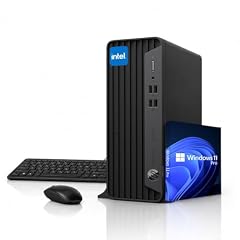
HP ProDesk SFF Business Desktop Computer
- CPU
- Intel Celeron G5905
- RAM
- 32 GB
- Storage
- 1000 GB
- OS
- Windows 11 Pro
$859.99 (as of 10/20/2026 04:06 PDT - Details)
The HP ProDesk SFF pairs 32GB of RAM with a 1TB SSD and a compact small-form-factor chassis. The Celeron processor is entry-level, but the high memory capacity makes it suitable for light multitasking in single-application office roles.
Pros
- 32GB DDR4 RAM, double the base of many budget picks
- 1TB SSD
- Compact SFF form factor
- HP brand with Windows 11 Pro
Cons
- Intel Celeron G5905 processor is entry-level
- No stated discrete GPU
- Older Celeron architecture limits multitasking
Good fit if
- Budget-minded offices running a single application like a web-based ERP
- Reception or kiosk roles that need memory for browser tabs but not CPU speed
Skip if
- You run CPU-intensive tasks like compiling or video rendering
- You need a modern CPU with an NPU for AI features
Verdict: A simple, high-memory desktop for light-duty office roles.
6 Best compact tower for basic office

Acer Aspire TC-1775 Desktop Computer Intel i5-14400
- CPU
- Intel Core i5-14400
- RAM
- 8 GB
- Storage
- 512 GB
- OS
- Windows 11 Pro
The Acer Aspire TC-1775 has a modern Intel Core i5-14400 processor and a 512GB SSD in a traditional tower. It is a straightforward starting point for offices that expect to expand memory or add a drive later.
Pros
- Intel Core i5-14400 processor
- 512GB NVMe SSD
- Windows 11 Pro
- Traditional tower chassis allows GPU and drive upgrades
Cons
- Only 8GB DDR5 RAM, which may require an upgrade for multitasking
- No discrete GPU
- Budget configuration may lack enterprise manageability features
Good fit if
- Businesses buying in bulk for basic tasks like email and Office
- Users who plan to add RAM themselves
Skip if
- You need 16GB or more out of the box
- Your office requires a small-form-factor or all-in-one setup
Verdict: A low-cost tower with a solid modern CPU; plan to add RAM for a comfortable experience.
7 Best balanced SFF for general office
Lenovo SFF Business Desktop Computer
- RAM
- 16 GB
- Storage
- 1000 GB
- OS
- Windows 11 Pro
$699.99 (as of 10/20/2026 06:05 PDT - Details)
This Lenovo SFF desktop gives you 16GB of DDR5 RAM and a 1TB SSD, hitting the most commonly requested configuration for general office work in a compact chassis.
Pros
- 16GB DDR5 RAM
- 1TB SSD
- Compact SFF chassis
- Lenovo reliability and standard warranty
Cons
- CPU model not stated by the seller
- No discrete GPU
- Only 16GB of RAM, which cannot be doubled without replacing the DIMMs
Good fit if
- Office workers who use Word, Excel, Teams, and browser tabs daily
- IT managers wanting a standard-issue machine with a known brand
Skip if
- You need 32GB or more for data analysis or VMs
- You prefer a tiny PC that can be mounted behind a monitor
Verdict: A straightforward, reliable SFF desktop for everyday office applications.
8 Best workstation-level tower

WOWPC Customized Dell Business Desktop Tower
- CPU
- Intel Core i9-12900K
- RAM
- 64 GB
- Storage
- 4000 GB
- OS
- Windows 11 Pro
$1,099.99 (as of 10/20/2026 06:06 PDT - Details)
The WOWPC custom Dell tower packs an Intel Core i9-12900K (16 cores), 64GB DDR5 RAM, and 4TB of SSD storage. It is the only pick with 4TB of storage and one of only two picks with a 16-core desktop CPU.
Pros
- 64GB DDR5 RAM
- 4TB SSD storage (largest in the list)
- Intel Core i9-12900K, a 16-core high-performance CPU
- Traditional tower has room for expansion
Cons
- Reseller config (WOWPC), not a factory Dell model
- No discrete GPU included
- Older generation (12th gen) compared to Core Ultra machines
Good fit if
- Professionals running virtual machines, large databases, or local servers
- Power users who need maximum RAM and storage in a desktop tower
Skip if
- You need a small or quiet office PC
- Your work is entirely browser-based (this setup is overkill)
Verdict: A high-capacity tower for demanding business applications and multitasking.
9 Best all-in-one for a clean desk

ASUS All in One 27" FHD Touchscreen PC
- CPU
- AMD Ryzen AI 5 330
- RAM
- 16 GB
- Storage
- 1000 GB
- OS
- Windows 11 Pro
$1,199.99 (as of 10/20/2026 16:06 PDT - Details)
The ASUS all-in-one integrates a 27-inch 1080p touchscreen, an AMD Ryzen AI 5 330 processor, 16GB of RAM, and a 1TB SSD into a single unit. It requires no separate monitor or tower.
Pros
- 27-inch FHD touchscreen display included
- AMD Ryzen AI 5 330 with NPU for AI features
- 16GB DDR5 RAM, 1TB SSD
- All-in-one saves desk space
Cons
- Only 16GB of RAM; not user-upgradable in many all-in-ones
- No discrete GPU
- Screen resolution is 1080p, not 4K
Good fit if
- Reception desks, executive offices, or retail stations where appearance matters
- Users who want a single power cord and no box under the desk
Skip if
- You already own a monitor and want a tower instead
- You need 32GB of RAM or a dedicated GPU
Verdict: A sleek, space-saving all-in-one with touch input and AI-capable hardware.
10 Best AMD compact desktop

Lenovo ThinkCentre 55s Gen 6 SFF AMD Ryzen 7 250
- CPU
- AMD Ryzen 7 250
- GPU
- Radeon 780M
- RAM
- 16 GB
- Storage
- 512 GB
- OS
- Windows 11 Pro
$999.95 (as of 10/20/2026 06:05 PDT - Details)
This ThinkCentre 55s Gen 6 SFF has an AMD Ryzen 7 250 processor, 16GB DDR5 RAM, and a 512GB SSD. It is the only pick with a modern AMD Ryzen 7 chip in a compact business chassis.
Pros
- AMD Ryzen 7 250 (up to 5.1 GHz)
- 16GB DDR5 RAM
- Compact SFF design
- Lenovo business support
Cons
- Only 512GB of storage
- No discrete GPU
- 16GB of RAM may be insufficient for heavy multitasking
Good fit if
- Users who prefer AMD processors for their efficiency or compatibility
- Office workers in a standard productivity environment
Skip if
- You need more than 512GB of storage out of the box
- You require a tower with internal expansion slots
Verdict: A well-built small-form-factor desktop powered by AMD's latest Ryzen 7.
11 Best touchscreen all-in-one for Copilot+

HP 27" All in One Desktop Computer Touchscreen Copilot PC 16GB DDR5 1TB
- CPU
- AMD Ryzen AI 7 350
- RAM
- 16 GB
- Storage
- 1000 GB
- OS
- Windows 11 Pro
$1,499.99 (as of 10/20/2026 04:07 PDT - Details) Typical price: $1,699.98, 12% off
The HP 27-inch all-in-one includes a touchscreen display, an AMD Ryzen AI 7 350 processor (with NPU), 16GB DDR5 RAM, and a 1TB SSD, making it a Copilot+ PC out of the box.
Pros
- 27-inch touchscreen display
- AMD Ryzen AI 7 350 with NPU (40+ TOPS, Copilot+ capable)
- 16GB DDR5 RAM, 1TB SSD
- All-in-one saves space
Cons
- 16GB of RAM is not upgradeable in many all-in-one designs
- No discrete GPU
- Integrated display cannot be swapped like a separate monitor
Good fit if
- Executives or managers who want the latest Copilot+ AI features in a polished package
- Users in customer-facing roles who benefit from touch input
Skip if
- You need more than 16GB of RAM
- You prefer a separate monitor setup for better future upgradeability
Verdict: A touchscreen all-in-one with full Copilot+ PC hardware support.
12 Best Dell mid-range SFF

Dell Pro Business Desktop Computer
- CPU
- Intel Core i5-14500
- RAM
- 16 GB
- Storage
- 512 GB
- OS
- Windows 11 Pro
$899.99 (as of 10/20/2026 17:06 PDT - Details)
This Dell Pro desktop uses an Intel Core i5-14500 (14 cores), 16GB of RAM, and a 512GB SSD. It is a new OptiPlex version with a modern CPU and the trusted Dell commercial lineup.
Pros
- Intel Core i5-14500, a 14-core modern CPU
- 16GB DDR5 RAM
- 512GB SSD
- Dell brand and commercial Pro line hardware
Cons
- Only 16GB of RAM
- 512GB SSD is modest for modern office storage
- No discrete GPU
Good fit if
- IT buyers who standardize on Dell's commercial line
- Users who need solid CPU performance for Office and multitasking
Skip if
- You need 32GB of RAM or a dedicated GPU
- You want a tiny form factor like the Dell Pro Micro
Verdict: A reliable Dell mid-range SFF with a strong CPU for standard business tasks.
13 Best AI-ready tower

Lenovo IdeaCentre Tower Gen 10 AI Desktop Computer
- CPU
- Intel Core Ultra 5 225
- RAM
- 16 GB
- Storage
- 512 GB
- OS
- Windows 11 Pro
The Lenovo IdeaCentre Tower Gen 10 includes the Intel Core Ultra 5 225 with an NPU, 16GB DDR5 RAM, and a 512GB SSD, giving it AI-capable hardware in a traditional tower format.
Pros
- Intel Core Ultra 5 225 with NPU for AI acceleration
- 16GB DDR5 RAM
- Tower format allows future expansion
- Lenovo brand with standard support
Cons
- Only 512GB of storage
- 16GB of RAM may need an upgrade for heavy workloads
- No discrete GPU
Good fit if
- Businesses wanting to test AI productivity tools without a large investment
- Users who need a traditional tower for easy internal upgrades
Skip if
- You need 32GB or more out of the box
- You prefer a small-form-factor or tiny desktop
Verdict: An AI-ready tower with a modern NPU for business computing.
14 Best HP SFF for standard office

HP ProDesk 400 G9 SFF Business Desktop Computer
- CPU
- Intel Core i5-13500
- RAM
- 16 GB
- Storage
- 512 GB
- OS
- Windows 11 Pro
$849.99 (as of 10/20/2026 04:06 PDT - Details)
The HP ProDesk 400 G9 SFF has an Intel Core i5-13500, 16GB RAM, and a 512GB PCIe SSD. It comes from HP's commercial ProDesk line with a solid track record in business deployments.
Pros
- Intel Core i5-13500 processor
- 16GB DDR5 RAM
- 512GB PCIe SSD
- HP ProDesk commercial SFF platform
Cons
- Only 16GB of RAM
- 512GB SSD is entry-level for storage
- No discrete GPU
Good fit if
- Office deployments that use HP's manageability and imaging tools
- Users who need a dependable SFF for daily Office 365 and web apps
Skip if
- You need more than 512GB of storage
- You want an all-in-one or tower for easier upgrades
Verdict: A solid HP ProDesk SFF with a capable i5 CPU for standard office work.
15 Best AMD Ryzen 7 SFF desktop

Lenovo ThinkCentre Neo 55s SFF Business AI Desktop
- CPU
- AMD Ryzen 7 250
- RAM
- 16 GB
- Storage
- 512 GB
- OS
- Windows 11 Pro
The Lenovo ThinkCentre Neo 55s SFF offers an AMD Ryzen 7 250 (up to 5.1 GHz), 16GB DDR5, and a 512GB SSD in Lenovo's commercial ThinkCentre lineup.
Pros
- AMD Ryzen 7 250, a modern 8-core processor
- 16GB DDR5 RAM
- 512GB SSD
- Lenovo business support and standard warranty
Cons
- Only 16GB of RAM
- 512GB SSD may be tight for larger file storage
- No discrete GPU
Good fit if
- Cost-conscious offices that want AMD Ryzen 7 performance
- Users in a standard productivity role who want a recent CPU
Skip if
- You need 32GB of RAM for heavy multitasking
- You prefer a tiny form factor like the ThinkCentre Tiny
Verdict: An affordable AMD SFF desktop with a strong CPU for everyday business tasks.
Specs compared
| # | Desktop | CPU | GPU | GPU memory | RAM | Storage | OS |
|---|---|---|---|---|---|---|---|
| 1 | Dell Pro Slim Plus QBS1250 AI PC | Intel Core Ultra 7 265 | not stated | not stated | 64 GB | 1000 GB | Windows 11 Pro |
| 2 | Lenovo SFF Business Desktop Computer | not stated | not stated | not stated | 32 GB | 2000 GB | Windows 11 Pro |
| 3 | HP OmniDesk M03 Business AI Desktop PC Intel Ultra 7-265 | Intel Core Ultra 7 | not stated | not stated | 64 GB | 2000 GB | Windows 11 Pro |
| 4 | Lenovo ThinkCentre Tiny M70q Gen 6 | not stated | not stated | not stated | 16 GB | 512 GB | Windows 11 Pro |
| 5 | HP ProDesk SFF Business Desktop Computer | Intel Celeron G5905 | not stated | not stated | 32 GB | 1000 GB | Windows 11 Pro |
| 6 | Acer Aspire TC-1775 Desktop Computer Intel i5-14400 | Intel Core i5-14400 | not stated | not stated | 8 GB | 512 GB | Windows 11 Pro |
| 7 | Lenovo SFF Business Desktop Computer | not stated | not stated | not stated | 16 GB | 1000 GB | Windows 11 Pro |
| 8 | WOWPC Customized Dell Business Desktop Tower | Intel Core i9-12900K | not stated | not stated | 64 GB | 4000 GB | Windows 11 Pro |
| 9 | ASUS All in One 27" FHD Touchscreen PC | AMD Ryzen AI 5 330 | not stated | not stated | 16 GB | 1000 GB | Windows 11 Pro |
| 10 | Lenovo ThinkCentre 55s Gen 6 SFF AMD Ryzen 7 250 | AMD Ryzen 7 250 | Radeon 780M | not stated | 16 GB | 512 GB | Windows 11 Pro |
| 11 | HP 27" All in One Desktop Computer Touchscreen Copilot PC 16GB DDR5 1TB | AMD Ryzen AI 7 350 | not stated | not stated | 16 GB | 1000 GB | Windows 11 Pro |
| 12 | Dell Pro Business Desktop Computer | Intel Core i5-14500 | not stated | not stated | 16 GB | 512 GB | Windows 11 Pro |
| 13 | Lenovo IdeaCentre Tower Gen 10 AI Desktop Computer | Intel Core Ultra 5 225 | not stated | not stated | 16 GB | 512 GB | Windows 11 Pro |
| 14 | HP ProDesk 400 G9 SFF Business Desktop Computer | Intel Core i5-13500 | not stated | not stated | 16 GB | 512 GB | Windows 11 Pro |
| 15 | Lenovo ThinkCentre Neo 55s SFF Business AI Desktop | AMD Ryzen 7 250 | not stated | not stated | 16 GB | 512 GB | Windows 11 Pro |
How we chose these
From a pool of 97 business-class desktop PCs listed on a single storefront, we applied a set of hard criteria. We kept only models sold in new condition (excluding renewed and refurbished units) and from established brands with ongoing support such as Dell, HP, Lenovo, ASUS, and Acer. Each desktop must run Windows 11 Pro, the standard OS for business environments. We then shortlisted 15 units that cover the range of likely office needs: compact tiny PCs for limited-space desks, small-form-factor towers for expandability, full towers for maximum internal room, and all-in-ones for integrated simplicity. The picks span processor families from Intel Celeron and Core i5 to Core Ultra 7 and AMD Ryzen 7, with RAM from 8GB to 64GB and storage from 256GB to 4TB. No unit was tested by the site; all specs are as stated by the seller or the maker.
What to look for
CPU: what the generation and brand mean for your workflow
Business desktop CPUs fall into two families: Intel Core (including the newer Core Ultra) and AMD Ryzen. The generation number (e.g., i5-14400 for 14th gen, Core Ultra 7 for the latest architecture) tells you how recent the design is. Newer generations generally offer better single-threaded speed, integrated graphics, and power efficiency. For standard office tasks (Office, web, email), a Core i5 or Ryzen 5 from the last two generations is sufficient. For heavier workloads like compiling code, handling large databases, or running virtual machines, step up to a Core i7/i9 or Ryzen 7. The NPU inside Intel Core Ultra and AMD Ryzen AI processors enables on-device AI features in Windows 11 (Copilot+), which may become relevant as more productivity apps integrate AI.
RAM: how much is enough for business software
Windows 11 Pro runs smoothly on 8GB of RAM for single-application use, but most offices find 16GB comfortable for multitasking across a browser, email, Office apps, and Teams. Heavy users dealing with large spreadsheets, virtual machines, or data analysis tools should consider 32GB or 64GB. All desktops in this selection use DDR4 or DDR5 memory. DDR5 offers higher bandwidth and lower power consumption, but the difference is small for typical office tasks. Check how many memory slots the desktop has and whether the RAM is soldered (common in tiny and all-in-one systems) or user-replaceable (most SFF and tower desktops).
Storage: SSD type and capacity for daily use
All modern business desktops use solid-state drives (SSDs). NVMe SSDs (like PCIe Gen 4 or Gen 5) are faster than SATA SSDs but both are much faster than old spinning hard drives. A 256GB drive is enough for the operating system and a few applications, but for most offices a 512GB or 1TB drive is the practical starting point. If your work involves keeping large files locally (project archives, CAD files, video), look for models with 1TB or more. Some desktops also have a second bay for adding another drive, especially tower and SFF models. Check the pool entry for the drive capacity; if it says 1TB HDD+256GB SSD, treat the SSD as the boot drive and the HDD as slow bulk storage.
Form factor: tiny, SFF, tower, or all-in-one
Business desktops come in four common shapes. Tiny or micro PCs (like the Lenovo ThinkCentre Tiny) are about the size of a paperback book and can be mounted behind a monitor. They save desk space but usually have soldered RAM and limited ports. Small form factor (SFF) towers are roughly the size of a shoebox, offering a few expansion slots and replaceable components. Full towers are larger, with room for multiple drives, full-size GPUs, and aftermarket cooling. All-in-one PCs integrate the screen and computer into a single unit, saving even more desk space but making upgrades harder. Choose based on your desk layout and whether you anticipate future hardware changes.
Operating system: Windows 11 Pro features for business
Every pick in this list ships with Windows 11 Pro. Pro edition differs from Home edition in key areas for business: it supports BitLocker device encryption, Remote Desktop, Hyper-V virtualization, Group Policy management, and joining a domain or Azure Active Directory. If your office uses Microsoft Intune or Configuration Manager for device management, Pro is required. Windows 11 Pro also includes safeguards like Windows Defender for Business and Windows Information Protection. For most work environments, the Pro edition is the correct choice, and you should verify that all your vertical software is compatible with Windows 11 (most business apps are).
Manageability and security features in business desktops
Commercial business desktops often include features that consumer models lack. Intel vPro technology provides hardware-level remote management and security, letting IT teams diagnose and repair systems even when the OS is down. Dell OptiPlex, HP ProDesk, and Lenovo ThinkCentre lines are built for enterprise manageability. Trusted Platform Module (TPM) 2.0 is required by Windows 11 and is present on all machines in this pool. If your organization uses disk encryption (BitLocker), remote wipes, or BIOS-level lockouts, prioritize desktops that advertise vPro or similar AMT technology. The pool entry will list vPro when the seller states it; if missing, assume standard TPM-only security.
Questions
What is the difference between a business desktop and a consumer desktop?
Business desktops typically ship with Windows 11 Pro, offer longer support lifecycles, and include manageability features like vPro or AMT that allow IT departments to update and troubleshoot remotely. They often have more consistent hardware configurations, better warranty options (3 years on-site is common), and undergo more rigorous certification for enterprise software. Consumer desktops may lack these features and usually come with Windows 11 Home.
How much RAM do I need for a business desktop in 2026?
For day-to-day office tasks (email, web browsing, Office 365, video calls), 16GB is the comfortable minimum in 2026. If you run multiple virtual machines, handle large datasets, or use memory-heavy applications like Microsoft Dynamics or Power BI, start at 32GB. 8GB is feasible for a single-role machine like a kiosk or a dedicated workstation running one app, but is too limiting for multitasking.
Should I buy a desktop with a dedicated GPU for business?
Most business tasks do not require a discrete graphics card. The integrated GPU inside modern Intel and AMD processors supports up to three 4K monitors and handles video playback and basic graphics acceleration. A dedicated GPU is necessary only for 3D CAD, video editing, rendering, machine learning, or if you need to drive more than three high-resolution displays. If your work does not involve these tasks, integrated graphics will serve you well.
What does Intel vPro mean for my business desktop?
Intel vPro is a set of hardware-based security and manageability features built into select Intel processors. It includes Intel AMT (Active Management Technology) for remote monitoring, troubleshooting, and repair even when the PC is powered off or the OS is unresponsive. vPro also enables hardware-level threat detection and identity protection. It is most useful in organizations with an IT team that needs to manage dozens or hundreds of systems remotely.
Can I upgrade the RAM or storage in a business desktop later?
It depends on the form factor. Tower and small-form-factor (SFF) desktops usually have accessible DIMM slots and drive bays, allowing you to add or replace RAM and SSDs. Tiny PCs and many all-in-ones have soldered or very limited upgrade options. Before buying, check the product description or the maker's maintenance documentation to see if memory and storage are socketed or soldered. Most picks in this list are SFF or tower models with some upgrade flexibility.
What is a Copilot+ PC and do I need one for business?
A Copilot+ PC is a Windows 11 computer with a dedicated neural processing unit (NPU) capable of at least 40 trillion operations per second (TOPS). This hardware enables faster on-device AI features like real-time captions, Windows Studio Effects, and improved search. For businesses, Copilot+ PCs may become relevant as more productivity apps (Office, Teams, Adobe) integrate AI tasks that run locally rather than in the cloud. If you want to be ready for these features, choose a pick listed as AI- or Copilot+ capable, such as those with an Intel Core Ultra or AMD Ryzen AI processor.
Update history
- : First published.