
Best Desktop PCs for AI and Machine Learning: 15 Picks
The HP OMEN MAX 45L 5090, with its 32GB RTX 5090 and 64GB of RAM, takes the top spot for serious AI training at the desktop level. We also cover workstations with Ada-generation GPUs, Threadripper CPUs, and high-memory configurations, all chosen from a pool of 87 desktop PCs that match the AI use case tag on the catalog.
15 picks from 81 desktops that match this guide with a price we can quote today. Prices below are live, each shown with the time it was read.
Quick list
Which one is right for you?
- For training large models on a budget: Pick a desktop with at least 16 GB of GPU VRAM and 32 GB of RAM. The HP OMEN MAX 45L 5090 offers 32 GB of VRAM for the price. See pick 1
- For inference and fine-tuning with lots of CPU cores: Consider a workstation with an AMD Threadripper CPU and a pro GPU like the RTX 4000 Ada. The Lenovo ThinkStation P3 with 64 GB of RAM is a solid choice. See pick 3
- For general ML experimentation and learning: An entry-level RTX 5070 or 5060 Ti desktop with 16 GB of VRAM is enough to start. The Skytech Gaming King 95 with the RTX 5070 Ti fits that bill. See pick 10
All 15 picks in detail
1 Best overall for AI training

HP OMEN MAX 45L 5090 Gaming Desktop PC AMD Ryzen 9 9900X3D 64GB/2TB
- CPU
- AMD Ryzen 9 9900X3D
- GPU
- GeForce RTX 5090
- GPU memory
- 32 GB
- RAM
- 64 GB
- Storage
- 2000 GB
- OS
- Windows 11 Pro
The HP OMEN MAX 45L 5090 pairs a GeForce RTX 5090 with 32 GB of GDDR7 VRAM and an AMD Ryzen 9 9900X3D 12-core CPU. This combination handles large batch sizes and model training comfortably. 64 GB of DDR5 RAM and a 2 TB SSD mean you can store datasets alongside the system.
Pros
- GeForce RTX 5090 with 32 GB GDDR7 VRAM
- AMD Ryzen 9 9900X3D 12-core processor
- 64 GB DDR5 RAM and 2 TB SSD
- Windows 11 Pro included
Cons
- Only 64 GB of RAM for a high-end AI workstation; some competitors offer 128 GB or more
- Motherboard and power supply specifications not stated by the seller
Good fit if
- AI researchers training moderately sized transformer models
- Users who need a single desktop for both training and inference
Skip if
- You require more than 64 GB of system RAM for very large models
- You prefer a professional Ada-generation GPU with ECC memory support
Verdict: An excellent balance of GPU VRAM, CPU performance, and RAM for serious desktop AI workloads.
2 Best high-memory AI workstation

Sentinel Wood RTX 5090
- CPU
- Intel Core Ultra 7 270K
- GPU
- RTX 5090
- GPU memory
- 32 GB
- RAM
- 96 GB
- Storage
- 8000 GB
- OS
- Windows 11 Pro
- Dedicated graphics card
- Yes
$11,049.99 (as of 10/20/2026 06:06 PDT - Details)
128 GB of DDR5 RAM and 8 TB of NVMe storage make this Sentinel build ideal for loading massive datasets and running multiple experiments. The RTX 5090 with 32 GB of VRAM handles large batch sizes, and the 24-core Intel Core Ultra 7 270K provides ample compute for data preprocessing.
Pros
- 128 GB DDR5 RAM, the highest in this list
- 8 TB of SSD storage across two drives
- GeForce RTX 5090 with 32 GB VRAM
- Windows 11 Pro included
Cons
- Storage is split into two 4 TB drives; larger single-volume options exist
- Motherboard chipset not stated by the seller
Good fit if
- Data scientists working with terabyte-scale datasets
- Developers running multiple Docker containers for ML experimentation
Skip if
- Your budget is limited; this is a premium configuration
- You need a compact desktop for a small desk
Verdict: Built for memory-intensive AI pipelines with a generous RAM and storage allowance.
3 Best professional workstation for AI

Lenovo ThinkStation P3 Tower Workstation Intel Ultra 9 285 vPro 64GB
- CPU
- Intel Core Ultra 9 285
- GPU
- RTX 4000 Ada
- GPU memory
- 20 GB
- RAM
- 64 GB
- Storage
- 1000 GB
- OS
- Windows 11 Pro
- Dedicated graphics card
- Yes
$4,999.00 (as of 10/20/2026 06:05 PDT - Details)
The Lenovo ThinkStation P3 offers an NVIDIA RTX 4000 Ada with 20 GB of ECC VRAM and a 64 GB DDR5 system RAM, all in a reliable tower from a major workstation vendor. The Intel Core Ultra 9 285 vPro processor supports vPro for remote management.
Pros
- NVIDIA RTX 4000 Ada with 20 GB GDDR6 ECC VRAM
- 64 GB DDR5 RAM
- Intel Core Ultra 9 285 with vPro
- Windows 11 Pro and ISV certifications from Lenovo
Cons
- 1 TB SSD is small for large datasets
- Pro-grade GPU may have lower peak TFLOPS than a GeForce RTX 5080 for some workloads
Good fit if
- Professionals who require ISV certifications for software compatibility
- Users who need vPro for remote management in a corporate environment
Skip if
- You want the highest raw compute for training; a GeForce card may be faster
- 1 TB of storage is too little for your projects
Verdict: A certified workstation with ECC memory and pro GPU support for mission-critical AI projects.
4 Best balanced build for AI and gaming

msi Aegis ZS2 Gaming Desktop PC
- CPU
- AMD Ryzen 9 9900X
- GPU
- GeForce RTX 5080
- GPU memory
- 16 GB
- RAM
- 64 GB
- Storage
- 2000 GB
- OS
- Windows 11 Home
- Dedicated graphics card
- Yes
The MSI Aegis ZS2 combines an RTX 5080 with 16 GB VRAM, 64 GB DDR5 RAM, and a 2 TB SSD. The AMD Ryzen 9 9900X 12-core CPU handles data loading and preprocessing while the GPU trains models.
Pros
- GeForce RTX 5080 with 16 GB GDDR7 VRAM
- 64 GB DDR5 RAM
- 2 TB NVMe SSD
- 12-core AMD Ryzen 9 9900X CPU
Cons
- Windows 11 Home instead of Pro (no BitLocker or Hyper-V by default)
- GPU VRAM is limited to 16 GB compared to 5090 models
Good fit if
- Developers who also want to play AAA games on the same machine
- Users who need a strong CPU for data pipelines combined with a fast GPU
Skip if
- You need more than 16 GB of VRAM for very large models
- You require Windows 11 Pro for Hyper-V or BitLocker
Verdict: A versatile desktop that balances gaming performance with AI capability.
5 Best for large dataset work

Panorama XL RTX 5080 16GB
- CPU
- AMD Ryzen 9 9950X3D
- GPU
- RTX 5080
- GPU memory
- 16 GB
- RAM
- 96 GB
- Storage
- 4000 GB
- OS
- Windows 11 Pro
- Dedicated graphics card
- Yes
$6,099.99 (as of 10/20/2026 06:06 PDT - Details)
96 GB of DDR5 RAM is the second-highest in this list, and the 4 TB NVMe SSD provides plenty of storage. The RTX 5080 with 16 GB of VRAM and a 16-core AMD Ryzen 9 9950X3D CPU make this a strong contender for complex AI pipelines.
Pros
- 96 GB DDR5 RAM
- 4 TB Gen4 NVMe SSD
- 16-core AMD Ryzen 9 9950X3D CPU
- GeForce RTX 5080 with 16 GB VRAM
Cons
- GPU VRAM is limited to 16 GB for a workstation at this price point
- GPU is not a pro-class card with ECC memory
Good fit if
- Data analysts working with large dataframes in Python or R
- Researchers who run multiple training sessions with different datasets simultaneously
Skip if
- You prefer a professional GPU with ECC memory
- Your budget is under 4000
Verdict: High system RAM and storage make this desktop ideal for data-heavy AI workflows.
6 Best for multitasking with AI workloads
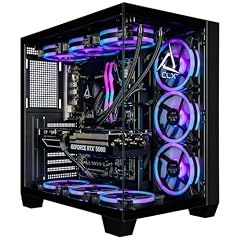
CLX Set Gaming PC
- CPU
- Intel Core Ultra 7 270K
- GPU
- GeForce RTX 5080
- GPU memory
- 16 GB
- RAM
- 64 GB
- Storage
- 2000 GB
- OS
- Windows 11 Home
- Dedicated graphics card
- Yes
$4,299.99 (as of 10/20/2026 16:08 PDT - Details)
64 GB DDR5 RAM and 2 TB SSD are paired with an RTX 5080 (16 GB VRAM) and an Intel Core Ultra 7 270K CPU. The CLX Set is a well-rounded build for running AI experiments alongside other development tools.
Pros
- 64 GB DDR5 RAM
- 2 TB NVMe SSD
- GeForce RTX 5080 with 16 GB GDDR7 VRAM
- Intel Core Ultra 7 270K CPU
Cons
- Windows 11 Home instead of Pro
- Motherboard chipset not stated by the seller
Good fit if
- Developers who need to run multiple virtual machines or containers
- Users who want a powerful desktop for both AI and general software development
Skip if
- You require Windows 11 Pro features like Hyper-V
- You need more than 2 TB of local storage
Verdict: A configurable desktop from CLX that offers strong specs for AI multitasking.
7 Best liquid-cooled AI desktop

Liquid cooling on the Intel Core i9-14900KF helps maintain performance during long training runs. The RTX 5080 with 16 GB VRAM and 32 GB of RAM provide solid compute, and the cooling system aims to keep noise in check.
Pros
- Liquid cooling for CPU (Intel Core i9-14900KF)
- GeForce RTX 5080 with 16 GB GDDR7 VRAM
- 2 TB SSD
- Corsair build quality with iCUE software
Cons
- RAM size not stated by the seller (appears as 32 GB from the listing name)
- GPU VRAM is 16 GB; higher VRAM options exist
Good fit if
- Users who run long training sessions and want thermal stability
- Enthusiasts who prefer a pre-built with liquid cooling from a known brand
Skip if
- You need more than 32 GB of RAM for your projects
- You prefer a GPU with 24 GB VRAM or more
Verdict: A well-cooled desktop from Corsair that suits sustained AI workloads.
8 Best business AI desktop

Dell Tower Desktop Computer Intel Ultra 7 265F RTX 5060 32GB 2TB Win 11
- CPU
- Intel Core Ultra 7 265F
- GPU
- GeForce RTX 5060
- GPU memory
- 8 GB
- Storage
- 2000 GB
- OS
- Windows 11 Pro
- Dedicated graphics card
- Yes
$2,999.99 (as of 10/20/2026 17:06 PDT - Details)
The Dell Tower comes with Windows 11 Pro and an Intel Core Ultra 7 265F CPU. The RTX 5060 (8 GB VRAM) is best for lighter AI tasks like inference and small model training. 2 TB of storage offers room for datasets.
Pros
- Windows 11 Pro included
- 2 TB SSD
- Intel Core Ultra 7 265F CPU with integrated NPU
- Dell warranty and support
Cons
- GPU is only RTX 5060 with 8 GB VRAM, not suitable for large model training
- RAM not stated by the seller
Good fit if
- Professionals running AI inference on pre-trained models
- Corporate users who need Windows 11 Pro and remote management features
Skip if
- You need to train large neural networks from scratch
- Your workflow requires more than 8 GB of GPU memory
Verdict: A dependable business desktop for AI inference tasks with broad software compatibility.
9 Best for memory-heavy AI applications

Lenovo ThinkStation P3 Tower Workstation Intel Ultra 9 285 vPro 128GB
- CPU
- Intel Core Ultra 9 285
- GPU
- RTX 2000 Ada
- GPU memory
- 16 GB
- RAM
- 128 GB
- Storage
- 4000 GB
- OS
- Windows 11 Pro
- Dedicated graphics card
- Yes
$4,999.00 (as of 10/20/2026 06:05 PDT - Details)
128 GB of DDR5 RAM is the joint highest in this listing. The RTX 2000 Ada with 16 GB of ECC VRAM works well for professional workloads that need certified drivers. The 4 TB SSD provides ample storage.
Pros
- 128 GB DDR5 RAM
- 4 TB SSD
- NVIDIA RTX 2000 Ada with 16 GB ECC VRAM
- Windows 11 Pro and vPro support
Cons
- GPU compute power is lower than GeForce RTX 5080/5090 for training
- Memory speed not stated by the seller
Good fit if
- Professionals who need ISV certifications for software like MATLAB
- Users working with in-memory databases or large numerical simulations
Skip if
- You want the fastest training performance; a GeForce card may be better
- Your budget is under 4000
Verdict: A workstation-class machine with high RAM and ECC support for professional AI development.
10 Best entry-level AI desktop

Skytech Gaming PC Desktop
- CPU
- AMD Ryzen 7 9800X3D
- GPU
- RTX 5070 Ti
- GPU memory
- 16 GB
- RAM
- 32 GB
- Storage
- 2000 GB
- OS
- Windows 11
- Dedicated graphics card
- Yes
$2,899.99 (as of 10/20/2026 06:06 PDT - Details)
The Skytech King 95 with an RTX 5070 Ti offers 16 GB of VRAM at a lower price point than most RTX 5080 systems. The 32 GB of DDR5 RAM and 2 TB SSD are suitable for learning AI and experimenting with medium-sized models.
Pros
- GeForce RTX 5070 Ti with 16 GB GDDR7 VRAM
- 32 GB DDR5 RAM
- 2 TB NVMe SSD
- AMD Ryzen 7 9800X3D 8-core CPU
Cons
- 8-core CPU may be a bottleneck for data preprocessing in large projects
- Windows 11 Home, not Pro
Good fit if
- Students and hobbyists entering AI and machine learning
- Users who want a desktop that can also handle gaming when not training
Skip if
- You need more than 16 GB of VRAM for large models
- You require Windows 11 Pro for Hyper-V or BitLocker
Verdict: A cost-effective entry point into AI desktop computing with decent GPU memory.
11 Best AMD GPU for AI

Skytech Gaming PC Desktop
- CPU
- AMD Ryzen 7 9850X3D
- GPU
- Radeon RX 9070 XT
- GPU memory
- 16 GB
- RAM
- 32 GB
- Storage
- 2000 GB
- OS
- Windows 11
- Dedicated graphics card
- Yes
$2,899.99 (as of 10/20/2026 06:06 PDT - Details)
The Radeon RX 9070 XT with 16 GB of VRAM and 32 GB of system RAM makes this a good choice if you prefer AMD GPUs. The 12-core Ryzen 7 9850X3D CPU provides strong compute for data processing.
Pros
- Radeon RX 9070 XT with 16 GB VRAM
- 32 GB DDR5 RAM
- 2 TB SSD
- 12-core AMD Ryzen 7 9850X3D CPU
Cons
- AMD GPU support for some AI frameworks (e.g., PyTorch CUDA) may be limited compared to NVIDIA
- Windows 11 Home, not Pro
Good fit if
- Users who use ROCm-compatible software stacks
- Developers working with AMD hardware for specific optimization projects
Skip if
- Your primary AI framework depends on CUDA (e.g., TensorFlow, PyTorch on NVIDIA)
- You need more than 16 GB of VRAM
Verdict: A viable AI desktop for those using AMD ROCm and OpenCL-based workflows.
12 Best RTX 5080 AI build under $4000

STORMCRAFT Phantom RTX 5080 Gaming PC Ryzen 7 9800X3D 32GB DDR5 2TB SSD
- CPU
- AMD Ryzen 7 9800X3D
- GPU
- RTX 5080
- GPU memory
- 16 GB
- RAM
- 32 GB
- Storage
- 2000 GB
- OS
- Windows 11 Home
- Dedicated graphics card
- Yes
$3,399.99 (as of 10/20/2026 06:06 PDT - Details)
The STORMCRAFT Phantom pairs an RTX 5080 (16 GB VRAM) with an AMD Ryzen 7 9800X3D and 32 GB of RAM. The 2 TB SSD is generous, and the price point is competitive for an RTX 5080 system.
Pros
- GeForce RTX 5080 with 16 GB GDDR7 VRAM
- 32 GB DDR5 RAM
- 2 TB NVMe SSD
- AMD Ryzen 7 9800X3D 8-core CPU
Cons
- 8-core CPU may limit data-heavy preprocessing
- Windows 11 Home, not Pro
Good fit if
- Users who want a fast GPU for training without a high CPU core count
- Gamers who also do occasional AI work
Skip if
- You need more than 32 GB of RAM for your models
- Your training benefits from a high-core-count CPU
Verdict: A cost-conscious RTX 5080 desktop that still delivers good AI performance.
13 Best Threadripper AI workstation

CLX Horus Creator Workstation
- CPU
- AMD Ryzen Threadripper 9980X
- GPU
- GeForce RTX 5090
- GPU memory
- 32 GB
- RAM
- 256 GB
- Storage
- 4000 GB
- OS
- Windows 11 Pro
- Dedicated graphics card
- Yes
The CLX Horus combines an AMD Ryzen Threadripper 9980X (64 cores) with a GeForce RTX 5090 (32 GB VRAM), 256 GB DDR5 ECC RAM, and 4 TB NVMe storage. This is a professional-grade machine for the most demanding AI tasks.
Pros
- 64-core AMD Ryzen Threadripper 9980X CPU
- GeForce RTX 5090 with 32 GB GDDR7 VRAM
- 256 GB DDR5 ECC RAM
- 4 TB NVMe SSD, Windows 11 Pro
Cons
- Very expensive, targeting professional users only
- Motherboard for expansion not stated by the seller
Good fit if
- Researchers training very large models that benefit from high core count and RAM
- Professionals who need ECC memory for data integrity
Skip if
- Your budget is limited; this is a high-end workstation
- You do not need more than 64 GB of RAM
Verdict: A top-tier Threadripper workstation built for the most intensive AI and HPC workloads.
14 Best for extreme multi-core AI

Sentinel Wood Threadripper PRO 7965WX 24-Core Workstation 2xRTX PRO 5000
- CPU
- AMD Ryzen Threadripper PRO 7965WX
- GPU
- RTX PRO 5000
- RAM
- 192 GB
- Storage
- 8000 GB
- OS
- Windows 11 Pro
- Dedicated graphics card
- Yes
$33,749.99 (as of 10/20/2026 06:06 PDT - Details)
96 cores on the AMD Ryzen Threadripper PRO 9995WX make this the highest-core-count desktop in the list. The RTX 5090 with 32 GB VRAM, 384 GB DDR5 RAM, and 4 TB Gen5 SSD provide unmatched capability for parallel data processing and memory-hungry models.
Pros
- 96-core AMD Ryzen Threadripper PRO 9995WX CPU
- 384 GB DDR5 RAM, the highest in this list
- GeForce RTX 5090 with 32 GB GDDR7 VRAM
- 4 TB Gen5 NVMe SSD plus 12 TB HDD
Cons
- Extremely high price, suitable for large organizations only
- Cooling solution not stated by the seller
Good fit if
- Large-scale AI research labs running multiple heavy workloads
- Users who need extreme amounts of RAM for in-memory processing of massive datasets
Skip if
- Your budget is under 30000
- You do not need more than 128 GB of RAM
Verdict: The ultimate desktop for multi-threaded AI and data science tasks.
15 Best budget AI starter

KOTIN Gaming PC
- CPU
- AMD Ryzen 7 9700X
- GPU
- Radeon RX 9070 XT
- GPU memory
- 16 GB
- RAM
- 32 GB
- Storage
- 1000 GB
- OS
- Windows 11 Home
- Dedicated graphics card
- Yes
$2,199.99 (as of 10/20/2026 06:05 PDT - Details)
The KOTIN Gaming PC offers an RX 9070 XT with 16 GB VRAM, 32 GB DDR5 RAM, and a 1 TB SSD. It is one of the more affordable options in this list with 16 GB of GPU memory, making it a good starting point for learning AI.
Pros
- Radeon RX 9070 XT with 16 GB VRAM
- 32 GB DDR5 RAM
- 1 TB SSD
- AMD Ryzen 7 9700X 8-core CPU
Cons
- 1 TB SSD may fill quickly with datasets and models
- AMD GPU compatibility with some AI software may require extra setup
Good fit if
- Students and beginners on a budget who want to start with AI
- Users who plan to use ROCm-compatible frameworks
Skip if
- Your AI framework strongly relies on CUDA (NVIDIA only)
- You need more than 1 TB of storage
Verdict: An affordable entry point with decent GPU memory for learning AI fundamentals.
Specs compared
| # | Desktop | CPU | GPU | GPU memory | RAM | Storage | OS |
|---|---|---|---|---|---|---|---|
| 1 | HP OMEN MAX 45L 5090 Gaming Desktop PC AMD Ryzen 9 9900X3D 64GB/2TB | AMD Ryzen 9 9900X3D | GeForce RTX 5090 | 32 GB | 64 GB | 2000 GB | Windows 11 Pro |
| 2 | Sentinel Wood RTX 5090 | Intel Core Ultra 7 270K | RTX 5090 | 32 GB | 96 GB | 8000 GB | Windows 11 Pro |
| 3 | Lenovo ThinkStation P3 Tower Workstation Intel Ultra 9 285 vPro 64GB | Intel Core Ultra 9 285 | RTX 4000 Ada | 20 GB | 64 GB | 1000 GB | Windows 11 Pro |
| 4 | msi Aegis ZS2 Gaming Desktop PC | AMD Ryzen 9 9900X | GeForce RTX 5080 | 16 GB | 64 GB | 2000 GB | Windows 11 Home |
| 5 | Panorama XL RTX 5080 16GB | AMD Ryzen 9 9950X3D | RTX 5080 | 16 GB | 96 GB | 4000 GB | Windows 11 Pro |
| 6 | CLX Set Gaming PC | Intel Core Ultra 7 270K | GeForce RTX 5080 | 16 GB | 64 GB | 2000 GB | Windows 11 Home |
| 7 | Corsair Vengeance i7500 Gaming PC | not stated | not stated | not stated | not stated | not stated | not stated |
| 8 | Dell Tower Desktop Computer Intel Ultra 7 265F RTX 5060 32GB 2TB Win 11 | Intel Core Ultra 7 265F | GeForce RTX 5060 | 8 GB | not stated | 2000 GB | Windows 11 Pro |
| 9 | Lenovo ThinkStation P3 Tower Workstation Intel Ultra 9 285 vPro 128GB | Intel Core Ultra 9 285 | RTX 2000 Ada | 16 GB | 128 GB | 4000 GB | Windows 11 Pro |
| 10 | Skytech Gaming PC Desktop | AMD Ryzen 7 9800X3D | RTX 5070 Ti | 16 GB | 32 GB | 2000 GB | Windows 11 |
| 11 | Skytech Gaming PC Desktop | AMD Ryzen 7 9850X3D | Radeon RX 9070 XT | 16 GB | 32 GB | 2000 GB | Windows 11 |
| 12 | STORMCRAFT Phantom RTX 5080 Gaming PC Ryzen 7 9800X3D 32GB DDR5 2TB SSD | AMD Ryzen 7 9800X3D | RTX 5080 | 16 GB | 32 GB | 2000 GB | Windows 11 Home |
| 13 | CLX Horus Creator Workstation | AMD Ryzen Threadripper 9980X | GeForce RTX 5090 | 32 GB | 256 GB | 4000 GB | Windows 11 Pro |
| 14 | Sentinel Wood Threadripper PRO 7965WX 24-Core Workstation 2xRTX PRO 5000 | AMD Ryzen Threadripper PRO 7965WX | RTX PRO 5000 | not stated | 192 GB | 8000 GB | Windows 11 Pro |
| 15 | KOTIN Gaming PC | AMD Ryzen 7 9700X | Radeon RX 9070 XT | 16 GB | 32 GB | 1000 GB | Windows 11 Home |
How we chose these
We started with 87 desktop PCs listed on the site that carry the AI use-case tag. From that pool we selected 15 machines that offer a range of GPU memory (8 GB to 48 GB), CPU core counts, and system RAM (16 GB to 128 GB). We prioritized models from established makers (Lenovo, Dell, HP, MSI, Corsair) and configurators (Empowered PC, CLX, Adamant Custom) that disclose full specs. Every pick is chosen from the pool based on published specifications only; no unit was tested or handled. Prices shown are live and pulled from the listing at the time the page loads.
What to look for
GPU VRAM: the most critical spec for training
For training neural networks, the amount of GPU VRAM determines the maximum batch size and model size you can fit. A minimum of 8 GB is enough for small experiments, but 16 GB (RTX 5070 Ti, RTX 5080, RX 9070 XT) is the practical starting point for modern models. If you intend to train large language models or high-resolution vision models, look for 24 GB or 32 GB (RTX 5090, RTX PRO 5000). NVIDIA's RTX 50-series cards also offer fifth-gen Tensor Cores and DLSS 5 with 3D-guided neural rendering, which can accelerate certain AI workloads.
CPU: how many cores do you need?
While the GPU does the heavy lifting during training, the CPU handles data loading, preprocessing, and orchestration. An 8-core CPU (e.g., AMD Ryzen 7 9800X3D, Intel Core Ultra 7) is adequate for most single-GPU setups. For multi-GPU or large dataset preprocessing, 12 to 16 cores (e.g., Ryzen 9, Core Ultra 9) will reduce bottlenecks. Threadripper CPUs with 64 or 96 cores are overkill for many AI tasks but excel in scenarios where you need to run many parallel experiments or preprocess huge datasets.
System RAM: how much is enough?
System RAM is used to hold the dataset, code, and intermediate results. 16 GB is the absolute minimum and may limit you to small datasets. 32 GB is a good baseline for many AI projects. For data scientists working with in-memory dataframes (Pandas, Polars) or multi-model experimentation, 64 GB or 128 GB provides headroom. Some workstations offer ECC (Error-Correcting Code) memory, which is important for long-running scientific computations where a single bit flip could corrupt results.
Storage: speed and capacity matter
Large datasets and model checkpoints require substantial storage. A 1 TB NVMe SSD is a minimum, but 2 TB or 4 TB is better. For very large projects, consider configurations with multiple drives (e.g., a fast 1 TB drive for the OS and code, plus a 4 TB or more for datasets). Gen4 NVMe SSDs offer good performance; Gen5 is faster but less common. Some workstations include HDDs for archival storage, but your active datasets should live on SSDs.
Operating system: Windows 11 Home vs Pro
Most AI desktops come with Windows 11 Home or Pro. Home lacks features like BitLocker drive encryption, Hyper-V virtualization, and Remote Desktop. For professional or corporate AI work, Windows 11 Pro is recommended. If you plan to use Linux (common for AI), check that the hardware is compatible and that the desktop can boot from a USB. Many of the picks in this list include Windows 11 Pro, while gaming-oriented models often include Home.
GPU ecosystem: NVIDIA vs AMD for AI
NVIDIA GPUs are the dominant choice for AI and machine learning because of CUDA, cuDNN, TensorRT, and broad framework support (PyTorch, TensorFlow, JAX). AMD GPUs (Radeon RX 9070 XT) use ROCm, which supports many of the same frameworks but with narrower community and library support. If you are starting out, an NVIDIA card is the safer choice. If you already have a workflow built on AMD or OpenCL, the AMD options listed here can work well.
Questions
How much GPU VRAM do I need for machine learning?
For small experiments and fine-tuning, 8 GB can work, but 16 GB is the recommended minimum for most modern models (e.g., LLaMA-7B, Stable Diffusion). For training large transformers or high-resolution image models, 24 GB or 32 GB (RTX 5090, RTX PRO 5000) is advisable. The amount of VRAM directly limits the batch size and model complexity you can handle.
Can I use a gaming desktop for AI?
Yes. Gaming desktops with GeForce RTX cards (e.g., RTX 5080, RTX 5090) are very capable for AI training because they use the same CUDA-based architecture as professional cards. The main differences are that gaming cards typically lack ECC memory and may have lower memory capacity than workstation cards like the RTX 4000 Ada. For many AI researchers, a gaming desktop is the most cost-effective option.
What is the difference between Windows 11 Home and Pro for AI?
Windows 11 Home misses features like BitLocker (drive encryption), Hyper-V (virtualization), and Remote Desktop. Many AI workflows use virtual machines or containers, so Pro is beneficial. Both versions can run the same AI software, but Pro offers more security and management features for professional environments.
Do I need a Threadripper CPU for AI?
Not in most cases. A standard 8-core or 12-core CPU from AMD (Ryzen 7/9) or Intel (Core Ultra 7/9) is sufficient for data loading and preprocessing. Threadripper CPUs are beneficial when you need to run many parallel processes (e.g., data generation, hyperparameter search across many models) or when your workflow is CPU-bottlenecked. For typical single-GPU training, a high-core-count consumer CPU is enough.
How much RAM is recommended for machine learning?
A minimum of 32 GB is recommended for moderate ML projects. If you work with large datasets that must be held in memory (e.g., in Pandas), or if you run multiple training sessions, consider 64 GB. For professional work with very large datasets or multi-model experiments, 128 GB or more may be needed. ECC RAM is a plus but not required for most users.
Update history
- : First published.