
Best AMD Ryzen 7 9800X3D Desktops in 2026: 10 Picks Compared
The AMD Ryzen 7 9800X3D is one of the fastest gaming CPUs available, and pairing it with a powerful GPU makes for a formidable desktop. Our top pick is the STORMCRAFT Phantom RTX 5080 Gaming PC, which balances the 9800X3D with 32GB of DDR5 RAM and a 2TB SSD for high-end gaming and creative work. We selected 10 prebuilt desktops from the pool of machines equipped with this processor, comparing them on GPU, memory, storage, and operating system to help you find the right configuration.
8 picks from 31 desktops that match this guide with a price we can quote today. Prices below are live, each shown with the time it was read.
Quick list
| # | Pick | Desktop | Price |
|---|---|---|---|
| 1 | Best entry-level 9800X3D desktop | KOTIN Gaming PC Desktop | $2,399.99 (as of 10/20/2026 06:05 PDT - Details) |
| 2 | Best overall | STORMCRAFT Phantom RTX 5080 Gaming PC Ryzen 7 9800X3D 32GB DDR5 2TB SSD | $3,399.99 (as of 10/20/2026 06:06 PDT - Details) |
| 3 | Best for 4K gaming and streaming | Skytech Gaming PC Desktop | $2,899.99 (as of 10/20/2026 06:06 PDT - Details) |
| 4 | Best for customization and cooling | CLX Set Gaming PC | $4,069.99 (as of 10/20/2026 16:08 PDT - Details) |
| 5 | Best for AI and heavy workloads | Panorama XL RTX 5090 32GB | $9,799.99 (as of 10/20/2026 06:06 PDT - Details) |
| 6 | Best from a major gaming PC brand | iBUYPOWER Y40 Gaming PC Desktop Computer AMD Ryzen 7 9800X3D CPU | $2,399.99 (as of 10/20/2026 04:05 PDT - Details) |
| 7 | Best with AMD Radeon GPU | Skytech Gaming PC Desktop | $2,799.99 (as of 10/20/2026 06:06 PDT - Details) |
| 8 | Best compact storage option | Skytech Gaming PC Desktop | $2,599.99 (as of 10/20/2026 06:06 PDT - Details) |
Which one is right for you?
- For high-end 4K gaming: You want a desktop that can handle demanding titles at 4K with ray tracing. Look for models with an RTX 5080 or RTX 5090. See pick 2
- For AI and creative workloads: You need ample VRAM and system memory for AI models, video editing, or 3D rendering. Desktops with 64GB RAM and an RTX 5090 are ideal. See pick 5
- For balanced performance on a budget: You want the Ryzen 7 9800X3D but with a more modest GPU to keep costs down. Options with an RTX 5070 or RX 9070 XT offer great value. See pick 1
All 8 picks in detail
1 Best entry-level 9800X3D desktop

KOTIN Gaming PC Desktop
- CPU
- AMD Ryzen 7 9800X3D
- GPU
- RTX 5070
- GPU memory
- 12 GB
- RAM
- 32 GB
- Storage
- 1000 GB
- OS
- Windows 11
- Dedicated graphics card
- Yes
$2,399.99 (as of 10/20/2026 06:05 PDT - Details)
This KOTIN desktop pairs the Ryzen 7 9800X3D with an RTX 5070 and 32GB of DDR5 RAM, making it one of the more affordable ways to get this CPU. The 1TB SSD provides solid storage for games and applications.
Pros
- RTX 5070 with 12GB VRAM for 1440p gaming
- 32GB DDR5 RAM
- 1TB SSD storage
- Windows 11 Home included
Cons
- Only 1TB of storage, less than several other picks
- GPU VRAM limited to 12GB for 4K workloads
- Brand less established than iBUYPOWER or Skytech
Good fit if
- Gamers who want the 9800X3D on a tighter budget
- Users who play at 1440p and don't need 4K
Skip if
- You need more than 1TB of storage out of the box
- You plan to do heavy 4K gaming or AI work
Verdict: A cost-effective entry into the Ryzen 7 9800X3D ecosystem with a capable RTX 5070.
2 Best overall

STORMCRAFT Phantom RTX 5080 Gaming PC Ryzen 7 9800X3D 32GB DDR5 2TB SSD
- CPU
- AMD Ryzen 7 9800X3D
- GPU
- RTX 5080
- GPU memory
- 16 GB
- RAM
- 32 GB
- Storage
- 2000 GB
- OS
- Windows 11 Home
- Dedicated graphics card
- Yes
$3,399.99 (as of 10/20/2026 06:06 PDT - Details)
The STORMCRAFT Phantom combines the Ryzen 7 9800X3D with an RTX 5080 and 32GB of DDR5 RAM, offering a strong balance for gaming and creative tasks. The 2TB SSD provides ample storage, and the RTX 5080's 16GB VRAM handles 4K gaming and video editing well.
Pros
- RTX 5080 with 16GB VRAM
- 32GB DDR5 RAM
- 2TB SSD storage
- Windows 11 Home included
Cons
- No Windows 11 Pro option
- Brand may be less familiar than Skytech or iBUYPOWER
- Not the highest VRAM option in this list
Good fit if
- Gamers who want high frame rates at 4K
- Creators who edit video or work with 3D models
Skip if
- You need 64GB of RAM for heavy multitasking
- You want the absolute fastest GPU available (RTX 5090)
Verdict: A well-rounded desktop that pairs the 9800X3D with a top-tier RTX 5080 for excellent gaming and creative performance.
3 Best for 4K gaming and streaming

Skytech Gaming PC Desktop
- CPU
- AMD Ryzen 7 9800X3D
- GPU
- RTX 5070 Ti
- GPU memory
- 16 GB
- RAM
- 32 GB
- Storage
- 2000 GB
- OS
- Windows 11
- Dedicated graphics card
- Yes
$2,899.99 (as of 10/20/2026 06:06 PDT - Details)
Skytech's King 95 configures the Ryzen 7 9800X3D with an RTX 5070 Ti and 32GB of RAM, plus a 2TB SSD. The 16GB VRAM on the 5070 Ti is well-suited for 4K gaming, and the large storage is ideal for a game library.
Pros
- RTX 5070 Ti with 16GB VRAM
- 32GB DDR5 RAM
- 2TB SSD storage
- Windows 11 Home included
Cons
- Not the highest GPU tier (RTX 5080 or 5090) available
- Only 32GB of RAM, not upgradeable without opening the case
Good fit if
- Gamers who play at 4K and want a reliable brand
- Streamers who need a powerful CPU and GPU combo
Skip if
- You need the absolute best GPU for AI workloads
- You prefer a smaller form factor
Verdict: A solid 4K gaming machine from a well-known builder with a generous 2TB SSD.
4 Best for customization and cooling

CLX Set Gaming PC
- CPU
- AMD Ryzen 7 9800X3D
- GPU
- RTX 5080
- RAM
- 32 GB
- Storage
- 2000 GB
- OS
- Windows 11 Home
- Dedicated graphics card
- Yes
$4,069.99 (as of 10/20/2026 16:08 PDT - Details)
The CLX Set Gaming PC features a 360mm AIO liquid cooler for the Ryzen 7 9800X3D, which can help maintain performance under sustained loads. It also includes an RTX 5080, 32GB of DDR5 RAM, and a 2TB NVMe SSD.
Pros
- 360mm AIO liquid cooler for the CPU
- RTX 5080 with 16GB VRAM
- 2TB NVMe SSD
- 32GB DDR5 RGB memory
Cons
- No Windows 11 Pro option
- Price is higher than some comparable RTX 5080 builds
- Brand less common than Skytech or iBUYPOWER
Good fit if
- Enthusiasts who want robust cooling for overclocking
- Users who value a custom-built look with RGB
Skip if
- You prefer a prebuilt from a larger manufacturer
- You don't need the extra cooling capacity
Verdict: A well-cooled desktop with a high-end GPU, ideal for users who push their CPU hard.
5 Best for AI and heavy workloads

Panorama XL RTX 5090 32GB
- CPU
- AMD Ryzen 7 9800X3D
- GPU
- RTX 5090
- GPU memory
- 32 GB
- RAM
- 64 GB
- Storage
- 2000 GB
- OS
- Windows 11 Pro
- Dedicated graphics card
- Yes
$9,799.99 (as of 10/20/2026 06:06 PDT - Details)
The Panorama XL from Empowered PC is the most powerful desktop in this list, pairing the Ryzen 7 9800X3D with an RTX 5090 (32GB VRAM) and 64GB of DDR5 RAM. This configuration is built for demanding AI model training, 8K video editing, and extreme multitasking.
Pros
- RTX 5090 with 32GB VRAM, the most powerful GPU available
- 64GB DDR5 RAM, double most other picks
- 2TB Gen4 NVMe SSD
- Windows 11 Pro included
Cons
- Highest price in this list
- Overkill for most gaming scenarios
- Large case size may not fit all desks
Good fit if
- AI researchers and developers running large models
- Professionals editing 8K video or doing 3D rendering
Skip if
- You only game and don't need workstation-level power
- Your budget is limited
Verdict: A no-compromise workstation for users who need the maximum GPU and memory available.
6 Best from a major gaming PC brand

iBUYPOWER Y40 Gaming PC Desktop Computer AMD Ryzen 7 9800X3D CPU
- CPU
- AMD Ryzen 7 9800X3D
- GPU
- GeForce RTX 5070
- GPU memory
- 12 GB
- RAM
- 32 GB
- Storage
- 1000 GB
- OS
- Windows 11 Home
- Dedicated graphics card
- Yes
$2,399.99 (as of 10/20/2026 04:05 PDT - Details)
iBUYPOWER is a well-known name in prebuilt gaming PCs, and this Y40 model features the Ryzen 7 9800X3D with an RTX 5070, 32GB of DDR5 RAM, and a 1TB SSD. It offers a reliable build from a reputable brand.
Pros
- RTX 5070 with 12GB VRAM
- 32GB DDR5 5200MHz RAM
- Trusted brand with good support
- Windows 11 Home included
Cons
- Only 1TB of storage
- GPU VRAM limited to 12GB
- Not the highest performance GPU in this list
Good fit if
- Gamers who want a reliable brand for their first high-end PC
- Users who play at 1440p and value customer support
Skip if
- You need more than 1TB of storage
- You want a GPU with more than 12GB VRAM
Verdict: A dependable choice from a major gaming PC builder, well-suited for 1440p gaming.
7 Best with AMD Radeon GPU
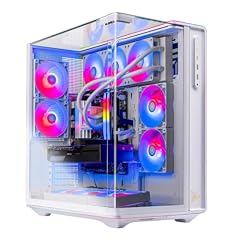
Skytech Gaming PC Desktop
- CPU
- AMD Ryzen 7 9800X3D
- GPU
- Radeon RX 9070 XT
- GPU memory
- 16 GB
- RAM
- 32 GB
- Storage
- 2000 GB
- OS
- Windows 11 Home
- Dedicated graphics card
- Yes
$2,799.99 (as of 10/20/2026 06:06 PDT - Details)
This Skytech Prism 5 desktop pairs the Ryzen 7 9800X3D with a Radeon RX 9070 XT, offering an all-AMD configuration. It has 32GB of RAM and a 2TB SSD, making it a strong option for gamers who prefer AMD graphics.
Pros
- Radeon RX 9070 XT with 16GB VRAM
- 32GB DDR5 RAM
- 2TB SSD storage
- Windows 11 Home included
Cons
- RX 9070 XT may not match RTX 5080 in ray tracing performance
- Only 32GB of RAM
- No Windows 11 Pro option
Good fit if
- Gamers who prefer AMD GPUs and want an all-AMD build
- Users who want 16GB VRAM at a lower price than RTX 5080 builds
Skip if
- You need NVIDIA CUDA for AI or creative software
- You want the highest possible ray tracing performance
Verdict: A compelling all-AMD desktop with a powerful GPU and generous storage.
8 Best compact storage option

Skytech Gaming PC Desktop
- CPU
- AMD Ryzen 7 9800X3D
- GPU
- Radeon RX 9070 XT
- GPU memory
- 16 GB
- RAM
- 32 GB
- Storage
- 1000 GB
- OS
- Windows 11 Home
- Dedicated graphics card
- Yes
$2,599.99 (as of 10/20/2026 06:06 PDT - Details)
This variant of the Skytech Prism 5 offers the same Ryzen 7 9800X3D and RX 9070 XT as its 2TB sibling, but with a 1TB SSD. It is a good choice for users who want the all-AMD performance at a lower price point.
Pros
- Radeon RX 9070 XT with 16GB VRAM
- 32GB DDR5 RAM
- Windows 11 Home included
- Lower price than the 2TB version
Cons
- Only 1TB of storage
- Same GPU as the 2TB version but less storage
- No Windows 11 Pro option
Good fit if
- Gamers on a tighter budget who still want an RX 9070 XT
- Users who don't need a large game library installed at once
Skip if
- You need more than 1TB of storage
- You prefer an NVIDIA GPU
Verdict: A cost-effective all-AMD build that sacrifices storage for a lower price.
Specs compared
| # | Desktop | CPU | GPU | GPU memory | RAM | Storage | OS |
|---|---|---|---|---|---|---|---|
| 1 | KOTIN Gaming PC Desktop | AMD Ryzen 7 9800X3D | RTX 5070 | 12 GB | 32 GB | 1000 GB | Windows 11 |
| 2 | STORMCRAFT Phantom RTX 5080 Gaming PC Ryzen 7 9800X3D 32GB DDR5 2TB SSD | AMD Ryzen 7 9800X3D | RTX 5080 | 16 GB | 32 GB | 2000 GB | Windows 11 Home |
| 3 | Skytech Gaming PC Desktop | AMD Ryzen 7 9800X3D | RTX 5070 Ti | 16 GB | 32 GB | 2000 GB | Windows 11 |
| 4 | CLX Set Gaming PC | AMD Ryzen 7 9800X3D | RTX 5080 | not stated | 32 GB | 2000 GB | Windows 11 Home |
| 5 | Panorama XL RTX 5090 32GB | AMD Ryzen 7 9800X3D | RTX 5090 | 32 GB | 64 GB | 2000 GB | Windows 11 Pro |
| 6 | iBUYPOWER Y40 Gaming PC Desktop Computer AMD Ryzen 7 9800X3D CPU | AMD Ryzen 7 9800X3D | GeForce RTX 5070 | 12 GB | 32 GB | 1000 GB | Windows 11 Home |
| 7 | Skytech Gaming PC Desktop | AMD Ryzen 7 9800X3D | Radeon RX 9070 XT | 16 GB | 32 GB | 2000 GB | Windows 11 Home |
| 8 | Skytech Gaming PC Desktop | AMD Ryzen 7 9800X3D | Radeon RX 9070 XT | 16 GB | 32 GB | 1000 GB | Windows 11 Home |
How we chose these
We started with a pool of 10 prebuilt desktop PCs that list an AMD Ryzen 7 9800X3D processor. From these, we selected all 10 for this guide, as the pool size is small enough to present every option. We compared each desktop on its GPU (from the RTX 5070 to the RTX 5090), RAM capacity (32GB or 64GB), storage (1TB or 2TB SSD), and operating system (Windows 11 Home or Pro). Prices shown are live from the store listing and updated at the time of reading. No units were tested; picks are based on published specifications and the maker's information.
What to look for
Graphics: matching the GPU to your monitor
The Ryzen 7 9800X3D is fast enough to feed any current GPU, so your choice of graphics card should match your display and workload. For 1080p or 1440p gaming, an RTX 5070 or RX 9070 XT is more than sufficient. For 4K gaming or VR, an RTX 5070 Ti or RTX 5080 provides the extra VRAM and bandwidth needed. For AI model training or 8K video editing, the RTX 5090 with 32GB VRAM is the only option in this list. All RTX 50-series cards support DLSS 5 and ray tracing, while the RX 9070 XT offers strong rasterization performance.
Memory: how much RAM you need
All desktops in this list come with at least 32GB of DDR5 RAM, which is the sweet spot for gaming and most creative tasks. The Panorama XL offers 64GB, which is beneficial for heavy multitasking, virtual machines, or large AI datasets. If you plan to keep your desktop for several years, 32GB is a good baseline, but 64GB provides more headroom for future applications.
Storage: SSD capacity and speed
Storage options in this list range from 1TB to 2TB NVMe SSDs. A 1TB drive is enough for a moderate game library and daily applications, but modern games can exceed 100GB each, so 2TB is recommended for heavy gamers. All SSDs are NVMe, which ensures fast load times. If you need more storage later, most desktops have additional slots for expansion.
Operating system: Windows 11 Home vs Pro
Most desktops here come with Windows 11 Home, which is sufficient for gaming and general use. The Panorama XL includes Windows 11 Pro, which adds features like BitLocker encryption, Remote Desktop, and Hyper-V virtualization. If you need these business or IT features, look for a Pro-equipped model; otherwise, Home is fine.
Brand and support considerations
iBUYPOWER and Skytech Gaming are established brands with dedicated support and warranty programs. KOTIN, STORMCRAFT, CLX, and Empowered PC are smaller builders that may offer more customization but could have different support experiences. Check the seller's warranty and return policy before purchasing.
Questions
Is the Ryzen 7 9800X3D good for gaming?
Yes, the Ryzen 7 9800X3D is one of the best gaming CPUs available, thanks to its 3D V-Cache technology that improves performance in games sensitive to cache size. It pairs well with high-end GPUs for smooth 4K gaming.
What GPU should I pair with a Ryzen 7 9800X3D?
The Ryzen 7 9800X3D works well with any GPU from an RTX 5070 to an RTX 5090. For 1440p gaming, an RTX 5070 or RX 9070 XT is sufficient. For 4K gaming, an RTX 5070 Ti or RTX 5080 is recommended. For AI or creative workloads, the RTX 5090 offers the most VRAM.
How much RAM do I need with a Ryzen 7 9800X3D?
32GB of DDR5 RAM is the standard for gaming and most creative tasks. 64GB is beneficial for heavy multitasking, virtual machines, or AI model training. All desktops in this list come with at least 32GB.
Are these desktops upgradeable?
Most prebuilt desktops allow for upgrades to RAM, storage, and sometimes the GPU. However, the specific upgrade path depends on the case and motherboard. Check the product details or manufacturer's site for upgrade options.
What is the difference between Windows 11 Home and Pro?
Windows 11 Home includes all core features for gaming and everyday use. Windows 11 Pro adds BitLocker encryption, Remote Desktop, Hyper-V virtualization, and group policy management, which are useful for business or IT environments.
Update history
- : First published.