
Best RTX 5080 Desktops in 2026: 15 Picks Compared on Specs
The GeForce RTX 5080, powered by NVIDIA Blackwell architecture, brings 16GB of GDDR7 memory, fifth-generation Tensor Cores, and DLSS 5 with Dynamic Multi Frame Generation to desktop PCs. For this guide, we compared 15 prebuilt desktops equipped with the RTX 5080, looking at CPU, RAM, storage, and operating system. The STORMCRAFT Phantom AI Gaming Desktop RTX 5080 Ultra7 265F stands out for its balanced specs and competitive feature set. Prices shown are live from the store listing and update with each page load.
15 picks from 50 desktops that match this guide with a price we can quote today. Prices below are live, each shown with the time it was read.
Quick list
Which one is right for you?
- For gamers who want the best CPU for RTX 5080: The CLX Set Gaming PC with an AMD Ryzen 7 9800X3D pairs the RTX 5080 with one of the fastest gaming CPUs available. See pick 12
- For creators who need maximum RAM: The Panorama XL with 96GB of DDR5 RAM and a Ryzen 9 9950X3D handles large video projects and AI workloads. See pick 6
- For a balance of performance and price: The STORMCRAFT Phantom AI Gaming Desktop offers an Intel Ultra 7 265F with 32GB RAM and 2TB SSD at a competitive price. See pick 1
All 15 picks in detail
1 Best overall

STORMCRAFT Phantom AI Gaming Desktop RTX 5080 Ultra7 265F 32GB DDR5 2TB
- GPU
- RTX 5080
- GPU memory
- 16 GB
- RAM
- 32 GB
- Storage
- 2000 GB
- Dedicated graphics card
- Yes
$3,149.99 (as of 10/20/2026 06:06 PDT - Details)
This STORMCRAFT Phantom pairs the RTX 5080 with an Intel Core Ultra 7 265F, 32GB of DDR5 RAM, and a 2TB SSD. It offers a strong balance of gaming and creative performance without the premium of a high-end CPU or excessive RAM, making it a versatile pick for most buyers.
Pros
- 32GB of DDR5 RAM, sufficient for gaming and most creative tasks
- 2TB SSD provides ample storage for games and projects
- Intel Core Ultra 7 265F is a modern, capable processor
Cons
- CPU is not the highest-performance option in this list
- No operating system stated by the seller
Good fit if
- Gamers who want a strong all-around RTX 5080 desktop
- Users who need a capable machine for both gaming and content creation
Skip if
- You need a workstation with 64GB or more of RAM
- You prefer a desktop with Windows 11 preinstalled
Verdict: A well-rounded RTX 5080 desktop that balances performance and price.
2 Best for gaming and AI

Skytech Gaming PC Desktop
- CPU
- AMD Ryzen 7 9850X3D
- GPU
- RTX 5080
- GPU memory
- 16 GB
- RAM
- 32 GB
- Storage
- 2000 GB
- OS
- Windows 11
- Dedicated graphics card
- Yes
$3,699.99 (as of 10/20/2026 06:06 PDT - Details)
The Skytech Gaming King 95 combines the RTX 5080 with an AMD Ryzen 7 9850X3D, a processor with 3D V-Cache that excels in gaming and AI workloads. With 32GB of RAM and a 2TB SSD, it is ready for demanding titles and local AI inference.
Pros
- AMD Ryzen 7 9850X3D offers excellent gaming and AI performance
- 32GB of DDR5 RAM and 2TB SSD
- Windows 11 Home preinstalled
Cons
- RAM is not upgradeable to 64GB without replacing modules
- No mention of liquid cooling in the listing
Good fit if
- Gamers who play CPU-intensive titles like simulation games
- Users who run AI models locally on their desktop
Skip if
- You need more than 32GB of RAM for video editing
- You prefer an Intel-based system
Verdict: A gaming-focused RTX 5080 desktop with a CPU that shines in AI and gaming.
3 Best AMD gaming desktop

STORMCRAFT Phantom RTX 5080 Gaming PC Ryzen 7 9800X3D 32GB DDR5 2TB SSD
- CPU
- AMD Ryzen 7 9800X3D
- GPU
- RTX 5080
- GPU memory
- 16 GB
- RAM
- 32 GB
- Storage
- 2000 GB
- OS
- Windows 11 Home
- Dedicated graphics card
- Yes
$3,399.99 (as of 10/20/2026 06:06 PDT - Details)
This STORMCRAFT Phantom uses the AMD Ryzen 7 9800X3D, widely regarded as one of the best gaming CPUs, paired with the RTX 5080. The 32GB of DDR5 RAM and 2TB SSD make it a strong contender for high-refresh-rate gaming at 4K.
Pros
- AMD Ryzen 7 9800X3D is a top-tier gaming processor
- 32GB DDR5 RAM and 2TB SSD
- Windows 11 Home preinstalled
Cons
- No storage expansion beyond the single 2TB SSD mentioned
- Case and cooling details not specified
Good fit if
- Enthusiast gamers who want the best CPU for gaming
- Users who plan to play at 4K with high settings
Skip if
- You need a desktop for heavy multi-threaded workstation tasks
- You prefer an Intel CPU
Verdict: A pure gaming powerhouse with the RTX 5080 and AMD's best gaming CPU.
4 Best liquid-cooled desktop

The Corsair Vengeance i7500 comes with liquid cooling for the Intel Core i9-14900KF, a high-performance CPU that benefits from efficient thermal management. The RTX 5080 and 2TB SSD complete a build aimed at sustained gaming and creative sessions.
Pros
- Liquid cooling for the CPU, reducing thermal throttling
- Intel Core i9-14900KF is a fast processor for gaming and creation
- 2TB SSD storage
Cons
- RAM size not stated by the seller
- No operating system mentioned
Good fit if
- Users who run long gaming sessions or render jobs
- Those who prefer a prebuilt with robust cooling
Skip if
- You want a desktop with Windows preinstalled
- You need more than 32GB of RAM (if that is the configuration)
Verdict: A well-cooled RTX 5080 desktop for demanding workloads.
5 Best compact RTX 5080 desktop

Cooler Master TD5 Pro Gaming PC Intel Ultra 7 + RTX 5080 ATX Desktop PC
- CPU
- Intel Core Ultra 7 265F
- GPU
- RTX 5080
- GPU memory
- 16 GB
- Dedicated graphics card
- Yes
$3,099.99 (as of 10/20/2026 17:05 PDT - Details)
The Cooler Master TD5 Pro is an ATX desktop that packs the RTX 5080 with an Intel Core Ultra 7 265F. Its form factor is more compact than full-tower cases, making it a good fit for desks with limited space while still offering strong performance.
Pros
- Compact ATX design saves desk space
- Intel Core Ultra 7 265F is a modern mid-range CPU
- 16GB of GDDR7 VRAM for the RTX 5080
Cons
- RAM and storage capacities not stated by the seller
- No operating system mentioned
Good fit if
- Users with limited desk space who want a full-power desktop
- Gamers who prefer a smaller case without sacrificing GPU performance
Skip if
- You need a desktop with large internal storage
- You require a full tower for future expansion
Verdict: A space-saving RTX 5080 desktop that does not compromise on GPU power.
6 Best for heavy multitasking

Panorama XL RTX 5080 16GB
- CPU
- AMD Ryzen 9 9950X3D
- GPU
- RTX 5080
- GPU memory
- 16 GB
- RAM
- 96 GB
- Storage
- 4000 GB
- OS
- Windows 11 Pro
- Dedicated graphics card
- Yes
$6,099.99 (as of 10/20/2026 06:06 PDT - Details)
The Panorama XL from Empowered PC features 96GB of DDR5 RAM and a 4TB Gen4 NVMe SSD, paired with the AMD Ryzen 9 9950X3D and RTX 5080. This configuration handles multiple virtual machines, large datasets, and 8K video editing without breaking a sweat.
Pros
- 96GB of DDR5 RAM, the most in this list among gaming-oriented desktops
- 4TB Gen4 NVMe SSD for massive storage
- AMD Ryzen 9 9950X3D is a 16-core processor for heavy workloads
- Windows 11 Pro preinstalled
Cons
- Higher price point due to premium components
- Overkill for pure gaming
Good fit if
- Professionals running VMs, large databases, or 8K video editing
- Users who need a single machine for both gaming and workstation tasks
Skip if
- You only game and do not need more than 32GB of RAM
- Your budget is limited
Verdict: A workstation-class RTX 5080 desktop with exceptional RAM and storage.
7 Best Intel-based workstation alternative
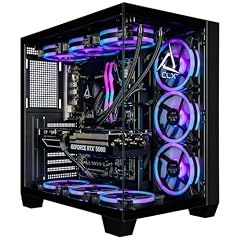
CLX Set Gaming PC
- CPU
- Intel Core Ultra 7 270K
- GPU
- GeForce RTX 5080
- GPU memory
- 16 GB
- RAM
- 64 GB
- Storage
- 2000 GB
- OS
- Windows 11 Home
- Dedicated graphics card
- Yes
$4,299.99 (as of 10/20/2026 16:08 PDT - Details)
The CLX Set Gaming PC uses an Intel Core Ultra 7 270K with 64GB of DDR5 RAM and a 2TB SSD. The higher RAM capacity makes it suitable for creative applications like 3D rendering and video editing, while the RTX 5080 handles GPU-accelerated tasks.
Pros
- 64GB of DDR5 RAM for demanding creative software
- Intel Core Ultra 7 270K is a capable multi-threaded CPU
- 2TB NVMe SSD
- Windows 11 Home preinstalled
Cons
- CPU is not the highest-end Intel option available
- No liquid cooling mentioned
Good fit if
- Video editors and 3D artists who need 64GB of RAM
- Users who prefer Intel CPUs for software compatibility
Skip if
- You are a pure gamer who does not need 64GB of RAM
- You want an AMD CPU
Verdict: A well-balanced RTX 5080 desktop for creative professionals on an Intel platform.
8 Best from a major brand

MSI Aegis ZS2 B9NVV-1409US Desktop PC
- CPU
- AMD Ryzen 9 9900X
- GPU
- GeForce RTX 5080
- RAM
- 32 GB
- Storage
- 2000 GB
- OS
- Windows 11 Home
- Dedicated graphics card
- Yes
The MSI Aegis ZS2 offers a known brand name with an AMD Ryzen 9 9900X, 32GB of DDR5 RAM, and a 2TB SSD. It provides a solid RTX 5080 experience without the premium of the highest-end CPUs, making it a good choice for gamers and creators.
Pros
- MSI is a well-known gaming brand with good support
- AMD Ryzen 9 9900X is a 12-core processor for multi-threaded tasks
- 32GB DDR5 RAM and 2TB SSD
- Windows 11 Home preinstalled
Cons
- CPU is not the latest generation from AMD
- No liquid cooling mentioned
Good fit if
- Buyers who trust MSI's build quality and warranty
- Gamers who want a reliable RTX 5080 desktop from a major brand
Skip if
- You want the absolute fastest CPU for gaming
- You need more than 32GB of RAM
Verdict: A reliable RTX 5080 desktop from a trusted gaming brand.
9 Best entry-level RTX 5080 desktop

NIMO Gaming AI Desktop
- CPU
- Intel Core i5-14400F
- GPU
- RTX 5080
- RAM
- 32 GB
- Storage
- 1000 GB
- Dedicated graphics card
- Yes
$3,199.99 (as of 10/20/2026 06:06 PDT - Details)
The NIMO Gaming AI Desktop pairs the RTX 5080 with an Intel Core i5-14400F and 32GB of RAM. While the CPU is less powerful than others in this list, it keeps the overall configuration more accessible for those who prioritize GPU performance over CPU power.
Pros
- RTX 5080 provides top-tier gaming performance
- 32GB of DDR5 RAM is sufficient for most games
- 1TB SSD offers fast storage
Cons
- Intel Core i5-14400F is a lower-end CPU for this GPU tier
- 1TB storage may fill quickly with modern games
- No operating system stated by the seller
Good fit if
- Gamers on a tighter budget who still want an RTX 5080
- Users who upgrade their CPU later and want a strong GPU now
Skip if
- You need a CPU for heavy multi-threaded work
- You want a desktop with Windows preinstalled
Verdict: An affordable way to get into RTX 5080 gaming, with a CPU that can be upgraded.
10 Best for 4K gaming on a budget

Skytech Gaming PC King 95
- CPU
- AMD Ryzen 7 7800X3D
- GPU
- RTX 5080
- GPU memory
- 16 GB
- RAM
- 32 GB
- Storage
- 2000 GB
- OS
- Windows 11 Home
- Dedicated graphics card
- Yes
This Skytech Gaming King 95 configuration uses an AMD Ryzen 7 7800X3D, a previous-generation gaming CPU, but still pairs it with the RTX 5080, 32GB of RAM, and a 2TB SSD. It offers strong 4K gaming performance at a lower price point than newer CPU builds.
Pros
- AMD Ryzen 7 7800X3D is still a very capable gaming CPU
- 32GB DDR5 RAM and 2TB SSD
- Windows 11 Home preinstalled
Cons
- CPU is one generation behind the 9800X3D
- No liquid cooling mentioned
Good fit if
- Gamers who want 4K performance without paying for the latest CPU
- Users who prioritize GPU over CPU for gaming
Skip if
- You want the absolute latest CPU technology
- You need a CPU for heavy productivity tasks
Verdict: A cost-effective RTX 5080 gaming desktop that still delivers excellent 4K performance.
11 Best for 64GB RAM on AMD
Panorama XL RTX 5080 16GB
- CPU
- AMD Ryzen 9 9950X3D
- GPU
- RTX 5080
- GPU memory
- 16 GB
- RAM
- 64 GB
- Storage
- 2000 GB
- OS
- Windows 11 Pro
- Dedicated graphics card
- Yes
$4,999.99 (as of 10/20/2026 06:06 PDT - Details)
The Panorama XL with 64GB of DDR5 RAM and a Ryzen 9 9950X3D offers a step up in memory for users who need more than 32GB but do not require the 96GB configuration. The 2TB SSD and Windows 11 Pro complete a professional-grade build.
Pros
- 64GB of DDR5 RAM for demanding creative and AI workloads
- AMD Ryzen 9 9950X3D is a top-tier 16-core processor
- Windows 11 Pro preinstalled
Cons
- 2TB SSD is smaller than the 4TB version of the same model
- Higher price than 32GB configurations
Good fit if
- Video editors and 3D artists who need 64GB of RAM
- Users who want a powerful AMD-based workstation with RTX 5080
Skip if
- You only need 32GB of RAM for gaming
- Your budget is limited
Verdict: A powerful AMD workstation with ample RAM for creative professionals.
12 Best for AMD gaming enthusiasts

CLX Set Gaming PC
- CPU
- AMD Ryzen 7 9800X3D
- GPU
- RTX 5080
- RAM
- 32 GB
- Storage
- 2000 GB
- OS
- Windows 11 Home
- Dedicated graphics card
- Yes
$4,069.99 (as of 10/20/2026 16:08 PDT - Details)
The CLX Set Gaming PC with an AMD Ryzen 7 9800X3D and 32GB of DDR5 RAM is built for high-frame-rate gaming. The 360mm AIO liquid cooler keeps the CPU cool during extended sessions, and the 2TB SSD provides fast load times.
Pros
- AMD Ryzen 7 9800X3D is one of the best gaming CPUs
- 360mm AIO liquid cooling for the CPU
- 2TB NVMe SSD
- Windows 11 Home preinstalled
Cons
- 32GB of RAM may be limiting for some creative tasks
- Higher price than some other 32GB configurations
Good fit if
- Enthusiast gamers who want the best CPU for gaming
- Users who plan to overclock or run demanding games for long periods
Skip if
- You need more than 32GB of RAM
- You prefer an Intel-based system
Verdict: A top-tier gaming desktop with liquid cooling and AMD's best gaming CPU.
13 Best for 64GB RAM from a major brand

msi Aegis ZS2 Gaming Desktop PC
- CPU
- AMD Ryzen 9 9900X
- GPU
- GeForce RTX 5080
- GPU memory
- 16 GB
- RAM
- 64 GB
- Storage
- 2000 GB
- OS
- Windows 11 Home
- Dedicated graphics card
- Yes
The MSI Aegis ZS2 with 64GB of DDR5 RAM and an AMD Ryzen 9 9900X offers a major-brand option for users who need more memory. The 2TB SSD and RTX 5080 make it suitable for both gaming and creative work.
Pros
- 64GB of DDR5 RAM from a trusted brand like MSI
- AMD Ryzen 9 9900X is a 12-core processor
- 2TB SSD and Windows 11 Home preinstalled
Cons
- CPU is not the latest generation
- No liquid cooling mentioned
Good fit if
- Users who want 64GB of RAM in a desktop from a major brand
- Gamers and creators who need extra memory for multitasking
Skip if
- You want the fastest CPU available
- You need more than 64GB of RAM
Verdict: A reliable 64GB RTX 5080 desktop from a well-known gaming brand.
14 Best for balanced AMD gaming

Panorama XL RTX 5080 16GB
- CPU
- AMD Ryzen 7 9700X
- GPU
- RTX 5080
- GPU memory
- 16 GB
- RAM
- 32 GB
- Storage
- 2000 GB
- OS
- Windows 11 Pro
- Dedicated graphics card
- Yes
$3,899.99 (as of 10/20/2026 06:06 PDT - Details)
The Panorama XL with an AMD Ryzen 7 9700X, 32GB of DDR5 RAM, and a 2TB SSD offers a balanced configuration for gamers who want a modern CPU without the premium of the 9950X3D. The RTX 5080 ensures top-tier graphics performance.
Pros
- AMD Ryzen 7 9700X is a modern 8-core processor
- 32GB DDR5 RAM and 2TB SSD
- Windows 11 Pro preinstalled
Cons
- CPU is not as powerful as the 9950X3D for multi-threaded tasks
- No liquid cooling mentioned
Good fit if
- Gamers who want a current-generation AMD CPU with RTX 5080
- Users who prefer Windows 11 Pro for business features
Skip if
- You need a CPU with more than 8 cores for heavy workloads
- Your budget allows for a higher-end CPU
Verdict: A well-balanced RTX 5080 gaming desktop with a modern AMD CPU.
15 Best from a premium gaming brand

Alienware Aurora Gaming Desktop
- CPU
- Intel Core Ultra 9 285
- GPU
- RTX 5080
- RAM
- 32 GB
- Storage
- 1000 GB
- OS
- Windows 11 Home
- Dedicated graphics card
- Yes
$3,275.00 (as of 10/20/2026 16:05 PDT - Details)
The Alienware Aurora is a well-known gaming desktop line, and this configuration with an Intel Core Ultra 9 285 and RTX 5080 offers a premium build and brand recognition. It is a solid choice for those who value Alienware's design and support.
Pros
- Alienware brand with a reputation for gaming desktops
- Intel Core Ultra 9 285 is a high-end processor
- RTX 5080 for top-tier gaming
Cons
- RAM and storage capacities not stated by the seller
- No operating system mentioned
- Higher price for the brand name
Good fit if
- Users who want a premium gaming desktop from a well-known brand
- Gamers who like Alienware's design and ecosystem
Skip if
- You want specific RAM and storage details before buying
- You prefer a desktop with Windows preinstalled
Verdict: A premium RTX 5080 gaming desktop from a legendary brand.
Specs compared
| # | Desktop | CPU | GPU | GPU memory | RAM | Storage | OS |
|---|---|---|---|---|---|---|---|
| 1 | STORMCRAFT Phantom AI Gaming Desktop RTX 5080 Ultra7 265F 32GB DDR5 2TB | not stated | RTX 5080 | 16 GB | 32 GB | 2000 GB | not stated |
| 2 | Skytech Gaming PC Desktop | AMD Ryzen 7 9850X3D | RTX 5080 | 16 GB | 32 GB | 2000 GB | Windows 11 |
| 3 | STORMCRAFT Phantom RTX 5080 Gaming PC Ryzen 7 9800X3D 32GB DDR5 2TB SSD | AMD Ryzen 7 9800X3D | RTX 5080 | 16 GB | 32 GB | 2000 GB | Windows 11 Home |
| 4 | Corsair Vengeance i7500 Gaming PC | not stated | not stated | not stated | not stated | not stated | not stated |
| 5 | Cooler Master TD5 Pro Gaming PC Intel Ultra 7 + RTX 5080 ATX Desktop PC | Intel Core Ultra 7 265F | RTX 5080 | 16 GB | not stated | not stated | not stated |
| 6 | Panorama XL RTX 5080 16GB | AMD Ryzen 9 9950X3D | RTX 5080 | 16 GB | 96 GB | 4000 GB | Windows 11 Pro |
| 7 | CLX Set Gaming PC | Intel Core Ultra 7 270K | GeForce RTX 5080 | 16 GB | 64 GB | 2000 GB | Windows 11 Home |
| 8 | MSI Aegis ZS2 B9NVV-1409US Desktop PC | AMD Ryzen 9 9900X | GeForce RTX 5080 | not stated | 32 GB | 2000 GB | Windows 11 Home |
| 9 | NIMO Gaming AI Desktop | Intel Core i5-14400F | RTX 5080 | not stated | 32 GB | 1000 GB | not stated |
| 10 | Skytech Gaming PC King 95 | AMD Ryzen 7 7800X3D | RTX 5080 | 16 GB | 32 GB | 2000 GB | Windows 11 Home |
| 11 | Panorama XL RTX 5080 16GB | AMD Ryzen 9 9950X3D | RTX 5080 | 16 GB | 64 GB | 2000 GB | Windows 11 Pro |
| 12 | CLX Set Gaming PC | AMD Ryzen 7 9800X3D | RTX 5080 | not stated | 32 GB | 2000 GB | Windows 11 Home |
| 13 | msi Aegis ZS2 Gaming Desktop PC | AMD Ryzen 9 9900X | GeForce RTX 5080 | 16 GB | 64 GB | 2000 GB | Windows 11 Home |
| 14 | Panorama XL RTX 5080 16GB | AMD Ryzen 7 9700X | RTX 5080 | 16 GB | 32 GB | 2000 GB | Windows 11 Pro |
| 15 | Alienware Aurora Gaming Desktop | Intel Core Ultra 9 285 | RTX 5080 | not stated | 32 GB | 1000 GB | Windows 11 Home |
How we chose these
We started with a pool of 20 RTX 5080 desktops listed on a major online retailer. From those, we selected 15 picks that represent a range of configurations, from gaming-focused builds to workstation-class machines. Our criteria included CPU generation and core count, amount and type of RAM, storage capacity, and operating system edition. We prioritized desktops from established brands and avoided near-duplicate configurations. No unit was tested or handled by our team; all specifications come from the seller's listing or the manufacturer's published information. Prices are live and read from the store at the time of page load.
What to look for
CPU: matching the processor to your workload
The RTX 5080 is a high-end GPU that can be paired with a range of CPUs. For pure gaming, AMD's Ryzen 7 9800X3D and Intel's Core Ultra 9 285 offer top-tier performance. For multi-threaded tasks like video editing or 3D rendering, consider CPUs with more cores, such as the AMD Ryzen 9 9950X3D or Intel Core i9-14900KF. Lower-end CPUs like the Intel Core i5-14400F can still drive the RTX 5080 well in games but may bottleneck in CPU-intensive workloads.
RAM: how much memory you need
Most RTX 5080 desktops come with 32GB of DDR5 RAM, which is sufficient for gaming and most creative tasks. For heavy multitasking, virtual machines, or large video projects, 64GB or 96GB configurations are available. The Panorama XL offers up to 96GB, while the CLX and MSI options provide 64GB. If you only game, 32GB is a good starting point.
Storage: SSD capacity and speed
All picks in this list use NVMe SSDs, which offer fast load times. Common capacities are 1TB, 2TB, and 4TB. A 2TB drive is a good balance for storing several modern games and projects. If you work with large files, consider the 4TB option in the Panorama XL. Some desktops may have additional slots for expansion, but this is not always stated by the seller.
Operating system: Windows 11 Home vs. Pro
Many RTX 5080 desktops come with Windows 11 Home preinstalled, which is sufficient for gaming and general use. Windows 11 Pro adds features like BitLocker encryption, Remote Desktop, and support for Hyper-V virtual machines. If you need these business or security features, look for desktops with Windows 11 Pro, such as the Panorama XL or CLX Horus models.
Cooling: air vs. liquid
High-performance CPUs like the Intel Core i9-14900KF and AMD Ryzen 7 9800X3D can generate significant heat. Some desktops, like the Corsair Vengeance i7500 and CLX Set Gaming PC, include liquid cooling (AIO) to manage temperatures. Air cooling is adequate for lower-power CPUs, but liquid cooling can help maintain performance under sustained loads.
Form factor and expansion
Most RTX 5080 desktops use standard ATX or mid-tower cases, which offer room for future upgrades. The Cooler Master TD5 Pro is a more compact ATX option. If you plan to add more storage, RAM, or a second GPU, ensure the case has enough space and the power supply has sufficient wattage. Some sellers do not specify these details, so check the listing carefully.
Questions
What is the RTX 5080 good for?
The RTX 5080 is designed for high-end gaming at 4K resolution with ray tracing and DLSS 5. It also accelerates creative tasks like video editing, 3D rendering, and AI workloads thanks to its 16GB of GDDR7 memory and fifth-generation Tensor Cores. It supports NVIDIA Studio drivers for creative applications.
How much RAM do I need with an RTX 5080?
For gaming, 32GB of DDR5 RAM is the standard recommendation. For video editing, 3D rendering, or running AI models, 64GB or more can be beneficial. Some RTX 5080 desktops offer up to 96GB of RAM, which is useful for heavy multitasking or virtual machines.
Do I need a liquid-cooled CPU with an RTX 5080?
Liquid cooling is not strictly necessary, but it helps maintain performance on high-end CPUs like the Intel Core i9-14900KF or AMD Ryzen 7 9800X3D under sustained loads. If you plan to run long gaming sessions or render jobs, a desktop with liquid cooling may run quieter and cooler.
Can I upgrade the RTX 5080 desktop later?
Most RTX 5080 desktops use standard components and can be upgraded. You can typically add more RAM, replace the SSD, or upgrade the CPU (if the motherboard supports it). However, some prebuilt systems use proprietary parts, so check the seller's description for upgrade options.
What is the difference between Windows 11 Home and Pro for an RTX 5080 desktop?
Windows 11 Home is sufficient for gaming and general use. Windows 11 Pro adds features like BitLocker encryption, Remote Desktop, and Hyper-V virtualization. If you use your desktop for business or need advanced security, Pro is worth considering.
Update history
- : First published.