
Best Prebuilt Gaming PCs in 2026: 15 Picks Compared on Specs
The Skytech Gaming Azure 3 with a Ryzen 7 9850X3D and Radeon RX 9070 XT is our top pick for its blend of high-end CPU and GPU performance at a competitive level. We selected 15 prebuilt gaming PCs from a pool of over 100 listings, comparing processor generation, GPU tier, memory, and storage to help you find the right desktop for your games and budget.
15 picks from 196 desktops that match this guide with a price we can quote today. Prices below are live, each shown with the time it was read.
Quick list
Which one is right for you?
- For esports on a budget: An RTX 5060 or RTX 3060 Ti system with 16GB of RAM is enough for high-frame-rate 1080p gaming in titles like Valorant, Fortnite, and Overwatch 2. See pick 12
- For 4K gaming and ray tracing: An RTX 5080 or RTX 5090 paired with a Ryzen 7 9800X3D or Ryzen 9 9950X3D delivers the performance needed for max-settings 4K gaming with ray tracing enabled. See pick 2
- For content creation and gaming: A system with 32GB or more RAM and a high-core-count CPU like the Ryzen 9 9900X or Intel Core i9-14900K handles video editing, 3D rendering, and gaming without compromise. See pick 4
- For a compact, ready-to-go machine: The Acer Nitro 60 and HP Omen 16L are compact prebuilts from major OEMs that include Windows 11 Pro and a warranty, ideal for buyers who want a single-brand solution. See pick 13
All 15 picks in detail
1 Best overall

Skytech Gaming PC Desktop
- CPU
- AMD Ryzen 7 9850X3D
- GPU
- Radeon RX 9070 XT
- GPU memory
- 16 GB
- RAM
- 32 GB
- Storage
- 2000 GB
- OS
- Windows 11
- Dedicated graphics card
- Yes
$2,899.99 (as of 10/20/2026 06:06 PDT - Details)
The Skytech Gaming Azure 3 combines a Ryzen 7 9850X3D, one of the fastest gaming CPUs available, with a Radeon RX 9070 XT that has 16GB of VRAM. It also includes 32GB of DDR5 RAM and a 2TB SSD, making it a well-rounded high-end machine.
Pros
- Ryzen 7 9850X3D CPU is among the best for gaming
- Radeon RX 9070 XT with 16GB VRAM
- 32GB DDR5 RAM and 2TB SSD
- Windows 11 Home included
Cons
- No storage expansion details stated by the seller
- Price may be above the budget of many buyers
Good fit if
- Gamers who want top-tier CPU and GPU performance at 1440p or 4K
- Users who need 32GB of RAM for multitasking or streaming
Skip if
- You need an NVIDIA GPU for specific features like CUDA
- Your budget is limited to entry-level or mid-range systems
Verdict: The Skytech Gaming Azure 3 offers a powerful CPU and GPU combination that excels in modern games.
2 Best for 4K gaming

STORMCRAFT Phantom RTX 5080 Gaming PC Ryzen 7 9800X3D 32GB DDR5 2TB SSD
- CPU
- AMD Ryzen 7 9800X3D
- GPU
- RTX 5080
- GPU memory
- 16 GB
- RAM
- 32 GB
- Storage
- 2000 GB
- OS
- Windows 11 Home
- Dedicated graphics card
- Yes
$3,399.99 (as of 10/20/2026 06:06 PDT - Details)
With an RTX 5080 GPU (16GB VRAM) and a Ryzen 7 9800X3D, this STORMCRAFT Phantom is built for max-settings 4K gaming. The 32GB of DDR5 RAM and 2TB SSD complement the high-end components.
Pros
- RTX 5080 with 16GB VRAM for 4K gaming
- Ryzen 7 9800X3D, a top gaming CPU
- 32GB DDR5 RAM and 2TB NVMe SSD
- Windows 11 Home included
Cons
- High price point
- Brand less established than some competitors
Good fit if
- Gamers who want to play at 4K with ray tracing enabled
- Enthusiasts who want a high-end system without building it themselves
Skip if
- You game at 1080p or 1440p and do not need an RTX 5080
- You prefer a system from a larger, more widely known brand
Verdict: The STORMCRAFT Phantom is a powerful 4K gaming machine with a top-tier CPU and GPU.
3 Best RTX 5080 alternative

Skytech Gaming PC Desktop
- CPU
- AMD Ryzen 7 9850X3D
- GPU
- RTX 5080
- GPU memory
- 16 GB
- RAM
- 32 GB
- Storage
- 2000 GB
- OS
- Windows 11
- Dedicated graphics card
- Yes
$3,699.99 (as of 10/20/2026 06:06 PDT - Details)
This Skytech Gaming King 95 also features an RTX 5080 and a Ryzen 7 9850X3D, with 32GB of RAM and a 2TB SSD. It is a direct competitor to the STORMCRAFT Phantom, from a more recognized brand.
Pros
- RTX 5080 with 16GB VRAM
- Ryzen 7 9850X3D CPU
- 32GB DDR5 RAM and 2TB SSD
- Skytech is a well-known prebuilt brand
Cons
- High price
- No stated details about the motherboard or cooling
Good fit if
- Gamers who want a high-end RTX 5080 system from a reputable prebuilt brand
- Users who want a balance of gaming and AI performance
Skip if
- You are on a strict budget
- You need more than 32GB of RAM for heavy workstation tasks
Verdict: The Skytech Gaming King 95 is a strong RTX 5080-based system from a trusted brand.
4 Best for streaming and multitasking

iBUYPOWER Element Gaming PC Desktop Computer AMD Ryzen 9 7900X CPU
- CPU
- AMD Ryzen 9 7900X
- GPU
- GeForce RTX 5070
- GPU memory
- 12 GB
- RAM
- 32 GB
- Storage
- 1000 GB
- OS
- Windows 11 Home
- Dedicated graphics card
- Yes
$2,299.99 (as of 10/20/2026 04:05 PDT - Details)
The iBUYPOWER Element pairs a Ryzen 9 7900X (12 cores) with an RTX 5070 (12GB VRAM) and 32GB of DDR5 RAM, making it well suited for gaming while streaming or running background tasks.
Pros
- 12-core Ryzen 9 7900X CPU
- RTX 5070 with 12GB VRAM
- 32GB DDR5 RAM
- 1TB NVMe SSD
Cons
- Only 1TB of storage for a system at this level
- No stated weight or dimensions
Good fit if
- Streamers who need CPU cores for encoding while gaming
- Gamers who run multiple applications simultaneously
Skip if
- You need more than 1TB of storage out of the box
- You prefer an Intel-based system
Verdict: The iBUYPOWER Element delivers strong multi-core performance for gaming and streaming.
5 Best Intel-based streaming PC

iBUYPOWER Element Gaming PC Desktop Computer Intel Core i7 14700F CPU
- CPU
- Intel Core i7-14700F
- GPU
- GeForce RTX 5070
- GPU memory
- 12 GB
- RAM
- 32 GB
- Storage
- 1000 GB
- OS
- Windows 11 Home
- Dedicated graphics card
- Yes
$2,189.00 (as of 10/20/2026 04:05 PDT - Details)
This iBUYPOWER Element uses an Intel Core i7-14700F with 20 cores (8 P-cores + 12 E-cores) and an RTX 5070, offering a different architecture choice for the same gaming and streaming workload.
Pros
- Intel Core i7-14700F with 20 cores
- RTX 5070 with 12GB VRAM
- 32GB DDR5 RAM
- 1TB NVMe SSD
Cons
- Only 1TB of storage
- No stated details about the motherboard chipset
Good fit if
- Users who prefer Intel CPUs for gaming and productivity
- Streamers who want a high-core-count CPU
Skip if
- You need more than 1TB of storage
- You are looking for an AMD-based system
Verdict: This iBUYPOWER Element is a solid Intel-based choice for gaming and streaming.
6 Best AMD RX 9070 XT system

KOTIN Gaming PC
- CPU
- AMD Ryzen 7 9700X
- GPU
- Radeon RX 9070 XT
- GPU memory
- 16 GB
- RAM
- 32 GB
- Storage
- 1000 GB
- OS
- Windows 11 Home
- Dedicated graphics card
- Yes
$2,199.99 (as of 10/20/2026 06:05 PDT - Details)
The KOTIN Gaming PC with a Ryzen 7 9700X and Radeon RX 9070 XT (16GB VRAM) offers a high-end AMD GPU alternative to NVIDIA's RTX 5070, with 32GB of DDR5 RAM.
Pros
- Radeon RX 9070 XT with 16GB VRAM
- Ryzen 7 9700X CPU
- 32GB DDR5 RAM
- 1TB SSD
Cons
- 1TB storage may be limiting for some users
- KOTIN is a smaller brand compared to Skytech or iBUYPOWER
Good fit if
- Gamers who prefer AMD GPUs for their price-to-performance ratio
- Users who want 16GB of VRAM for high-resolution textures
Skip if
- You need NVIDIA-specific features like CUDA or DLSS 5
- You prefer a system from a more established prebuilt brand
Verdict: The KOTIN Gaming PC is a strong AMD-based system with a generous 16GB of VRAM.
7 Best RTX 5070 value

Skytech Gaming Archangel 5 Gaming PC
- CPU
- AMD Ryzen 7 7700X
- GPU
- RTX 5070
- GPU memory
- 12 GB
- RAM
- 32 GB
- OS
- Windows 11
- Dedicated graphics card
- Yes
The Skytech Gaming Archangel 5 pairs a Ryzen 7 7700X with an RTX 5070 (12GB VRAM) and 32GB of RAM, offering a well-balanced mid-to-high-end configuration at a competitive price.
Pros
- RTX 5070 with 12GB VRAM
- Ryzen 7 7700X CPU
- 32GB DDR5 RAM
- 1TB Gen4 NVMe SSD
Cons
- Storage capacity not stated in the pool data
- No stated details about the motherboard or cooling
Good fit if
- Gamers who want RTX 5070 performance without paying for a higher-tier CPU
- Users who want 32GB of RAM for multitasking
Skip if
- You need more than 1TB of storage
- You want a CPU with more than 8 cores
Verdict: The Skytech Gaming Archangel 5 offers excellent value with its RTX 5070 and 32GB of RAM.
8 Best high-core-count RTX 5070

CyberPowerPC Gaming PC
- CPU
- AMD Ryzen 9 9900X
- GPU
- GeForce RTX 5070
- GPU memory
- 12 GB
- RAM
- 32 GB
- Storage
- 1000 GB
- OS
- Windows 11 Home
- Dedicated graphics card
- Yes
$2,345.60 (as of 10/20/2026 17:05 PDT - Details)
This CyberPowerPC system features a Ryzen 9 9900X (12 cores) and an RTX 5070 (12GB VRAM), providing strong multi-core performance for gaming and productivity.
Pros
- 12-core Ryzen 9 9900X CPU
- RTX 5070 with 12GB VRAM
- 32GB DDR5 RAM
- 1TB SSD
Cons
- Only 1TB of storage
- No stated details about the motherboard
Good fit if
- Users who need CPU cores for video editing or 3D rendering alongside gaming
- Gamers who want a high-end AMD CPU
Skip if
- You need more than 1TB of storage
- You prefer an Intel-based system
Verdict: The CyberPowerPC gaming PC with a Ryzen 9 9900X is a strong choice for multi-threaded workloads and gaming.
9 Best Ryzen 7 9800X3D with RTX 5070

KOTIN Gaming PC Desktop
- CPU
- AMD Ryzen 7 9800X3D
- GPU
- RTX 5070
- GPU memory
- 12 GB
- RAM
- 32 GB
- Storage
- 1000 GB
- OS
- Windows 11
- Dedicated graphics card
- Yes
$2,399.99 (as of 10/20/2026 06:05 PDT - Details)
The KOTIN Gaming PC combines the excellent gaming CPU Ryzen 7 9800X3D with an RTX 5070 (12GB VRAM) and 32GB of DDR5 RAM, focusing on gaming performance.
Pros
- Ryzen 7 9800X3D, a top-tier gaming CPU
- RTX 5070 with 12GB VRAM
- 32GB DDR5 RAM
- 1TB SSD
Cons
- 1TB storage may be limiting
- KOTIN is a smaller brand
Good fit if
- Gamers who prioritize single-threaded gaming performance
- Users who want the 3D V-Cache advantage of the 9800X3D
Skip if
- You need a high core count for productivity tasks
- You prefer a system from a larger brand
Verdict: The KOTIN Gaming PC with a 9800X3D is built for maximum gaming performance.
10 Best iBUYPOWER with 9800X3D

iBUYPOWER Y40 Gaming PC Desktop Computer AMD Ryzen 7 9800X3D CPU
- CPU
- AMD Ryzen 7 9800X3D
- GPU
- GeForce RTX 5070
- GPU memory
- 12 GB
- RAM
- 32 GB
- Storage
- 1000 GB
- OS
- Windows 11 Home
- Dedicated graphics card
- Yes
$2,399.99 (as of 10/20/2026 04:05 PDT - Details)
The iBUYPOWER Y40 also uses the Ryzen 7 9800X3D and RTX 5070, but from a more established brand than KOTIN, with 32GB of DDR5 RAM.
Pros
- Ryzen 7 9800X3D CPU
- RTX 5070 with 12GB VRAM
- 32GB DDR5 RAM
- 1TB SSD
Cons
- Only 1TB of storage
- No stated details about the motherboard
Good fit if
- Gamers who want a 9800X3D system from a well-known prebuilt brand
- Users who want a balance of gaming performance and brand reliability
Skip if
- You need more than 1TB of storage
- You are on a tight budget
Verdict: The iBUYPOWER Y40 is a reliable choice for gamers who want the 9800X3D CPU.
11 Best Intel Ultra 7 system

MSI Codex R2 AI A2NVL7-464US Desktop PC
- CPU
- Intel Core Ultra 7 265K
- GPU
- GeForce RTX 5060
- GPU memory
- 8 GB
- RAM
- 32 GB
- Storage
- 2000 GB
- OS
- Windows 11 Home
- Dedicated graphics card
- Yes
$1,449.99 (as of 10/20/2026 06:06 PDT - Details)
The MSI Codex R2 AI features an Intel Core Ultra 7 265K, an RTX 5060, 32GB of DDR5 RAM, and a 2TB SSD, offering a large storage capacity and a modern Intel CPU.
Pros
- Intel Core Ultra 7 265K CPU
- 32GB DDR5 RAM
- 2TB NVMe Gen4 SSD
- MSI is a well-known gaming brand
Cons
- RTX 5060 with 8GB VRAM may be limiting for 1440p ray tracing
- No stated details about the motherboard chipset
Good fit if
- Users who want a large 2TB SSD out of the box
- Gamers who prefer Intel CPUs and play at 1080p or light 1440p
Skip if
- You need a higher-tier GPU for 4K gaming
- You prefer an AMD-based system
Verdict: The MSI Codex R2 AI offers a modern Intel CPU and a generous 2TB SSD.
12 Best entry-level RTX 5060

CyberPowerPC Gamer Xtreme VR Gaming PC
- CPU
- Intel Core i5-13400F
- GPU
- GeForce RTX 5060
- GPU memory
- 8 GB
- RAM
- 16 GB
- Storage
- 1000 GB
- OS
- Windows 11 Home
- Dedicated graphics card
- Yes
$1,272.00 (as of 10/20/2026 17:05 PDT - Details)
The CyberPowerPC Gamer Xtreme VR is an affordable entry point into the RTX 5060 generation, with an Intel Core i5-13400F and 16GB of DDR5 RAM.
Pros
- RTX 5060 with 8GB VRAM
- Intel Core i5-13400F CPU
- 16GB DDR5 RAM
- 1TB PCIe 4.0 SSD
Cons
- Only 16GB of RAM, which may be limiting for multitasking
- CPU is a previous generation (13th Gen)
Good fit if
- Budget-conscious gamers who want the latest RTX 5060 GPU
- Users who play at 1080p and do not need 32GB of RAM
Skip if
- You need 32GB of RAM for streaming or heavy multitasking
- You want a newer generation CPU
Verdict: The CyberPowerPC Gamer Xtreme VR is a solid entry-level RTX 5060 system.
13 Best compact OEM desktop

Acer Nitro 60 Gaming AI Desktop Intel 10-core Ultra 5 225F 16GB DDR5 1TB
- CPU
- Intel Core Ultra 5 225F
- GPU
- GeForce RTX 5060
- GPU memory
- 8 GB
- RAM
- 16 GB
- Storage
- 1000 GB
- OS
- Windows 11 Pro
- Dedicated graphics card
- Yes
$1,259.99 (as of 10/20/2026 15:07 PDT - Details)
The Acer Nitro 60 is a compact prebuilt from a major OEM, featuring an Intel Core Ultra 5 225F, RTX 5060, 16GB of DDR5 RAM, and Windows 11 Pro.
Pros
- Compact form factor from a major brand
- Windows 11 Pro included
- Intel Core Ultra 5 225F CPU
- 1TB SSD
Cons
- Only 16GB of RAM
- RTX 5060 with 8GB VRAM
Good fit if
- Users who want a small desktop from a well-known manufacturer
- Office or home users who also game at 1080p
Skip if
- You need more than 16GB of RAM
- You want a high-end GPU for 4K gaming
Verdict: The Acer Nitro 60 is a compact, reliable choice for 1080p gaming from a major brand.
14 Best HP Omen with 32GB RAM

HP Omen 16L 5060 Gaming Desktop PC
- CPU
- Intel Core Ultra 7 265F
- GPU
- GeForce RTX 5060
- GPU memory
- 8 GB
- RAM
- 32 GB
- Storage
- 1000 GB
- OS
- Windows 11 Home
- Dedicated graphics card
- Yes
The HP Omen 16L offers an Intel Core Ultra 7 265F, RTX 5060, and 32GB of DDR5 RAM, providing more memory than many competing RTX 5060 systems.
Pros
- 32GB DDR5 RAM
- Intel Core Ultra 7 265F CPU
- RTX 5060 with 8GB VRAM
- HP Omen brand with support
Cons
- Only 1TB SSD
- RTX 5060 may be a bottleneck for the CPU in some games
Good fit if
- Users who want 32GB of RAM in a mid-range system
- Gamers who prefer HP's Omen ecosystem
Skip if
- You need a higher-tier GPU for 1440p gaming
- You want more than 1TB of storage
Verdict: The HP Omen 16L is a well-balanced mid-range system with ample RAM.
15 Best budget option with 32GB RAM
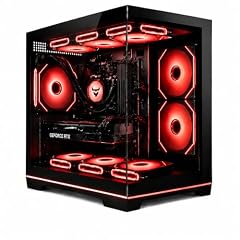
Evounic Gaming PC Desktop Computer 12-Core RTX 2070 8GB GDDR6
- GPU
- RTX 2070
- GPU memory
- 8 GB
- RAM
- 32 GB
- Storage
- 1000 GB
- OS
- Windows 11
- Dedicated graphics card
- Yes
$769.88 (as of 10/20/2026 05:05 PDT - Details)
The Evounic Gaming PC offers 32GB of RAM and an RTX 2070 (8GB VRAM) at a very accessible price point, making it a good entry-level choice for 1080p gaming.
Pros
- 32GB of RAM, high for its price tier
- RTX 2070 with 8GB VRAM
- 1TB storage
- Windows 11 included
Cons
- GPU is two generations old (RTX 2070)
- CPU is not stated by the seller
Good fit if
- Budget gamers who want 32GB of RAM for multitasking
- Users who play older or less demanding titles at 1080p
Skip if
- You want the latest RTX 50 series GPU
- You need a modern CPU for CPU-bound games
Verdict: The Evounic Gaming PC is a budget-friendly option with a generous 32GB of RAM.
Specs compared
| # | Desktop | CPU | GPU | GPU memory | RAM | Storage | OS |
|---|---|---|---|---|---|---|---|
| 1 | Skytech Gaming PC Desktop | AMD Ryzen 7 9850X3D | Radeon RX 9070 XT | 16 GB | 32 GB | 2000 GB | Windows 11 |
| 2 | STORMCRAFT Phantom RTX 5080 Gaming PC Ryzen 7 9800X3D 32GB DDR5 2TB SSD | AMD Ryzen 7 9800X3D | RTX 5080 | 16 GB | 32 GB | 2000 GB | Windows 11 Home |
| 3 | Skytech Gaming PC Desktop | AMD Ryzen 7 9850X3D | RTX 5080 | 16 GB | 32 GB | 2000 GB | Windows 11 |
| 4 | iBUYPOWER Element Gaming PC Desktop Computer AMD Ryzen 9 7900X CPU | AMD Ryzen 9 7900X | GeForce RTX 5070 | 12 GB | 32 GB | 1000 GB | Windows 11 Home |
| 5 | iBUYPOWER Element Gaming PC Desktop Computer Intel Core i7 14700F CPU | Intel Core i7-14700F | GeForce RTX 5070 | 12 GB | 32 GB | 1000 GB | Windows 11 Home |
| 6 | KOTIN Gaming PC | AMD Ryzen 7 9700X | Radeon RX 9070 XT | 16 GB | 32 GB | 1000 GB | Windows 11 Home |
| 7 | Skytech Gaming Archangel 5 Gaming PC | AMD Ryzen 7 7700X | RTX 5070 | 12 GB | 32 GB | not stated | Windows 11 |
| 8 | CyberPowerPC Gaming PC | AMD Ryzen 9 9900X | GeForce RTX 5070 | 12 GB | 32 GB | 1000 GB | Windows 11 Home |
| 9 | KOTIN Gaming PC Desktop | AMD Ryzen 7 9800X3D | RTX 5070 | 12 GB | 32 GB | 1000 GB | Windows 11 |
| 10 | iBUYPOWER Y40 Gaming PC Desktop Computer AMD Ryzen 7 9800X3D CPU | AMD Ryzen 7 9800X3D | GeForce RTX 5070 | 12 GB | 32 GB | 1000 GB | Windows 11 Home |
| 11 | MSI Codex R2 AI A2NVL7-464US Desktop PC | Intel Core Ultra 7 265K | GeForce RTX 5060 | 8 GB | 32 GB | 2000 GB | Windows 11 Home |
| 12 | CyberPowerPC Gamer Xtreme VR Gaming PC | Intel Core i5-13400F | GeForce RTX 5060 | 8 GB | 16 GB | 1000 GB | Windows 11 Home |
| 13 | Acer Nitro 60 Gaming AI Desktop Intel 10-core Ultra 5 225F 16GB DDR5 1TB | Intel Core Ultra 5 225F | GeForce RTX 5060 | 8 GB | 16 GB | 1000 GB | Windows 11 Pro |
| 14 | HP Omen 16L 5060 Gaming Desktop PC | Intel Core Ultra 7 265F | GeForce RTX 5060 | 8 GB | 32 GB | 1000 GB | Windows 11 Home |
| 15 | Evounic Gaming PC Desktop Computer 12-Core RTX 2070 8GB GDDR6 | not stated | RTX 2070 | 8 GB | 32 GB | 1000 GB | Windows 11 |
How we chose these
We started with a pool of more than 100 prebuilt gaming desktops listed on a major online retailer. From that pool, we selected 15 machines that represent a range of GPU tiers (from the RTX 5060 to the RTX 5090 and Radeon RX 9070 XT), processor generations (AMD Ryzen 7000 and 9000 series, Intel Core Ultra and 14th Gen), and memory configurations (16GB to 64GB). We prioritized systems from established brands such as Skytech, CyberPowerPC, iBUYPOWER, MSI, and HP, and avoided near-duplicate models. Prices shown on the page are live and pulled directly from the store listing; we did not test any of these units. Our selections are based on published specifications and the maker's own information.
What to look for
Graphics: what the GPU name tells you
The graphics card (GPU) is the most important component for gaming performance. NVIDIA's GeForce RTX 50 series (RTX 5060, 5070, 5080, 5090) uses the Blackwell architecture and supports DLSS 5 with Multi Frame Generation. The RTX 5060 is designed for 1080p gaming, the RTX 5070 for 1440p, and the RTX 5080 and 5090 for 4K. AMD's Radeon RX 9070 XT competes with the RTX 5070 and offers 16GB of VRAM. Older GPUs like the RTX 3060 Ti and RTX 2070 are still capable at 1080p but lack the latest features. The number after the GPU name (e.g., 8GB, 12GB, 16GB) indicates the video memory (VRAM), which helps with higher resolutions and texture quality.
CPU: AMD vs. Intel for gaming
Both AMD and Intel offer excellent gaming CPUs. AMD's Ryzen 7 9800X3D and 9850X3D feature 3D V-Cache technology, which can provide a significant performance boost in many games. The Ryzen 9 series (7900X, 9900X, 9950X3D) offers more cores for multitasking and productivity. Intel's Core Ultra 7 and Core i7 and i9 processors (like the 265K, 14700F, and 14900K) also deliver strong gaming performance, with the Core i9 models having the highest clock speeds. For pure gaming, the Ryzen X3D chips are often the fastest, but Intel's higher-core-count CPUs can be better for streaming and content creation.
Memory (RAM): how much do you need?
16GB of RAM is the minimum for modern gaming and is sufficient for most games at 1080p. 32GB is recommended for gamers who also stream, run multiple background applications, or play memory-intensive titles. 64GB is overkill for gaming alone but useful for content creation, video editing, or running virtual machines. All the picks in this list use DDR5 RAM, which is faster than the older DDR4 standard.
Storage: SSD vs. HDD and capacity
All the prebuilt gaming PCs in this list use NVMe SSDs, which are much faster than traditional hard drives for loading games and the operating system. A 1TB SSD is a good starting point and can hold several large games. A 2TB or larger SSD is better if you play many games or store large media files. Some systems may have additional slots for adding more storage later, but this is not always stated by the seller.
Operating system and extras
Most prebuilt gaming PCs come with Windows 11 pre-installed. Windows 11 Home is standard for consumer systems, while Windows 11 Pro includes additional features like BitLocker encryption and Remote Desktop, which are useful for business or advanced users. Some systems also include a keyboard and mouse, but this varies by model and is not always listed in the specifications.
Questions
What is the best prebuilt gaming PC for 4K gaming?
For 4K gaming, look for a system with an RTX 5080 or RTX 5090 GPU. The STORMCRAFT Phantom (RTX 5080, Ryzen 7 9800X3D) and the Skytech Gaming King 95 (RTX 5080, Ryzen 7 9850X3D) are strong choices. These GPUs have 16GB or more of VRAM and support DLSS 5 for high frame rates at 4K resolution.
How much RAM do I need for gaming in 2026?
16GB of RAM is the minimum for most modern games. 32GB is recommended for a smoother experience, especially if you run other applications in the background, stream your gameplay, or play memory-intensive titles. 64GB is generally unnecessary for gaming alone but can be beneficial for content creation.
Is the RTX 5060 good for gaming?
Yes, the RTX 5060 is a good GPU for 1080p gaming at high settings. It can also handle 1440p gaming in less demanding titles. It supports DLSS 5 and ray tracing, but its 8GB of VRAM may be a limitation for some newer games at higher resolutions or with high-resolution texture packs.
Should I buy a prebuilt gaming PC or build my own?
Buying a prebuilt gaming PC saves you the time and effort of selecting individual components and assembling them. It also comes with a warranty and support for the entire system. Building your own can be cheaper and allows for more customization, but requires technical knowledge and troubleshooting skills. Prebuilts are a good choice for those who want a ready-to-use system.
What is the difference between Windows 11 Home and Pro?
Windows 11 Home includes all the core features for gaming and everyday use. Windows 11 Pro adds business-oriented features such as BitLocker device encryption, Remote Desktop, and the ability to join a domain. For most gamers, Windows 11 Home is sufficient.
Update history
- : First published.