
Best Prebuilt PCs for Video Editing in 2026: 15 Picks Compared
The Skytech Gaming King 95 with a Ryzen 7 9850X3D and RTX 5080 leads our list for 4K video editing, combining a high-core-count CPU with 16GB of VRAM for smooth timeline scrubbing and fast exports. We selected 15 prebuilt desktops from a pool of 135 based on their GPU, CPU, RAM, and storage specifications, focusing on machines that meet the demands of modern video editing software.
15 picks from 155 desktops that match this guide with a price we can quote today. Prices below are live, each shown with the time it was read.
Quick list
Which one is right for you?
- For 4K and multi-layer timelines: You need a high-core-count CPU and a GPU with ample VRAM for smooth playback and fast rendering. See pick 1
- For budget-conscious editors: You want a capable machine for 1080p or light 4K editing without spending on top-tier components. See pick 4
- For heavy multi-tasking and large projects: You need 64GB or more of RAM and a fast processor to handle complex timelines and multiple applications. See pick 12
All 15 picks in detail
1 Best overall for 4K video editing

Skytech Gaming PC Desktop
- CPU
- AMD Ryzen 7 9850X3D
- GPU
- RTX 5080
- GPU memory
- 16 GB
- RAM
- 32 GB
- Storage
- 2000 GB
- OS
- Windows 11
- Dedicated graphics card
- Yes
$3,699.99 (as of 10/20/2026 06:06 PDT - Details)
The Ryzen 7 9850X3D and RTX 5080 with 16GB of VRAM provide the CPU and GPU power needed for 4K timelines, effects, and fast rendering. 32GB of DDR5 RAM and a 2TB SSD cover project storage and multitasking.
Pros
- 16GB of GPU VRAM for 4K and multi-layer timelines
- High-core-count Ryzen 7 9850X3D CPU
- 2TB SSD for project storage
- Windows 11 Home included
Cons
- 32GB RAM may be limiting for very large projects
- No OS specified as Pro for advanced networking
Good fit if
- Editors working with 4K footage and effects
- Users who want a single machine for both editing and gaming
Skip if
- You need 64GB or more RAM for massive projects
- You require a workstation with ISV certification
Verdict: A balanced high-end pick for 4K video editing with a strong GPU and CPU.
2 Best with AMD Radeon GPU

Skytech Gaming PC Desktop
- CPU
- AMD Ryzen 7 9850X3D
- GPU
- Radeon RX 9070 XT
- GPU memory
- 16 GB
- RAM
- 32 GB
- Storage
- 2000 GB
- OS
- Windows 11
- Dedicated graphics card
- Yes
$2,899.99 (as of 10/20/2026 06:06 PDT - Details)
The RX 9070 XT with 16GB of VRAM and the Ryzen 7 9850X3D offer strong performance for video editing, especially in applications that leverage AMD's hardware encoding. 32GB of RAM and a 2TB SSD round out the configuration.
Pros
- 16GB of VRAM on a Radeon GPU
- High-core-count Ryzen 7 9850X3D CPU
- 2TB SSD for storage
- Windows 11 Home included
Cons
- 32GB RAM may be limiting for large projects
- Radeon GPU may have less software optimization in some editing suites
Good fit if
- Editors using DaVinci Resolve or other AMD-friendly software
- Users who want a high-end AMD system
Skip if
- You prefer NVIDIA CUDA acceleration for plugins
- You need 64GB or more RAM
Verdict: A strong AMD-based option for video editing with a capable GPU and CPU.
3 Best mid-range for 1440p editing

msi Codex Z2 Gaming Desktop
- CPU
- AMD Ryzen 7 8700F
- GPU
- GeForce RTX 5070
- RAM
- 32 GB
- Storage
- 2000 GB
- OS
- Windows 11 Home
- Dedicated graphics card
- Yes
$1,999.00 (as of 10/20/2026 06:06 PDT - Details)
The RTX 5070 with 12GB of VRAM and the Ryzen 7 8700F provide a good balance for 1440p video editing and light 4K work. 32GB of DDR5 RAM and a 2TB SSD are standard for this tier.
Pros
- 12GB of GPU VRAM for 1440p timelines
- Ryzen 7 8700F with 8 cores
- 2TB SSD for storage
- Windows 11 Home included
Cons
- 32GB RAM may be limiting for larger projects
- CPU is not the highest core count in this list
Good fit if
- Editors working primarily with 1440p footage
- Users on a mid-range budget who want a current-gen GPU
Skip if
- You need 64GB or more RAM
- You edit 4K or 8K footage regularly
Verdict: A capable mid-range pick for 1440p video editing with a solid GPU.
4 Best entry-level for 1080p editing

MSI Codex R2 AI A2NVL7-464US Desktop PC
- CPU
- Intel Core Ultra 7 265K
- GPU
- GeForce RTX 5060
- GPU memory
- 8 GB
- RAM
- 32 GB
- Storage
- 2000 GB
- OS
- Windows 11 Home
- Dedicated graphics card
- Yes
$1,449.99 (as of 10/20/2026 06:06 PDT - Details)
The RTX 5060 with 8GB of VRAM and the Intel Core Ultra 7 265K provide enough power for 1080p video editing and light 4K work. 32GB of DDR5 RAM and a 2TB SSD offer good value for the price.
Pros
- 8GB of GPU VRAM for 1080p timelines
- Intel Core Ultra 7 265K with NPU for AI tasks
- 2TB SSD for storage
- Windows 11 Home included
Cons
- 8GB VRAM may limit 4K multi-layer editing
- 32GB RAM is the minimum for video editing
Good fit if
- Editors working with 1080p footage
- Users on a budget who want a current-gen CPU
Skip if
- You edit 4K or 8K footage regularly
- You need more than 32GB of RAM
Verdict: A solid entry-level pick for 1080p video editing with a modern CPU.
5 Best for 1080p editing with Intel CPU

CyberpowerPC Gamer Xtreme Gaming PC Desktop
- CPU
- Intel Core i5-13400KF
- GPU
- GeForce RTX 4060
- GPU memory
- 8 GB
- RAM
- 32 GB
- Storage
- 2000 GB
- OS
- Windows 11 Home
- Dedicated graphics card
- Yes
$1,585.00 (as of 10/20/2026 17:05 PDT - Details)
The RTX 4060 with 8GB of VRAM and the Intel Core i5-13400KF provide a cost-effective solution for 1080p video editing. 32GB of RAM and a 2TB SSD are generous for this tier.
Pros
- 8GB of GPU VRAM for 1080p timelines
- Intel Core i5-13400KF with 10 cores
- 2TB SSD for storage
- Windows 11 Home included
Cons
- Older 13th-gen CPU
- 32GB RAM is the minimum for video editing
Good fit if
- Editors on a tight budget
- Users who need a capable machine for 1080p editing
Skip if
- You edit 4K footage regularly
- You want the latest CPU generation
Verdict: A budget-friendly option for 1080p video editing with good storage.
6 Best for 1440p editing with Intel CPU

iBUYPOWER Trace Mesh Gaming PC Desktop Computer Intel Core i7 14700F CPU
- CPU
- Intel Core i7-14700F
- GPU
- GeForce RTX 4060
- GPU memory
- 8 GB
- RAM
- 32 GB
- Storage
- 2000 GB
- OS
- Windows 11 Home
- Dedicated graphics card
- Yes
$1,799.00 (as of 10/20/2026 04:05 PDT - Details)
The RTX 4060 with 8GB of VRAM and the Intel Core i7-14700F provide a good balance for 1440p video editing. 32GB of DDR5 RAM and a 2TB SSD are standard for this tier.
Pros
- 8GB of GPU VRAM for 1440p timelines
- Intel Core i7-14700F with 20 cores
- 2TB SSD for storage
- Windows 11 Home included
Cons
- 8GB VRAM may limit 4K multi-layer editing
- 32GB RAM may be limiting for larger projects
Good fit if
- Editors working with 1440p footage
- Users who prefer Intel CPUs
Skip if
- You need 64GB or more RAM
- You edit 4K or 8K footage regularly
Verdict: A capable Intel-based pick for 1440p video editing with a high-core-count CPU.
7 Best with Intel Core Ultra 5
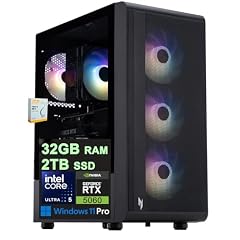
Acer Nitro 60 Gaming AI Desktop
- CPU
- Intel Core Ultra 5 225F
- GPU
- GeForce RTX 5060
- GPU memory
- 8 GB
- RAM
- 32 GB
- Storage
- 2000 GB
- OS
- Windows 11 Pro
- Dedicated graphics card
- Yes
$1,799.00 (as of 10/20/2026 15:07 PDT - Details)
The RTX 5060 with 8GB of VRAM and the Intel Core Ultra 5 225F provide a good entry point for video editing with a current-gen CPU. 32GB of DDR5 RAM and a 2TB SSD are included.
Pros
- 8GB of GPU VRAM for 1080p timelines
- Intel Core Ultra 5 225F with 10 cores
- 2TB SSD for storage
- Windows 11 Pro included
Cons
- 8GB VRAM may limit 4K editing
- 32GB RAM is the minimum for video editing
Good fit if
- Editors who want Windows 11 Pro
- Users on a budget who want a current-gen CPU
Skip if
- You edit 4K footage regularly
- You need more than 32GB of RAM
Verdict: A good entry-level pick with Windows 11 Pro for 1080p editing.
8 Best for business video editing

Dell Tower Desktop ECT1250
- CPU
- Intel Core Ultra 7 265F
- GPU
- RTX 5060
- GPU memory
- 8 GB
- RAM
- 32 GB
- Storage
- 2000 GB
- OS
- Windows 11 Pro
- Dedicated graphics card
- Yes
$2,049.99 (as of 10/20/2026 17:06 PDT - Details) Typical price: $2,349.00, 13% off
The Dell Tower Plus with an Intel Core Ultra 7 and RTX 5060 is a solid choice for business environments that need a reliable machine for video editing. 32GB of RAM and a 2TB SSD are standard.
Pros
- 8GB of GPU VRAM for 1080p timelines
- Intel Core Ultra 7 CPU with NPU
- 2TB SSD for storage
- Windows 11 Pro included
Cons
- 8GB VRAM may limit 4K editing
- 32GB RAM may be limiting for larger projects
Good fit if
- Business users who need a reliable desktop
- Editors working with 1080p footage
Skip if
- You need a high-end GPU for 4K editing
- You need more than 32GB of RAM
Verdict: A dependable business desktop for 1080p video editing.
9 Best for 4K editing with Intel CPU

msi Aegis R2 Gaming Desktop
- CPU
- Intel Core Ultra 9 285
- GPU
- RTX 5070
- RAM
- 32 GB
- Storage
- 2000 GB
- OS
- Windows 11 Home
- Dedicated graphics card
- Yes
$3,398.08 (as of 10/20/2026 06:06 PDT - Details)
The RTX 5070 with 12GB of VRAM and the Intel Core Ultra 9 285 provide a strong combination for 4K video editing. 32GB of DDR5 RAM and a 2TB SSD are included.
Pros
- 12GB of GPU VRAM for 4K timelines
- Intel Core Ultra 9 285 with 24 cores
- 2TB SSD for storage
- Windows 11 Home included
Cons
- 32GB RAM may be limiting for very large projects
- No Windows 11 Pro for advanced networking
Good fit if
- Editors working with 4K footage
- Users who prefer Intel CPUs
Skip if
- You need 64GB or more RAM
- You require a workstation with ISV certification
Verdict: A strong Intel-based pick for 4K video editing with a high-core-count CPU.
10 Best for AI-enhanced editing

msi Aegis R2 AI Gaming Desktop
- CPU
- Intel Core Ultra 9 285
- GPU
- GeForce RTX 5070 Ti
- RAM
- 32 GB
- Storage
- 2000 GB
- OS
- Windows 11 Home
- Dedicated graphics card
- Yes
The RTX 5070 Ti with 16GB of VRAM and the Intel Core Ultra 9 285 provide excellent performance for video editing, especially with AI-powered features. 32GB of DDR5 RAM and a 2TB SSD are included.
Pros
- 16GB of GPU VRAM for 4K and AI tasks
- Intel Core Ultra 9 285 with 24 cores
- 2TB SSD for storage
- Windows 11 Home included
Cons
- 32GB RAM may be limiting for very large projects
- No Windows 11 Pro for advanced networking
Good fit if
- Editors who use AI features in editing software
- Users working with 4K footage and effects
Skip if
- You need 64GB or more RAM
- You require a workstation with ISV certification
Verdict: A powerful pick for AI-enhanced video editing with a high-VRAM GPU.
11 Best for 4K editing with AMD CPU
Skytech Gaming PC Desktop
- CPU
- AMD Ryzen 7 9800X3D
- GPU
- RTX 5070 Ti
- GPU memory
- 16 GB
- RAM
- 32 GB
- Storage
- 2000 GB
- OS
- Windows 11
- Dedicated graphics card
- Yes
$2,899.99 (as of 10/20/2026 06:06 PDT - Details)
The RTX 5070 Ti with 16GB of VRAM and the Ryzen 7 9800X3D provide a strong combination for 4K video editing. 32GB of DDR5 RAM and a 2TB SSD are included.
Pros
- 16GB of GPU VRAM for 4K timelines
- Ryzen 7 9800X3D with high single-core performance
- 2TB SSD for storage
- Windows 11 Home included
Cons
- 32GB RAM may be limiting for very large projects
- No Windows 11 Pro for advanced networking
Good fit if
- Editors working with 4K footage
- Users who prefer AMD CPUs
Skip if
- You need 64GB or more RAM
- You require a workstation with ISV certification
Verdict: A strong AMD-based pick for 4K video editing with a high-VRAM GPU.
12 Best for heavy multi-tasking

msi Aegis ZS2 Gaming Desktop PC
- CPU
- AMD Ryzen 9 9900X
- GPU
- GeForce RTX 5080
- GPU memory
- 16 GB
- RAM
- 64 GB
- Storage
- 2000 GB
- OS
- Windows 11 Home
- Dedicated graphics card
- Yes
The RTX 5080 with 16GB of VRAM and the Ryzen 9 9900X with 12 cores provide excellent performance for video editing and multi-tasking. 64GB of DDR5 RAM and a 2TB SSD are included.
Pros
- 16GB of GPU VRAM for 4K timelines
- 64GB of DDR5 RAM for large projects
- Ryzen 9 9900X with 12 cores
- 2TB SSD for storage
Cons
- No Windows 11 Pro for advanced networking
- High price point
Good fit if
- Editors working with large 4K projects
- Users who run multiple applications simultaneously
Skip if
- You are on a tight budget
- You only edit 1080p footage
Verdict: A high-end pick for heavy multi-tasking with ample RAM and a powerful GPU.
13 Best for 4K editing with Windows 11 Pro

Dell Tower Plus EBT2250 Desktop Computer
- CPU
- Intel Core Ultra 9 285K
- GPU
- GeForce RTX 5070
- GPU memory
- 12 GB
- RAM
- 64 GB
- Storage
- 4000 GB
- OS
- Windows 11 Pro
- Dedicated graphics card
- Yes
The RTX 5070 with 12GB of VRAM and the Intel Core Ultra 9 285K provide a strong combination for 4K video editing. 64GB of DDR5 RAM and a 4TB SSD offer ample storage and memory.
Pros
- 12GB of GPU VRAM for 4K timelines
- 64GB of DDR5 RAM for large projects
- 4TB SSD for extensive storage
- Windows 11 Pro included
Cons
- 12GB VRAM may be limiting for very complex timelines
- High price point
Good fit if
- Editors who need Windows 11 Pro
- Users working with large 4K projects
Skip if
- You are on a tight budget
- You only edit 1080p footage
Verdict: A well-rounded pick for 4K editing with ample RAM and storage.
14 Best for 4K editing with high RAM

HP Envy Desktop PC 2TB SSD 64GB RAM Win 11 Pro
- CPU
- Intel Core i9-14900K
- GPU
- GeForce RTX 3050
- GPU memory
- 8 GB
- RAM
- 64 GB
- Storage
- 2000 GB
- OS
- Windows 11 Pro
- Dedicated graphics card
- Yes
The Intel Core i9-14900K and 64GB of RAM provide excellent performance for 4K video editing, though the RTX 3050 with 8GB of VRAM is a bottleneck for GPU-intensive tasks. A 2TB SSD is included.
Pros
- 64GB of DDR5 RAM for large projects
- Intel Core i9-14900K with 24 cores
- 2TB SSD for storage
- Windows 11 Pro included
Cons
- 8GB of GPU VRAM may limit 4K editing
- RTX 3050 is an older entry-level GPU
Good fit if
- Editors who need high RAM for CPU-intensive tasks
- Users who prioritize CPU performance over GPU
Skip if
- You need a powerful GPU for effects and rendering
- You edit 4K footage with heavy effects
Verdict: A CPU-focused pick for 4K editing with ample RAM, but a weak GPU.
15 Best for 1080p editing with high RAM

HP OMEN 45L Gaming Desktop
- CPU
- Intel Core i7-12700KF
- GPU
- GeForce GTX 1660 SUPER
- RAM
- 32 GB
- Storage
- 1000 GB
- OS
- Windows 11 Home
- Dedicated graphics card
- Yes
$1,349.00 (as of 10/20/2026 04:05 PDT - Details)
The Intel Core i7 and 64GB of RAM provide good performance for 1080p video editing, though the GTX 1660 SUPER is an older GPU. A 2TB SSD is included.
Pros
- 64GB of RAM for large projects
- 2TB SSD for storage
- Intel Core i7 CPU
- Windows 11 included
Cons
- GTX 1660 SUPER is an older GPU with 6GB VRAM
- May struggle with 4K editing
Good fit if
- Editors working with 1080p footage
- Users who need high RAM for multi-tasking
Skip if
- You edit 4K footage regularly
- You need a modern GPU for effects
Verdict: A RAM-focused pick for 1080p editing with an older GPU.
Specs compared
| # | Desktop | CPU | GPU | GPU memory | RAM | Storage | OS |
|---|---|---|---|---|---|---|---|
| 1 | Skytech Gaming PC Desktop | AMD Ryzen 7 9850X3D | RTX 5080 | 16 GB | 32 GB | 2000 GB | Windows 11 |
| 2 | Skytech Gaming PC Desktop | AMD Ryzen 7 9850X3D | Radeon RX 9070 XT | 16 GB | 32 GB | 2000 GB | Windows 11 |
| 3 | msi Codex Z2 Gaming Desktop | AMD Ryzen 7 8700F | GeForce RTX 5070 | not stated | 32 GB | 2000 GB | Windows 11 Home |
| 4 | MSI Codex R2 AI A2NVL7-464US Desktop PC | Intel Core Ultra 7 265K | GeForce RTX 5060 | 8 GB | 32 GB | 2000 GB | Windows 11 Home |
| 5 | CyberpowerPC Gamer Xtreme Gaming PC Desktop | Intel Core i5-13400KF | GeForce RTX 4060 | 8 GB | 32 GB | 2000 GB | Windows 11 Home |
| 6 | iBUYPOWER Trace Mesh Gaming PC Desktop Computer Intel Core i7 14700F CPU | Intel Core i7-14700F | GeForce RTX 4060 | 8 GB | 32 GB | 2000 GB | Windows 11 Home |
| 7 | Acer Nitro 60 Gaming AI Desktop | Intel Core Ultra 5 225F | GeForce RTX 5060 | 8 GB | 32 GB | 2000 GB | Windows 11 Pro |
| 8 | Dell Tower Desktop ECT1250 | Intel Core Ultra 7 265F | RTX 5060 | 8 GB | 32 GB | 2000 GB | Windows 11 Pro |
| 9 | msi Aegis R2 Gaming Desktop | Intel Core Ultra 9 285 | RTX 5070 | not stated | 32 GB | 2000 GB | Windows 11 Home |
| 10 | msi Aegis R2 AI Gaming Desktop | Intel Core Ultra 9 285 | GeForce RTX 5070 Ti | not stated | 32 GB | 2000 GB | Windows 11 Home |
| 11 | Skytech Gaming PC Desktop | AMD Ryzen 7 9800X3D | RTX 5070 Ti | 16 GB | 32 GB | 2000 GB | Windows 11 |
| 12 | msi Aegis ZS2 Gaming Desktop PC | AMD Ryzen 9 9900X | GeForce RTX 5080 | 16 GB | 64 GB | 2000 GB | Windows 11 Home |
| 13 | Dell Tower Plus EBT2250 Desktop Computer | Intel Core Ultra 9 285K | GeForce RTX 5070 | 12 GB | 64 GB | 4000 GB | Windows 11 Pro |
| 14 | HP Envy Desktop PC 2TB SSD 64GB RAM Win 11 Pro | Intel Core i9-14900K | GeForce RTX 3050 | 8 GB | 64 GB | 2000 GB | Windows 11 Pro |
| 15 | HP OMEN 45L Gaming Desktop | Intel Core i7-12700KF | GeForce GTX 1660 SUPER | not stated | 32 GB | 1000 GB | Windows 11 Home |
How we chose these
We started with a pool of 135 prebuilt desktop PCs listed for video editing. From those, we selected 15 that offer a strong balance of CPU cores, GPU VRAM, RAM capacity, and storage speed for video editing workflows. We prioritized machines from established brands and configurations with at least 32GB of RAM and a dedicated GPU with 8GB or more of VRAM. Prices shown are live from the store listing and update with each page load. No unit was tested or benchmarked by our team; all picks are based on published specifications from the maker and the catalogue.
What to look for
Graphics: what the GPU name tells you
The GPU is the most important component for video editing, as it handles effects, color grading, and rendering. NVIDIA GeForce RTX 50-series cards (RTX 5060, 5070, 5080, 5090) offer the latest features like DLSS 5 and AV1 encoding, which can speed up exports and improve playback. The VRAM (video memory) is critical: 8GB is suitable for 1080p editing, 12GB for 1440p, and 16GB or more for 4K and multi-layer timelines. AMD Radeon RX 9000-series cards also offer strong performance, especially in DaVinci Resolve. For professional workstations, NVIDIA RTX Ada cards provide certified drivers for ISV applications.
CPU: cores and clock speed matter
Video editing benefits from high core counts for rendering and high clock speeds for timeline scrubbing. Intel Core i7 and i9 processors (13th, 14th gen and Core Ultra) and AMD Ryzen 7 and 9 processors (7000, 8000, 9000 series) are common choices. Intel Core Ultra processors include an NPU for AI acceleration, which can help with features like background removal and noise reduction in supported software. For heavy 4K or 8K editing, a processor with at least 8 cores is recommended.
RAM: how much do you need
RAM is used to store project files, previews, and undo history. For 1080p editing, 32GB is the recommended minimum. For 1440p and 4K editing, 64GB is ideal, especially for complex timelines with multiple layers and effects. Some high-end workstations offer 128GB or more for 8K editing or heavy multi-tasking. DDR5 RAM is standard in current-generation desktops and offers faster speeds than DDR4.
Storage: speed and capacity
A fast NVMe SSD is essential for video editing, as it allows for quick loading of project files and media. A 1TB or 2TB SSD is a good starting point, but 4TB or more may be needed for large projects. Some desktops offer multiple storage slots, allowing you to add more drives later. Consider a configuration with a fast primary drive for the OS and software, and a secondary drive for media and projects.
Operating system: Windows 11 Home vs. Pro
Windows 11 Home is sufficient for most video editors, but Windows 11 Pro offers additional features like BitLocker encryption, Remote Desktop, and support for Hyper-V virtualization. For business or enterprise environments, Windows 11 Pro is often preferred. Both versions support the same video editing software, but Pro may be required for certain IT policies or advanced networking.
Prebuilt vs. custom: what to expect
Prebuilt desktops offer convenience and a single warranty, but may have less flexibility in component choices. Some prebuilt systems use proprietary parts that can be harder to upgrade. When choosing a prebuilt, look for standard form factors (like ATX or mATX) and standard power supplies to make future upgrades easier. Brands like Dell, HP, Lenovo, and MSI offer prebuilt systems with good support and warranties.
Questions
What is the minimum GPU VRAM for 4K video editing?
For 4K video editing, a GPU with at least 8GB of VRAM is recommended, but 12GB or 16GB is better for multi-layer timelines and effects. Higher VRAM allows for smoother playback of high-resolution footage and more complex color grading.
Is 32GB of RAM enough for video editing?
32GB of RAM is the recommended minimum for 1080p video editing and can handle light 4K work. For 4K editing with multiple layers and effects, 64GB is ideal. For 8K editing or heavy multi-tasking, 128GB or more may be necessary.
Do I need a dedicated GPU for video editing?
Yes, a dedicated GPU is essential for video editing, as it accelerates effects, color grading, and rendering. Integrated graphics may be sufficient for basic 1080p editing, but a dedicated GPU with at least 8GB of VRAM is recommended for smooth performance.
What is the best CPU for video editing?
The best CPU for video editing depends on your budget and workflow. Intel Core i7 and i9 processors and AMD Ryzen 7 and 9 processors offer high core counts and clock speeds. For 4K editing, a processor with at least 8 cores is recommended. Intel Core Ultra processors include an NPU for AI acceleration.
Can I upgrade a prebuilt PC for video editing?
Many prebuilt PCs allow for upgrades to RAM, storage, and GPU, but some use proprietary parts that can be harder to replace. Check the form factor and power supply before purchasing. Brands like Dell and HP often use proprietary motherboards and power supplies, while MSI and Skytech Gaming typically use standard parts.
Update history
- : First published.