
Best 32GB RAM Desktops in 2026: 15 Picks Compared
The top pick among desktops with 32GB of memory is the Skytech Gaming Azure 3, pairing a Ryzen 7 9850X3D processor with a Radeon RX 9070 XT and 2TB of SSD storage for demanding gaming and creative workloads. We selected 15 machines from a pool of 141 desktops that list 32GB RAM, based on their processor generation, GPU tier, storage, and suitability for specific use cases. All prices shown are live from the store listing; no unit was tested by our team.
15 picks from 214 desktops that match this guide with a price we can quote today. Prices below are live, each shown with the time it was read.
Quick list
Which one is right for you?
- For gamers on a mid-range budget: A desktop with a current-generation GPU and fast DDR5 memory, around the 32GB sweet spot. See pick 5
- For 4K video editing and 3D rendering: A system with a high-core-count processor and a powerful GPU like the RTX 5080 or RX 9070 XT. See pick 1
- For AI and machine learning workloads: A desktop with a large GPU VRAM buffer and a fast CPU for local model training or inference. See pick 3
All 15 picks in detail
1 Best overall

Skytech Gaming PC Desktop
- CPU
- AMD Ryzen 7 9850X3D
- GPU
- Radeon RX 9070 XT
- GPU memory
- 16 GB
- RAM
- 32 GB
- Storage
- 2000 GB
- OS
- Windows 11
- Dedicated graphics card
- Yes
$2,899.99 (as of 10/20/2026 06:06 PDT - Details)
Balances a top-tier Ryzen 7 9850X3D CPU with a Radeon RX 9070 XT GPU (16GB VRAM) and 2TB of SSD storage. The 32GB of RAM is supported by a current-generation platform for both gaming and creative work.
Pros
- Ryzen 7 9850X3D, one of the fastest gaming CPUs available
- Radeon RX 9070 XT with 16GB VRAM
- 2TB SSD provides ample storage
- Windows 11 Home included
Cons
- No stated RAM speed or type (likely DDR5)
- No stated form factor or weight
- Premium price tier
Good fit if
- Gamers who want the latest high-end CPU and GPU
- Video editors who need 16GB of GPU memory for 4K timelines
Skip if
- Your budget is limited to entry-level pricing
- You need an office PC with no dedicated graphics
Verdict: The Skytech Gaming Azure 3 delivers a well-rounded high-end specification that handles modern games and creative software with ease.
2 Best for video editing

msi Codex Z2 Gaming Desktop
- CPU
- AMD Ryzen 7 8700F
- GPU
- GeForce RTX 5070
- RAM
- 32 GB
- Storage
- 2000 GB
- OS
- Windows 11 Home
- Dedicated graphics card
- Yes
$1,999.00 (as of 10/20/2026 06:06 PDT - Details)
Combines an AMD Ryzen 7 8700F with an RTX 5070 and 2TB of SSD storage, offering strong CPU and GPU performance for video rendering and color grading at a competitive specification level.
Pros
- 2TB SSD for large media libraries
- RTX 5070 GPU with 12GB VRAM
- Windows 11 Home preinstalled
Cons
- Storage type not specified (likely NVMe)
- No stated RAM speed or form factor
Good fit if
- Video editors who render in DaVinci Resolve or Premiere Pro
- Content creators needing a large, fast SSD out of the box
Skip if
- You need a GPU with more than 12GB VRAM for 8K workflows
- You prefer an Intel-based platform
Verdict: The MSI Codex Z2 is a well-equipped machine for video editors who value storage capacity and a current-gen GPU.
3 Best for AI workloads

KOTIN Gaming PC
- CPU
- AMD Ryzen 7 9700X
- GPU
- Radeon RX 9070 XT
- GPU memory
- 16 GB
- RAM
- 32 GB
- Storage
- 1000 GB
- OS
- Windows 11 Home
- Dedicated graphics card
- Yes
$2,199.99 (as of 10/20/2026 06:05 PDT - Details)
A Ryzen 7 9700X and Radeon RX 9070 XT with 16GB VRAM provide the GPU memory and compute power needed for local AI model inference and training within the 32GB RAM class.
Pros
- 16GB GPU VRAM for larger AI models
- Ryzen 7 9700X, a modern high-performance CPU
- 1TB NVMe SSD (inferred from listing)
- Windows 11 Home included
Cons
- No stated RAM speed
- Reseller brand (KOTIN) may have limited support compared to major OEMs
Good fit if
- Developers running local LLMs or Stable Diffusion
- Users who want a powerful GPU for both AI and gaming
Skip if
- You need a prebuilt from a national brand with in-home service
- Your workflow requires an NVIDIA GPU for CUDA acceleration
Verdict: The KOTIN Gaming PC offers a rare combination of 16GB GPU RAM and a modern CPU in a 32GB desktop, making it a strong choice for AI tasks.
4 Best for high-end gaming

STORMCRAFT Phantom RTX 5080 Gaming PC Ryzen 7 9800X3D 32GB DDR5 2TB SSD
- CPU
- AMD Ryzen 7 9800X3D
- GPU
- RTX 5080
- GPU memory
- 16 GB
- RAM
- 32 GB
- Storage
- 2000 GB
- OS
- Windows 11 Home
- Dedicated graphics card
- Yes
$3,399.99 (as of 10/20/2026 06:06 PDT - Details)
Pairs the powerful Ryzen 7 9800X3D with an RTX 5080 (16GB VRAM) and 2TB of storage, creating a top-tier 1440p and 4K gaming machine with 32GB of DDR5 RAM.
Pros
- RTX 5080 GPU with 16GB VRAM, among the most powerful available
- Ryzen 7 9800X3D CPU optimized for gaming
- 2TB SSD for game libraries
Cons
- Premium pricing tier
- No stated form factor or cooling details
Good fit if
- Enthusiasts who want the best gaming performance available
- Gamers playing at 4K max settings with ray tracing
Skip if
- Your budget is below the luxury tier
- You need a machine primarily for office productivity
Verdict: The STORMCRAFT Phantom is a no-compromise gaming desktop built around the fastest gaming CPU and GPU in this list.
5 Best under $1200 for gaming

Skytech Gaming PC Desktop
- CPU
- AMD Ryzen 7 5700
- GPU
- RTX 5060
- GPU memory
- 8 GB
- RAM
- 32 GB
- Storage
- 1000 GB
- OS
- Windows 11
- Dedicated graphics card
- Yes
$1,199.99 (as of 10/20/2026 06:06 PDT - Details)
Offers a Ryzen 7 5700, RTX 5060, 32GB RAM, and a 1TB SSD at a price point that keeps it accessible for gamers on a mid-range budget without sacrificing 32GB of memory.
Pros
- RTX 5060 supports DLSS 5 and ray tracing
- 1TB SSD included
- Windows 11 Home preinstalled
Cons
- Older Ryzen 7 5700 (Zen 3 architecture)
- Only 8GB GPU VRAM
Good fit if
- Gamers who want 32GB RAM and a current GPU at a moderate price
- Users moving from an older console or PC
Skip if
- You need the latest CPU generation
- You plan to do heavy 4K video editing
Verdict: The Skytech Crystal provides a well-balanced gaming specification with 32GB memory and a capable RTX 5060 at a reasonable entry point.
6 Best AMD Ryzen 9 gaming desktop

iBUYPOWER Element Gaming PC Desktop Computer AMD Ryzen 9 7900X CPU
- CPU
- AMD Ryzen 9 7900X
- GPU
- GeForce RTX 5070
- GPU memory
- 12 GB
- RAM
- 32 GB
- Storage
- 1000 GB
- OS
- Windows 11 Home
- Dedicated graphics card
- Yes
$2,299.99 (as of 10/20/2026 04:05 PDT - Details)
A Ryzen 9 7900X paired with an RTX 5070 (12GB VRAM) and 1TB SSD gives this machine strong multi-core performance for both gaming and streaming.
Pros
- Ryzen 9 7900X with 12 cores for heavy multitasking
- RTX 5070 with 12GB VRAM
- Windows 11 Home included
Cons
- No stated RAM speed
- Storage size may be limiting for some users
Good fit if
- Gamers who also stream or run productivity apps in the background
- Users who want a high core count CPU for rendering
Skip if
- You need more than 1TB of storage
- You prefer an Intel-based system
Verdict: The iBUYPOWER Element delivers excellent multi-core performance and a solid GPU for a balanced gaming and productivity machine.
7 Best Intel gaming desktop

ASUS ROG G700
- CPU
- Intel Core Ultra 7 265F
- GPU
- GeForce RTX 5070
- RAM
- 32 GB
- Storage
- 1000 GB
- OS
- Windows 11 Pro
- Dedicated graphics card
- Yes
$2,399.00 (as of 10/20/2026 16:06 PDT - Details)
An Intel Core Ultra 7 265F processor and RTX 5070 provide strong single-threaded gaming performance and modern AI features, backed by 32GB of RAM and a 1TB NVMe SSD.
Pros
- Intel Core Ultra 7 265F with integrated NPU for AI acceleration
- RTX 5070 GPU with DLSS 5 support
- Windows 11 Pro for advanced networking and security
Cons
- No stated RAM speed
- Only 1TB of storage
Good fit if
- Gamers who prefer Intel processors
- Users who need Windows 11 Pro features like BitLocker and Remote Desktop
Skip if
- You need a larger SSD out of the box
- Your budget is below this tier
Verdict: The ASUS ROG G700 combines an Intel Core Ultra 7 with an RTX 5070 for modern gaming and AI-enhanced workloads.
8 Best AI-enhanced gaming desktop
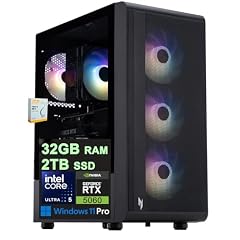
Acer Nitro 60 Gaming AI Desktop
- CPU
- Intel Core Ultra 5 225F
- GPU
- GeForce RTX 5060
- GPU memory
- 8 GB
- RAM
- 32 GB
- Storage
- 2000 GB
- OS
- Windows 11 Pro
- Dedicated graphics card
- Yes
$1,799.00 (as of 10/20/2026 15:07 PDT - Details)
An Intel Core Ultra 5 225F with an RTX 5060 and 2TB SSD offers access to Intel AI features and DLSS 5 at a mid-range price, with double the storage of many competitors.
Pros
- 2TB SSD for large game installations
- Intel Core Ultra 5 with NPU for local AI tasks
- RTX 5060 with DLSS 5 (Multi Frame Generation)
- Windows 11 Pro included
Cons
- Only 8GB GPU VRAM
- CPU is an entry-level Ultra 5
Good fit if
- Gamers who want AI-accelerated gaming and productivity features
- Users needing ample storage from the start
Skip if
- You need a higher-end GPU for 4K gaming
- You prefer AMD processors
Verdict: The Acer Nitro 60 brings AI-enhanced processing and generous storage to a mid-range gaming desktop.
9 Best office desktop with 32GB RAM

Dell Tower Desktop
- CPU
- Intel Core Ultra 7
- RAM
- 32 GB
- Storage
- 1000 GB
- OS
- Windows 11 Home
$1,479.99 (as of 10/20/2026 17:06 PDT - Details)
A Dell Tower with an Intel Core Ultra 7 and 32GB RAM delivers strong productivity and multitasking performance without a dedicated GPU, suitable for business and office use.
Pros
- Intel Core Ultra 7 with integrated GPU and NPU
- 32GB RAM for heavy multitasking and large spreadsheets
- Windows 11 Home preinstalled
Cons
- No dedicated GPU
- Storage size not stated in listing
Good fit if
- Office workers who run multiple virtual machines or large databases
- Users who need a reliable prebuilt from a major OEM
Skip if
- You need gaming or 3D rendering performance
- You require a small form factor
Verdict: The Dell Tower is a solid choice for productivity users who need 32GB of memory and a modern Intel processor.
10 Best small form factor business PC

Lenovo SFF Business Desktop Computer
- RAM
- 32 GB
- Storage
- 1000 GB
- OS
- Windows 11 Pro
$999.99 (as of 10/20/2026 06:05 PDT - Details)
A Lenovo SFF desktop with 32GB DDR5 RAM, 1TB SSD, and Windows 11 Pro fits into tight spaces while providing enough memory for demanding business applications.
Pros
- Small form factor saves desk space
- 32GB DDR5 RAM for fast multitasking
- 1TB SSD storage
- Windows 11 Pro included
Cons
- Processor not specified in listing
- No dedicated GPU
Good fit if
- Businesses needing compact desktops for cubicles or reception areas
- IT departments that use Windows 11 Pro for domain management
Skip if
- You need a high-performance GPU
- You prefer a tower with more expansion slots
Verdict: The Lenovo SFF packs 32GB of DDR5 RAM into a compact chassis suitable for professional environments.
11 Best budget productivity desktop
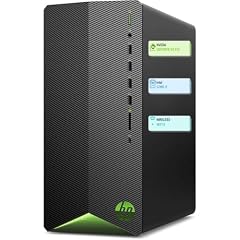
HP Pavilion Desktop Tower Computer
- CPU
- Intel Core i7-11700F
- RAM
- 16 GB
- Storage
- 512 GB
- OS
- Windows 11 Home
$949.98 (as of 10/20/2026 04:06 PDT - Details)
An Intel Core i7-11700F with 32GB RAM and a 1TB SSD provides plenty of memory and storage for office work, web browsing, and light content creation at a value price.
Pros
- Intel Core i7-11700F (8 cores) for multi-threaded tasks
- 1TB SSD storage
- Windows 11 Home included
Cons
- CPU is from the 11th generation (2021)
- No dedicated GPU
Good fit if
- Users who need 32GB RAM for large spreadsheets or data analysis
- Budget-conscious buyers who want a reliable HP desktop
Skip if
- You need the latest CPU generation or integrated AI features
- You plan to play modern games
Verdict: The HP Pavilion Tower offers good value for users who prioritize RAM capacity over the newest processor generation.
12 Best all-in-one with 32GB RAM

HP 24“ FHD OmniStudio All-in-One Desktop
- RAM
- 8 GB
- Storage
- 640 GB
- OS
- Windows 11
$599.97 (as of 10/20/2026 04:07 PDT - Details)
An HP OmniStudio 24-inch all-in-one with 32GB DDR5 RAM integrates the computer and display into one unit, saving desk space for home or office users.
Pros
- All-in-one design with 24-inch FHD display
- 32GB DDR5 RAM for smooth multitasking
- Includes external 512GB and internal 128GB storage (combined 640GB)
Cons
- Processor not named in listing (Intel multi-cores)
- No dedicated GPU
Good fit if
- Home users who want a clutter-free setup
- Office environments with limited desk space
Skip if
- You need a separate monitor upgrade path
- You require a high-performance GPU
Verdict: The HP OmniStudio all-in-one delivers 32GB of DDR5 RAM in an integrated package ideal for space-saving setups.
13 Best touchscreen all-in-one

ASUS VM670 27" All-in-One Desktop Computer
- CPU
- AMD Ryzen AI 7 350
- RAM
- 32 GB
- Storage
- 1000 GB
$1,399.99 (as of 10/20/2026 16:06 PDT - Details)
The ASUS VM670 features a 27-inch touchscreen, AMD Ryzen AI 7 350, 32GB DDR5 RAM, and a 1TB SSD, combining AI processing with an interactive display.
Pros
- 27-inch touchscreen display for interactive use
- AMD Ryzen AI 7 350 with integrated NPU
- 1TB SSD and 32GB DDR5 RAM
Cons
- No dedicated GPU (uses Radeon 860M integrated graphics)
- RAM speed not stated
Good fit if
- Creative professionals who benefit from touch input (e.g., designers, artists)
- Home users wanting a large all-in-one with modern AI features
Skip if
- You need a non-touch display to reduce glare
- You require a discrete GPU for gaming
Verdict: The ASUS VM670 all-in-one offers a large touchscreen and a modern AI processor with 32GB of memory.
14 Best entry-level tower with 32GB

Dell 2026 Edition Tower Desktop Computers
- CPU
- Intel Core i3-14100
- RAM
- 8 GB
- Storage
- 512 GB
- OS
- Windows 11 Pro
$649.99 (as of 10/20/2026 17:06 PDT - Details)
A Dell tower with an Intel Core i3-14100 and 32GB RAM provides basic computing capabilities with plenty of memory for multitasking at a very low price point.
Pros
- 32GB RAM at an entry-level price
- Windows 11 Pro included
- 1TB SSD storage
Cons
- Intel Core i3-14100 (only 4 cores) limits multitasking
- No dedicated GPU
Good fit if
- Budget office PCs for light tasks like email and web browsing
- Users who need Windows 11 Pro but have a tight budget
Skip if
- You run CPU-intensive applications like video editing
- You need a high-performance desktop
Verdict: The Dell 2026 Edition Tower is an inexpensive entry point to get 32GB of RAM in a machine for basic computing.
15 Best AI-powered gaming desktop

Lenovo Legion Tower 5i
- CPU
- Intel Core Ultra 7 265F
- GPU
- GeForce RTX 5070 Ti
- RAM
- 32 GB
- Storage
- 1000 GB
- Dedicated graphics card
- Yes
The Lenovo Legion Tower 5i combines an Intel Core Ultra 7 265F with an RTX 5070 Ti, offering AI acceleration via the CPU's NPU and NVIDIA's DLSS 5 for gaming.
Pros
- Intel Core Ultra 7 265F with NPU for local AI tasks
- RTX 5070 Ti GPU with 16GB VRAM
- 1TB SSD
Cons
- No stated RAM speed
- Only 1TB storage for a high-end machine
Good fit if
- Gamers who want both AI and gaming performance
- Users who prefer Lenovo's Legion build quality
Skip if
- You need more than 1TB of storage from the factory
- Your budget is limited
Verdict: The Lenovo Legion Tower 5i is a well-built AI gaming desktop with a powerful GPU and modern Intel processor.
Specs compared
| # | Desktop | CPU | GPU | GPU memory | RAM | Storage | OS |
|---|---|---|---|---|---|---|---|
| 1 | Skytech Gaming PC Desktop | AMD Ryzen 7 9850X3D | Radeon RX 9070 XT | 16 GB | 32 GB | 2000 GB | Windows 11 |
| 2 | msi Codex Z2 Gaming Desktop | AMD Ryzen 7 8700F | GeForce RTX 5070 | not stated | 32 GB | 2000 GB | Windows 11 Home |
| 3 | KOTIN Gaming PC | AMD Ryzen 7 9700X | Radeon RX 9070 XT | 16 GB | 32 GB | 1000 GB | Windows 11 Home |
| 4 | STORMCRAFT Phantom RTX 5080 Gaming PC Ryzen 7 9800X3D 32GB DDR5 2TB SSD | AMD Ryzen 7 9800X3D | RTX 5080 | 16 GB | 32 GB | 2000 GB | Windows 11 Home |
| 5 | Skytech Gaming PC Desktop | AMD Ryzen 7 5700 | RTX 5060 | 8 GB | 32 GB | 1000 GB | Windows 11 |
| 6 | iBUYPOWER Element Gaming PC Desktop Computer AMD Ryzen 9 7900X CPU | AMD Ryzen 9 7900X | GeForce RTX 5070 | 12 GB | 32 GB | 1000 GB | Windows 11 Home |
| 7 | ASUS ROG G700 | Intel Core Ultra 7 265F | GeForce RTX 5070 | not stated | 32 GB | 1000 GB | Windows 11 Pro |
| 8 | Acer Nitro 60 Gaming AI Desktop | Intel Core Ultra 5 225F | GeForce RTX 5060 | 8 GB | 32 GB | 2000 GB | Windows 11 Pro |
| 9 | Dell Tower Desktop | Intel Core Ultra 7 | not stated | not stated | 32 GB | 1000 GB | Windows 11 Home |
| 10 | Lenovo SFF Business Desktop Computer | not stated | not stated | not stated | 32 GB | 1000 GB | Windows 11 Pro |
| 11 | HP Pavilion Desktop Tower Computer | Intel Core i7-11700F | not stated | not stated | 16 GB | 512 GB | Windows 11 Home |
| 12 | HP 24“ FHD OmniStudio All-in-One Desktop | not stated | not stated | not stated | 8 GB | 640 GB | Windows 11 |
| 13 | ASUS VM670 27" All-in-One Desktop Computer | AMD Ryzen AI 7 350 | not stated | not stated | 32 GB | 1000 GB | not stated |
| 14 | Dell 2026 Edition Tower Desktop Computers | Intel Core i3-14100 | not stated | not stated | 8 GB | 512 GB | Windows 11 Pro |
| 15 | Lenovo Legion Tower 5i | Intel Core Ultra 7 265F | GeForce RTX 5070 Ti | not stated | 32 GB | 1000 GB | not stated |
How we chose these
From a pool of 141 desktops on the market that include 32GB of RAM by specification, we narrowed the field to 15 picks that cover a range of processors (from Intel Core i5 and AMD Ryzen 5 to Ryzen 9 and Core Ultra 9) and GPUs (from integrated graphics to the GeForce RTX 5080 and Radeon RX 9070 XT). We prioritized machines from established brands over reseller configurations when specifications were similar, and we avoided duplicates of the same model. Each pick is evaluated on its published specs against competitors in the same price bracket. No unit was tested, and no customer reviews were consulted. All prices are read live from the listing; they may change at any time.
What to look for
Why 32GB RAM matters for desktop computing
32GB of system memory has become the sweet spot for multitasking, productivity, and many gaming and creative applications. It allows you to run several demanding programs simultaneously (such as a browser with dozens of tabs, a video editor, and a communication app) without slowdowns. For reference, Windows 11 requires only 4GB, but real-world usage often exceeds 16GB when editing large files or playing modern games. 32GB ensures headroom.
Graphics: what the GPU name tells you
The graphics processing unit (GPU) determines a desktop's gaming and rendering ability. NVIDIA's GeForce RTX 50-series (RTX 5060, 5070, 5070 Ti, 5080) supports DLSS 5 with Multi Frame Generation, ray tracing, and AI-enhanced features. AMD's Radeon RX 9070 XT competes with the RTX 5070 Ti. Higher numbers within a generation (e.g., RTX 5080 vs. RTX 5070) indicate more CUDA cores, memory bandwidth, and performance. For office work, integrated graphics or an entry-level GPU like the RTX 3050 suffices.
CPU generation and core count
The processor generation matters as much as core count. Newer cores (Intel Core Ultra series, AMD Ryzen 7000/9000 series) offer better instructions-per-clock (IPC), integrated AI accelerators (NPUs), and support for DDR5 memory and PCIe 5.0. A modern 6-core processor often outperforms an older 8-core in games and single-threaded tasks. For heavy multitasking or rendering, look for 8 cores or more, such as the Ryzen 7, Core i7, or Core Ultra 7.
Storage: SSD type and capacity
Nearly all modern desktops use NVMe SSDs, which are much faster than older SATA SSDs or hard drives. A 1TB drive is the baseline for gaming and creative work, while 2TB provides room for a larger library. Some entries list both a fast SSD and a secondary hard drive (HDD) for bulk storage. If you work with large video files or many games, prioritize a 2TB SSD.
Operating system: Windows 11 Home vs. Pro
Windows 11 Home is suitable for most home users and gamers. Windows 11 Pro adds features like BitLocker encryption, Remote Desktop, and the ability to join a domain, which are valuable for business environments. The listing will specify which version is preinstalled. All desktops in this list include Windows 11, meeting the 4GB RAM minimum requirement, though 32GB naturally exceeds it.
Form factor and expandability
Desktop form factors range from full-size towers (more expansion slots, easier upgrades) to small form factor (SFF) and all-in-one (AIO) designs that save space but limit internal upgrades. If you plan to add a GPU, additional storage, or RAM later, a tower from a major brand (Dell, HP, Lenovo) typically offers more room. SFF and AIO systems are better for fixed configurations where space is at a premium.
Questions
Is 32GB of RAM enough for gaming in 2026?
Yes, 32GB is considered the sweet spot for modern gaming. Most current titles run comfortably on 16GB, but 32GB provides headroom for background applications, streaming, and future games that may require more memory. Higher-end titles with ray tracing and large open worlds benefit from the extra capacity.
Can I add more RAM later to a prebuilt desktop?
It depends on the motherboard and the number of RAM slots. Many tower desktops have two or four DIMM slots, allowing you to upgrade to 64GB or more. Some small form factor and all-in-one systems have soldered memory or limited slots. Check the desktop's specification sheet before purchasing if you plan to upgrade.
What is the difference between DDR4 and DDR5 RAM?
DDR5 is the newer standard, offering higher speeds (typically 4800 MT/s to 6000 MT/s or more) and lower power consumption compared to DDR4. It can improve performance in memory-intensive tasks like video editing and some games. Most desktops from 2024 onward use DDR5. Desktops with older processors (e.g., Intel 11th/12th gen) may still use DDR4.
Do I need a dedicated GPU if I have 32GB of RAM?
RAM and the GPU serve different purposes. 32GB of system RAM helps with multitasking and large files, but it does not replace a dedicated graphics card for gaming, 3D rendering, or GPU-accelerated tasks. For office work and web browsing, integrated graphics may suffice, but for gaming or creative software, a dedicated GPU (NVIDIA GeForce or AMD Radeon) is essential.
Which brand of prebuilt desktop is most reliable?
Major brands such as Dell, HP, Lenovo, MSI, ASUS, and Skytech Gaming have established reputations for quality and customer support. Within this guide, we have prioritized picks from these brands. Smaller resellers (e.g., KOTIN, STORMCRAFT) can offer unique configurations but may have less comprehensive support. Always check the warranty terms before purchasing.
Update history
- : First published.