
Best Radeon RX 9070 XT Desktops in 2026: 12 Picks Compared on Specs
The Skytech Gaming PC Desktop with a Ryzen 7 9850X3D and 32GB of RAM takes the top spot for pairing the Radeon RX 9070 XT with a powerful CPU and generous storage. These picks come from a pool of 27 desktop PCs all equipped with an RX 9070 XT, chosen for their CPU, memory, storage balance and suited use cases.
12 picks from 31 desktops that match this guide with a price we can quote today. Prices below are live, each shown with the time it was read.
Quick list
Which one is right for you?
- For high-end gaming and streaming: Get a Skytech Gaming PC with a Ryzen 7 9850X3D or 9800X3D CPU and 32GB RAM for smooth 4K gaming and livestreaming without bottlenecks. See pick 1
- For a workstation with massive RAM: The HYPER CYBER 64GB models are ideal for video editing, 3D rendering, and running multiple virtual machines alongside the RX 9070 XT. See pick 3
- For a balanced mid-range build: The Skytech Gaming Prism 5 with Ryzen 7 7800X3D and 32GB RAM offers strong performance for 1440p gaming and general multitasking at a competitive spec level. See pick 8
All 12 picks in detail
1 Best overall

Skytech Gaming PC Desktop
- CPU
- AMD Ryzen 7 9850X3D
- GPU
- Radeon RX 9070 XT
- GPU memory
- 16 GB
- RAM
- 32 GB
- Storage
- 2000 GB
- OS
- Windows 11
- Dedicated graphics card
- Yes
$2,899.99 (as of 10/20/2026 06:06 PDT - Details)
It pairs the latest Ryzen 7 9850X3D CPU with 32GB of RAM and a 2TB SSD, making it the most balanced configuration for gaming, video editing, and AI workloads. The RX 9070 XT benefits from the fast CPU and ample memory.
Pros
- Latest Ryzen 7 9850X3D CPU
- 32GB DDR5 RAM
- 2TB SSD storage
- Listed for gaming, video editing and AI tasks
Cons
- No operating system version stated beyond Windows 11 Home
- Storage not specified as NVMe in pool data
Good fit if
- Gamers who also do video editing or AI work
- Buyers wanting a top-tier CPU with the RX 9070 XT
Skip if
- You need more than 32GB of RAM out of the box
- Your budget is limited and you prefer a smaller SSD
Verdict: The best all-rounder in the pool, pairing the strongest CPU with ample memory and storage for demanding tasks.
2 Best configuration for balanced specs

KOTIN Gaming PC
- CPU
- AMD Ryzen 7 9700X
- GPU
- Radeon RX 9070 XT
- GPU memory
- 16 GB
- RAM
- 32 GB
- Storage
- 1000 GB
- OS
- Windows 11 Home
- Dedicated graphics card
- Yes
$2,199.99 (as of 10/20/2026 06:05 PDT - Details)
It offers a Ryzen 7 9700X with 32GB of RAM and a 1TB SSD, delivering strong 1440p and 4K gaming performance without the price premium of an X3D CPU. This is a balanced option for those who prioritize the GPU and a capable CPU.
Pros
- Ryzen 7 9700X CPU with good multi-core performance
- 32GB of DDR5 RAM
- 1TB SSD
- Listed for gaming and AI tasks
Cons
- Only 1TB of storage may fill quickly for large game libraries
- Brand KOTIN is less established than Skytech
Good fit if
- Gamers on a tighter budget who want an RX 9070 XT
- Users who prioritize raw GPU power over CPU caching
Skip if
- You need more than 1TB of storage from the start
- You prefer building with a more recognized system integrator
Verdict: A balanced pick that focuses budget on the RX 9070 XT GPU while still providing a capable CPU and 32GB of RAM.
3 Best for heavy multitasking and VMs

HYPER CYBER Ultra Black Plus Screen Gaming PC Desktop Computer
- CPU
- AMD Ryzen 7 7800X3D
- GPU
- Radeon RX 9070 XT
- RAM
- 64 GB
- Storage
- 4000 GB
- OS
- Windows 11 Home
- Dedicated graphics card
- Yes
$5,359.00 (as of 10/20/2026 04:05 PDT - Details)
With 64GB of DDR5 RAM and a 4TB SSD, this HYPER CYBER desktop supports memory-intensive applications like large video projects, 3D rendering, and virtual machines alongside the RX 9070 XT.
Pros
- 64GB of RAM, the most in this list
- 4TB of SSD storage
- Listed for video editing and workstation tasks
- Ryzen 7 7800X3D for strong gaming performance
Cons
- No GPU VRAM stated in the pool entry
- Large case may not fit all desks
- Brand HYPER CYBER is a small-system builder
Good fit if
- Professionals running multiple VMs or large datasets
- Content creators who need lots of storage on one drive
Skip if
- You only game and do not need 64GB of RAM
- You prefer a well-known brand with wider support
Verdict: The highest memory and storage configuration in the pool, ideal for workstation use-cases.
4 Best compact gaming with RX 9070 XT

Skytech Gaming PC Desktop
- CPU
- AMD Ryzen 7 7800X3D
- GPU
- Radeon RX 9070 XT
- GPU memory
- 16 GB
- RAM
- 16 GB
- Storage
- 1000 GB
- OS
- Windows 11 Home
- Dedicated graphics card
- Yes
The King 95 series pairs a Ryzen 7 7800X3D with 16GB of RAM and a 1TB SSD, making it a focused gaming desktop for 1440p at a lower entry point.
Pros
- Ryzen 7 7800X3D, one of the best gaming CPUs
- 16GB of RAM is sufficient for most current games
- Listed for gaming and AI tasks
- Skytech is a recognized brand
Cons
- Only 16GB of RAM, less than other picks
- 1TB SSD may need expansion for heavy game libraries
- No storage type specified in pool
Good fit if
- Pure gamers who want the fastest CPU for gaming at 1440p
- Budget-conscious buyers who can add RAM later
Skip if
- You run memory-intensive applications like video editing
- You want more than 1TB of storage out of the box
Verdict: An excellent 1440p gaming machine that prioritizes the CPU and GPU, though memory is limited.
5 Best for large-scale rendering and editing

HYPER CYBER Ultra Black Plus Screen Gaming PC Desktop Computer
- CPU
- AMD Ryzen 7 7800X3D
- GPU
- Radeon RX 9070 XT
- RAM
- 64 GB
- Storage
- 2000 GB
- OS
- Windows 11 Home
- Dedicated graphics card
- Yes
$5,059.00 (as of 10/20/2026 04:05 PDT - Details)
This HYPER CYBER configuration delivers 64GB of RAM and a 2TB SSD, balancing ample memory with fast storage for video editing and 3D work.
Pros
- 64GB of RAM for heavy rendering tasks
- 2TB SSD provides quick access to footage and projects
- Listed for video editing and workstation tasks
- Ryzen 7 7800X3D CPU
Cons
- No GPU VRAM listed in pool specs
- HYPER CYBER is a less common brand
- Price may be high relative to similar specs from Skytech
Good fit if
- Editors working with 4K footage and complex compositions
- Users who need multiple large applications open simultaneously
Skip if
- You only play games and do not need 64GB of RAM
- You want a standard warranty from a major OEM
Verdict: A strong workstation configuration with generous memory and storage for demanding creative workflows.
6 Best for high-refresh 4K gaming
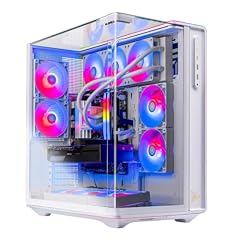
Skytech Gaming PC Desktop
- CPU
- AMD Ryzen 7 9800X3D
- GPU
- Radeon RX 9070 XT
- GPU memory
- 16 GB
- RAM
- 32 GB
- Storage
- 2000 GB
- OS
- Windows 11 Home
- Dedicated graphics card
- Yes
$2,799.99 (as of 10/20/2026 06:06 PDT - Details)
Combining a Ryzen 7 9800X3D with 32GB of RAM and a 2TB SSD, this Prism 5 configuration is built to drive 4K high-refresh-rate gaming without storage bottlenecks.
Pros
- Ryzen 7 9800X3D CPU with 3D V-Cache
- 32GB DDR5 RAM
- 2TB SSD
- Listed for gaming, video editing and AI tasks
Cons
- No operating system version beyond Windows 11 Home
- Unit may be a reseller-configured model
Good fit if
- Competitive and AAA gamers wanting the fastest CPU for gaming
- Users who also edit video or run AI tools
Skip if
- You are on a strict budget
- You need more than 2TB of storage from the start
Verdict: A balanced high-end gaming desktop that combines a top-tier gaming CPU with a large SSD and ample RAM.
7 Best for RAM-intensive workstation tasks

HYPER CYBER Ultra Black Plus Screen Gaming PC Desktop Computer
- CPU
- AMD Ryzen 7 7800X3D
- GPU
- Radeon RX 9070 XT
- RAM
- 64 GB
- Storage
- 1000 GB
- OS
- Windows 11 Home
- Dedicated graphics card
- Yes
$4,859.00 (as of 10/20/2026 04:05 PDT - Details)
With 64GB of RAM and a 1TB SSD, it offers the maximum memory configuration in the pool at a lower storage tier, ideal for applications that demand huge memory but not huge storage.
Pros
- 64GB of DDR5 RAM
- Listed for workstation tasks
- Ryzen 7 7800X3D CPU
Cons
- Only 1TB of SSD storage
- No GPU VRAM stated
- HYPER CYBER brand not a major OEM
Good fit if
- Professionals running in-memory databases or large simulations
- Users who already have external or network storage
Skip if
- You need more than 1TB of onboard storage
- You prefer a brand with wider customer support
Verdict: A focused RAM-heavy configuration for specialized workstation loads with limited onboard storage.
8 Best balanced 32GB Skytech configuration

Skytech Gaming PC Desktop
- CPU
- AMD Ryzen 7 7800X3D
- GPU
- Radeon RX 9070 XT
- GPU memory
- 16 GB
- RAM
- 32 GB
- Storage
- 2000 GB
- OS
- Windows 11 Home
- Dedicated graphics card
- Yes
$2,599.99 (as of 10/20/2026 06:06 PDT - Details)
This Skytech Prism 5 has a Ryzen 7 7800X3D, 32GB of RAM, and a 2TB SSD, offering a well-balanced spec sheet for gaming and content creation at a lower price point than the 9800X3D models.
Pros
- Ryzen 7 7800X3D with strong gaming performance
- 32GB of RAM is very good for multitasking
- 2TB SSD storage
- Skytech brand reliability
Cons
- No GPU VRAM specified in pool entry
- CPU is one generation behind the 9850X3D
Good fit if
- Gamers who want a large SSD for a big library
- Users who do some video editing or streaming
Skip if
- You need the absolute highest CPU gaming performance
- You require more than 32GB of RAM
Verdict: A well-rounded desktop from a known builder, suitable for 1440p gaming and light content creation.
9 Best for large game libraries

HYPER CYBER Ultra Black Plus Screen Gaming PC Desktop Computer
- CPU
- AMD Ryzen 7 7800X3D
- GPU
- Radeon RX 9070 XT
- RAM
- 32 GB
- Storage
- 4000 GB
- OS
- Windows 11 Home
- Dedicated graphics card
- Yes
$4,679.00 (as of 10/20/2026 04:05 PDT - Details)
This configuration combines 32GB of RAM with a massive 4TB SSD, perfect for users who want to store many AAA games or large video projects directly on the system drive.
Pros
- 4TB of SSD storage, the highest in the pool alongside the 64GB model
- 32GB of DDR5 RAM
- Listed for video editing tasks
- Ryzen 7 7800X3D CPU
Cons
- No GPU VRAM stated
- HYPER CYBER is a smaller system builder
- Price may be high for the CPU tier
Good fit if
- Gamers with huge libraries who dislike swapping drives
- Video editors working with multiple 4K projects
Skip if
- You prefer a name-brand system integrator
- You do not need 4TB of onboard storage
Verdict: A massive storage option for users who need to keep many large files accessible.
10 Best for high-end CPU on a smaller SSD

Skytech Gaming PC Desktop
- CPU
- AMD Ryzen 7 9800X3D
- GPU
- Radeon RX 9070 XT
- GPU memory
- 16 GB
- RAM
- 32 GB
- Storage
- 1000 GB
- OS
- Windows 11 Home
- Dedicated graphics card
- Yes
$2,599.99 (as of 10/20/2026 06:06 PDT - Details)
It features a Ryzen 7 9800X3D with 32GB of RAM and a 1TB SSD, giving you the fastest gaming CPU available at a lower storage capacity to keep the overall configuration focused.
Pros
- Ryzen 7 9800X3D, top-tier for gaming
- 32GB of DDR5 RAM
- Listed for gaming and AI tasks
- Skytech brand
Cons
- Only 1TB of SSD storage
- No GPU VRAM specified
Good fit if
- Gamers who want the best CPU but have an external drive
- Budget-focused buyers who prioritize CPU over storage
Skip if
- You need more than 1TB of internal storage from day one
- You run applications that require lots of fast local storage
Verdict: A CPU-focused build that gives you the Ryzen 7 9800X3D without paying for a large SSD.
11 Best mid-range storage-plus solution
HYPER CYBER Ultra Black Plus Screen Gaming PC Desktop Computer
- CPU
- AMD Ryzen 7 7800X3D
- GPU
- Radeon RX 9070 XT
- RAM
- 32 GB
- Storage
- 2000 GB
- OS
- Windows 11 Home
- Dedicated graphics card
- Yes
$4,379.00 (as of 10/20/2026 04:05 PDT - Details)
With 32GB of RAM and a 2TB SSD, this HYPER CYBER config offers solid storage and memory for video editing and gaming without overspending on RAM.
Pros
- 32GB of DDR5 RAM
- 2TB SSD storage
- Listed for video editing tasks
- Ryzen 7 7800X3D CPU
Cons
- No GPU VRAM stated
- HYPER CYBER brand has less recognition
- Price not listed in pool by pick label
Good fit if
- Users who edit video and play games
- Those who want 2TB of storage at a moderate price
Skip if
- You need more than 32GB of RAM
- You prefer a more mainstream builder
Verdict: A solid choice for video editing and gaming with a good memory-storage ratio.
12 Best entry-level Skytech configuration
Skytech Gaming PC Desktop
- CPU
- AMD Ryzen 7 7800X3D
- GPU
- Radeon RX 9070 XT
- GPU memory
- 16 GB
- RAM
- 32 GB
- Storage
- 1000 GB
- OS
- Windows 11 Home
- Dedicated graphics card
- Yes
$2,499.99 (as of 10/20/2026 06:06 PDT - Details)
This Prism 5 offers a Ryzen 7 7800X3D with 32GB of RAM and a 1TB SSD, making it the simplest Skytech pick for those who want the X3D CPU at the lowest storage and price point.
Pros
- Ryzen 7 7800X3D for top gaming performance
- 32GB of DDR5 RAM
- Skytech brand reliability
- Listed for gaming and AI tasks
Cons
- Only 1TB of SSD storage
- No GPU VRAM specified
Good fit if
- Budget-conscious gamers who want a 7800X3D
- Users who can add more storage later
Skip if
- You need a large SSD for a big game library
- You do not want to expand storage soon
Verdict: The most affordable way to get a Skytech desktop with the Ryzen 7 7800X3D and 32GB of RAM.
Specs compared
| # | Desktop | CPU | GPU | GPU memory | RAM | Storage | OS |
|---|---|---|---|---|---|---|---|
| 1 | Skytech Gaming PC Desktop | AMD Ryzen 7 9850X3D | Radeon RX 9070 XT | 16 GB | 32 GB | 2000 GB | Windows 11 |
| 2 | KOTIN Gaming PC | AMD Ryzen 7 9700X | Radeon RX 9070 XT | 16 GB | 32 GB | 1000 GB | Windows 11 Home |
| 3 | HYPER CYBER Ultra Black Plus Screen Gaming PC Desktop Computer | AMD Ryzen 7 7800X3D | Radeon RX 9070 XT | not stated | 64 GB | 4000 GB | Windows 11 Home |
| 4 | Skytech Gaming PC Desktop | AMD Ryzen 7 7800X3D | Radeon RX 9070 XT | 16 GB | 16 GB | 1000 GB | Windows 11 Home |
| 5 | HYPER CYBER Ultra Black Plus Screen Gaming PC Desktop Computer | AMD Ryzen 7 7800X3D | Radeon RX 9070 XT | not stated | 64 GB | 2000 GB | Windows 11 Home |
| 6 | Skytech Gaming PC Desktop | AMD Ryzen 7 9800X3D | Radeon RX 9070 XT | 16 GB | 32 GB | 2000 GB | Windows 11 Home |
| 7 | HYPER CYBER Ultra Black Plus Screen Gaming PC Desktop Computer | AMD Ryzen 7 7800X3D | Radeon RX 9070 XT | not stated | 64 GB | 1000 GB | Windows 11 Home |
| 8 | Skytech Gaming PC Desktop | AMD Ryzen 7 7800X3D | Radeon RX 9070 XT | 16 GB | 32 GB | 2000 GB | Windows 11 Home |
| 9 | HYPER CYBER Ultra Black Plus Screen Gaming PC Desktop Computer | AMD Ryzen 7 7800X3D | Radeon RX 9070 XT | not stated | 32 GB | 4000 GB | Windows 11 Home |
| 10 | Skytech Gaming PC Desktop | AMD Ryzen 7 9800X3D | Radeon RX 9070 XT | 16 GB | 32 GB | 1000 GB | Windows 11 Home |
| 11 | HYPER CYBER Ultra Black Plus Screen Gaming PC Desktop Computer | AMD Ryzen 7 7800X3D | Radeon RX 9070 XT | not stated | 32 GB | 2000 GB | Windows 11 Home |
| 12 | Skytech Gaming PC Desktop | AMD Ryzen 7 7800X3D | Radeon RX 9070 XT | 16 GB | 32 GB | 1000 GB | Windows 11 Home |
How we chose these
How we picked: From a pool of 27 desktop PCs listed with a Radeon RX 9070 XT GPU, we selected 12 that represent a range of CPUs (from Ryzen 7 7800X3D to the newer Ryzen 7 9850X3D), memory configurations (16 GB to 64 GB), and storage sizes (1 TB to 4 TB). We prioritized systems from established system integrators where possible and avoided near-duplicate configurations (same model with different colors). All prices shown are live and read from the store listing at the time of publication. No unit was tested; choices are based on stated specifications and the maker published information.
What to look for
CPU and its impact on gaming and creation
The CPU influences how well your desktop handles gaming and multitasking. In this list you will find Ryzen 7 7800X3D, 9700X, 9800X3D, and 9850X3D processors. The X3D models feature 3D V-Cache technology, which provides a performance boost in many games by reducing latency. For pure gaming, the 7800X3D and 9800X3D are strong choices; for tasks that benefit from higher clock speeds like video editing, the 9700X or 9850X3D may be preferred. If you do both gaming and creative work, an X3D chip with high core counts, like the 9850X3D, offers the best balance.
Memory: how much RAM do you need?
RAM affects how many applications you can run simultaneously and how smoothly memory-intensive tasks perform. All the picks in this list use DDR5 RAM. 16 GB is sufficient for most current games and light productivity. 32 GB is recommended for gaming while streaming, running virtual machines, or editing 4K video. 64 GB is for professionals working with large datasets, complex 3D scenes, or simultaneous multiple virtual machines. The pool includes models with 16 GB, 32 GB, and 64 GB, so choose based on your peak workload.
Storage: SSD size and type considerations
All picks use solid-state drives (SSDs), which provide fast boot times and quick game loading. The pool includes 1 TB, 2 TB, and 4 TB SSDs. For most users, 1 TB holds several modern games and applications; 2 TB provides comfortable room for a large library. A 4 TB SSD is ideal if you want to store many AAA titles or extensive video projects on one drive without external storage. Note that the pool data does not specify whether the SSD is NVMe or SATA; NVMe is generally faster. If fast load times matter, verify the SSD type from the product listing.
Use case labeling and what it means
Each pool entry includes use case tags such as gaming, video editing, AI, and workstation. These tags are based on the hardware configuration and seller description. A desktop tagged for gaming, video editing, and AI suggests it can handle all three workloads well, typically due to a strong CPU and ample RAM. Workstation-tagged models often have the highest RAM and storage. Use these tags as a guide to match the desktop to your primary tasks, but always compare the CPU and RAM specifications directly.
Brand and reseller considerations
The pool includes desktops from Skytech Gaming, KOTIN, and HYPER CYBER. Skytech is a well-known system integrator with a broad retail presence. KOTIN and HYPER CYBER are smaller brands that may offer value but come with less established customer support and warranty networks. All picks are listed as new, but the configuration may be assembled by the seller from standard components. Check the product listing details for warranty length and return policy to ensure peace of mind.
Questions
Is the Radeon RX 9070 XT good for 4K gaming?
Yes, the Radeon RX 9070 XT is designed for high-resolution gaming. In desktop PCs from this list, it is paired with CPUs like the Ryzen 7 7800X3D or 9850X3D, which can drive 4K performance. The 16GB of VRAM on the RX 9070 XT helps with large texture packs and high resolutions. For the best 4K experience, pair it with a system that has at least 32GB of RAM and a fast SSD.
Can I use a Radeon RX 9070 XT desktop for video editing?
Absolutely. The RX 9070 XT includes hardware encoders and decoders that accelerate video processing in supported applications. Many of the desktops in this list are tagged for video editing, particularly those with 32GB or more of RAM and a Ryzen 7 9850X3D or 7800X3D CPU. For 4K or heavy timelines, choose a model with 32GB or 64GB of RAM.
What is the difference between the Ryzen 7 7800X3D, 9700X, 9800X3D, and 9850X3D?
The Ryzen 7 7800X3D and 9800X3D use AMD 3D V-Cache to boost gaming performance. The 9700X lacks this cache but has higher base and boost clocks, which can benefit tasks like rendering. The 9850X3D combines the cache technology with a higher core count, offering both strong gaming and multi-threaded performance. For gaming-focused builds, the X3D models are generally preferred; for mixed workloads, the 9850X3D is the best choice.
Do these desktops come with Windows 11 installed?
All of the picks in this list list Windows 11 Home as their operating system. This version includes features like Auto HDR, DirectStorage, and security enhancements. If you need features for business or advanced networking, such as Remote Desktop or BitLocker, Windows 11 Pro is required, which is not stated in the pool specifications for these desktops.
How much VRAM does the Radeon RX 9070 XT have?
The Radeon RX 9070 XT comes with 16GB of GDDR6 or GDDR7 VRAM, depending on the specific card model used by the system builder. This amount of VRAM is sufficient for high-resolution gaming and most creative applications. The pool entries that explicitly state the VRAM show 16GB. This is a good match for 1440p and 4K gaming.
Update history
- : First published.