
Best 16GB Graphics Desktops in 2026: 15 Picks by Specs
The best 16GB graphics desktops combine a GPU with 16GB of video memory with a processor and RAM that keep up. That capacity handles 1440p and 4K gaming, AI model work, and video editing without constantly swapping textures. Our top pick is the Skytech King 95 with an RTX 5080 and Ryzen 7 9850X3D, because it pairs a fast Blackwell GPU with 32GB of RAM and 2TB of SSD storage. We selected these desktops from a pool of 42 configurations based on the stated specifications and the makers' published information.
15 picks from 72 desktops that match this guide with a price we can quote today. Prices below are live, each shown with the time it was read.
Quick list
Which one is right for you?
- For 4K gaming on a budget: A desktop with an RTX 5070 Ti or RX 9070 XT offers 16GB of VRAM, enough for high settings at 4K with DLSS or FSR. Look for a Ryzen 7 or Core Ultra 7 CPU. See pick 12
- For AI model work: You need a CUDA-friendly GPU with 16GB, like an RTX 5080, plus at least 32GB of system RAM. These picks keep your model weights resident and avoid large swaps. See pick 7
- For a quiet workstation: A Lenovo ThinkStation P3 Tower with an RTX 2000 Ada and Intel vPro offers enterprise-grade security and manageability, with 128GB of RAM and 4TB of storage. See pick 6
- For an all-round creator: A Ryzen 9 9950X3D with an RTX 5080 and 96GB of RAM gives you high core counts and fast graphics for rendering and gaming on one machine. See pick 5
All 15 picks in detail
1 Best overall

Skytech Gaming PC Desktop
- CPU
- AMD Ryzen 7 9850X3D
- GPU
- RTX 5080
- GPU memory
- 16 GB
- RAM
- 32 GB
- Storage
- 2000 GB
- OS
- Windows 11
- Dedicated graphics card
- Yes
$3,699.99 (as of 10/20/2026 06:06 PDT - Details)
This Skytech pairs a Ryzen 7 9850X3D with an RTX 5080, 32GB of RAM, and 2TB of NVMe storage. It balances the highest single-GPU performance with a CPU that won't bottleneck at 1440p or 4K.
Pros
- RTX 5080 with 16GB of GDDR7 and 5th-gen Tensor Cores
- 2TB NVMe SSD for current game libraries
- 32GB DDR5 RAM is the sweet spot for gaming and streaming
Cons
- No stated cooling details beyond the stock configuration
- Power supply capacity not specified in the listing
Good fit if
- Those who want a top-tier gaming desktop with no upgrade needed for years
- Users who play at 4K and want DLSS Multi Frame Generation
Skip if
- You need enterprise-grade manageability like vPro
- You prefer a workstation with ECC memory
Verdict: The Skytech King 95 is the best all-around pick for anyone who needs a 16GB graphics desktop today.
2 Best for esports and fast shooters

STORMCRAFT Phantom RTX 5080 Gaming PC Ryzen 7 9800X3D 32GB DDR5 2TB SSD
- CPU
- AMD Ryzen 7 9800X3D
- GPU
- RTX 5080
- GPU memory
- 16 GB
- RAM
- 32 GB
- Storage
- 2000 GB
- OS
- Windows 11 Home
- Dedicated graphics card
- Yes
$3,399.99 (as of 10/20/2026 06:06 PDT - Details)
The Ryzen 7 9800X3D has extra 3D V-Cache that lowers latency in competitive games. Pair it with the RTX 5080 and you get high frame rates even at 1080p with all settings maxed.
Pros
- 3D V-Cache CPU reduces latency in CPU-bound titles
- 2TB SSD for large competitive game installs
- RTX 5080 can push high refresh rates at 1440p
Cons
- 32GB RAM is adequate but not exceptional for future heavy multitasking
- Case airflow not detailed in the listing
Good fit if
- Esports players who play Counter-Strike, Valorant, or Overwatch at high refresh
- Users who want a machine that also handles 4K gaming
Skip if
- You need more than 2TB of storage without adding a drive
- You prefer a compact form factor over a mid-tower
Verdict: If your priority is low-latency competitive gaming, this STORMCRAFT phantom is a strong choice.
3 Best for AI inference

Cooler Master TD5 Pro Gaming PC Intel Ultra 7 + RTX 5080 ATX Desktop PC
- CPU
- Intel Core Ultra 7 265F
- GPU
- RTX 5080
- GPU memory
- 16 GB
- Dedicated graphics card
- Yes
$3,099.99 (as of 10/20/2026 17:05 PDT - Details)
The RTX 5080 has 16GB of GDDR7 and 5th-gen Tensor Cores that excel at running local language models and image generation. The Intel Core Ultra 7 265F adds an NPU for lighter AI tasks.
Pros
- RTX 5080 with 1801 AI TOPS for fast inference
- Intel Core Ultra 7 includes an NPU for background AI
- Cooler Master case offers good thermal design
Cons
- RAM and storage not stated in the listing
- GPU and CPU make it power hungry, so check your PSU
Good fit if
- Developers testing local models or using AI tools
- Users who want a desktop that can also play games
Skip if
- You need a full spec sheet before purchase
- You prefer AMD GPUs for FSR scaling
Verdict: This Cooler Master desktop is built for AI work, with a GPU that handles heavy models and a CPU ready for the next wave of AI features.
4 Best for multitasking
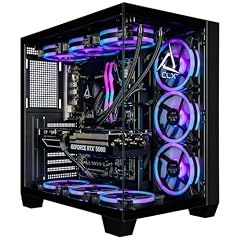
CLX Set Gaming PC
- CPU
- Intel Core Ultra 7 270K
- GPU
- GeForce RTX 5080
- GPU memory
- 16 GB
- RAM
- 64 GB
- Storage
- 2000 GB
- OS
- Windows 11 Home
- Dedicated graphics card
- Yes
$4,299.99 (as of 10/20/2026 16:08 PDT - Details)
With 64GB of DDR5 RAM and an Intel Core Ultra 7 270K, this CLX desktop can handle heavy multitasking, toggling between games, streaming, and editing software without slowdown.
Pros
- 64GB DDR5 RAM for extensive multitasking
- 2TB NVMe M.2 SSD for fast load times
- RTX 5080 supports DLSS 5 and ray tracing
Cons
- Intel Core Ultra 7 is not a top-tier 16-core part
- No mention of Windows version in the listing
Good fit if
- Streamers who run OBS, Discord, and a game simultaneously
- Content creators who juggle multiple editing tools
Skip if
- You want a quiet system, as RGB cases often include many fans
- You need more than 2TB of storage out of the box
Verdict: The CLX Set is for those who want a high-RAM, fast-storage desktop that never feels cramped.
5 Best for video editing

Panorama XL RTX 5080 16GB
- CPU
- AMD Ryzen 9 9950X3D
- GPU
- RTX 5080
- GPU memory
- 16 GB
- RAM
- 96 GB
- Storage
- 4000 GB
- OS
- Windows 11 Pro
- Dedicated graphics card
- Yes
$6,099.99 (as of 10/20/2026 06:06 PDT - Details)
A Ryzen 9 9950X3D with 16 cores and 96GB of DDR5 RAM makes this Panorama XL a powerhouse for 4K and 8K timeline scrubbing. The RTX 5080's NVENC encoder accelerates exports.
Pros
- 96GB of DDR5 RAM for massive preview caches
- 4TB Gen4 NVMe SSD for raw footage and projects
- 16-core Ryzen 9 9950X3D handles multi-threaded effects
Cons
- Large tower may be hard to place under a desk
- Priced for professionals, not casual editors
Good fit if
- Video editors working with long 4K timelines
- Colorists who need smooth previews and fast rendering
Skip if
- You edit in 1080p and only need 16GB of RAM
- You prefer a smaller form factor
Verdict: For video professionals, this Panorama XL offers the RAM and storage headroom to keep you in the flow.
6 Best for ISV certification

Lenovo ThinkStation P3 Tower Workstation Intel Ultra 9 285 vPro 128GB
- CPU
- Intel Core Ultra 9 285
- GPU
- RTX 2000 Ada
- GPU memory
- 16 GB
- RAM
- 128 GB
- Storage
- 4000 GB
- OS
- Windows 11 Pro
- Dedicated graphics card
- Yes
$4,999.00 (as of 10/20/2026 06:05 PDT - Details)
Lenovo ThinkStations are certified for professional software like SolidWorks and AutoCAD. This P3 pairs an Intel Ultra 9 285 with an RTX 2000 Ada, a workstation GPU with 16GB of GDDR6.
Pros
- RTX 2000 Ada provides certified reliability for CAD and DCC
- 128GB DDR5 for huge simulation datasets
- Intel vPro and Windows 11 Pro for enterprise manageability
Cons
- RTX 2000 Ada is not designed for gaming performance
- 4TB SSD may be overkill for light users
Good fit if
- Engineers running CAD and finite element analysis
- IT departments needing remote management and security
Skip if
- You plan to game on this machine at high settings
- You need a desktop with a consumer GPU for content creation
Verdict: If reliability and certified drivers matter more than gaming, this Lenovo workstation is a safe bet.
7 Best for AI devs

msi Aegis ZS2 Gaming Desktop PC
- CPU
- AMD Ryzen 9 9900X
- GPU
- GeForce RTX 5080
- GPU memory
- 16 GB
- RAM
- 64 GB
- Storage
- 2000 GB
- OS
- Windows 11 Home
- Dedicated graphics card
- Yes
The RTX 5080 in this MSI Aegis ZS2 has 16GB of VRAM and strong CUDA support, while the Ryzen 9 9900X offers 12 cores for heavy CPU tasks. The 64GB RAM allows large batch sizes.
Pros
- 64GB DDR5 RAM for machine learning datasets
- 2TB SSD for code and checkpoints
- RTX 5080's 5th-gen Tensor Cores accelerate training
Cons
- Not as fast as a Threadripper for pure parallel CPU work
- Case design may attract fingerprints
Good fit if
- Data scientists running PyTorch or TensorFlow locally
- Researchers who want a single machine for inferencing and small training runs
Skip if
- You need ECC memory for 24/7 compute
- You prefer a workstation brand for support
Verdict: This MSI offers the VRAM and RAM balance that local AI developers need without going to a full workstation.
8 Best for multi-GPU preparation

Adamant Custom 64-Core Workstation Desktop Computer PC AMD Ryzen
- CPU
- AMD Ryzen Threadripper 9980X
- GPU
- RTX PRO 2000
- GPU memory
- 16 GB
- RAM
- 512 GB
- Storage
- 2000 GB
- OS
- Windows 11 Pro
- Dedicated graphics card
- Yes
A 64-core Threadripper 9980X with 512GB of RAM and an RTX PRO 2000 is a serious workstation. The 16GB GPU handles display and compute, and you can add more GPUs later.
Pros
- 64-core Threadripper is a monster for rendering and simulation
- 512GB DDR5 RAM for in-memory databases
- Windows 11 Pro and RTX PRO support professional workflows
Cons
- Very high price for most users
- Only 2TB SSD, small for a workstation of this class
Good fit if
- Film studios simulating physics or rendering huge scenes
- Researchers in fields needing massive CPU core counts
Skip if
- You only need 16GB VRAM for gaming
- You want a quiet, compact desktop
Verdict: The Adamant custom workstation is for compute-heavy users who need the ultimate CPU and RAM, not for mainstream gaming.
9 Best for AMD fans

Skytech Gaming PC Desktop
- CPU
- AMD Ryzen 7 9850X3D
- GPU
- Radeon RX 9070 XT
- GPU memory
- 16 GB
- RAM
- 32 GB
- Storage
- 2000 GB
- OS
- Windows 11
- Dedicated graphics card
- Yes
$2,899.99 (as of 10/20/2026 06:06 PDT - Details)
This Skytech pairs a Ryzen 7 9850X3D with a Radeon RX 9070 XT, which has 16GB of VRAM and supports AMD's FSR upscaling. It's a high-end all-AMD build for 1440p and 4K.
Pros
- RX 9070 XT offers 16GB of fast GDDR6 memory
- 2TB SSD and 32GB RAM provide a balanced setup
- FSR 4 support is available on this family
Cons
- AMD GPUs lack DLSS's Multi Frame Generation
- Ray tracing performance is usually behind NVIDIA at this tier
Good fit if
- Users who prefer AMD software like Adrenalin and FSR
- Gamers who want a powerful PC with an AMD GPU
Skip if
- You need CUDA for AI or rendering
- You want the absolute best ray tracing performance
Verdict: The Skytech Azure 3 is a strong all-AMD alternative that doesn't compromise on VRAM.
10 Best for mid-range 4K

STORMCRAFT Phantom AI Gaming Desktop RTX 5080 Ultra7 265F 32GB DDR5 2TB
- GPU
- RTX 5080
- GPU memory
- 16 GB
- RAM
- 32 GB
- Storage
- 2000 GB
- Dedicated graphics card
- Yes
$3,149.99 (as of 10/20/2026 06:06 PDT - Details)
With an RTX 5080, 32GB RAM, and 2TB SSD, this STORMCRAFT offers nearly the same gaming experience as pricier builds. The Intel Ultra 7 265F is a solid 8-core part for balanced performance.
Pros
- RTX 5080 is the best 16GB GPU for gaming right now
- 2TB SSD gives room for current and future games
- Windows 11 Home is included
Cons
- No Windows version stated in the listing
- CPU is not an X3D variant, so some games will see lower frame ceilings
Good fit if
- Gamers who want a top-tier GPU without paying for a 9950X3D
- Users who do light video editing and want CUDA acceleration
Skip if
- You need 64GB of RAM for complex simulations
- You prefer a smaller case like an ITX build
Verdict: This STORMCRAFT gives you the RTX 5080 and 16GB VRAM that matters most for 4K gaming.
11 Best for 3D rendering

CLX Horus Creator Workstation
- CPU
- AMD Ryzen Threadripper 9970X
- GPU
- GeForce RTX 5080
- GPU memory
- 16 GB
- RAM
- 256 GB
- Storage
- 4000 GB
- OS
- Windows 11 Pro
- Dedicated graphics card
- Yes
$18,259.99 (as of 10/20/2026 16:08 PDT - Details)
The Threadripper 9970X has 24 cores, and the 256GB DDR5 ECC RAM ensures stability in long renders. The RTX 5080 accelerates viewport performance with 16GB VRAM.
Pros
- 24-core Threadripper 9970X for CPU renders
- 256GB ECC DDR5 for error-free computations
- 4TB NVMe SSD stores large asset libraries
Cons
- Overkill for most users, with more compute than typical workloads need
- Windows 11 Pro lacks some workstation-specific features of Windows 11 for Workstations
Good fit if
- 3D artists using Blender Cycles or Cinema 4D
- Architectural visualization firms handling huge scenes
Skip if
- You only need a GPU for rendering
- You have a limited budget and won't use the CPU cores
Verdict: The CLX Horus is a purpose-built creator workstation that justifies its price through raw CPU performance.
12 Best for balanced performance
Skytech Gaming PC Desktop
- CPU
- AMD Ryzen 7 9800X3D
- GPU
- RTX 5070 Ti
- GPU memory
- 16 GB
- RAM
- 32 GB
- Storage
- 2000 GB
- OS
- Windows 11
- Dedicated graphics card
- Yes
$2,899.99 (as of 10/20/2026 06:06 PDT - Details)
This Skytech pairs an RTX 5070 Ti with a Ryzen 7 9800X3D, giving you 16GB of VRAM and the 3D V-Cache for gaming. It offers a strong balance of CPU and GPU performance for high refresh 1440p gaming.
Pros
- RTX 5070 Ti has 16GB GDDR7 and DLSS 5
- Ryzen 7 9800X3D is excellent for gaming
- 2TB SSD and 32GB RAM are well balanced
Cons
- RTX 5070 Ti is not as fast as the RTX 5080 at high resolutions
- No Windows version stated
Good fit if
- Gamers who want a desktop that runs any game at high settings without stutter
- Users who plan to upgrade to a 4K monitor later and want enough VRAM
Skip if
- You need the absolute maximum GPU performance
- You want a workstation with ECC memory
Verdict: The Skytech King 95 with RTX 5070 Ti is a smart pick for gamers who want 16GB VRAM without moving to a top-tier GPU.
13 Best for showpiece builds

Skytech Gaming O11 Vision Gaming PC
- CPU
- AMD Ryzen 7 9850X3D
- GPU
- RTX 5070 Ti
- GPU memory
- 16 GB
- RAM
- 32 GB
- OS
- Windows 11
- Dedicated graphics card
- Yes
The O11 Vision case features glass panels and a vertical GPU mount, making it a visual centerpiece. Inside, an RTX 5070 Ti and Ryzen 7 9850X3D deliver strong performance.
Pros
- Unique O11 Vision case with tempered glass
- 32GB RAM and 2TB SSD for a fast system
- RTX 5070 Ti has 16GB for high textures
Cons
- Case fans are not specified
- No Windows version listed
Good fit if
- Users who want a desktop that looks as good as it performs
- Gamers who plan to show off their build on a desk
Skip if
- You need a compact or quiet PC
- You prefer a simple black tower without RGB
Verdict: The O11 Vision Skytech is a statement piece that also delivers serious gaming performance.
14 Best for entry-level 16GB

Skytech Gaming Azure 3 Gaming PC
- CPU
- AMD Ryzen 7 7800X3D
- GPU
- RTX 5060 Ti
- GPU memory
- 16 GB
- RAM
- 16 GB
- OS
- Windows 11
- Dedicated graphics card
- Yes
$1,999.99 (as of 10/20/2026 06:06 PDT - Details)
This Skytech pairs an RTX 5060 Ti with a Ryzen 7 7800X3D. The RTX 5060 Ti has 16GB of VRAM, which is rare at this GPU tier, making it ideal for 1080p with heavy mods.
Pros
- RTX 5060 Ti with 16GB is a unique affordable option
- Ryzen 7 7800X3D is a great gaming chip
- 16GB RAM is low but acceptable for light users
Cons
- Only 16GB of system RAM, limiting multitasking
- Storage is not stated in the listing
Good fit if
- Gamers on a budget who want 16GB VRAM for texture-heavy games
- Users who don't do heavy multitasking
Skip if
- You plan to run AI models that need system RAM
- You want 32GB of RAM for future-proofing
Verdict: The Skytech Azure 3 delivers a 16GB graphics card in a new system, a smart entry point for gamers who want that VRAM.
15 Best for 1440p gaming

Skytech Gaming PC Desktop
- CPU
- AMD Ryzen 7 9800X3D
- GPU
- Radeon RX 9070 XT
- GPU memory
- 16 GB
- RAM
- 32 GB
- Storage
- 1000 GB
- OS
- Windows 11 Home
- Dedicated graphics card
- Yes
$2,599.99 (as of 10/20/2026 06:06 PDT - Details)
The combination of a Ryzen 7 9800X3D and an RX 9070 XT with 16GB VRAM is tuned for high refresh 1440p. The 1TB SSD is enough for a few games, and 32GB RAM keeps the system fluid.
Pros
- RX 9070 XT offers 16GB and solid 1440p performance
- Ryzen 7 9800X3D avoids CPU bottlenecks
- 32GB RAM and Windows 11 Home included
Cons
- 1TB SSD may fill quickly with large games
- AMD GPUs lack DLSS, so upscaling quality varies
Good fit if
- Gamers who have a 1440p 144Hz monitor
- Users who prefer AMD and want a high refresh rate experience
Skip if
- You need more than 1TB of storage
- You want ray tracing performance, where NVIDIA typically wins
Verdict: The Prism 5 is a sweet spot for 1440p gaming with 16GB VRAM.
Specs compared
| # | Desktop | CPU | GPU | GPU memory | RAM | Storage | OS |
|---|---|---|---|---|---|---|---|
| 1 | Skytech Gaming PC Desktop | AMD Ryzen 7 9850X3D | RTX 5080 | 16 GB | 32 GB | 2000 GB | Windows 11 |
| 2 | STORMCRAFT Phantom RTX 5080 Gaming PC Ryzen 7 9800X3D 32GB DDR5 2TB SSD | AMD Ryzen 7 9800X3D | RTX 5080 | 16 GB | 32 GB | 2000 GB | Windows 11 Home |
| 3 | Cooler Master TD5 Pro Gaming PC Intel Ultra 7 + RTX 5080 ATX Desktop PC | Intel Core Ultra 7 265F | RTX 5080 | 16 GB | not stated | not stated | not stated |
| 4 | CLX Set Gaming PC | Intel Core Ultra 7 270K | GeForce RTX 5080 | 16 GB | 64 GB | 2000 GB | Windows 11 Home |
| 5 | Panorama XL RTX 5080 16GB | AMD Ryzen 9 9950X3D | RTX 5080 | 16 GB | 96 GB | 4000 GB | Windows 11 Pro |
| 6 | Lenovo ThinkStation P3 Tower Workstation Intel Ultra 9 285 vPro 128GB | Intel Core Ultra 9 285 | RTX 2000 Ada | 16 GB | 128 GB | 4000 GB | Windows 11 Pro |
| 7 | msi Aegis ZS2 Gaming Desktop PC | AMD Ryzen 9 9900X | GeForce RTX 5080 | 16 GB | 64 GB | 2000 GB | Windows 11 Home |
| 8 | Adamant Custom 64-Core Workstation Desktop Computer PC AMD Ryzen | AMD Ryzen Threadripper 9980X | RTX PRO 2000 | 16 GB | 512 GB | 2000 GB | Windows 11 Pro |
| 9 | Skytech Gaming PC Desktop | AMD Ryzen 7 9850X3D | Radeon RX 9070 XT | 16 GB | 32 GB | 2000 GB | Windows 11 |
| 10 | STORMCRAFT Phantom AI Gaming Desktop RTX 5080 Ultra7 265F 32GB DDR5 2TB | not stated | RTX 5080 | 16 GB | 32 GB | 2000 GB | not stated |
| 11 | CLX Horus Creator Workstation | AMD Ryzen Threadripper 9970X | GeForce RTX 5080 | 16 GB | 256 GB | 4000 GB | Windows 11 Pro |
| 12 | Skytech Gaming PC Desktop | AMD Ryzen 7 9800X3D | RTX 5070 Ti | 16 GB | 32 GB | 2000 GB | Windows 11 |
| 13 | Skytech Gaming O11 Vision Gaming PC | AMD Ryzen 7 9850X3D | RTX 5070 Ti | 16 GB | 32 GB | not stated | Windows 11 |
| 14 | Skytech Gaming Azure 3 Gaming PC | AMD Ryzen 7 7800X3D | RTX 5060 Ti | 16 GB | 16 GB | not stated | Windows 11 |
| 15 | Skytech Gaming PC Desktop | AMD Ryzen 7 9800X3D | Radeon RX 9070 XT | 16 GB | 32 GB | 1000 GB | Windows 11 Home |
How we chose these
We started with a pool of 42 desktop configurations, each with a GPU that carries 16GB of dedicated graphics memory. From that pool we selected 15 machines that cover the main use cases: gaming at high resolutions, AI inference, video editing, and workstation tasks. We required each pick to have a clearly stated graphics card, processor, RAM, and storage. We did not test any unit; selections are based on the catalog specs and the manufacturers' own product pages. Prices on the page are live and read from the store listing at the time of publication, so we never compare prices in the text.
What to look for
Understand what 16GB of VRAM means
Graphics memory (VRAM) is where the GPU stores textures, geometry, and framebuffer data. 16GB is the new sweet spot for high-res gaming and AI workloads. It lets you load large texture packs, run ray tracing at 1440p, and keep more of a neural network in memory. At 1080p, 16GB is more than enough, but it becomes useful when you turn on ultra settings or use DLSS quality modes.
Match GPU memory with CPU and RAM
A 16GB GPU needs a processor that can feed it data. For gaming, an 8-core CPU like a Ryzen 7 or Intel Core Ultra 7 is the minimum to avoid stalls. For content creation, consider a 12- or 16-core chip. System RAM also matters: 32GB is the recommended baseline for these desktops, but 64GB helps if you edit video while keeping many browser tabs open.
Check the GPU model and generation
Not all 16GB GPUs are equal. The RTX 5080 and RX 9070 XT are the fastest in our picks; the RTX 5070 Ti and RTX 5060 Ti are lower tiers. NVIDIA's RTX 50 series uses GDDR7 memory and supports DLSS 5, while the RX 9070 XT uses AMD's FSR technology. If you rely on CUDA or specific AI libraries, an NVIDIA GPU is usually the safer choice.
Look at the chassis and cooling approach
Desktops with high-end GPUs generate heat. Look for a case with multiple front and rear fans, or a liquid-cooled CPU. The listings in our pool rarely specify fan counts, so you may need to check manufacturer pages. A larger case offers better airflow and easier upgrades, while a compact case saves desk space but may run warmer.
Verify the operating system and driver support
Most picks ship with Windows 11 Home, but some professional models have Windows 11 Pro, which adds features like BitLocker and Remote Desktop. Check the OS before buying if you need enterprise tools or if you prefer Linux, since NVIDIA and AMD drivers work on both but can be finicky. Windows 11 requires a TPM 2.0, which all modern desktops have.
Consider upgrade paths for storage and RAM
A 16GB graphics card is a solid foundation, but you'll eventually want more storage or RAM. Many towers have additional M.2 slots and DIMM slots. In our picks, the CLX Set and MSI Aegis have 64GB of RAM, giving you headroom. Always check the motherboard's max RAM and whether the SSD slots are populated before you plan upgrades.
Questions
Is 16GB of VRAM enough for gaming in 2026?
Yes, 16GB is currently the recommended amount for 1440p and comfortable for 4K at high settings. Games like Cyberpunk 2077, Hogwarts Legacy, and the latest Call of Duty can exceed 12GB with ray tracing and ultra textures, but they stay under 16GB in most scenarios. If you don't plan to upgrade your graphics card for several years, 16GB is the right amount.
What is the difference between the RTX 5070 Ti and RTX 5080?
The RTX 5080 has more CUDA cores (10752 vs 8960) and higher memory bandwidth (960 GB/s vs 896 GB/s), so it is about 15-20% faster at 4K. Both have 16GB of GDDR7 and support DLSS 5. The RTX 5080 also has twice the NVENC encoders for video editing. The RTX 5070 Ti is a better value if you are on a budget, but the RTX 5080 lasts longer for future games.
Can I use a 16GB graphics desktop for machine learning?
Yes, but with limits. A 16GB VRAM GPU can run small to medium models like Llama 3.1 8B quantized or Stable Diffusion at 512x512. For larger models, you need to use quantization or offload to system RAM, which hurts performance. NVIDIA GPUs are better because of CUDA support in PyTorch and TensorFlow. We recommend at least 32GB of system RAM to complement the 16GB VRAM.
Do I need Windows 11 Pro on a gaming desktop?
No, Windows 11 Home is fine for gaming and most personal tasks. Pro adds BitLocker drive encryption, Remote Desktop, and Hyper-V. If you use group policy or join a company domain, Pro is necessary. For most users, the upgrade cost isn't justified. Check that the desktop comes with Windows 11 Home and not an older version.
Are AMD RX 9070 XT desktops competitive with NVIDIA RTX 5080?
In rasterized performance, the RX 9070 XT is close to the RTX 5070 Ti, but usually below the RTX 5080. AMD wins in raw VRAM per dollar, and FSR 4 improves upscaling quality. However, NVIDIA has better ray tracing acceleration and DLSS Multi Frame Generation, which can triple frame rates in supported games. For AI and CUDA work, NVIDIA is the clear leader.
Update history
- : First published.