
Best 8GB RAM Desktops in 2026: 15 Picks Compared on Specs
The Acer Aspire TC-1775, with its Intel Core i5-14400 and 512GB SSD, is the top pick for business and office use among 8GB RAM desktops. We selected 15 models from a pool of 24, comparing processor generation, storage type, and operating system to help you find the right fit for your needs and budget.
15 picks from 31 desktops that match this guide with a price we can quote today. Prices below are live, each shown with the time it was read.
Quick list
Which one is right for you?
- For office productivity on a budget: The Dell Optiplex 7070 SFF (Renewed) offers a business-class Intel Core i5-9500 and 512GB SSD at a low entry point. See pick 6
- For entry-level gaming: The HP Pavilion Gaming Desktop with a GTX 1650 SUPER and Intel Core i3-10100 provides a dedicated GPU for 1080p gaming. See pick 14
- For a compact business desktop: The Lenovo ThinkCentre Neo 55s with an AMD Ryzen 5 220 and Windows 11 Pro fits small office spaces. See pick 3
All 15 picks in detail
1 Best overall

Acer Aspire TC-1775 Desktop Computer Intel i5-14400
- CPU
- Intel Core i5-14400
- RAM
- 8 GB
- Storage
- 512 GB
- OS
- Windows 11 Pro
The Acer Aspire TC-1775 combines a current-generation Intel Core i5-14400 processor with 512GB of SSD storage and Windows 11 Pro. It offers the most balanced set of features for business and office use among the 8GB RAM desktops we selected.
Pros
- Intel Core i5-14400, the newest processor among the picks
- 512GB SSD provides ample storage for documents and applications
- Windows 11 Pro includes BitLocker and Remote Desktop
- DDR5 RAM, faster than the DDR4 found on many competitors
Cons
- 8GB RAM may limit multitasking with many browser tabs or large spreadsheets
- No dedicated graphics card for gaming or creative work
- Only one storage drive; no secondary HDD listed
Good fit if
- Office workers who need a snappy, modern desktop for everyday tasks
- Businesses that want Windows 11 Pro for security and management features
Skip if
- You need to run demanding creative software like video editing or 3D modeling
- You plan to game on the desktop without adding a dedicated GPU
Verdict: The Acer Aspire TC-1775 is a well-rounded business desktop with a current-gen processor and fast storage.
2 Best for office use
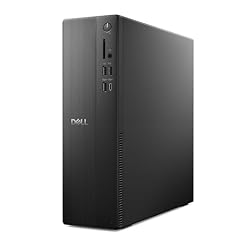
Dell Slim Desktop ECS1250
- CPU
- Intel Core i3-14100
- RAM
- 8 GB
- Storage
- 512 GB
- OS
- Windows 11 Home
$699.99 (as of 10/20/2026 17:06 PDT - Details)
The Dell Slim Desktop ECS1250 features an Intel Core i3-14100, DDR5 RAM, and a 512GB SSD in a compact tower. Its slim design and modern processor make it a strong choice for office environments.
Pros
- Intel Core i3-14100, a current-generation processor
- 512GB SSD and DDR5 RAM for fast boot times and app loading
- Compact slim tower saves desk space
- Includes WiFi 6 for wireless connectivity
Cons
- Intel UHD Graphics 730 is integrated, not suitable for gaming
- 8GB RAM is the only configuration; not upgradable without replacing modules
- No dedicated GPU for video editing or CAD work
Good fit if
- Office workers who need a reliable, space-saving desktop
- Users who want a modern CPU and fast storage for daily productivity
Skip if
- You need a desktop for gaming or graphics-intensive work
- You prefer a full-size tower with more expansion slots
Verdict: A slim, modern office desktop with a current-gen Core i3 and fast storage.
3 Best compact business desktop

Lenovo ThinkCentre Neo 55s AMD Ryzen 5 220 8GB + 256GB Business SFF
- CPU
- AMD Ryzen 5 220
- RAM
- 8 GB
- Storage
- 256 GB
- OS
- Windows 11 Pro
$699.00 (as of 10/20/2026 06:05 PDT - Details)
The Lenovo ThinkCentre Neo 55s is a small-form-factor (SFF) business desktop with an AMD Ryzen 5 220 processor and Windows 11 Pro. Its compact size and business-oriented features make it ideal for constrained workspaces.
Pros
- AMD Ryzen 5 220 processor offers solid multi-core performance
- Windows 11 Pro for business security and management
- Small form factor fits easily on a desk or in a tight space
- Lenovo's ThinkCentre line is known for business reliability
Cons
- Only 256GB of storage, which may fill up quickly
- No dedicated graphics card
- 8GB RAM is the only configuration listed
Good fit if
- Businesses deploying desktops in cubicles or small offices
- Users who need a reliable, compact PC for standard office applications
Skip if
- You need more than 256GB of storage for large files or media
- You want a desktop with a dedicated GPU for gaming or creative work
Verdict: A compact and reliable business desktop from Lenovo, suitable for office tasks.
4 Best budget office tower

HP Desktop Tower 290 G9| Intel 13th CPU
- RAM
- 8 GB
- Storage
- 256 GB
- OS
- Windows 11 Home
$559.99 (as of 10/20/2026 04:07 PDT - Details)
The HP Desktop Tower 290 G9 offers an Intel 13th-gen CPU and 8GB of DDR4 RAM in a standard tower form factor. It is a straightforward, no-frills option for basic office work.
Pros
- Intel 13th-gen CPU provides capable performance for office tasks
- Standard tower design allows for easier upgrades than SFF cases
- 8GB DDR4 RAM is sufficient for basic multitasking
- HP is a well-known brand with widespread support
Cons
- Only 256GB of storage, which is limited for many users
- DDR4 RAM, not the faster DDR5 found on some newer models
- No dedicated graphics card
Good fit if
- Users who need a simple, affordable desktop for word processing and web browsing
- Offices that prefer a standard tower for easy servicing
Skip if
- You need more than 256GB of storage out of the box
- You want a compact or slim desktop to save space
Verdict: A capable and affordable tower for basic office productivity.
5 Best SFF with Windows 11 Pro

Lenovo SFF Business Desktop Computer
- RAM
- 8 GB
- Storage
- 512 GB
- OS
- Windows 11 Pro
$499.99 (as of 10/20/2026 06:05 PDT - Details)
The Lenovo SFF Business Desktop comes with an Intel Quad-Core processor, 512GB SSD, and Windows 11 Pro. Its small form factor and dual display support make it a versatile choice for business users.
Pros
- 512GB SSD provides generous storage for a business desktop
- Windows 11 Pro includes advanced security and management features
- Dual display support for increased productivity
- Small form factor saves desk space
Cons
- Processor model is not specified in the listing, only 'Intel Quad-Core'
- 8GB RAM may limit heavy multitasking
- No dedicated graphics card
Good fit if
- Business users who need a compact desktop with dual monitor support
- Users who want Windows 11 Pro for BitLocker and Remote Desktop
Skip if
- You need a known processor model for performance guarantees
- You plan to use the desktop for gaming or graphics work
Verdict: A compact business desktop with good storage and dual display support.
6 Best for budget-conscious businesses

Dell Optiplex 7070 SFF
- CPU
- Intel Core i5-9500
- RAM
- 8 GB
- Storage
- 512 GB
- OS
- Windows 11 Pro
$259.99 (as of 10/20/2026 17:06 PDT - Details)
The Dell Optiplex 7070 SFF (Renewed) offers a business-class Intel Core i5-9500, 512GB SSD, and Windows 11 Pro. It is a cost-effective option for budget-conscious offices.
Pros
- Intel Core i5-9500 provides strong performance for office tasks
- 512GB SSD offers ample storage
- Windows 11 Pro for business features
- Renewed model offers significant savings over new
Cons
- Renewed condition may have cosmetic wear or shorter lifespan than new
- Older Intel 9th-gen processor compared to current models
- Small form factor limits expansion options
Good fit if
- Businesses on a tight budget that need a capable desktop
- Users who are comfortable buying renewed electronics
Skip if
- You prefer a brand-new desktop with a full warranty
- You need the latest processor generation for demanding applications
Verdict: A budget-friendly renewed business desktop with solid specs for office work.
7 Best for minimal computing needs
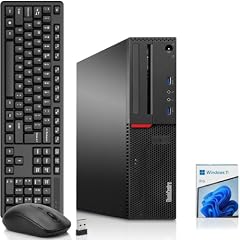
Lenovo SFF PC
- CPU
- Intel Core i5-6500
- RAM
- 8 GB
- Storage
- 512 GB
- OS
- Windows 11 Pro
$211.11 (as of 10/20/2026 06:05 PDT - Details)
The Lenovo SFF PC (Renewed) with an Intel Core i5-6500 and 512GB SSD is one of the most affordable options in this list. It is a good choice for basic office tasks on a very tight budget.
Pros
- Very low price point for a desktop with 512GB SSD
- Intel Core i5-6500 is capable for basic productivity
- Small form factor saves space
- Windows 11 Pro included
Cons
- Renewed condition; may have wear
- Older 6th-gen Intel processor, significantly slower than current models
- 8GB RAM is the maximum listed; may not be upgradable
Good fit if
- Users who need a low-cost desktop for simple tasks like email and web browsing
- Budget-constrained home offices
Skip if
- You need modern performance for multitasking or newer software
- You prefer a new desktop with a full warranty
Verdict: An ultra-budget renewed SFF desktop for basic computing needs.
8 Best with included monitor

Lenovo ThinkCentre Desktop PC
- CPU
- Intel Core i5-6500
- RAM
- 8 GB
- Storage
- 256 GB
- OS
- Windows 11 Pro
$227.78 (as of 10/20/2026 06:06 PDT - Details)
The Lenovo ThinkCentre Desktop PC (Renewed) includes a 24-inch monitor, making it a complete package for a home or office setup. It is the only pick that comes with a display.
Pros
- Includes a 24-inch monitor, saving the cost of buying one separately
- Intel Core i5-6500 is adequate for office applications
- Very low price for a desktop-plus-monitor bundle
- Lenovo ThinkCentre is a business-class machine
Cons
- Renewed condition; may have cosmetic wear
- Older 6th-gen Intel processor
- Only 256GB of storage, which is limited
Good fit if
- Users who need a complete desktop setup at low cost
- Home offices or students on a tight budget
Skip if
- You already have a monitor and want a more powerful desktop
- You need more than 256GB of storage
Verdict: A complete, low-cost desktop bundle for basic computing.
9 Best for light computing

OKAMUS Pre-Built PC
- CPU
- Intel Core i5
- RAM
- 8 GB
- OS
- Windows 11 Home
$245.99 (as of 10/20/2026 06:06 PDT - Details)
The OKAMUS Pre-Built PC is one of the most affordable desktops in the list, featuring an Intel Core i5 processor and 256GB M.2 storage. It is suitable for very light computing tasks.
Pros
- Very low price point
- Intel Core i5 processor (generation not stated) for basic tasks
- 256GB M.2 SSD for fast boot times
- RGB lighting adds aesthetic appeal
Cons
- Processor generation is not specified by the seller
- Only 256GB of storage, which may fill quickly
- Integrated graphics only; not suitable for gaming
Good fit if
- Users who need an inexpensive desktop for web browsing and document editing
- Budget-conscious buyers who want a basic PC with some style
Skip if
- You need a desktop from a major brand with known support
- You plan to do anything beyond light productivity
Verdict: An ultra-budget desktop for the most basic computing needs.
10 Best for maximum savings

Prebuilt Desktop Computer PC
- CPU
- Intel Core i5
- RAM
- 8 GB
- Storage
- 256 GB
- OS
- Windows 11 Home
$239.99 (as of 10/20/2026 06:06 PDT - Details)
The Prebuilt Desktop Computer PC from DeXwtzfn is the lowest-priced desktop in this list. It offers a Core i5 processor and 8GB of RAM for the absolute minimum budget.
Pros
- Lowest price among all picks
- Core i5 processor for basic performance
- 8GB RAM meets minimum requirements for Windows 11
- Windows 11 Home included
Cons
- Processor generation and specific model not stated
- Storage size not specified in the listing
- Brand is not a well-known PC manufacturer
Good fit if
- Users who need the most affordable desktop possible for basic tasks
- Buyers who are comfortable with an unknown brand
Skip if
- You need a known quantity for reliability or support
- You require a specific amount of storage
Verdict: The most affordable desktop in the list, for the most basic of tasks.
11 Best for 1080p gaming on a budget

CyberpowerPC Gamer Xtreme VR Gaming PC
- CPU
- Intel Core i5-10400F
- GPU
- GeForce GTX 1660 SUPER
- GPU memory
- 6 GB
- RAM
- 8 GB
- Storage
- 500 GB
- OS
- Windows 10 Home
- Dedicated graphics card
- Yes
$1,019.00 (as of 10/20/2026 17:05 PDT - Details)
The CyberpowerPC Gamer Xtreme VR Gaming PC pairs an Intel Core i5-10400F with a GeForce GTX 1660 Super, making it capable of 1080p gaming. It is one of the few picks with a dedicated GPU.
Pros
- GeForce GTX 1660 Super is a capable 1080p gaming GPU
- Intel Core i5-10400F is a solid gaming processor
- 500GB NVMe SSD for fast game loading
- VR-ready according to the listing
Cons
- 8GB RAM is a bottleneck for modern games; 16GB is recommended
- Older 10th-gen Intel processor
- Windows 10 Home, not Windows 11
Good fit if
- Budget gamers who want to play at 1080p with medium to high settings
- Users who plan to upgrade RAM to 16GB in the future
Skip if
- You want to play the latest AAA titles at high settings
- You need more than 500GB of storage for a large game library
Verdict: A budget gaming desktop with a dedicated GPU, but limited by 8GB RAM.
12 Best for esports gaming

SkyTech Shadow Gaming Computer PC Desktop
- CPU
- AMD Ryzen 5 3600
- GPU
- GeForce GTX 1660 Ti
- GPU memory
- 6 GB
- RAM
- 8 GB
- Storage
- 500 GB
- OS
- Windows 10 Home
- Dedicated graphics card
- Yes
$1,339.00 (as of 10/20/2026 06:06 PDT - Details)
The Skytech Shadow Gaming PC features an AMD Ryzen 5 3600 and a GTX 1660 Ti, offering strong performance for esports titles like Fortnite and Valorant at 1080p.
Pros
- GTX 1660 Ti is a step up from the standard GTX 1660
- AMD Ryzen 5 3600 is a capable 6-core processor
- 500GB SSD for fast game loading
- RGB lighting for aesthetic appeal
Cons
- 8GB RAM is limiting for modern games
- Older Ryzen 3000-series processor
- Windows 10 Home, not Windows 11
Good fit if
- Esports gamers who play competitive titles at 1080p
- Users who prioritize GPU performance over CPU generation
Skip if
- You want to play the latest AAA single-player games at high settings
- You need more than 500GB of storage
Verdict: A solid esports gaming desktop with a strong GPU, but RAM is a limitation.
13 Best for storage capacity

CyberpowerPC Gamer Xtreme VR Gaming PC
- CPU
- Intel Core i5-9400F
- GPU
- GeForce GTX 1660
- GPU memory
- 6 GB
- RAM
- 8 GB
- Storage
- 1000 GB
- OS
- Windows 10 Home
- Dedicated graphics card
- Yes
$1,099.99 (as of 10/20/2026 17:05 PDT - Details)
The CyberpowerPC Gamer Xtreme VR Gaming PC comes with a 1TB HDD, offering the most storage among the gaming picks. It is a good choice for users with a large game library.
Pros
- 1TB of total storage, the most among the gaming picks
- GeForce GTX 1660 for 1080p gaming
- Intel Core i5-9400F is a capable gaming CPU
- VR-ready according to the listing
Cons
- 1TB is a 120GB SSD + 1TB HDD; the SSD is small for the OS and a few games
- Older 9th-gen Intel processor
- 8GB RAM is a bottleneck for modern games
Good fit if
- Gamers who need a lot of storage for a large game library
- Users who are comfortable managing a dual-drive setup (SSD + HDD)
Skip if
- You want a fast NVMe SSD for all games
- You need the latest processor generation
Verdict: A gaming desktop with ample storage, but with older components and limited RAM.
14 Best entry-level gaming desktop

HP Pavilion Gaming Desktop
- CPU
- Intel Core i3-10100
- GPU
- GeForce GTX 1650 SUPER
- RAM
- 8 GB
- Storage
- 256 GB
- OS
- Windows 11
- Dedicated graphics card
- Yes
$729.99 (as of 10/20/2026 04:06 PDT - Details)
The HP Pavilion Gaming Desktop with a GTX 1650 SUPER and Intel Core i3-10100 is an affordable entry point into PC gaming. It can handle many games at 1080p with medium settings.
Pros
- GeForce GTX 1650 SUPER is a capable entry-level GPU
- Intel Core i3-10100 is sufficient for most games at 1080p
- HP is a well-known brand with good support
- Windows 11 included
Cons
- Only 256GB of storage, which is very limited for games
- 8GB RAM is a bottleneck for modern titles
- Older 10th-gen Intel processor
Good fit if
- First-time PC gamers on a tight budget
- Users who play older or less demanding games
Skip if
- You need to play the latest AAA games at high settings
- You want more than 256GB of storage for a game library
Verdict: An affordable entry-level gaming desktop from a major brand.
15 Best for VR readiness

hp VR Ready Pavilion Gaming PC Desktop Computer
- CPU
- Intel Core i5-9400F
- GPU
- GeForce GTX 1660 Ti
- RAM
- 8 GB
- Storage
- 256 GB
- OS
- Windows 10
- Dedicated graphics card
- Yes
$749.00 (as of 10/20/2026 04:06 PDT - Details)
The HP VR Ready Pavilion Gaming PC is specifically marketed as VR-ready, with a GTX 1660 Ti and Intel Core i5-9400F. It is a good choice for users looking to try virtual reality.
Pros
- GeForce GTX 1660 Ti is a strong GPU for VR and 1080p gaming
- Intel Core i5-9400F is a capable gaming CPU
- Marketed as VR-ready by HP
- Windows 10 included
Cons
- Only 256GB of storage, which is very limited
- 8GB RAM is a bottleneck for modern games and VR
- Older 9th-gen Intel processor
Good fit if
- Users who want to try VR gaming on a budget
- Gamers who prioritize GPU performance for 1080p gaming
Skip if
- You need more than 256GB of storage
- You want the latest processor generation
Verdict: A VR-ready gaming desktop with a strong GPU but limited RAM and storage.
Specs compared
| # | Desktop | CPU | GPU | GPU memory | RAM | Storage | OS |
|---|---|---|---|---|---|---|---|
| 1 | Acer Aspire TC-1775 Desktop Computer Intel i5-14400 | Intel Core i5-14400 | not stated | not stated | 8 GB | 512 GB | Windows 11 Pro |
| 2 | Dell Slim Desktop ECS1250 | Intel Core i3-14100 | not stated | not stated | 8 GB | 512 GB | Windows 11 Home |
| 3 | Lenovo ThinkCentre Neo 55s AMD Ryzen 5 220 8GB + 256GB Business SFF | AMD Ryzen 5 220 | not stated | not stated | 8 GB | 256 GB | Windows 11 Pro |
| 4 | HP Desktop Tower 290 G9| Intel 13th CPU | not stated | not stated | not stated | 8 GB | 256 GB | Windows 11 Home |
| 5 | Lenovo SFF Business Desktop Computer | not stated | not stated | not stated | 8 GB | 512 GB | Windows 11 Pro |
| 6 | Dell Optiplex 7070 SFF | Intel Core i5-9500 | not stated | not stated | 8 GB | 512 GB | Windows 11 Pro |
| 7 | Lenovo SFF PC | Intel Core i5-6500 | not stated | not stated | 8 GB | 512 GB | Windows 11 Pro |
| 8 | Lenovo ThinkCentre Desktop PC | Intel Core i5-6500 | not stated | not stated | 8 GB | 256 GB | Windows 11 Pro |
| 9 | OKAMUS Pre-Built PC | Intel Core i5 | not stated | not stated | 8 GB | not stated | Windows 11 Home |
| 10 | Prebuilt Desktop Computer PC | Intel Core i5 | not stated | not stated | 8 GB | 256 GB | Windows 11 Home |
| 11 | CyberpowerPC Gamer Xtreme VR Gaming PC | Intel Core i5-10400F | GeForce GTX 1660 SUPER | 6 GB | 8 GB | 500 GB | Windows 10 Home |
| 12 | SkyTech Shadow Gaming Computer PC Desktop | AMD Ryzen 5 3600 | GeForce GTX 1660 Ti | 6 GB | 8 GB | 500 GB | Windows 10 Home |
| 13 | CyberpowerPC Gamer Xtreme VR Gaming PC | Intel Core i5-9400F | GeForce GTX 1660 | 6 GB | 8 GB | 1000 GB | Windows 10 Home |
| 14 | HP Pavilion Gaming Desktop | Intel Core i3-10100 | GeForce GTX 1650 SUPER | not stated | 8 GB | 256 GB | Windows 11 |
| 15 | hp VR Ready Pavilion Gaming PC Desktop Computer | Intel Core i5-9400F | GeForce GTX 1660 Ti | not stated | 8 GB | 256 GB | Windows 10 |
How we chose these
We started with a pool of 24 desktops that have 8GB of RAM listed on the store. We narrowed the list to 15 by focusing on models from established brands (Dell, HP, Lenovo, Acer, Skytech, CyberpowerPC) and excluding near-duplicate configurations. Each pick is evaluated on its processor, storage capacity, GPU (if any), and operating system. Prices shown are live and read from the store listing; we have not tested any of these units. Our selections are based on published specifications and the maker's own information.
What to look for
RAM: Why 8GB is a starting point
8GB of RAM is the minimum recommended by Microsoft for Windows 11. It is sufficient for basic tasks like web browsing, email, and office applications. However, if you plan to run multiple applications simultaneously, work with large spreadsheets, or do any photo or video editing, you may find 8GB limiting. For gaming, 16GB is now the standard recommendation for modern titles. All desktops in this list have 8GB, so consider your workload carefully.
Processor: Generation matters
The processor (CPU) determines how fast your desktop can handle tasks. Newer generations, like Intel's 13th and 14th-gen Core i5 or AMD's Ryzen 5 series, offer better performance and efficiency than older models. For example, the Intel Core i5-14400 in the Acer Aspire TC-1775 is significantly faster than the Intel Core i5-6500 found in some renewed models. When comparing desktops, look for the specific processor model number to understand its age and performance level.
Storage: SSD vs. HDD
Solid-state drives (SSDs) are much faster than traditional hard disk drives (HDDs). An SSD will make your desktop boot up in seconds and applications load quickly. Most desktops in this list use SSDs, with capacities ranging from 256GB to 512GB. If you store a lot of files, photos, or games, consider a model with 512GB or more. Some gaming desktops use a combination of a small SSD for the operating system and a larger HDD for storage.
Graphics: Integrated vs. Dedicated
Integrated graphics are built into the processor and are fine for office work, web browsing, and video playback. They are not suitable for gaming or graphics-intensive tasks like video editing or 3D modeling. Dedicated graphics cards (GPUs) from NVIDIA or AMD provide much more power. If you plan to game, even at 1080p, look for a desktop with a dedicated GPU like the GeForce GTX 1650 or GTX 1660 series found in some of our gaming picks.
Operating System: Windows 11 Home vs. Pro
Windows 11 Home is the standard version for most consumers. Windows 11 Pro includes additional features like BitLocker encryption, Remote Desktop, and Group Policy management, which are useful for businesses and IT administrators. Many business-oriented desktops in this list come with Windows 11 Pro. If you are using the desktop for work, especially in a managed environment, Pro may be worth the extra cost.
Form Factor: Tower vs. SFF vs. All-in-One
Desktop form factors affect size, upgradeability, and cooling. Standard towers are larger and easier to upgrade. Small-form-factor (SFF) desktops save space but may have limited expansion slots and cooling. All-in-one (AIO) desktops integrate the computer into the monitor, saving the most space but making upgrades very difficult. Choose based on your desk space and whether you plan to upgrade components later.
Questions
Is 8GB of RAM enough for Windows 11?
Yes, 8GB of RAM meets the minimum system requirement for Windows 11, as stated by Microsoft. It is sufficient for basic tasks like web browsing, email, and office applications. However, for smoother multitasking with many browser tabs or running more demanding software, 16GB is recommended.
Can I upgrade the RAM on these desktops?
Many desktops, especially standard towers, allow you to upgrade the RAM. Small-form-factor (SFF) and all-in-one (AIO) desktops may have limited or no upgrade options. Check the specific model's specifications or the seller's listing for upgrade information. Some renewed models may have soldered RAM that cannot be upgraded.
What is the difference between DDR4 and DDR5 RAM?
DDR5 is the newer standard, offering faster speeds and better power efficiency than DDR4. It can improve performance in memory-intensive tasks. Some newer desktops, like the Acer Aspire TC-1775, use DDR5, while many older or budget models still use DDR4. The performance difference is noticeable in some applications but may not be critical for basic use.
Are renewed desktops a good value?
Renewed desktops can offer significant savings compared to new models. They are typically tested and refurbished by the seller. However, they may have cosmetic wear, shorter lifespans, and limited warranties. They are a good option for budget-conscious buyers who are comfortable with these trade-offs, especially for basic office tasks.
Can I play games on a desktop with 8GB of RAM?
You can play many games on a desktop with 8GB of RAM, especially older or less demanding titles and esports games like Fortnite or Valorant. However, modern AAA games often recommend 16GB of RAM. You may experience stuttering or longer load times with only 8GB. A dedicated GPU is also essential for a good gaming experience.
Update history
- : First published.