
Best CLX Desktops in 2026: 6 Picks Compared on Specs
The top pick among CLX desktops is the CLX Set Gaming PC with an Intel Core Ultra 7 270K and GeForce RTX 5080, offering a strong balance of gaming and creator performance. We chose it and the other five CLX models here by comparing their published specifications, focusing on the CPU, GPU, RAM, and storage that matter most for gaming and professional workloads.
6 picks from 5 desktops that match this guide with a price we can quote today. Prices below are live, each shown with the time it was read.
Quick list
| # | Pick | Desktop | Price |
|---|---|---|---|
| 1 | Best overall | CLX Set Gaming PC | $4,299.99 (as of 10/20/2026 16:08 PDT - Details) |
| 2 | Best for gaming performance | CLX Set Gaming PC | $4,069.99 (as of 10/20/2026 16:08 PDT - Details) |
| 3 | Best for professional creation | CLX Horus Creator Workstation | |
| 4 | Best workstation with RTX 5080 | CLX Horus Creator Workstation | $18,259.99 (as of 10/20/2026 16:08 PDT - Details) |
| 5 | Best for AI and professional visualization | CLX Set Creator Workstation | $24,359.99 (as of 10/20/2026 16:08 PDT - Details) |
| 6 | Best balanced workstation | CLX Horus Creator Workstation | $26,639.99 (as of 10/20/2026 16:08 PDT - Details) |
Which one is right for you?
- For high-end gaming: The CLX Set Gaming PC with the AMD Ryzen 7 9800X3D and RTX 5080 is built for fast, smooth gameplay at high resolutions. See pick 2
- For heavy 3D rendering and AI workloads: The CLX Horus Creator Workstation with a Threadripper 9980X and RTX 5090 provides the core count and VRAM needed for demanding professional tasks. See pick 3
- For a balanced gaming and streaming setup: The CLX Set Gaming PC with the Intel Core Ultra 7 270K and RTX 5080 offers a strong mix of gaming and multitasking performance. See pick 1
All 6 picks in detail
1 Best overall
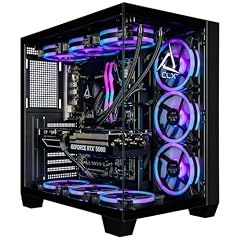
CLX Set Gaming PC
- CPU
- Intel Core Ultra 7 270K
- GPU
- GeForce RTX 5080
- GPU memory
- 16 GB
- RAM
- 64 GB
- Storage
- 2000 GB
- OS
- Windows 11 Home
- Dedicated graphics card
- Yes
$4,299.99 (as of 10/20/2026 16:08 PDT - Details)
This CLX Set Gaming PC pairs an Intel Core Ultra 7 270K processor with a GeForce RTX 5080, making it a strong choice for both gaming and content creation. Its 64GB of DDR5 RAM is the most of any gaming-focused CLX in this list, and the 2TB NVMe SSD provides ample fast storage.
Pros
- Intel Core Ultra 7 270K is a high-performance desktop processor with an NPU for AI tasks
- 64GB of DDR5 RAM, the most in the gaming-focused picks here
- GeForce RTX 5080 with 16GB of GDDR7 VRAM for 4K gaming and ray tracing
- 2TB NVMe SSD provides fast load times and generous storage
Cons
- No stated weight or dimensions
- Only one storage drive; no secondary HDD or SSD mentioned
- Windows 11 Home, not Pro
Good fit if
- Gamers who also edit video or stream
- Users who want a high core count CPU for multitasking
Skip if
- You need a workstation with ECC memory or a professional GPU
- You require the absolute highest gaming frame rates from an X3D CPU
Verdict: A well-rounded gaming desktop with a strong CPU and GPU, plus ample RAM for multitasking.
2 Best for gaming performance

CLX Set Gaming PC
- CPU
- AMD Ryzen 7 9800X3D
- GPU
- RTX 5080
- RAM
- 32 GB
- Storage
- 2000 GB
- OS
- Windows 11 Home
- Dedicated graphics card
- Yes
$4,069.99 (as of 10/20/2026 16:08 PDT - Details)
The AMD Ryzen 7 9800X3D is widely recognized for its exceptional gaming performance due to its 3D V-Cache technology. Paired with an RTX 5080, this CLX Set Gaming PC is optimized for high-frame-rate gaming at 1440p and 4K.
Pros
- AMD Ryzen 7 9800X3D with 3D V-Cache for top-tier gaming performance
- GeForce RTX 5080 with 16GB GDDR7 VRAM
- 2TB NVMe SSD for fast game loading
- 360mm AIO liquid cooler for CPU cooling
Cons
- 32GB of RAM, less than the Intel-based Set model
- No stated weight or dimensions
- Windows 11 Home, not Pro
Good fit if
- Competitive and enthusiast gamers who want the best frame rates
- Users who prioritize gaming performance over multi-threaded workstation tasks
Skip if
- You need more than 32GB of RAM for heavy multitasking or content creation
- You require a professional-grade GPU like an RTX PRO
Verdict: A gaming-first desktop that leverages the 9800X3D's cache for superior frame rates.
3 Best for professional creation

CLX Horus Creator Workstation
- CPU
- AMD Ryzen Threadripper 9980X
- GPU
- GeForce RTX 5090
- GPU memory
- 32 GB
- RAM
- 256 GB
- Storage
- 4000 GB
- OS
- Windows 11 Pro
- Dedicated graphics card
- Yes
This CLX Horus Creator Workstation is built around an AMD Ryzen Threadripper 9980X, a high-core-count processor, and a GeForce RTX 5090 with 32GB of VRAM. With 256GB of ECC RAM and 4TB of NVMe storage, it is designed for the most demanding 3D rendering, video editing, and AI workloads.
Pros
- AMD Ryzen Threadripper 9980X with a high core count for multi-threaded tasks
- GeForce RTX 5090 with 32GB of GDDR7 VRAM
- 256GB of DDR5 ECC RAM for stability in professional applications
- 4TB NVMe SSD for large project files and fast access
Cons
- Very high price point, reflecting its workstation-class components
- No stated weight or dimensions
- Overkill for gaming or light productivity
Good fit if
- Professional 3D artists, video editors, and data scientists
- Users who need ECC memory for error-critical computations
Skip if
- You are building a gaming-only PC
- Your budget is limited or you do not need a Threadripper CPU
Verdict: A no-compromise workstation for professionals who need maximum CPU and GPU power.
4 Best workstation with RTX 5080
CLX Horus Creator Workstation
- CPU
- AMD Ryzen Threadripper 9970X
- GPU
- GeForce RTX 5080
- GPU memory
- 16 GB
- RAM
- 256 GB
- Storage
- 4000 GB
- OS
- Windows 11 Pro
- Dedicated graphics card
- Yes
$18,259.99 (as of 10/20/2026 16:08 PDT - Details)
This CLX Horus Creator Workstation uses an AMD Ryzen Threadripper 9970X and a GeForce RTX 5080, offering a slightly lower price than the 9980X model while still providing 256GB of ECC RAM and 4TB of storage. It is a strong choice for professionals who need a high-core-count CPU and large memory but can work with the RTX 5080's 16GB of VRAM.
Pros
- AMD Ryzen Threadripper 9970X with a high core count
- 256GB of DDR5 ECC RAM for stability
- 4TB NVMe SSD for ample storage
- GeForce RTX 5080 with 16GB GDDR7 VRAM
Cons
- GPU VRAM is half that of the RTX 5090 model, limiting some extreme workloads
- No stated weight or dimensions
- Windows 11 Pro, but no OS version details beyond that
Good fit if
- Professionals who need a Threadripper CPU and 256GB of RAM but not the top-tier GPU
- Users who work with large datasets and need ECC memory
Skip if
- You need the maximum VRAM available for GPU rendering
- Your work does not require a workstation CPU or ECC memory
Verdict: A powerful workstation that balances CPU cores and memory with a capable GPU at a lower price point.
5 Best for AI and professional visualization

CLX Set Creator Workstation
- GPU
- RTX PRO 6000
- GPU memory
- 96 GB
- RAM
- 192 GB
- Storage
- 4000 GB
- OS
- Windows 11 Pro
- Dedicated graphics card
- Yes
$24,359.99 (as of 10/20/2026 16:08 PDT - Details)
This CLX Set Creator Workstation features an RTX PRO 6000 GPU with 96GB of VRAM, the most in this list, making it ideal for large AI model training, scientific visualization, and high-end 3D rendering. It is paired with 192GB of DDR5 RAM and a 4TB NVMe SSD.
Pros
- RTX PRO 6000 GPU with 96GB of VRAM, the highest in this list
- 192GB of DDR5 RAM for large datasets
- 4TB NVMe SSD for fast storage
- Windows 11 Pro for advanced management features
Cons
- CPU is not stated in the listing
- Very high price point
- No stated weight or dimensions
Good fit if
- AI researchers and data scientists working with large models
- Professionals in scientific visualization and high-end 3D rendering
Skip if
- You need a high-core-count CPU for CPU-bound tasks
- Your work does not require a professional GPU with massive VRAM
Verdict: A GPU-focused workstation with industry-leading VRAM for AI and visualization workloads.
6 Best balanced workstation

CLX Horus Creator Workstation
- CPU
- AMD Ryzen Threadripper 9970X
- GPU
- RTX PRO 6000
- GPU memory
- 96 GB
- RAM
- 64 GB
- Storage
- 4000 GB
- OS
- Windows 11 Pro
- Dedicated graphics card
- Yes
$26,639.99 (as of 10/20/2026 16:08 PDT - Details)
This CLX Horus Creator Workstation combines an AMD Ryzen Threadripper 9970X with an RTX PRO 6000 GPU, offering both a high-core-count CPU and 96GB of VRAM. With 64GB of DDR5 ECC REG memory and a 4TB NVMe SSD, it is a balanced choice for professionals who need strong CPU and GPU performance.
Pros
- AMD Ryzen Threadripper 9970X for multi-threaded tasks
- RTX PRO 6000 GPU with 96GB of VRAM
- 4TB NVMe SSD for large project files
- Windows 11 Pro and ECC REG memory for stability
Cons
- 64GB of RAM is less than other workstation models in this list
- No stated weight or dimensions
- Very high price point
Good fit if
- Professionals who need both a powerful CPU and a high-VRAM GPU
- Users who work with large 3D scenes and need ECC memory
Skip if
- You need more than 64GB of RAM for your workloads
- Your budget is limited
Verdict: A well-rounded workstation that pairs a Threadripper CPU with a top-tier professional GPU.
Specs compared
| # | Desktop | CPU | GPU | GPU memory | RAM | Storage | OS |
|---|---|---|---|---|---|---|---|
| 1 | CLX Set Gaming PC | Intel Core Ultra 7 270K | GeForce RTX 5080 | 16 GB | 64 GB | 2000 GB | Windows 11 Home |
| 2 | CLX Set Gaming PC | AMD Ryzen 7 9800X3D | RTX 5080 | not stated | 32 GB | 2000 GB | Windows 11 Home |
| 3 | CLX Horus Creator Workstation | AMD Ryzen Threadripper 9980X | GeForce RTX 5090 | 32 GB | 256 GB | 4000 GB | Windows 11 Pro |
| 4 | CLX Horus Creator Workstation | AMD Ryzen Threadripper 9970X | GeForce RTX 5080 | 16 GB | 256 GB | 4000 GB | Windows 11 Pro |
| 5 | CLX Set Creator Workstation | not stated | RTX PRO 6000 | 96 GB | 192 GB | 4000 GB | Windows 11 Pro |
| 6 | CLX Horus Creator Workstation | AMD Ryzen Threadripper 9970X | RTX PRO 6000 | 96 GB | 64 GB | 4000 GB | Windows 11 Pro |
How we chose these
We started with a pool of 6 CLX desktop PCs listed on the store, all from the brand CLX. We then shortlisted every one of them (6 total) because the brand's lineup is small and each model targets a distinct use case, from high-end gaming to workstation-class creation. We compared each desktop's stated specs: the processor generation and core count, the GPU model and its VRAM, the amount and type of RAM, and the storage capacity. Prices shown on the page are live and read from the store listing at the time of writing. No units were tested or handled by our team. All specifications come from the seller's listing or the manufacturer's published information.
What to look for
CPU: Core count vs. gaming cache
CLX desktops use both Intel and AMD processors. For gaming, the AMD Ryzen 7 9800X3D with its 3D V-Cache offers a performance advantage in many titles. For professional work like 3D rendering, video encoding, or compiling code, a higher core count from a Threadripper (like the 9970X or 9980X) or a Core Ultra 7 will provide faster multi-threaded performance. Consider whether your primary workload benefits from many cores or from specialized gaming cache.
GPU: GeForce vs. RTX PRO
CLX offers both GeForce RTX (50-series) and RTX PRO 6000 graphics cards. GeForce RTX cards, such as the RTX 5080 and RTX 5090, are designed for gaming and general content creation, with support for DLSS and ray tracing. The RTX PRO 6000 is a professional-grade GPU with significantly more VRAM (96GB) and certified drivers for ISV applications like CAD and scientific simulation. Choose a GeForce card for gaming and standard creative work; choose an RTX PRO for professional visualization and AI workloads that require large VRAM pools.
RAM: Capacity and ECC
RAM capacity in CLX desktops ranges from 32GB to 256GB. For gaming, 32GB is sufficient, while 64GB or more is beneficial for video editing, 3D rendering, and running virtual machines. ECC (Error-Correcting Code) memory, found in the Horus Creator Workstations, is important for data integrity in professional and scientific computing, where a single bit error can corrupt a calculation. For general use and gaming, non-ECC DDR5 is standard and more cost-effective.
Storage: NVMe SSDs
All CLX desktops in this list use NVMe M.2 SSDs, which offer fast read and write speeds for quick boot times and application loading. Storage capacities range from 2TB to 4TB. If you work with large files, such as 4K video or 3D models, a 4TB drive provides more space for projects without needing external storage. For gaming, 2TB is typically enough for a large library of modern titles.
Operating system: Windows 11 Home vs. Pro
CLX desktops come with either Windows 11 Home or Windows 11 Pro. Windows 11 Home is suitable for gaming and general use. Windows 11 Pro adds features like BitLocker device encryption, Remote Desktop, and the ability to join a domain, which are useful for business and professional environments. If you need advanced security or management features, choose a model with Windows 11 Pro.
Use case: Gaming vs. creation
CLX's lineup is split between 'Set Gaming' and 'Horus Creator' / 'Set Creator' models. Gaming models prioritize high clock speeds and strong single-threaded performance, with GPUs like the RTX 5080. Creator models focus on multi-core CPUs (Threadripper), large amounts of RAM (up to 256GB), and professional GPUs (RTX PRO 6000). Identify your primary use: if it is gaming, choose a Set Gaming PC; if it is professional content creation, AI, or scientific computing, choose a Horus or Set Creator workstation.
Questions
What does CLX stand for?
CLX is a brand of custom gaming and workstation PCs. The company is known for building desktops with high-end components, including the latest Intel and AMD processors and NVIDIA GeForce and RTX PRO graphics cards. Their systems are often configured for gaming, content creation, and professional workloads.
Are CLX desktops good for gaming?
Yes, CLX offers gaming-focused models like the Set Gaming PC, which come with powerful CPUs (such as the AMD Ryzen 7 9800X3D) and high-end GPUs (like the GeForce RTX 5080). These components are well-suited for modern games at high resolutions and frame rates. The brand also includes features like liquid cooling and fast NVMe storage.
What is the difference between the CLX Set and CLX Horus models?
The CLX Set models are generally more compact or mid-tower gaming and creator PCs, often using standard desktop CPUs like the Intel Core Ultra 7 or AMD Ryzen 9. The CLX Horus models are larger workstation-class systems that use AMD Ryzen Threadripper processors, support ECC memory, and are designed for professional content creation, AI, and scientific computing.
Do CLX desktops come with a warranty?
The warranty terms are not specified in the product listings we reviewed. You should check the seller's page or contact CLX directly for warranty information. Typically, custom PC builders offer a limited warranty on parts and labor, but the duration and coverage vary by model and seller.
Can I upgrade a CLX desktop later?
CLX desktops are built with standard components (desktop CPUs, standard-size GPUs, and DDR5 RAM), so upgrades are generally possible. The specific upgrade path depends on the case size, motherboard, and power supply. For example, the Horus models may have more room for additional storage or larger GPUs. Check the product specifications for details on expansion slots and power supply wattage.
Update history
- : First published.