
Best Acer Desktops in 2026: 8 Picks Compared on Specs
Acer desktops cover a wide range of use cases from quiet office towers to dedicated gaming machines. The top pick overall is the Acer Nitro 60 Gaming AI Desktop with an Intel Core Ultra 5 225F and an RTX 5060 GPU, because it offers modern performance for both gaming and creative work in a single configuration. The eight desktops below were selected from the Acer brand pool and compared by processor, RAM, storage, and GPU features.
7 picks from 10 desktops that match this guide with a price we can quote today. Prices below are live, each shown with the time it was read.
Quick list
| # | Pick | Desktop | Price |
|---|---|---|---|
| 1 | Best overall | Acer Nitro 60 Gaming AI Desktop Intel 10-core Ultra 5 225F 16GB DDR5 1TB | $1,259.99 (as of 10/20/2026 15:07 PDT - Details) |
| 2 | Best for gaming and video editing | Acer Nitro 60 Gaming AI Desktop | $1,799.00 (as of 10/20/2026 15:07 PDT - Details) |
| 3 | Best for storage capacity | Acer Aspire Tower Desktop Computer | $999.99 (as of 10/20/2026 15:07 PDT - Details) |
| 4 | Best budget office desktop | Acer Aspire TC-1775 Desktop Computer Intel i5-14400 | |
| 5 | Best for legacy software compatibility | Acer Aspire TC-895-UA91 Desktop | |
| 6 | Best for optical media users | acer Aspire TC-885-UA92 Desktop | $798.99 (as of 10/20/2026 15:07 PDT - Details) |
| 7 | Best small form factor for business | Acer Aspire Business Desktop | 16GB DDR5 RAM | $614.90 (as of 10/20/2026 15:07 PDT - Details) Typical price: |
Which one is right for you?
- For gaming and AI tasks: Get a system with a dedicated GPU like the RTX 5060. The Acer Nitro 60 Gaming AI Desktop (32GB) is the strongest choice. See pick 2
- For everyday office work: The Acer Aspire TC-1775 with a 14th-gen i5 and 8GB RAM is a solid budget option for documents and web. See pick 4
- For large file storage: Two desktops offer 2TB of storage: the Acer Aspire Tower with i5 and the high-end Nitro 60. See pick 3
All 7 picks in detail
1 Best overall

Acer Nitro 60 Gaming AI Desktop Intel 10-core Ultra 5 225F 16GB DDR5 1TB
- CPU
- Intel Core Ultra 5 225F
- GPU
- GeForce RTX 5060
- GPU memory
- 8 GB
- RAM
- 16 GB
- Storage
- 1000 GB
- OS
- Windows 11 Pro
- Dedicated graphics card
- Yes
$1,259.99 (as of 10/20/2026 15:07 PDT - Details)
This desktop combines a 10-core Intel Core Ultra 5 225F with an RTX 5060 GPU and 16GB of DDR5 RAM, making it capable for gaming at 1080p and 1440p with DLSS support. The 1TB SSD provides ample space for a game library. It runs Windows 11 Pro, which includes advanced security features like BitLocker.
Pros
- Dedicated GeForce RTX 5060 GPU with 8GB GDDR7 VRAM
- Intel Core Ultra 5 225F processor with 10 cores
- Windows 11 Pro for business security features
- 1TB SSD storage
Cons
- 16GB RAM is the second-lowest in the Nitro 60 line
- Only 1TB of storage; the 32GB variant has 2TB
Good fit if
- Gamers who want a modern GPU at a mid-range price
- Users who need Windows 11 Pro for remote desktop or encryption
Skip if
- You need more than 16GB of RAM for heavy multitasking
- You prefer a non-gaming design for a quiet office
Verdict: Strong combination of Core Ultra 5 and RTX 5060 for 1080p gaming and AI-enhanced workloads.
2 Best for gaming and video editing
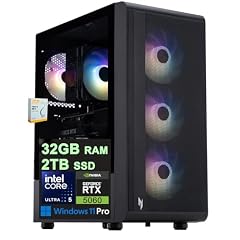
Acer Nitro 60 Gaming AI Desktop
- CPU
- Intel Core Ultra 5 225F
- GPU
- GeForce RTX 5060
- GPU memory
- 8 GB
- RAM
- 32 GB
- Storage
- 2000 GB
- OS
- Windows 11 Pro
- Dedicated graphics card
- Yes
$1,799.00 (as of 10/20/2026 15:07 PDT - Details)
With 32GB of DDR5 RAM and a 2TB SSD, this version of the Nitro 60 handles large video projects and AAA game installations without storage stress. The same RTX 5060 and Core Ultra 5 225F provide the graphics and compute power. It has the most memory of any pick in this list.
Pros
- 32GB DDR5 RAM, the most in this list
- 2TB SSD for large game and media libraries
- RTX 5060 GPU with 8GB VRAM and DLSS support
- Windows 11 Pro included
Cons
- No optical drive or card reader mentioned by the seller
- Heavier than the Aspire line desktops
Good fit if
- Video editors who need RAM for timeline rendering
- Gamers who want a large SSD for many titles
Skip if
- Your budget is limited to a smaller RAM configuration
- You need a compact or tower-only form factor
Verdict: The highest-RAM Acer desktop in this guide, ideal for gaming and content creation.
3 Best for storage capacity

Acer Aspire Tower Desktop Computer
- CPU
- Intel Core i5
- RAM
- 16 GB
- Storage
- 2000 GB
- OS
- Windows 11
$999.99 (as of 10/20/2026 15:07 PDT - Details)
This Aspire Tower packs a 14th-gen Intel Core i5 processor, 16GB DDR5 RAM, and a total of 2TB of storage (SSD). It lacks a dedicated GPU, which keeps power draw low and the price accessible. It is a pure productivity machine with generous space for files and media.
Pros
- 2TB SSD, tied for the largest storage in this list
- 14th-gen Intel Core i5, a modern processor
- 16GB DDR5 RAM for smooth multitasking
- WiFi 6E and Bluetooth for wireless connectivity
Cons
- No dedicated graphics card for gaming or GPU-accelerated tasks
- Operating system is Windows 11, not Windows 11 Pro
Good fit if
- Home and office users with large document or photo libraries
- Users who prefer an integrated graphics system to reduce fan noise
Skip if
- You need a desktop for 3D gaming or video rendering
- You require Windows 11 Pro features
Verdict: A capable workstation for everyday tasks with double the storage of the base Aspire models.
4 Best budget office desktop

Acer Aspire TC-1775 Desktop Computer Intel i5-14400
- CPU
- Intel Core i5-14400
- RAM
- 8 GB
- Storage
- 512 GB
- OS
- Windows 11 Pro
The TC-1775 pairs an Intel Core i5-14400 with 8GB DDR5 RAM and a 512GB SSD. It runs Windows 11 Pro. Its low entry price makes it a sensible choice for basic office applications, but 8GB may limit multitasking with many browser tabs or large spreadsheets.
Pros
- Intel Core i5-14400, a capable 14th-gen processor
- Windows 11 Pro for business and security features
- Low price for a fully modern CPU
Cons
- 8GB DDR5 RAM is the smallest amount in this list
- 512GB SSD may fill quickly with media and software
- No dedicated GPU
Good fit if
- Budget-conscious buyers who need a stable system for documents and web
- Businesses that want Windows 11 Pro on a tight budget
Skip if
- You run memory-heavy applications like virtual machines or large databases
- You want more than 512GB of internal storage
Verdict: Affordable 14th-gen i5 performance for basic office workloads with Windows 11 Pro.
5 Best for legacy software compatibility

This older model uses a 10th-gen Intel Core i3-10100, 8GB DDR4 RAM, and a 512GB SSD. It runs Windows 10 Home, which may be useful for software that does not fully support Windows 11. However, its older CPU and DDR4 RAM limit its performance for modern multitasking.
Pros
- Windows 10 Home for legacy application compatibility
- 512GB NVMe SSD for fast boot times
- Reliable Core i3 quad-core processor
Cons
- 10th-gen Intel Core i3, several generations behind current CPUs
- 8GB DDR4, less than newer DDR5 systems
- No dedicated GPU
Good fit if
- Users who require Windows 10 for specialized legacy software
- Basic home computing such as email and web browsing
Skip if
- You need Windows 11 or modern AI features
- You want a processor with more than 4 cores
Verdict: A serviceable Windows 10 desktop for basic tasks, but outdated specs make it a secondary choice.
6 Best for optical media users

acer Aspire TC-885-UA92 Desktop
- CPU
- Intel Core i5-9400
- RAM
- 12 GB
- Storage
- 512 GB
- OS
- Windows 10 Home
$798.99 (as of 10/20/2026 15:07 PDT - Details)
The TC-885-UA92 comes with a 9th-gen Intel Core i5-9400, 12GB DDR4 RAM, and a 512GB SSD. Its standout feature is an 8X DVD drive, which is rare in modern desktops. It runs Windows 10 Home. The 9th-gen CPU is older, and 12GB of RAM is an unusual capacity that may be less efficient for dual-channel memory.
Pros
- Built-in 8X DVD drive for optical media
- 12GB RAM, more than the 8GB models in this list
- Intel Core i5-9400 with 6 cores for moderate multitasking
Cons
- 9th-gen processor, significantly older than current generations
- Windows 10 Home, not Windows 11
- 12GB RAM may be unevenly matched in dual-channel mode
Good fit if
- Users who still use CDs or DVDs for software or media
- Those looking for a secondary desktop with an optical drive
Skip if
- You need the latest connectors or USB 3.1 Gen 2 speeds
- You prefer a modern operating system with AI features
Verdict: A niche choice for users who need a DVD drive, but its older CPU and OS limit its longevity.
7 Best small form factor for business

Acer Aspire Business Desktop | 16GB DDR5 RAM
- CPU
- Intel Core i3
- RAM
- 16 GB
- Storage
- 1000 GB
- OS
- Windows 11 Pro
$614.90 (as of 10/20/2026 15:07 PDT - Details) Typical price: $649.99, 5% off
This Aspire Business Desktop uses an Intel Core i3 (listed as beating an i5-12400T by the seller), 16GB DDR5 RAM, and 1TB of total storage (512GB SSD + 500GB HDD). It runs Windows 11 Pro. The combination of SSD and HDD gives both speed and capacity, making it a versatile office machine.
Pros
- 16GB DDR5 RAM for smooth office multitasking
- 1TB total storage with both SSD and HDD
- Windows 11 Pro for business management features
Cons
- CPU is a Core i3, less powerful than i5 or i7 alternatives
- Storage configuration reported as 512GB SSD and 500GB HDD, not a single drive
Good fit if
- Small businesses needing a balanced desktop with a fast boot drive and bulk storage
- Users who want Windows 11 Pro at a low price point
Skip if
- You require a high-core-count processor for compiling or encoding
- You prefer a single large SSD for simplicity
Verdict: A practical business desktop with dual-storage flexibility and enough RAM for daily tasks.
Specs compared
| # | Desktop | CPU | GPU | GPU memory | RAM | Storage | OS |
|---|---|---|---|---|---|---|---|
| 1 | Acer Nitro 60 Gaming AI Desktop Intel 10-core Ultra 5 225F 16GB DDR5 1TB | Intel Core Ultra 5 225F | GeForce RTX 5060 | 8 GB | 16 GB | 1000 GB | Windows 11 Pro |
| 2 | Acer Nitro 60 Gaming AI Desktop | Intel Core Ultra 5 225F | GeForce RTX 5060 | 8 GB | 32 GB | 2000 GB | Windows 11 Pro |
| 3 | Acer Aspire Tower Desktop Computer | Intel Core i5 | not stated | not stated | 16 GB | 2000 GB | Windows 11 |
| 4 | Acer Aspire TC-1775 Desktop Computer Intel i5-14400 | Intel Core i5-14400 | not stated | not stated | 8 GB | 512 GB | Windows 11 Pro |
| 5 | Acer Aspire TC-895-UA91 Desktop | Intel Core i3-10100 | not stated | not stated | not stated | 512 GB | Windows 10 Home |
| 6 | acer Aspire TC-885-UA92 Desktop | Intel Core i5-9400 | not stated | not stated | 12 GB | 512 GB | Windows 10 Home |
| 7 | Acer Aspire Business Desktop | 16GB DDR5 RAM | Intel Core i3 | not stated | not stated | 16 GB | 1000 GB | Windows 11 Pro |
How we chose these
The pool held 8 Acer desktop listings on the site, each with a product name, price, and published specifications. From those we selected every listing, as the pool size is small. For each desktop we examined the stated processor generation and model, amount and type of RAM, storage capacity, operating system version, and whether a dedicated GPU was included. No unit was tested or handled. Prices shown on the page are live and read from the store listing at the time displayed. Picks are ordered by use case fit, not by price.
What to look for
Graphics: whether you need a dedicated GPU
Desktop computers fall into two broad categories: those with integrated graphics built into the processor and those with a separate, dedicated graphics card. For basic office work, web browsing, and video playback, integrated graphics on an Intel Core i5 or i3 are sufficient. For gaming, 3D modeling, or video editing, a dedicated GPU such as the NVIDIA GeForce RTX 5060 in the Acer Nitro 60 line is necessary for smooth frame rates and AI-enhanced features like DLSS. The RTX 5060 is part of the NVIDIA 50 Series and supports DLSS 5 with Multi Frame Generation, which can boost performance in supported games.
Processor: understanding the Intel naming scheme
Intel processors are named by generation and model. The 14th-gen Core i5-14400 in the Aspire TC-1775 is newer and faster than the 9th-gen Core i5-9400 in the TC-885-UA92. The Core Ultra 5 225F in the Nitro 60 is a different family altogether, offering an integrated NPU for AI workloads. Suffixes matter: 'F' means the CPU requires a discrete GPU; 'U' would mean power-optimized for laptops. For desktop use, look for 12th-gen or newer, and avoid generations older than 10th unless your budget is very tight.
RAM: DDR5 vs. DDR4 and how much you need
All Acer desktops in this guide released in the last two years use DDR5 RAM, which is faster and more power-efficient than the older DDR4 standard in the older Aspire models. For Windows 11, 8GB is the minimum from Microsoft, but 16GB is recommended for comfortable multitasking. 32GB, as found in the Nitro 60 variant, is beneficial for video editing, virtual machines, or heavy data analysis. The memory type (DDR4 vs. DDR5) is usually not upgradeable without changing the motherboard, so check the specification before buying.
Operating system: Windows 11 Home vs. Pro
Windows 11 Home is the standard version for most consumers. Windows 11 Pro adds features such as BitLocker device encryption, Remote Desktop, and support for business management tools. Many of the Acer desktops listed come with Windows 11 Pro, which is a benefit if you plan to use them for work or need extra security. The older models run Windows 10, which is no longer receiving security updates after October 2025, so they are less suitable for everyday use.
Storage: SSD and HDD configurations
All picks use an SSD for the operating system and applications, which ensures fast boot times and responsiveness. The Aspire Business Desktop adds a separate HDD for extra bulk storage. For gaming, a 1TB or 2TB SSD is recommended because modern games can exceed 100GB each. If you store large media files, the dual-drive setup or a larger SSD is preferable. The pure SSD models (like the Nitro 60 with 2TB) offer the fastest load speeds but may cost more per gigabyte.
Form factor and expandability
Acer desktop towers vary in size from compact mini-towers to medium ATX cases. The Aspire line uses a standard tower shape that fits under a desk, while the Nitro 60 is a dedicated gaming case with room for a GPU and additional fans. If you plan to add internal components later (such as a second hard drive or more RAM), check the seller's list of internal slots. Most Acer prebuilt desktops have limited room for expansion compared to custom builds, but the Nitro line tends to have more space for upgrades.
Questions
Can I upgrade the RAM in an Acer desktop?
Most Acer desktop towers allow RAM upgrades by opening the case and installing compatible DIMMs. The Aspire line typically has two or four memory slots, with some models having two slots already filled. Check the specific model's specifications for the supported memory type (DDR4 or DDR5) and maximum capacity. The Nitro 60 uses DDR5, and its 32GB variant occupies both slots. Upgrading may require replacing the existing modules.
Is the Acer Nitro 60 good for video editing?
Yes, the Nitro 60 with 32GB of RAM and an RTX 5060 GPU is well suited for 1080p and 1440p video editing in applications like DaVinci Resolve or Adobe Premiere Pro. The dedicated GPU accelerates rendering and effects, while the Core Ultra 5 processor handles timeline scrubbing. The 16GB variant is also capable but may struggle with longer timelines or multiple layers without enough RAM.
Do Acer desktops come with Windows 11 installed?
Many newer Acer desktops come with Windows 11 preinstalled. The Aspire Tower and Nitro 60 models run Windows 11 or Windows 11 Pro. Some older models in this guide still ship with Windows 10. Microsoft ended support for Windows 10 in October 2025, so for security updates and new features, a Windows 11 machine is recommended.
What is the difference between the two Acer Nitro 60 models?
The two Nitro 60 models share the same CPU (Intel Core Ultra 5 225F) and GPU (RTX 5060). The difference is the RAM and storage. One has 16GB RAM and a 1TB SSD, the other has 32GB RAM and a 2TB SSD. The higher-spec model is better for video editing, larger game libraries, and multitasking. Both come with Windows 11 Pro.
Are Acer desktops good for gaming?
Only the Acer Nitro 60 models in this guide have a dedicated GPU powerful enough for modern gaming. The RTX 5060 can handle 1080p and 1440p gaming with ray tracing and DLSS support. The Aspire line uses integrated graphics, which are suitable only for very light or older games. If gaming is a priority, choose a Nitro 60 model.
Update history
- : First published.