
Best Intel Core Ultra 5 225 Desktops in 2026: 5 Picks
The Lenovo IdeaCentre Tower Gen 10 AI Desktop Computer leads our list of the best Intel Core Ultra 5 225 desktops with 32GB of DDR5 RAM and a 1TB SSD for demanding multitasking. We compared every desktop in our catalogue that features this 10-core processor, evaluating memory, storage, and graphics to match different use cases.
5 picks from 9 desktops that match this guide with a price we can quote today. Prices below are live, each shown with the time it was read.
Quick list
| # | Pick | Desktop | Price |
|---|---|---|---|
| 1 | Best for office productivity | Lenovo IdeaCentre Tower Desktop Computer • 10-core Intel Ultra 5 225 | $749.99 (as of 10/20/2026 06:05 PDT - Details) |
| 2 | Best for entry-level gaming | Acer Nitro 60 Gaming AI Desktop Intel 10-core Ultra 5 225F 16GB DDR5 1TB | $1,259.99 (as of 10/20/2026 15:07 PDT - Details) |
| 3 | Best basic office desktop | HP OmniDesk Desktop PC | $734.99 (as of 10/20/2026 04:06 PDT - Details) |
| 4 | Best for business multitasking | Lenovo IdeaCentre Tower Gen 10 AI Desktop Computer | |
| 5 | Best for gaming and video editing | Acer Nitro 60 Gaming AI Desktop | $1,799.00 (as of 10/20/2026 15:07 PDT - Details) |
Which one is right for you?
- For office productivity on a budget: A desktop with 16GB of RAM and a 512GB SSD, ideal for everyday tasks and Microsoft Office. See pick 1
- For gaming with a dedicated GPU: A desktop with an RTX 5060 and 16GB of RAM, ready for 1080p gaming and AI features. See pick 2
- For heavy multitasking and storage: A desktop with 32GB of RAM and a 2TB SSD, plus an RTX 5060 for gaming and video editing. See pick 5
All 5 picks in detail
1 Best for office productivity

Lenovo IdeaCentre Tower Desktop Computer • 10-core Intel Ultra 5 225
- CPU
- Intel Core Ultra 5 225
- RAM
- 16 GB
- Storage
- 512 GB
- OS
- Windows 11
$749.99 (as of 10/20/2026 06:05 PDT - Details)
This Lenovo IdeaCentre Tower pairs the Intel Core Ultra 5 225 with 16GB of DDR5 RAM and a 512GB SSD, sufficient for everyday office tasks and web browsing. It includes Office 365, making it a ready-to-use solution for home or small business users.
Pros
- 16GB of DDR5 RAM for smooth multitasking
- Includes Office 365 for productivity out of the box
- Windows 11 operating system
Cons
- 512GB storage may fill quickly with large files
- No dedicated GPU for gaming or creative work
- Only 16GB of RAM, the lowest in this list alongside the HP OmniDesk
Good fit if
- Home users needing a basic office desktop
- Budget-conscious buyers who want a complete package with Office
Skip if
- You need a desktop for gaming or 3D work
- You require more than 512GB of storage
Verdict: A solid, affordable choice for everyday office tasks with the included Office 365 suite.
2 Best for entry-level gaming

Acer Nitro 60 Gaming AI Desktop Intel 10-core Ultra 5 225F 16GB DDR5 1TB
- CPU
- Intel Core Ultra 5 225F
- GPU
- GeForce RTX 5060
- GPU memory
- 8 GB
- RAM
- 16 GB
- Storage
- 1000 GB
- OS
- Windows 11 Pro
- Dedicated graphics card
- Yes
$1,259.99 (as of 10/20/2026 15:07 PDT - Details)
The Acer Nitro 60 Gaming AI Desktop brings the Intel Core Ultra 5 225F processor together with an NVIDIA GeForce RTX 5060 GPU and 8GB of GDDR7 VRAM, enabling 1080p gaming with DLSS support. Its 16GB of DDR5 RAM and 1TB SSD provide a balanced configuration for gaming and general use.
Pros
- NVIDIA GeForce RTX 5060 with 8GB GDDR7 VRAM for modern games
- 1TB SSD offers ample storage for games and applications
- Windows 11 Pro for advanced security and management features
Cons
- 16GB of RAM may limit heavy multitasking in demanding games
- 225F variant requires a discrete GPU, no integrated graphics fallback
- Only 16GB of RAM, less than the 32GB found in other picks
Good fit if
- Gamers building a 1080p gaming setup
- Users who want a dedicated GPU for light creative work
Skip if
- You need 32GB of RAM for professional video editing or 3D rendering
- You prefer a desktop with integrated graphics for basic tasks
Verdict: A capable entry-level gaming desktop with a modern GPU and fast storage.
3 Best basic office desktop

HP OmniDesk Desktop PC
- CPU
- Intel Core Ultra 5 225
- RAM
- 16 GB
- Storage
- 512 GB
- OS
- Windows 11 Home
$734.99 (as of 10/20/2026 04:06 PDT - Details)
The HP OmniDesk Desktop PC offers the Intel Core Ultra 5 225 with 16GB of RAM and a 512GB SSD at a competitive price point. It is a straightforward, no-frills machine for standard office applications and web use.
Pros
- 16GB of DDR5 RAM for everyday multitasking
- Intel integrated graphics sufficient for office tasks
- Windows 11 Home for a familiar user experience
Cons
- 512GB storage is limited for large file collections
- No dedicated GPU for gaming or creative applications
- Only 16GB of RAM, matching the lowest in this list
Good fit if
- Office workers needing a reliable desktop for spreadsheets and email
- Users who want a simple, affordable desktop for home use
Skip if
- You need a GPU for gaming or video editing
- You require more than 512GB of storage
Verdict: A dependable, budget-friendly desktop for basic office productivity.
4 Best for business multitasking

Lenovo IdeaCentre Tower Gen 10 AI Desktop Computer
- CPU
- Intel Core Ultra 5 225
- RAM
- 32 GB
- Storage
- 1000 GB
- OS
- Windows 11 Pro
The Lenovo IdeaCentre Tower Gen 10 AI Desktop Computer stands out with 32GB of DDR5 RAM, the most in this list, and a 1TB SSD. It is equipped with Windows 11 Pro and supports 4K dual displays, making it suitable for business users who run multiple applications simultaneously.
Pros
- 32GB of DDR5 RAM, the highest capacity in this list
- 1TB SSD provides generous storage for business files
- Windows 11 Pro with advanced security and remote desktop features
- Supports 4K dual display output for enhanced productivity
Cons
- No dedicated GPU for gaming or graphics-intensive work
- Heavier than some office-focused desktops, weight not stated by the seller
Good fit if
- Business professionals running virtual machines or large datasets
- Users who need 32GB of RAM for demanding multitasking
Skip if
- You need a desktop for gaming or 3D rendering
- You are on a tight budget and do not need 32GB of RAM
Verdict: The top pick for business users who need ample memory and storage for heavy multitasking.
5 Best for gaming and video editing
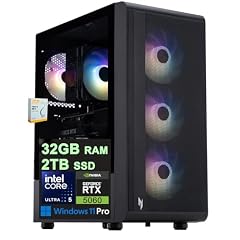
Acer Nitro 60 Gaming AI Desktop
- CPU
- Intel Core Ultra 5 225F
- GPU
- GeForce RTX 5060
- GPU memory
- 8 GB
- RAM
- 32 GB
- Storage
- 2000 GB
- OS
- Windows 11 Pro
- Dedicated graphics card
- Yes
$1,799.00 (as of 10/20/2026 15:07 PDT - Details)
This Acer Nitro 60 configuration combines the Intel Core Ultra 5 225F with an RTX 5060 GPU, 32GB of DDR5 RAM, and a 2TB SSD. The large memory and storage make it suitable for both gaming and video editing workflows, while the dedicated GPU handles rendering and AI-accelerated tasks.
Pros
- 32GB of DDR5 RAM for smooth multitasking in creative apps
- 2TB SSD offers the most storage in this list for large media files
- NVIDIA GeForce RTX 5060 with 8GB GDDR7 VRAM for gaming and GPU-accelerated editing
- Windows 11 Pro for business-grade features
Cons
- 225F variant requires a discrete GPU, no integrated graphics fallback
- Higher price point compared to other picks in this list
Good fit if
- Content creators who edit video and play games on the same machine
- Users who need 32GB of RAM and 2TB of storage for large projects
Skip if
- You only need a desktop for basic office tasks
- Your budget is limited and you do not require 2TB of storage
Verdict: The most versatile pick for users who want a powerful combination of gaming and creative performance.
Specs compared
| # | Desktop | CPU | GPU | GPU memory | RAM | Storage | OS |
|---|---|---|---|---|---|---|---|
| 1 | Lenovo IdeaCentre Tower Desktop Computer • 10-core Intel Ultra 5 225 | Intel Core Ultra 5 225 | not stated | not stated | 16 GB | 512 GB | Windows 11 |
| 2 | Acer Nitro 60 Gaming AI Desktop Intel 10-core Ultra 5 225F 16GB DDR5 1TB | Intel Core Ultra 5 225F | GeForce RTX 5060 | 8 GB | 16 GB | 1000 GB | Windows 11 Pro |
| 3 | HP OmniDesk Desktop PC | Intel Core Ultra 5 225 | not stated | not stated | 16 GB | 512 GB | Windows 11 Home |
| 4 | Lenovo IdeaCentre Tower Gen 10 AI Desktop Computer | Intel Core Ultra 5 225 | not stated | not stated | 32 GB | 1000 GB | Windows 11 Pro |
| 5 | Acer Nitro 60 Gaming AI Desktop | Intel Core Ultra 5 225F | GeForce RTX 5060 | 8 GB | 32 GB | 2000 GB | Windows 11 Pro |
How we chose these
We maintain a pool of desktops listed on the store, updated daily with live prices. For this guide we filtered for models equipped with an Intel Core Ultra 5 225 or 225F processor, which returned 5 desktops. We shortlisted each one based on its stated specifications: memory capacity, storage type and size, operating system edition, and the presence of a discrete GPU. No units were tested; all information comes from the seller listing and the manufacturer's published specifications. Prices shown are live and read from the store listing at the time of publication.
What to look for
Intel Core Ultra 5 225 vs. 225F: what the suffix means
The Intel Core Ultra 5 225 and 225F are both 10-core desktop processors from Intel's Core Ultra series. The key difference is that the 225 includes integrated Intel Graphics, while the 225F does not. If you plan to use a discrete graphics card, the 225F is a suitable choice and may be found in gaming desktops. If you want the option to use the desktop without a dedicated GPU, choose a model with the 225.
Memory: how much RAM do you need?
All desktops in this list come with DDR5 RAM, which offers faster speeds than DDR4. For basic office tasks and web browsing, 16GB is sufficient. For gaming, 16GB is the current standard, but 32GB provides more headroom for multitasking and future-proofing. For video editing, 3D rendering, or running virtual machines, 32GB is recommended. The picks here range from 16GB to 32GB, so choose based on your workload.
Storage: SSD capacity and your workflow
All desktops in this list use solid-state drives (SSDs), which are much faster than traditional hard drives. A 512GB SSD is adequate for the operating system, applications, and a modest collection of files. A 1TB SSD offers more room for games, projects, and media. A 2TB SSD is ideal for users who work with large video files or have extensive game libraries. Consider your storage needs before choosing.
Operating system: Windows 11 Home vs. Pro
Windows 11 Home is the standard edition for most home users, offering features like the new Start menu, widgets, and gaming optimizations. Windows 11 Pro adds advanced security features, BitLocker device encryption, Remote Desktop, and support for Hyper-V virtualization. If you use your desktop for business or need remote access and enhanced security, Windows 11 Pro is worth considering.
Graphics: integrated vs. dedicated GPU
Desktops with the Intel Core Ultra 5 225 include integrated Intel Graphics, which is sufficient for office productivity, video playback, and light photo editing. For gaming, 3D modeling, or video editing, a dedicated GPU like the NVIDIA GeForce RTX 5060 is necessary. The RTX 5060 supports DLSS for AI-enhanced gaming performance and has 8GB of GDDR7 VRAM for handling modern games and creative applications.
Questions
What is the difference between the Intel Core Ultra 5 225 and 225F?
The Intel Core Ultra 5 225 includes integrated Intel Graphics, allowing the desktop to display video without a separate graphics card. The 225F does not have integrated graphics and requires a discrete GPU for display output. Both processors have 10 cores and are part of the same performance tier.
Can I upgrade the RAM or storage on these desktops?
Most desktop towers allow for RAM and storage upgrades, but the specific upgradeability depends on the model. The Lenovo IdeaCentre Tower and Acer Nitro 60 are standard tower designs that typically offer accessible DIMM slots and drive bays. Check the manufacturer's specifications for exact upgrade options.
Are these desktops suitable for 4K video editing?
Desktops with a dedicated GPU like the NVIDIA GeForce RTX 5060 and at least 32GB of RAM are capable of 4K video editing. The Acer Nitro 60 with 32GB of RAM and a 2TB SSD is the best fit for this workload. Models with integrated graphics and 16GB of RAM are not recommended for 4K editing.
Do these desktops support Wi-Fi and Bluetooth?
Connectivity features vary by model. The pool data does not specify Wi-Fi or Bluetooth for every desktop. Check the seller listing or the manufacturer's product page for detailed connectivity specifications before purchasing.
Which operating system do these desktops come with?
The desktops in this list come with either Windows 11 Home or Windows 11 Pro. The Lenovo IdeaCentre Tower Desktop (10-b0gdqml5pf) includes Windows 11, while the HP OmniDesk has Windows 11 Home. The Acer Nitro 60 models and the Lenovo IdeaCentre Tower Gen 10 AI come with Windows 11 Pro.
Update history
- : First published.